

armyan
Newbie
- Jun 8, 2023
- 22
- 67
Hello BHW members,
This is my first time writing a guide, so please be patient, I am maybe the worst teacher possible but will try to provide as much value as possible.
Few months ago I came across some accounts on SM that promote their courses on how to make your AI Model/Influencer with price tags of $100+
I decided to dive in and I found a course on Udemy for $12 (undervalued in my opinion).
The "tutor" was a good teacher, with pretty straight forward method.
I want to let you know that I have ZERO knowledge regarding coding, development, even PC hardware characteristics, didn't even know that you need good GPU to run AI softwares locally (i didn't even know what "running locally" means)
Now, I am able to create AI models that 95% of masturbators online will not be able to recognize that are not real.
For this I am using Flux-1.1-Pro-Ultra model and attention, it costs only $0.06 (6 cents) per image generation.
NOTE: I am not related in any way to the links I am going to post below, I'm just sharing what I know
In order to access Flux, follow these steps:
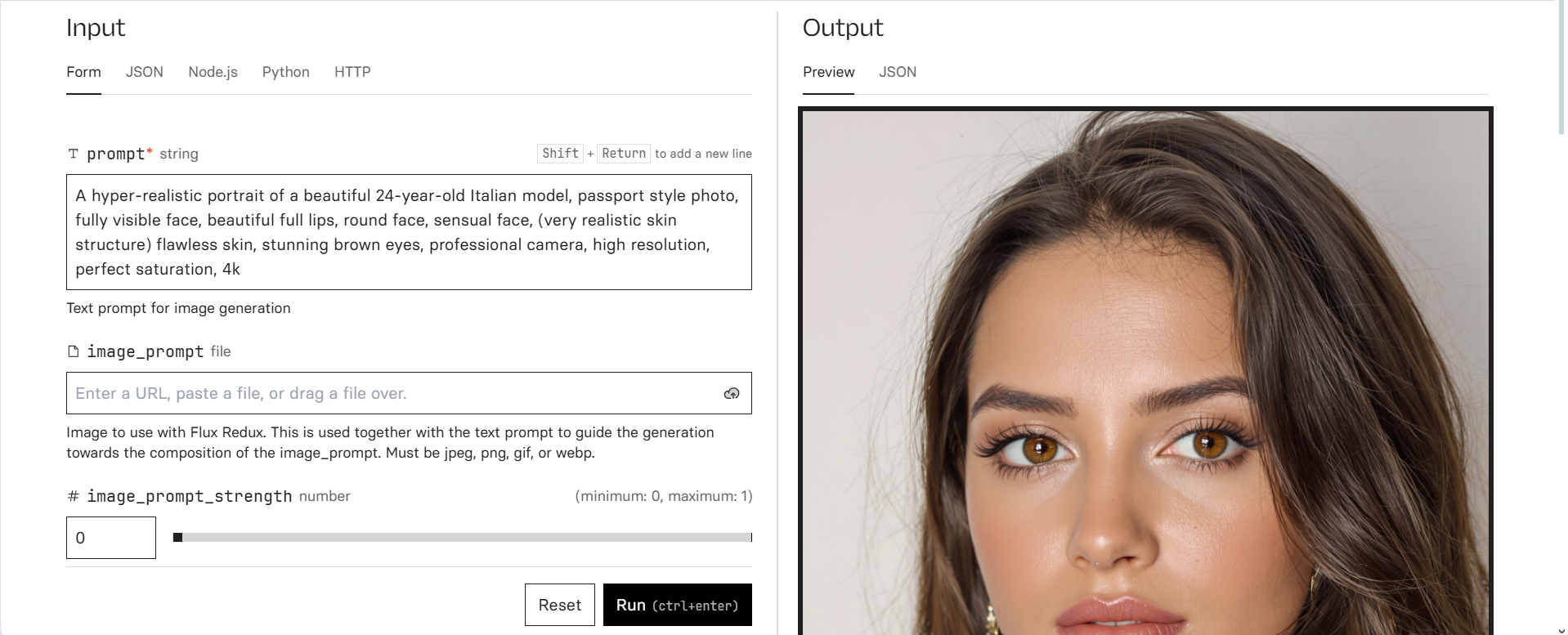
Now you need to create the face of your model.
Example prompt:
"A hyper-realistic portrait of a beautiful 24-year-old Italian model, passport style photo, fully visible face, beautiful full lips, round face, sensual face, (very realistic skin structure) flawless skin, stunning brown eyes, professional camera, high resolution, perfect saturation, 4k"
Play around and change things you want. For example instead of Italian you can put Latino, sharp face etc.
Have in mind that the examples below might not be the MOST realistic generations, but I don't have time to play around, after generating few times you will get the face you want.
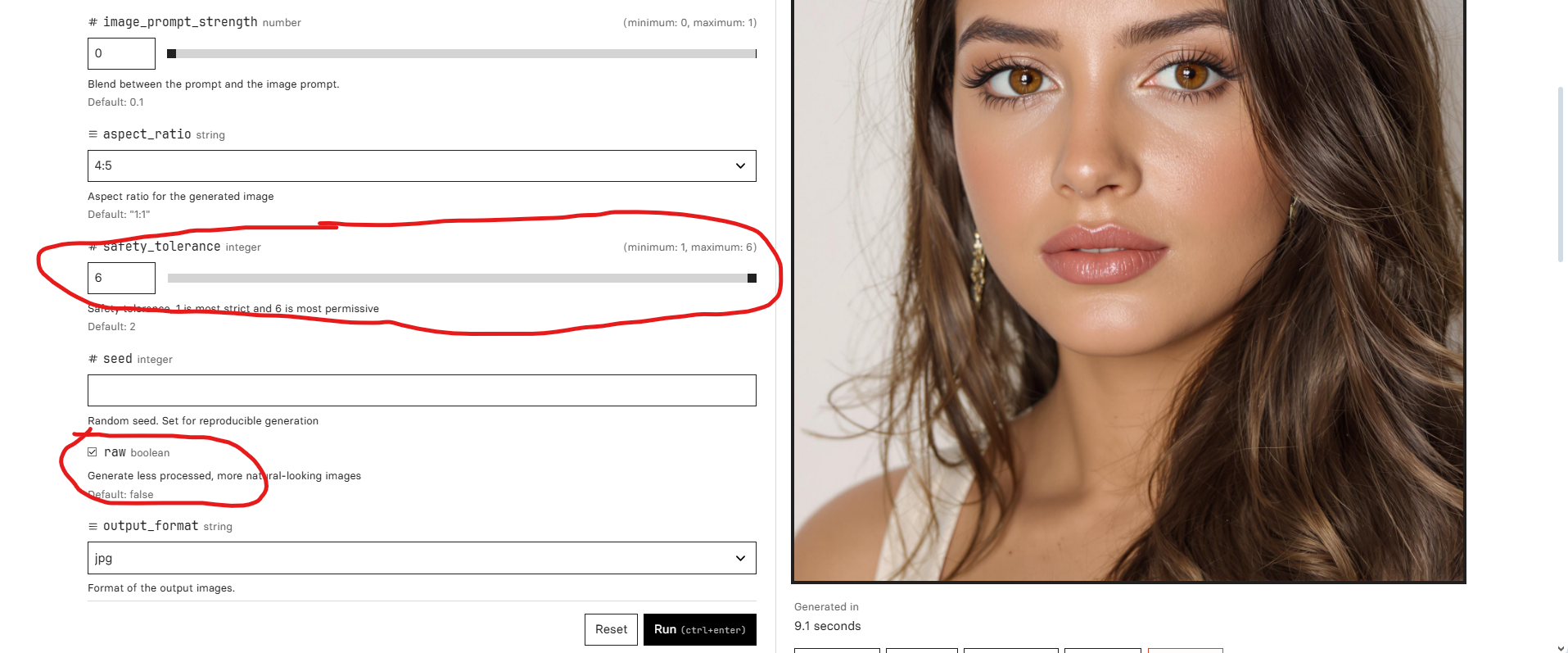
You need to have "raw" ticked for realistic photos.
Once you generate the face you want, make to sure to save the image.
Have in mind that the full face must be visible in order to create consistent character.
Now that we have created the face, let's generate some body images.
We can generate image using two methods.
The first one is to write the prompt ourself, and the second one is to put an example image as a prompt.
First we will generate ourselves.
Here are you some prompt examples:
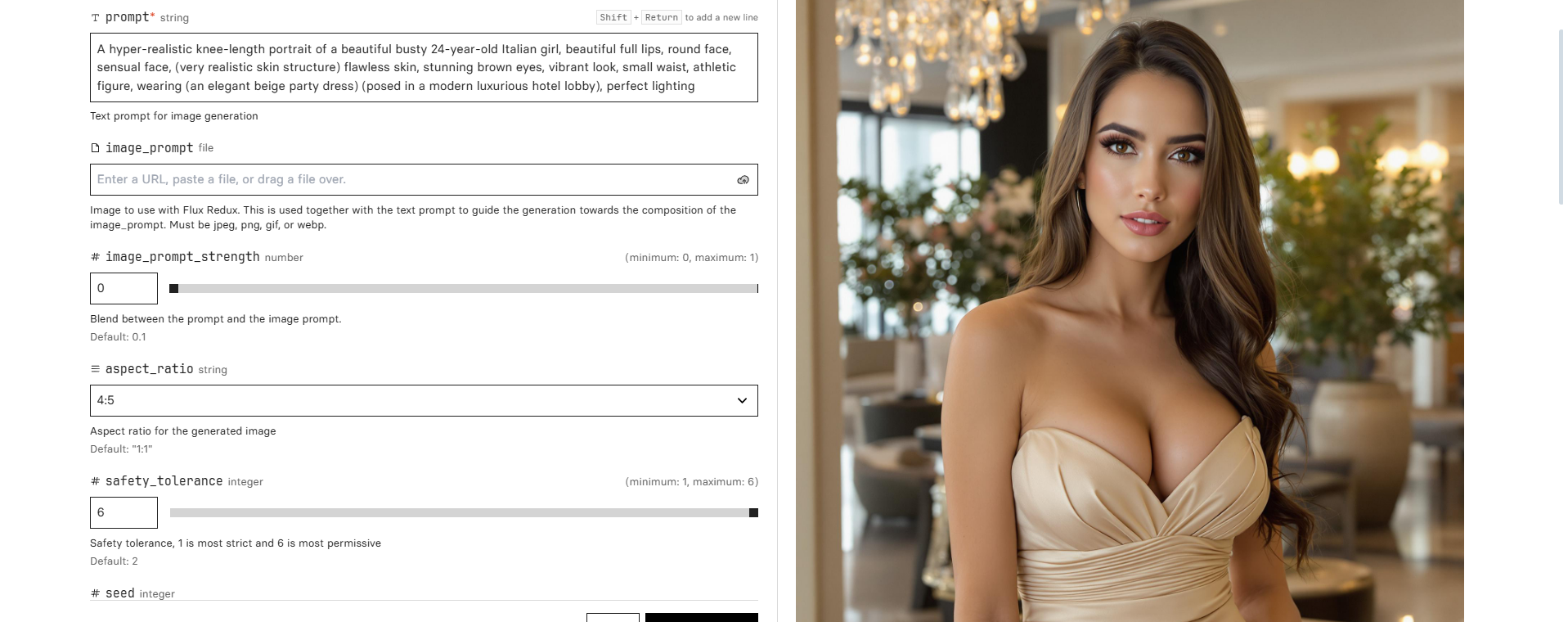
Body Prompt 1
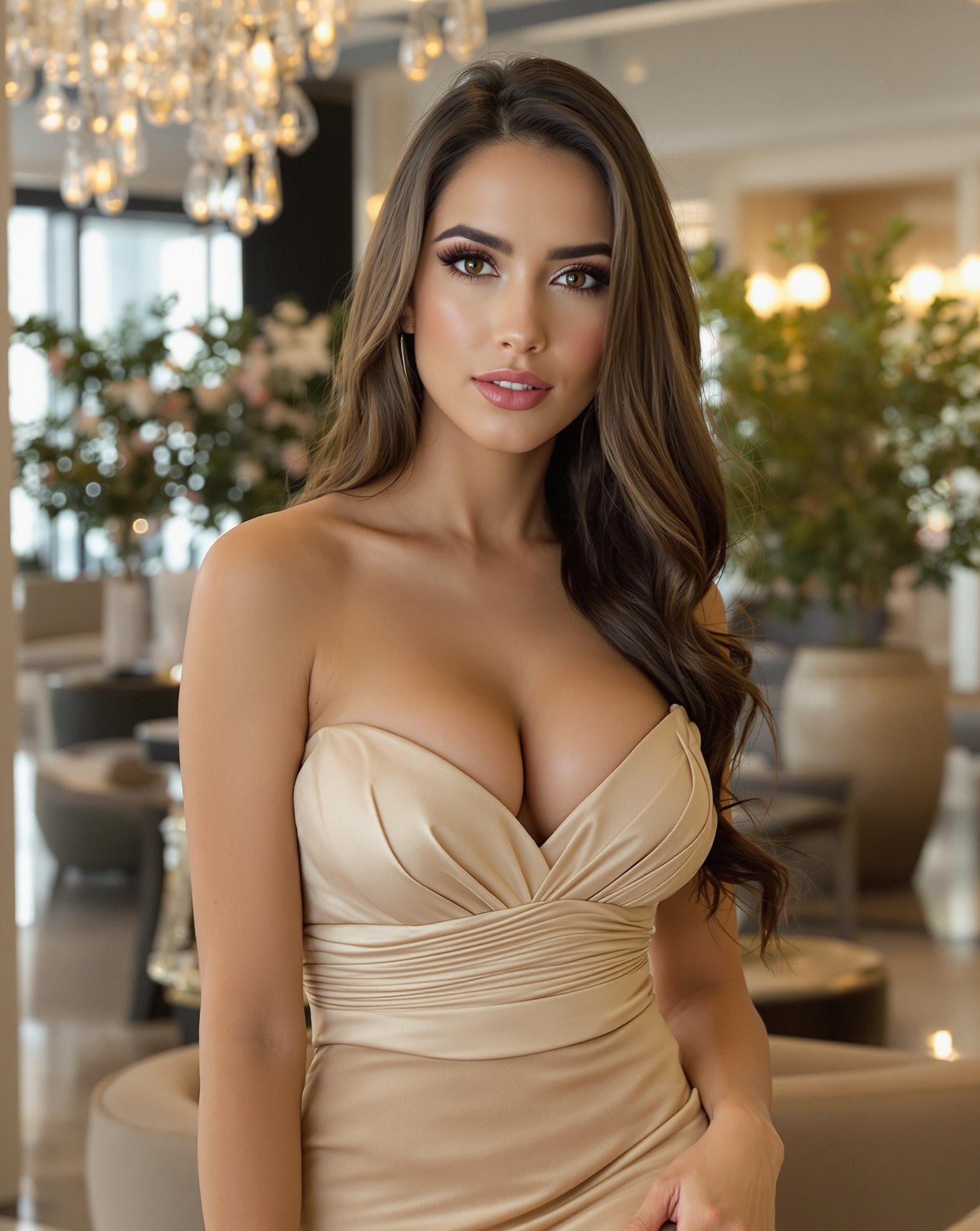
A hyper-realistic knee-length portrait of a beautiful busty 24-year-old Italian girl, beautiful full lips, round face, sensual face, (very realistic skin structure) flawless skin, stunning brown eyes, vibrant look, small waist, athletic figure, wearing (an elegant beige party dress) (posed in a modern luxurious hotel lobby), perfect lighting
Body Prompt 2
A hyper-realistic knee-length portrait of a beautiful busty 24-year-old Italian girl, beautiful full lips, round face, sensual face, (very realistic skin structure) flawless skin, stunning brown eyes, vibrant look, small waist, athletic figure, wearing (a white spaghetti top and a black jeans, standing in modern designer kitchen), perfect lighting
Body Prompt 3
A hyper-realistic knee-length portrait of a beautiful busty 24-year-old Italian girl, beautiful full lips, round face, sensual face, (very realistic skin structure) flawless skin, stunning brown eyes, vibrant look, small waist, athletic figure, wearing (an olive-green swimsuit with cutouts posing at a beautiful rooftop infinity pool), perfect lighting
Now I'll explain how to do it with image prompt.
You need to a find a model on Instagram for example, where you like her body type, pose, clothing etc. and save the image.
After saving the image, you need to upload it where it says "image_prompt", write above "hyper-realistic image" and generate.
You can also see "image_prompt_strength"
The higher the number, the more identical the generated image will be with the uploaded image.
Play around and you will get some fantastic results.
The image above might not be the most hyper-realistic, but 50% of the time you will get really incredible results.
Now that you have learned how to generate face and body images, let's dive into how to make your character consistent.
Since Flux will not replicate the face you want in 99.99% of the time, there is a easy and free trick to do that.
First you need to login to Discord.
Then click on the big + on the top left
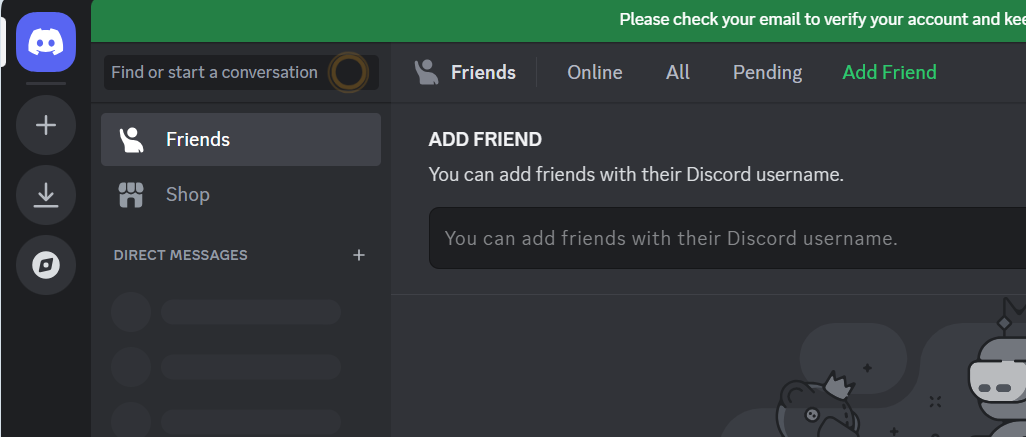
Now click on "Create My Own"
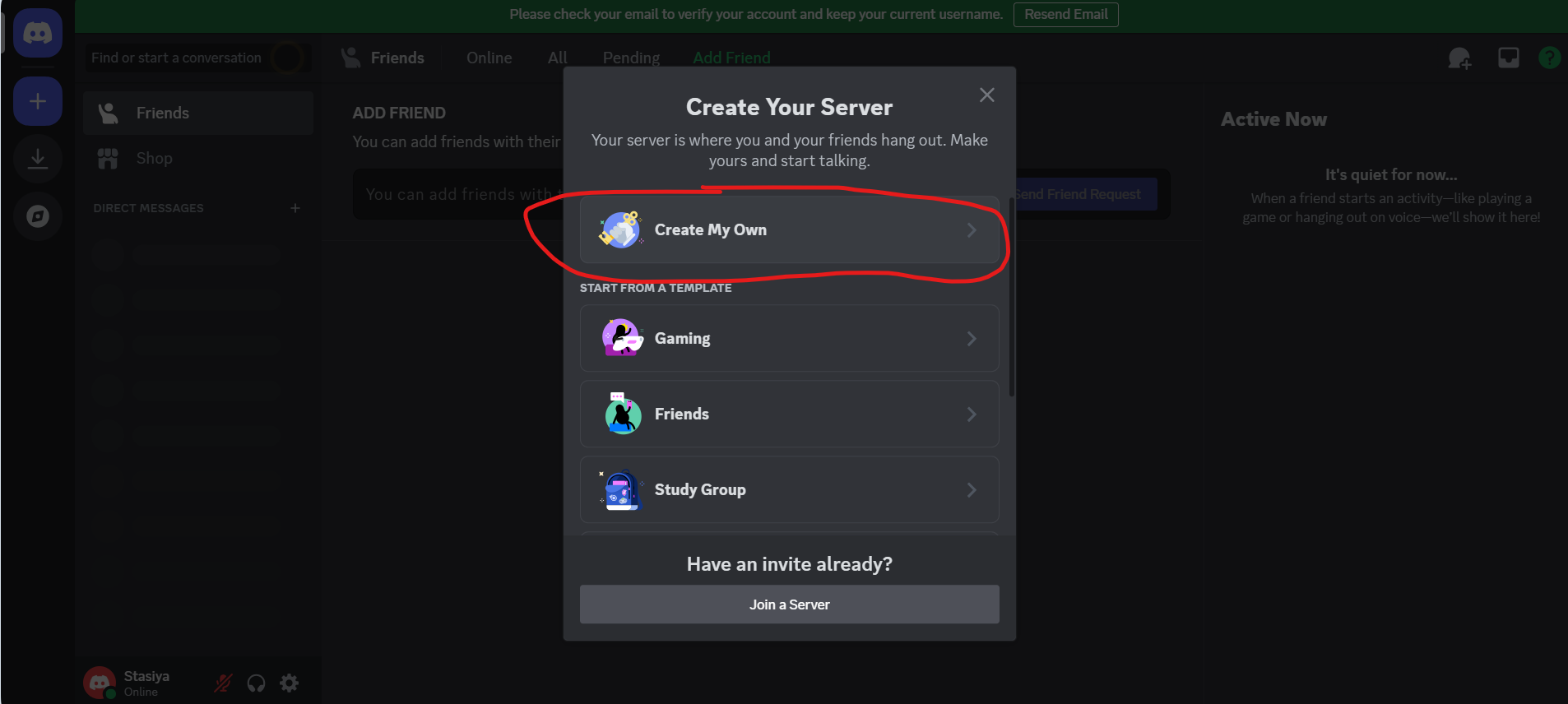
"For me and my friends"
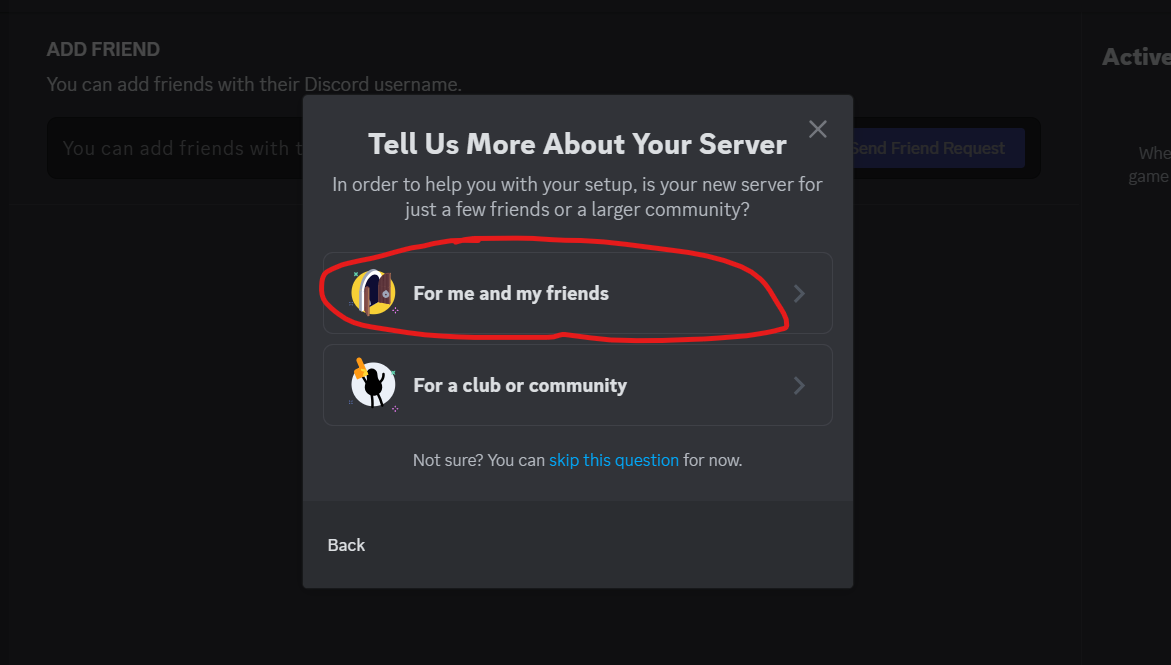
Then go into the server's general page and click on "Add your first app"
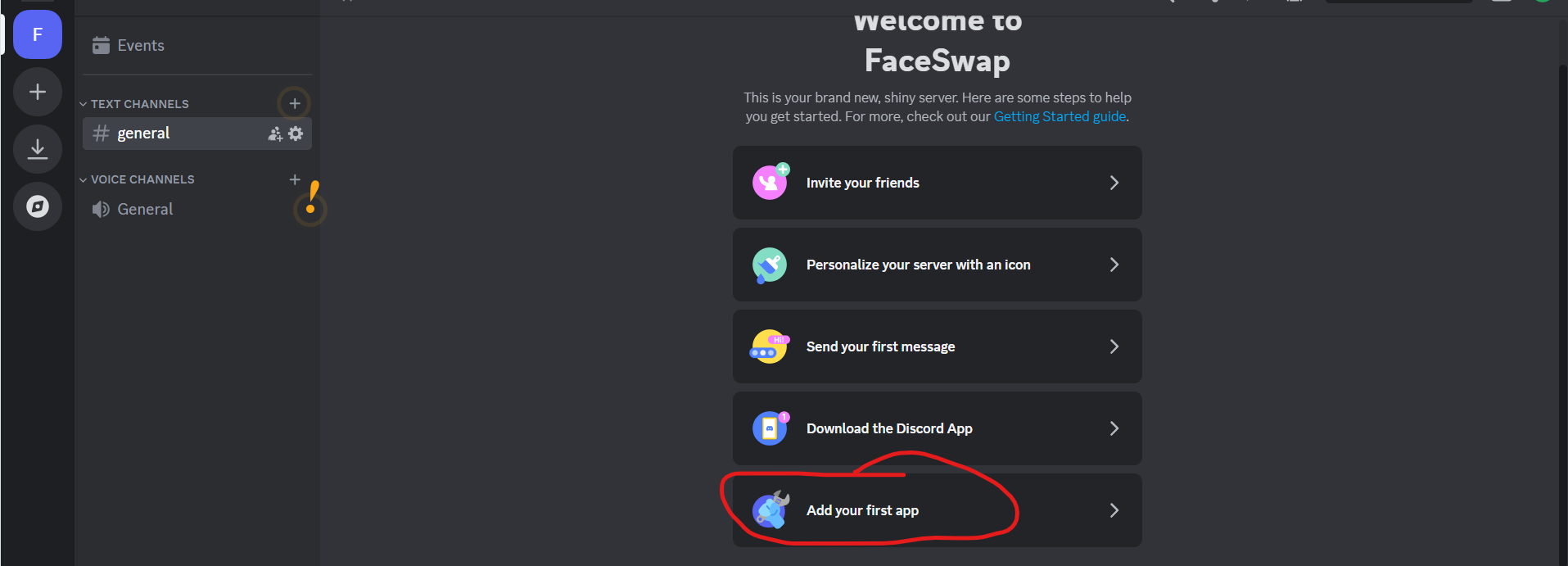
Search for "Midjourney Bot" and click on it.
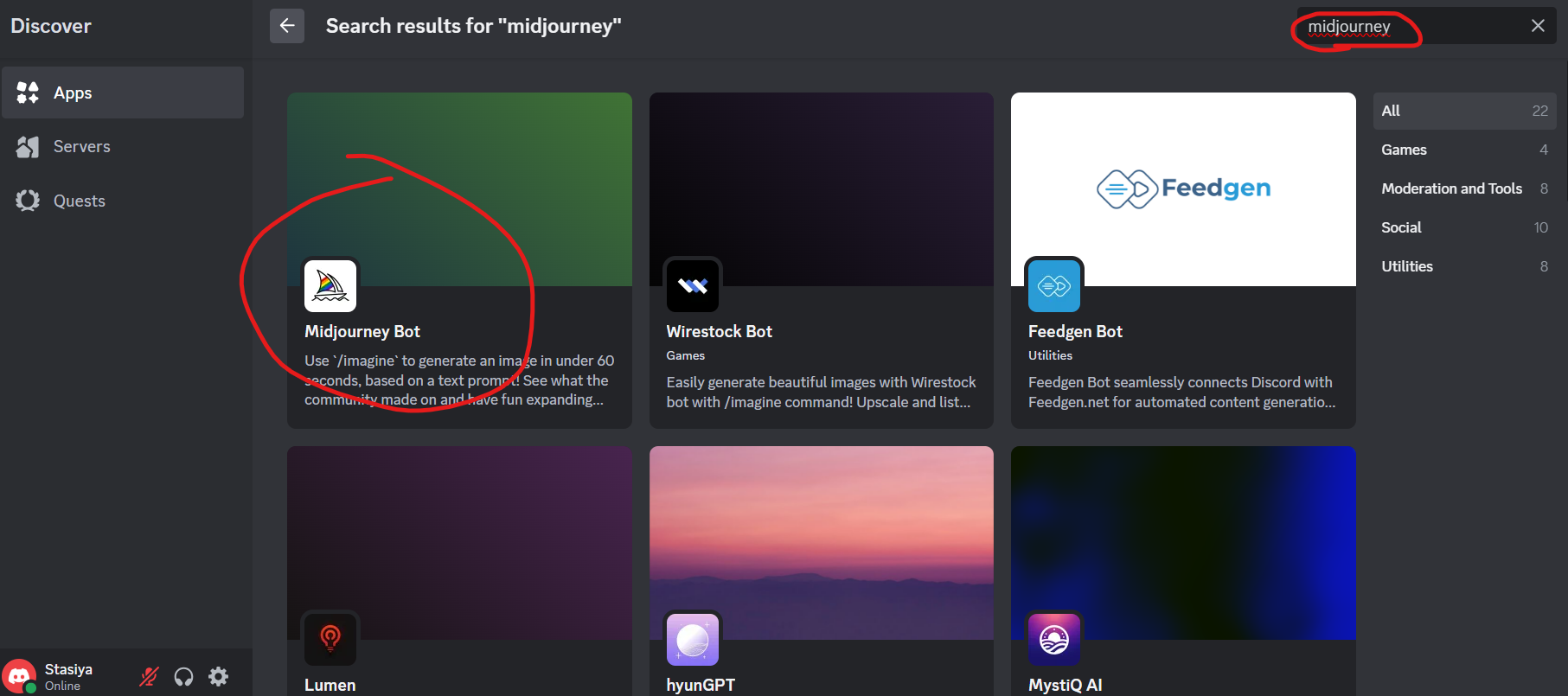
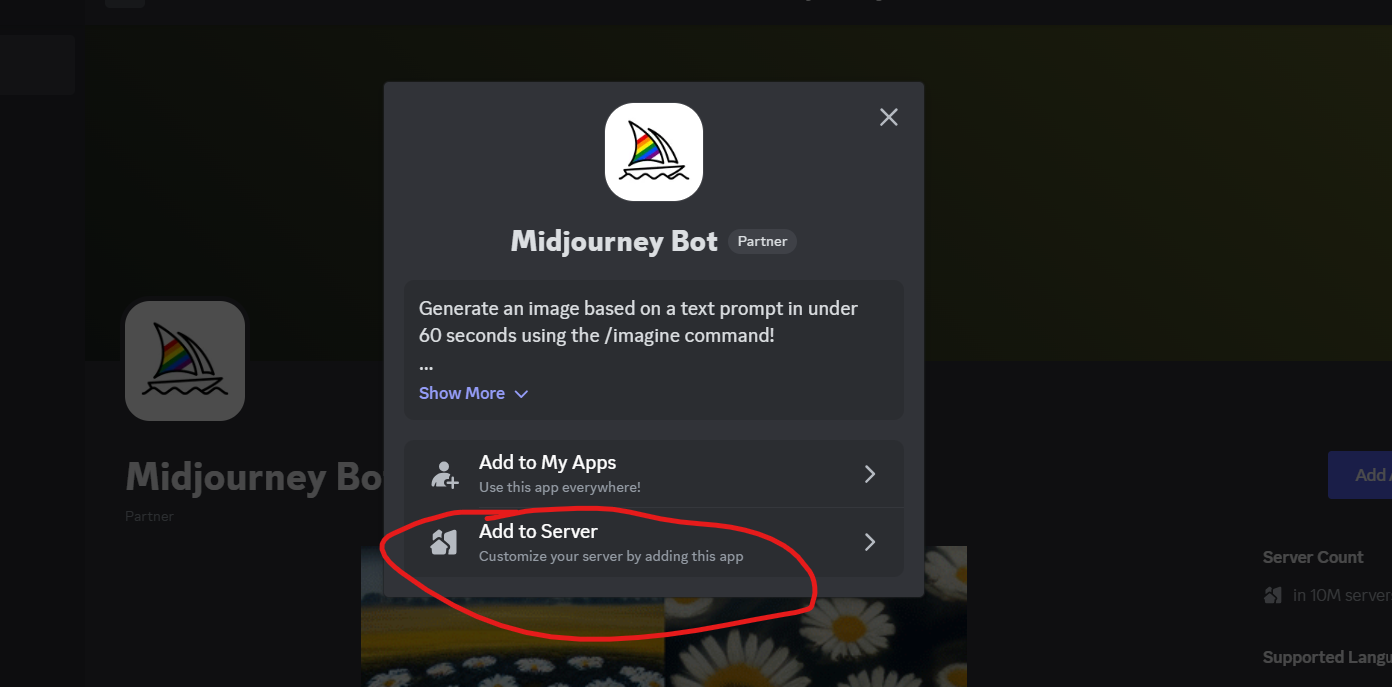
And the "Add to server" ---> "Continue" ---> Authorize
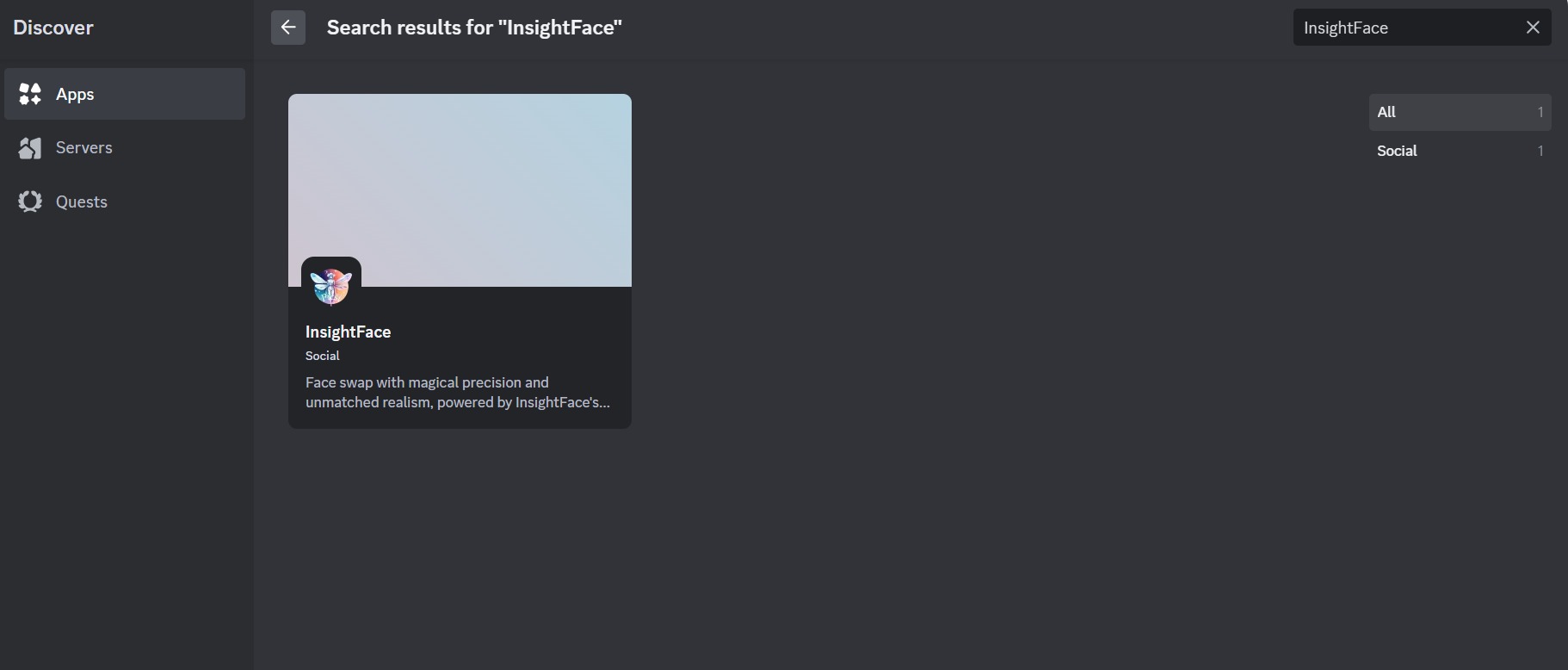
Now you need to go back to the server, and repeat the process, this time adding "InsightFace" app
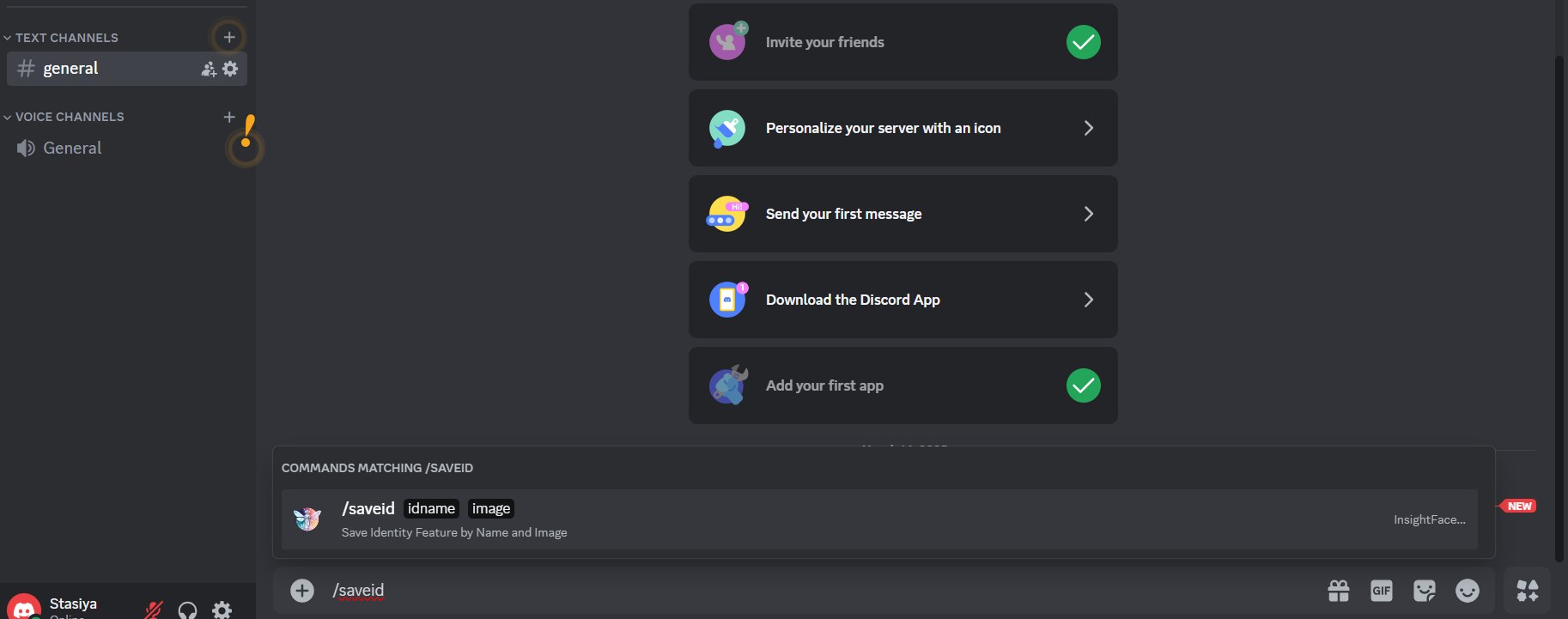
Now go back to the server where you added both of the bots and type in "/saveid" and chose the option that comes open.
Now give it some random name and upload the FACE IMAGE you have generated.
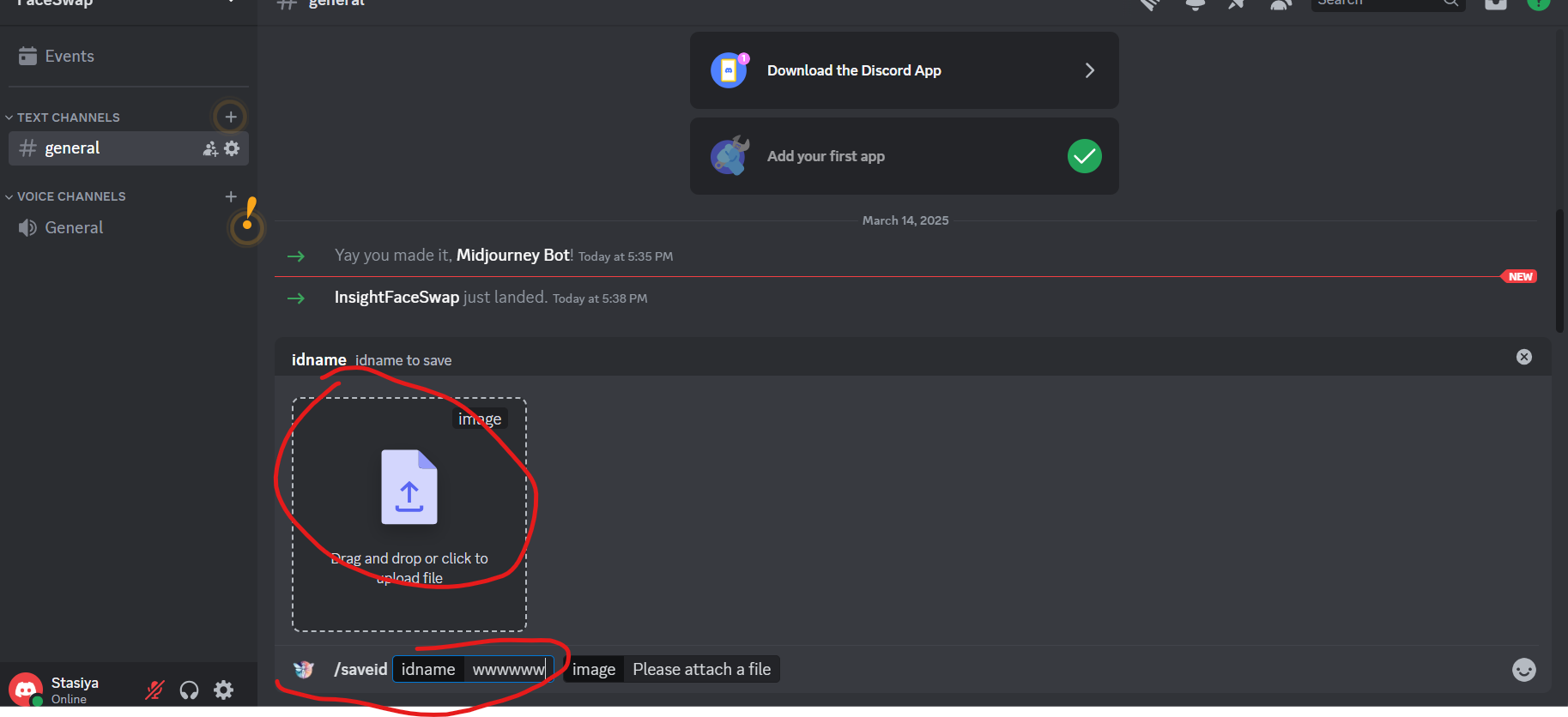
After uploading our face image, now it's time to upload a body image.
Once the image is uploaded, right click on it, click on apps and then INSwapper
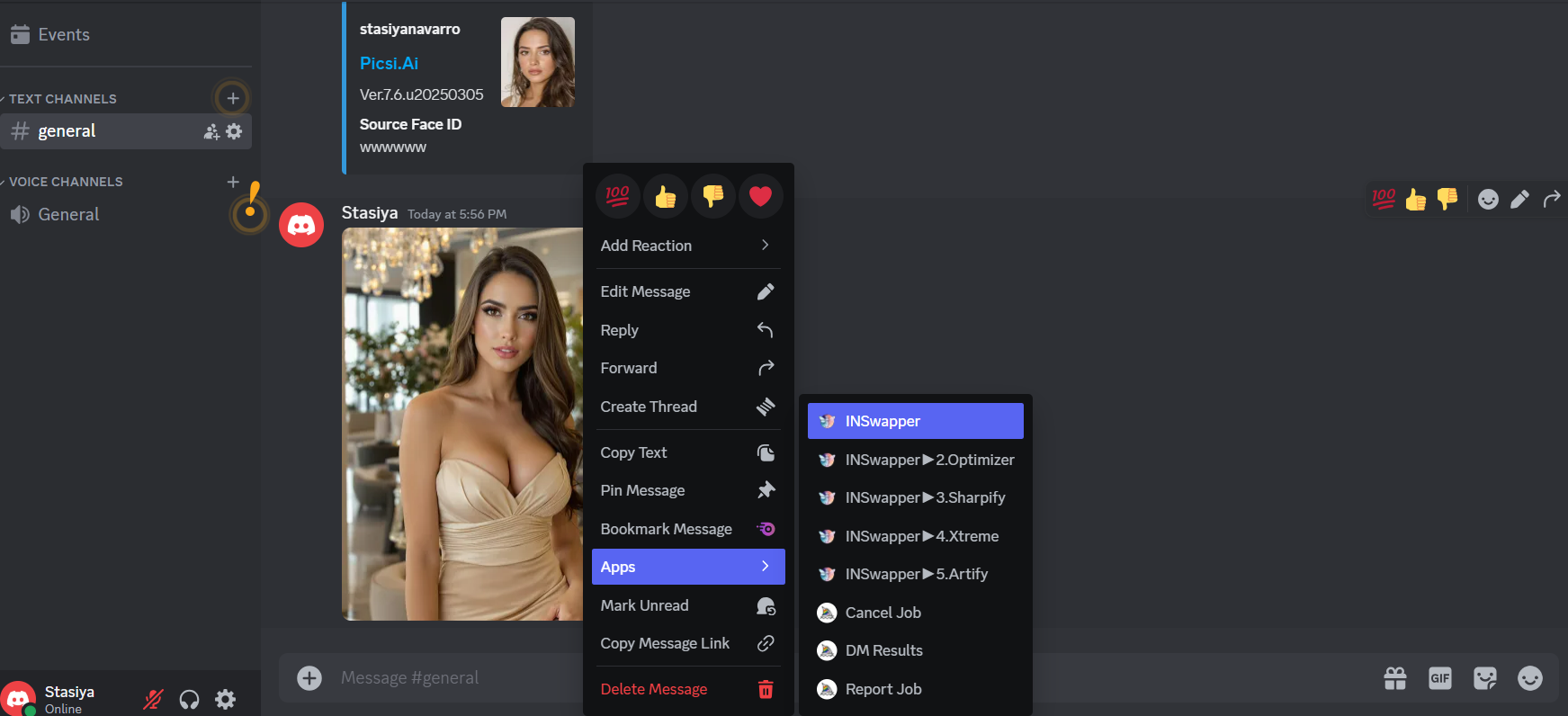
And this is the result.
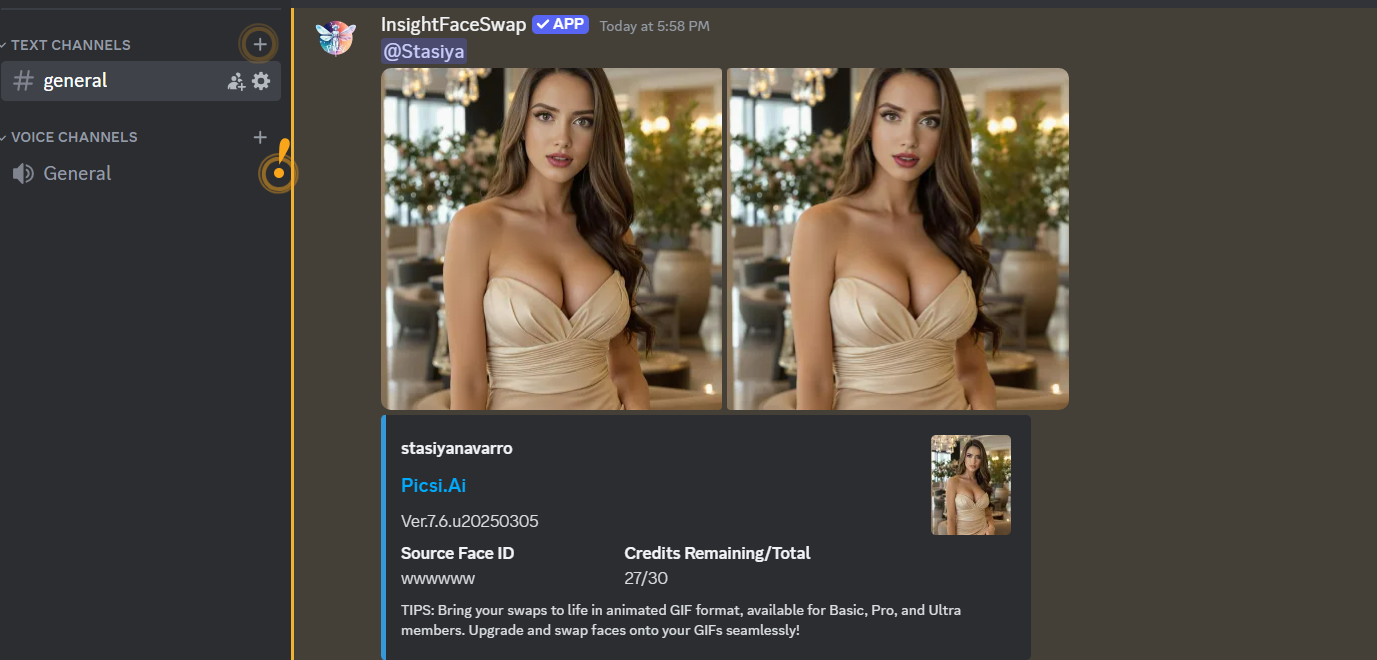
This is the most easy, efficient and free way (you can do it 10 times a day per Discord account)
Have in mind that the images and faceswaps above are from my first time while writing this "guide".
Didn't want to waste time on generating the "perfect" image.
As I mentioned I might not be the best teacher, so if you have any questions feel free to ask and I will help you.
Here are some images of one of my models.


This is my first time writing a guide, so please be patient, I am maybe the worst teacher possible but will try to provide as much value as possible.
Few months ago I came across some accounts on SM that promote their courses on how to make your AI Model/Influencer with price tags of $100+
I decided to dive in and I found a course on Udemy for $12 (undervalued in my opinion).
The "tutor" was a good teacher, with pretty straight forward method.
I want to let you know that I have ZERO knowledge regarding coding, development, even PC hardware characteristics, didn't even know that you need good GPU to run AI softwares locally (i didn't even know what "running locally" means)
Now, I am able to create AI models that 95% of masturbators online will not be able to recognize that are not real.
For this I am using Flux-1.1-Pro-Ultra model and attention, it costs only $0.06 (6 cents) per image generation.
NOTE: I am not related in any way to the links I am going to post below, I'm just sharing what I know
In order to access Flux, follow these steps:
- go here https://replicate.com/signin and create GitHub account
- then go here https://replicate.com/black-forest-labs/flux-1.1-pro-ultra (there are a lot of Flux Models, but this one works the best)
Now you need to create the face of your model.
Example prompt:
"A hyper-realistic portrait of a beautiful 24-year-old Italian model, passport style photo, fully visible face, beautiful full lips, round face, sensual face, (very realistic skin structure) flawless skin, stunning brown eyes, professional camera, high resolution, perfect saturation, 4k"
Play around and change things you want. For example instead of Italian you can put Latino, sharp face etc.
Have in mind that the examples below might not be the MOST realistic generations, but I don't have time to play around, after generating few times you will get the face you want.
You need to have "raw" ticked for realistic photos.
Once you generate the face you want, make to sure to save the image.
Have in mind that the full face must be visible in order to create consistent character.
Now that we have created the face, let's generate some body images.
We can generate image using two methods.
The first one is to write the prompt ourself, and the second one is to put an example image as a prompt.
First we will generate ourselves.
Here are you some prompt examples:
Body Prompt 1
A hyper-realistic knee-length portrait of a beautiful busty 24-year-old Italian girl, beautiful full lips, round face, sensual face, (very realistic skin structure) flawless skin, stunning brown eyes, vibrant look, small waist, athletic figure, wearing (an elegant beige party dress) (posed in a modern luxurious hotel lobby), perfect lighting
Body Prompt 2
A hyper-realistic knee-length portrait of a beautiful busty 24-year-old Italian girl, beautiful full lips, round face, sensual face, (very realistic skin structure) flawless skin, stunning brown eyes, vibrant look, small waist, athletic figure, wearing (a white spaghetti top and a black jeans, standing in modern designer kitchen), perfect lighting
Body Prompt 3
A hyper-realistic knee-length portrait of a beautiful busty 24-year-old Italian girl, beautiful full lips, round face, sensual face, (very realistic skin structure) flawless skin, stunning brown eyes, vibrant look, small waist, athletic figure, wearing (an olive-green swimsuit with cutouts posing at a beautiful rooftop infinity pool), perfect lighting
Now I'll explain how to do it with image prompt.
You need to a find a model on Instagram for example, where you like her body type, pose, clothing etc. and save the image.
After saving the image, you need to upload it where it says "image_prompt", write above "hyper-realistic image" and generate.
You can also see "image_prompt_strength"
The higher the number, the more identical the generated image will be with the uploaded image.
Play around and you will get some fantastic results.
The image above might not be the most hyper-realistic, but 50% of the time you will get really incredible results.
Now that you have learned how to generate face and body images, let's dive into how to make your character consistent.
Since Flux will not replicate the face you want in 99.99% of the time, there is a easy and free trick to do that.
First you need to login to Discord.
Then click on the big + on the top left
Now click on "Create My Own"
"For me and my friends"
Then go into the server's general page and click on "Add your first app"
Search for "Midjourney Bot" and click on it.
And the "Add to server" ---> "Continue" ---> Authorize
Now you need to go back to the server, and repeat the process, this time adding "InsightFace" app
Now go back to the server where you added both of the bots and type in "/saveid" and chose the option that comes open.
Now give it some random name and upload the FACE IMAGE you have generated.
After uploading our face image, now it's time to upload a body image.
Once the image is uploaded, right click on it, click on apps and then INSwapper
And this is the result.
This is the most easy, efficient and free way (you can do it 10 times a day per Discord account)
Have in mind that the images and faceswaps above are from my first time while writing this "guide".
Didn't want to waste time on generating the "perfect" image.
As I mentioned I might not be the best teacher, so if you have any questions feel free to ask and I will help you.
Here are some images of one of my models.


