statmark56
Newbie
- Feb 17, 2025
- 9
- 0
Like title, is it a myth webrtc can leak the source ip no matter proxy/vpn we're using?
Gpt also confirm yes.
Gpt also confirm yes.


WebRTC can leak your real IP address even when using a proxy or VPN.Like title, is it a myth webrtc can leak the source ip no matter proxy/vpn we're using?
Gpt also confirm yes.
So I should find proxy which can offer this cover guarantee?Yes can leak.
The proxy should cover your WebRTC, otherwise deactivate it completely.

Check the post from @Zombie Pop, all said where you need to know.So I should find proxy which can offer this cover guarantee?
Or is it simply I can configure from ADB settings? (I'm using Gologin btw)

Yes, WebRTC can leak your real IP. It’s a feature of the technology itself—it connects two clients directly, without a server in between.Like title, is it a myth webrtc can leak the source ip no matter proxy/vpn we're using?


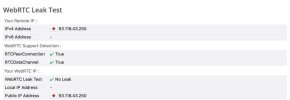
I tried browserleaks and it says no leak (I'm using VPN though). Does it mean my ip is safe?Web rtc has been leaking noobies IP for the last 15 years.
If you just learned about web rtc it’s going to blow your mind to know that JavaScript can reveal your location/time zone as well.
One big leak will be your TCP/IP fingerprint. You can’t control that in a lot of cases
And many more advanced web/server technologies can reveal massive amounts of information about you. To the point you are almost literally fingerprinted.
Checkout browserleaks.com and pixelscan.net to do multiple types of tests for data leaks.
No.I tried browserleaks and it says no leak (I'm using VPN though). Does it mean my ip is safe?

I have a question about browser fingerprints for Reddit. My goal is simple, but since Reddit has strong detection systems, I want to make sure my setup is as natural as possible.No.
There’s multiple tests on browser leaks. Browserleaks won’t say dns leaks are a leak but is is a leak. There’s several things like that about browser fingerprinting Furthermore, I mentioned that you need to also use pixelscan.net as well. You should follow instructions so you get exposed to different types of information and tests made available by these two comprehensive tools. That way you can learn about them on your own time. If you’re asking me with a screenshot I'm going to assume that you don’t know anything about browser fingerprinting.
If you think that one simple test or patching webrtc leak is going to be enough to evade billion dollar companies bot detection/multiple account detection algorithms you’re not going to do well in this sphere. You need to learn all you can about browser fingerprinting.
 Private Mobile Proxy AdsPower (Antidetect Browser) Noise enabled for Canvas & WebGL Image to mask fingerprint