

- Jan 11, 2023
- 1,475
- 497
Here are some effective methods you can try to fake your IP address on your Android phone.
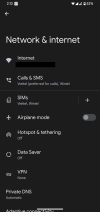
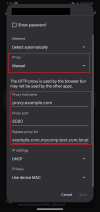
Manual proxy setup in WiFi Settings:
Use a Proxy app:
If manual setup is too complex, apps like Tun2Tap can automate the process. Tun2Tap is only available on Android phones, if you use iOS you can use Potatso or Shadowrocket app.

Which method do you use? Let’s discuss in the comments!
Method 1: Use proxy
You can set up a proxy manually or use a proxy app.Manual proxy setup in WiFi Settings:
- Go to Settings > Network & Internet > Select your WiFi network.
- Tap Modify network > Select Advanced options.
- Under Proxy, choose Manual and enter your proxy details.
Use a Proxy app:
If manual setup is too complex, apps like Tun2Tap can automate the process. Tun2Tap is only available on Android phones, if you use iOS you can use Potatso or Shadowrocket app.
Method 2: Use a VPN
VPN will let you change your IP to any location you choose while encrypting your traffic. Simply:- Download a VPN app (e.g., NordVPN, ExpressVPN, ProtonVPN, HMA VPN, etc).
- Connect to a server in the desired location.
- Your IP will now appear as if you’re in that region.
Method 3: Use Tor Browser
Tor browser will reroute your connection through multiple servers, assigning you a new IP each time you open it. This way will be suitable for accessing blocked websites and anonymous browsing, but it’s slower than VPNs.Method 4: Toggle airplane mode
Most mobile networks assign dynamic IP addresses, meaning your IP changes every time you reconnect. However, this method can only refresh your IP address but cannot fake IP to a new location.- Turn Airplane Mode ON for 30 seconds.
- Turn Airplane Mode OFF again.
Which method do you use? Let’s discuss in the comments!


