Why I'm seeing this issue of 403 forbidden

Captainleo

Newbie
Joined
Nov 4, 2023
Messages
25
Reaction score
10
I have a saas website and from last couple of weeks I'm seeing this issues on one of my landing pages on which I have got some good backlinks from premium sites.
Can anyone tell me what is the reason and how to solve it as My page is visible in search engine and there is no issue with page or rankings.
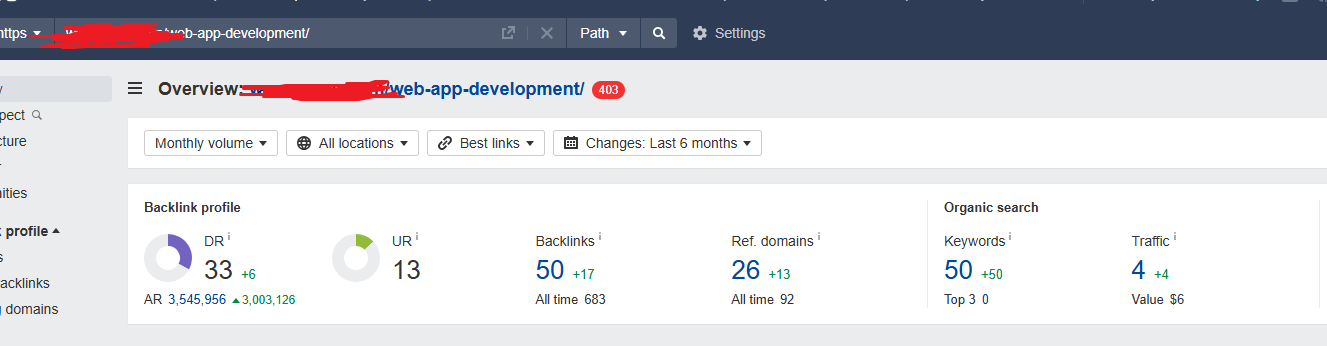
Screenshot 2024-12-06 170419.png
 
I have a saas website and from last couple of weeks I'm seeing this issues on one of my landing pages on which I have got some good backlinks from premium sites.
Can anyone tell me what is the reason and how to solve it as My page is visible in search engine and there is no issue with page or rankings.
View attachment 401065
Hey mate. Some details needed.

Is this a WP site?
If you try to access it in a incognito tab does it open?
Dies this happen every now and then or permanently?
 
Hey mate. Some details needed.

Is this a WP site?
If you try to access it in a incognito tab does it open?
Dies this happen every now and then or permanently?
ye my website is on WP,
yes it does open in incognito mode
it is happening from past few weeks,
it is also happening to one of my other blog page as well.

Actually, I have noticed this after getting backlinks from some good sites, is it because of some backlink that I got from any site or something else is happened?
 
ye my website is on WP,
yes it does open in incognito mode
it is happening from past few weeks,
it is also happening to one of my other blog page as well.

Actually, I have noticed this after getting backlinks from some good sites, is it because of some backlink that I got from any site or something else is happened?
What it could be is one of your plugins on WP could cause this problem.

What you can try is deactivate your plugins and see if one of the isn't maybe causing the problem.

Backlinks won't cause an error.

403 Is a server error where the server is blocking access to a file or page.

Plugins can also cause this error where they block access.
 
ye my website is on WP,
yes it does open in incognito mode
it is happening from past few weeks,
it is also happening to one of my other blog page as well.

Actually, I have noticed this after getting backlinks from some good sites, is it because of some backlink that I got from any site or something else is happened?
backlinks have nothing to do with the website errors,
it's most likely that your web server is misconfigured, blocking users for some reason,
if your hosting have a web-tech support, try contacting them
 
I have a saas website and from last couple of weeks I'm seeing this issues on one of my landing pages on which I have got some good backlinks from premium sites.
Can anyone tell me what is the reason and how to solve it as My page is visible in search engine and there is no issue with page or rankings.
View attachment 401065

403 error means an Authentication error.

What this means is that the server is expecting you to provide some form of authentication (username/password) before allowing you to access that page.

What is the script? I am assuming you have some misconfiguration somewhere in the script that is blocking access to the page.

If the error persists and if you'd like, you can DM me the credentials and I'll be happy to take a look at this for you.
 
Are you using Hostinger hosting?

A 403 Forbidden error usually means the server is refusing to authorize your request. Since it works in incognito mode, here are some steps you can try.
Clear your browser cache and cookies.
Temporarily disable browser extensions to check for interference.
Check your WordPress plugins, recently installed or updated ones might be blocking access.
Check your .htaccess file for any misconfigurations.
Make sure your file permissions are correct (755 for directories, 644 for files).

If none of these work, contact your hosting provider, as this issue often comes from the hosting side.
 
Reset your htaccess with this:
# BEGIN WordPress

RewriteEngine On
RewriteRule .* - [E=HTTP_AUTHORIZATION:%{HTTP:Authorization}]
RewriteBase /
RewriteRule ^index\.php$ - [L]
RewriteCond %{REQUEST_FILENAME} !-f
RewriteCond %{REQUEST_FILENAME} !-d
RewriteRule . /index.php [L]

# END WordPress
 
Back
Top