[First time using SEMrush] - How to solve outgoing internal links contain nofollow attribute?

Danki

Senior Member
Joined
Jan 26, 2019
Messages
966
Reaction score
1,089
Hello guys, I've never used SEMrush, as I was using only free tools. Now, I'm using SEMrush and after doing the site audit, SEMrush showed me the following Warnings:
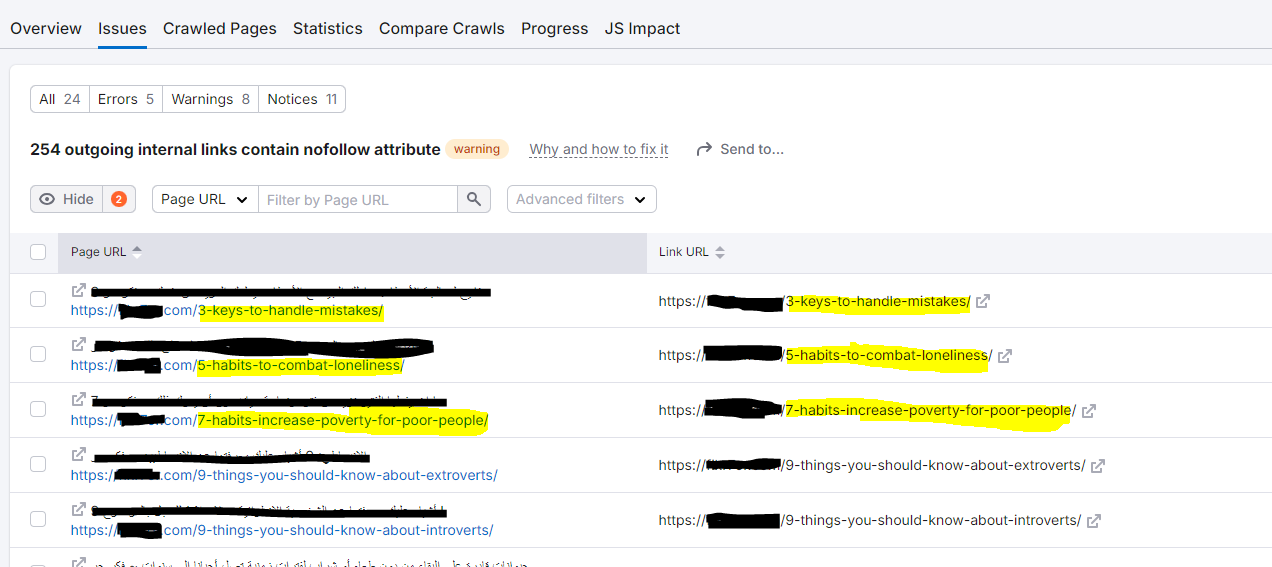
capture-semrush.PNG


Isn't weird that the Page URL is the same as Link URL? I checked the pages, and I didn't find any links with nofollow attribute, except the "share" button of social media like Facebook and Twitter. Should I just ignore this?
 
  • What CMS is this?
  • Does the blog posts accept comments?

- Wordpress
- Yes I’m using Bimber theme and it has a comment section.

Do you think it’s from the comment section?
 
Aren't these pingbacks?

How can I know if it's a pingback? some links have no comments. Should I just ignore these warning?!
 
- Wordpress
- Yes I’m using Bimber theme and it has a comment section.
If you´re running on WordPress addressing this issue is insanely easier. Most SEO plugins handle this automatically...Do you have one installed?

By the way, as default, there’s no such thing as a “********” tag. Links are followed automatically unless marked as “nofollow”.

Do you think it’s from the comment section?
It can, we will need to do a more in-depth analysis.

Also, ALWAYS take with a grain of salt whatever issues are being triggered by any SEO tool. You´ll be surprised how often these are just false positives.
 
If you´re running on WordPress addressing this issue is insanely easier. Most SEO plugins handle this automatically...Do you have one installed?

By the way, as default, there’s no such thing as a “********” tag. Links are followed automatically unless marked as “nofollow”.


It can, we will need to do a more in-depth analysis.

Also, ALWAYS take with a grain of salt whatever issues are being triggered by any SEO tool. You´ll be surprised how often these are just false positives.

Hey, sorry for the late reply. Yes I have Rank Math installed already. I did "view page source" on 1 of those links and I found this:

comment.PNG


Could it be this? It's from the comment section!
 
The fact that the Page URL and Link URL are the same suggests that these could be self-referencing links like those used in breadcrumbs or navigation. If those links are correctly formatted, it’s fine. SEMrush just flags anything with nofollow by default. I’d recommend checking a few of these flagged URLs manually. If it’s only on social buttons or non-essential links, you’re good to go.
 
The fact that the Page URL and Link URL are the same suggests that these could be self-referencing links like those used in breadcrumbs or navigation. If those links are correctly formatted, it’s fine. SEMrush just flags anything with nofollow by default. I’d recommend checking a few of these flagged URLs manually. If it’s only on social buttons or non-essential links, you’re good to go.

Okay, thank you.
 
Hello guys, I've never used SEMrush, as I was using only free tools. Now, I'm using SEMrush and after doing the site audit, SEMrush showed me the following Warnings:

View attachment 368709

Isn't weird that the Page URL is the same as Link URL? I checked the pages, and I didn't find any links with nofollow attribute, except the "share" button of social media like Facebook and Twitter. Should I just ignore this?
Use semrush from groupbuyseotools.store buddy you can also try their ahrefs
 
Back
Top