Need advice for setting up a big mobile proxy farm

_february

Newbie
Joined
Feb 24, 2024
Messages
1
Reaction score
3
Hello, I am planning to open a mobile proxy farm with 100 USB dongles, and I have a budget of 15,000 USD. I have a few questions and I hope some of you are able to answer them:

1. What CPU do you recommend for a proxy server?
2. Will 3proxy handle that much traffic on a single server?
3. How fast of an internet connection should I have? Fiber-optic internet cannot be installed there, so I can only have unlimited 5G internet with download speeds up to 5.4 Gb/s and upload speeds of 500 Mb/s, with a bandwidth of up to 3000 Mb/s assuming the best coverage.
4. Are there better dongles available than the Huawei e3372h-153 for this purpose?

Thank you for your help. I appreciate any advice or suggestions you can provide.
 
For setup of 100 dongles:

1. 5x Odroid XU4 or just single Tower with Ryzen 9
2. You didn't mention how much traffic you will have, dongle amount doesn't determine that. But yes.
3. Mb/s Mbit/s are two different things. Again depends on 2. a lot.
4. Yes, ZTE MF79U are a lot better.
 
Last edited:
For setup of 100 dongles:

1. 5x Odroid XU4 or just single Tower with Ryzen 9
2. You didn't mention how much traffic you will have, dongle amount doesn't determine that. But yes.
3. Mb/s Mbit/s are two different things. Again depends on 2. a lot.
4. Yes, ZTE MF79U are a lot better.
Not op but thank you for giving guidance on how to set this up. I am also currently looking into setting something like this up for my botting purposes.

I was wondering why you are recommending the ZTE MF79U + Odroid XU4 combo instead of the commonly advised e3372h + pi combo. From what I can tell Odroid seems to be more cost effective and the ZTE dongles are easier to work with as they are based on a USB to Ethernet stack. Are those the main reasons or are there other things to consider?

Also I assume if one is using ethernet for any of the data transfer one is going to run into bandwith constraints quite fast if they are looking to handle significant traffic. Unless they have unusually high network switching capacity. What is your experience with interference between the dongles? Can you quantify how many dongles can be used concurrently within proximity before bottlenecks arise?

Again, thank you for your advice on this.
 
Not op but thank you for giving guidance on how to set this up. I am also currently looking into setting something like this up for my botting purposes.
Sure. I would recommend sticking with the idea of having more small clusters of mini PC's or SBC's than one large one just because of fault tolerance. But this depends on whether you will be around them or not and how good uptime you want to reach. If only for your botting setup and you plan to be around it so you can do maintenance I would recommend going with a good tower PC.

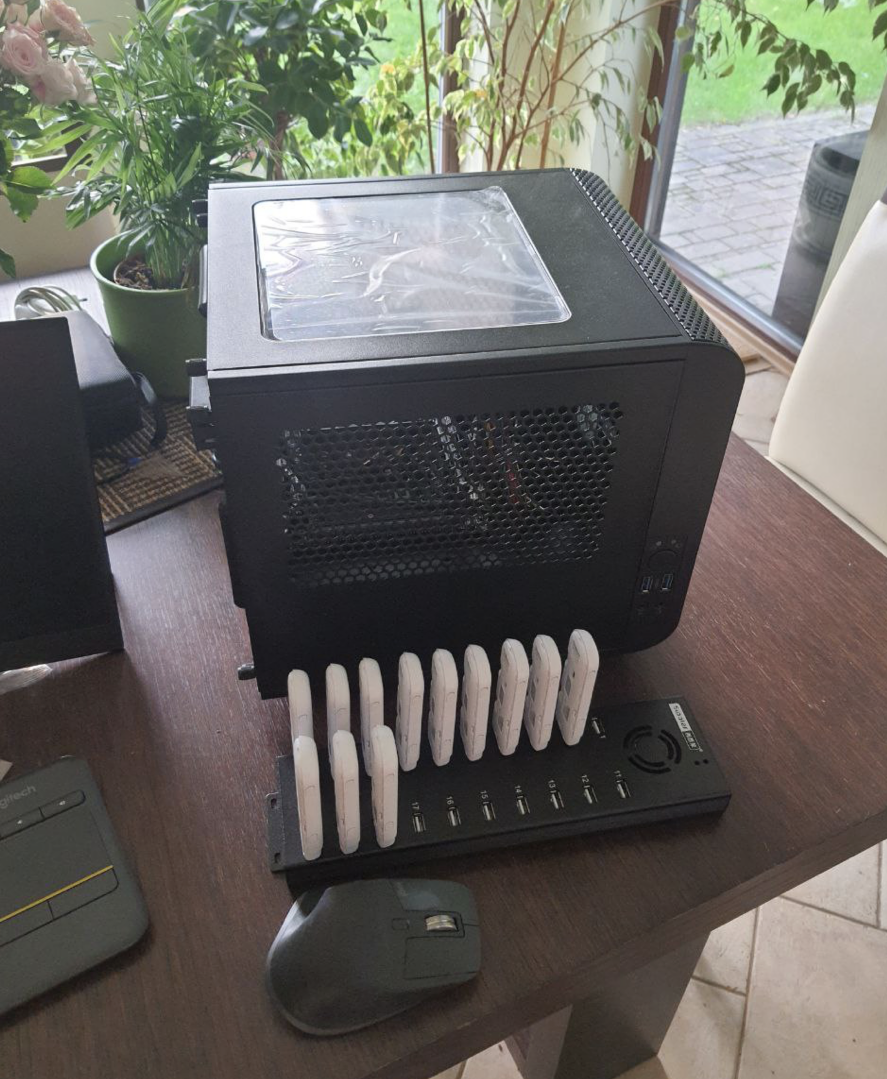
Right now my tower specs are:
- Intel, Core i5-12500
- Thermaltake, Core V1 Snow Edition / Black edition. Because it looks dope.
- motherboard Gigabyte, H610I
- cheapest ddr4 RAM and cheapest/smallest SSD

With these specs it shows 3k connections open to this box
# ss -o state established | wc -l
3044

and it's practically sleeping in terms of CPU load.

1708926522037.png

This is what it looks like:
image.png


So you really dont need a powerful box to run 100 dongles on a single PC.

For hubs just go with orico or sipolar USB hubs.

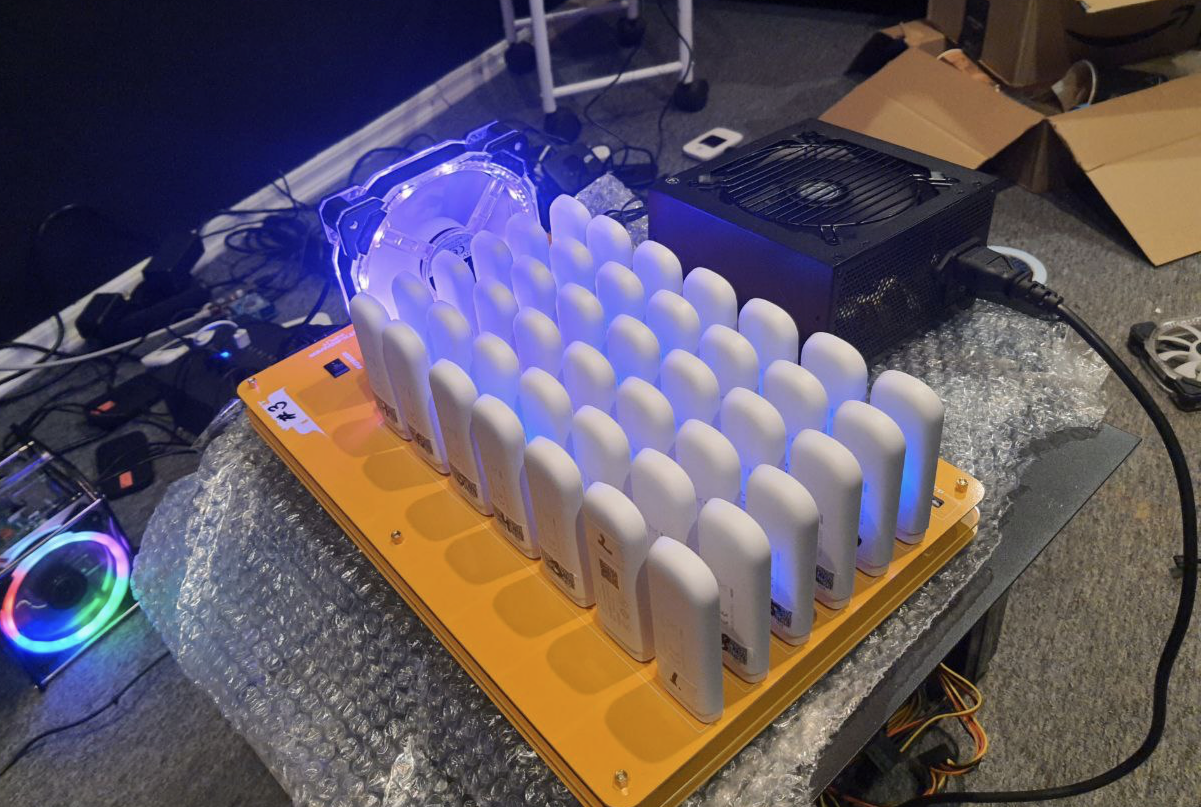
Don't do experiments with custom hubs as I did:

image.png

This is BAD. While this hub is very cool because it works from a regular PSU, has a lot of slots with good spacing between for good airflow, this is where I learned the hard truth about what USB controllers are and how they work. With this setup on medium to high load speed per dongle decreased to glorious 1 Mbit/s and latency went up to 1000ms.

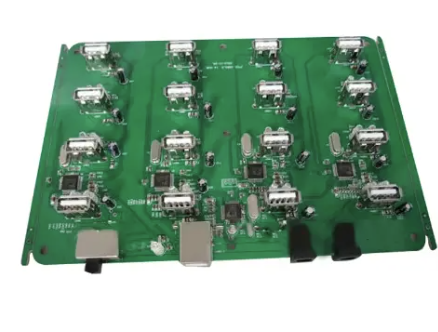
Now I'm working to switch setup on boards like these which I haven't seen others using.

image.png


While they still have 1.5A and 5V output to support dongle on high load, there is only 16 2.0 ports, with good spacing for ideal airflow and double power slots for fault tolerance.

For Mikrotik I switched to RB4011iGS+5HacQ2HnD-IN. I kinda don't like it has passive cooling but specs/price ratio is very good and it has built in wireless which makes things easier when you want to quickly go to site, do some maintenance and be on your way. Before I used more regular mikrotik router boards.

300x400


Right now I have around 1000 modems hosted in multiple countries,
I have tried it all, this is my approx history of upgrades:

- started with a single PC, Orico hubs and Huawei modems
- changed standalone PC setup for XU4
- started using mikrotik's router boards
- changed Huawei Dongles for ZTE(lifechanging experience)
- experimented with $1000 worth of various hubs to find what works best
- for reasons unclear even to myself I changed some XU4 to a single PC approach again hosting 80-100 dongles per PC
- only couple power outages and hardware faults did show that single PC approach is bad for high uptime requirements
- now I'm switching back to SBC approach and using vim4 from Khadas, it's like XU4 on steroids.


I was wondering why you are recommending the ZTE MF79U + Odroid XU4 combo instead of the commonly advised e3372h + pi combo.
Because commonly advised is hobbyist experiment on a proof of concept level, it will work but you wont be able to run more than 4-6 dongles per rpi. I dont know why, never had interest to investigate why it's so, either it comes from rpi chipset limits or software, i dont know, dont care, XU4 is cheaper and way more powerful. That said XU4 is soon to be discontinued, so will need to look for other options.

From what I can tell Odroid seems to be more cost effective and the ZTE dongles are easier to work with as they are based on a USB to Ethernet stack. Are those the main reasons or are there other things to consider?
- Both are more cost effective as I get my ZTE for less than $20 per dongle with pretty much unlimited supply.
- ZTE has never frozen on me, Huawei had tendency to freeze and stop responding and only hard reset did help.
- ZTE vs Huawei i got better speeds for some carriers. I never experimented much with it but i did notice about 20% difference.
- XU4 uses eMMC where rpi uses microSD. Yes yes, you can probably upgrade rpi with all sorts of stuff to support SSD etc, don't care.


Also I assume if one is using ethernet for any of the data transfer one is going to run into bandwith constraints quite fast if they are looking to handle significant traffic. Unless they have unusually high network switching capacity. What is your experience with interference between the dongles?
What's significant traffic? Why you want to run big traffic, you need to skip any static resources in your bot from being proxied, it will decrease the use a lot. Unless you plan to use real android phones, then it's another story, and a deep one too haha. But even there optimizations are possible to handle big loads properly.

Can you quantify how many dongles can be used concurrently within proximity before bottlenecks arise?

Again, thank you for your advice on this.
And here starts the rabbit hole,
USB Controller chipset endpoint limits.

I will try to simplify as much as I can.
- Every USB chipset has limits on how many USB devices can be connected to it.
- With USB 2.0(white color) you will be able to connect 20-40 devices, with USB 3.0(blue color) you will be able to connect only 16 devices
- Max supported device count comes from how many endpoints USB device uses, technically USB 2.0 supports 127 devices but you will have bad time trying to do so
- ZTE/Huawei dongles are USB 2.0, so it doesn't matter if you use USB 3.0 hubs or 3.0 ports on your m/b, it will go backward compatibility to USB 2.0
- USB 2.0 is half-duplex, which means data travels one way at a time, which means it's slow. If you add more than -N devices to the USB controller, it will become slower with each additional device if they are all on high load.

So to run on PC you will need good USB PCIe card with separate channels per port to get most of your setup.

All the above is only about hardware. You will need software to manage it all too. For inhouse use simple node.js script that generates 3proxy config will be enough.

My coffee got cold writing this. Will come back later if I will remember to add something here.
 
I'm a wireless master, in everything. I can get accsess to lines in the usa super cheap and can tell you how to bypass anything cellular to get data...anything.

So I did this, and I couldent get any proxys to sell. I can even get my cost lower than anyone selling any network to use as a proxy Att, Verizon, tmobile, I can have anything cheap. Keep in mind, I have other successful busnesses in tech.

But never had any proxy sales. I would recommend just not going forward. I dumped money into this and got nowhere. Litterly lost about $600 setting up. Not to mention the monthly lines cost.

I say it's a crap shoot.
 
Also to add, I use phobs that are cat 16 or higher, imei programmable and can look like any device I want. No phone bullshit. No old as year 2000 fobs eather.

Still zero sales. Not one. I also have a location central to the usa, and can get just about any major city on any network. Dosnet matter if I'm in that state or not.
 
Not op but thank you for giving guidance on how to set this up. I am also currently looking into setting something like this up for my botting purposes.

I was wondering why you are recommending the ZTE MF79U + Odroid XU4 combo instead of the commonly advised e3372h + pi combo. From what I can tell Odroid seems to be more cost effective and the ZTE dongles are easier to work with as they are based on a USB to Ethernet stack. Are those the main reasons or are there other things to consider?

Also I assume if one is using ethernet for any of the data transfer one is going to run into bandwith constraints quite fast if they are looking to handle significant traffic. Unless they have unusually high network switching capacity. What is your experience with interference between the dongles? Can you quantify how many dongles can be used concurrently within proximity before bottlenecks arise?

Again, thank you for your advice on this.
No, all that gear you listed is old as shit. How do you feel about 5mbps up and down for a proxy? For the same price I can use other stuff that's gonna give you 15mbps to 50mbps.
 
I see the discussion has moved forward quite a bit, but I'll add my two cents on the initial questions :)

1. Any CPU with the highest clock speed you can find :) at least 3 GHz. By the way, if it's a desktop, they usually have a lot of energy-saving features turned on, I'd recommend turning those off. Because ideally, you want your processor running at max speed.
2. Yeah, 3proxy can usually handle hundreds of Mbps, but there's a catch. If you're running a lot of 3proxy instances, you should ideally allocate one core per instance. In reality, you can fit at most around ten 3proxy instances per core to get a really good speed for each proxy connection.
3. Putting your server on 5G is a pretty sketchy idea, man. Your speed will depend on the weather forecast (seriously, rain can affect it a lot). Your actual experience will be much worse than the numbers you're mentioning.

1. 5x Odroid XU4 or just single Tower with Ryzen 9
Agree, it's a good thing for sure.
 
My coffee got cold writing this. Will come back later if I will remember to add something here.
Wow! Thank you for getting back to me with such a thoughtout response. I am sorry to hear about your coffee though.

Ideally, I would like to have stable endspeeds of around 10-20 Mbit/s minimum for devices connecting via proxy. So the reasoning behind asking about significant traffic was 2-fold.

1. Does 100 modems connecting to the same cell tower while being right next to eachother cause any issues regarding interference or signal congestion from you experience?

2. In my particular use case I want to forward the proxy ports to a VPS. However, the landline connection in my office is horribly unreliable. So my initial thought was to forward them via the individual modems. Have you ever done it like this? If so what was your experience, frankly, does that even work haha?

Would also love to hear if you had experienced any other common bottlenecks along your journey.

Thank you again for letting me learn from all the trial and error you had to do. Genuinely appreciate it.

No, all that gear you listed is old as shit. How do you feel about 5mbps up and down for a proxy? For the same price I can use other stuff that's gonna give you 15mbps to 50mbps.

What hardware do you work with?
 
Um I'd rather not say, given I spent a large ammount of time developing hardware nobody uses in this industry curently and it is kinda a golden goose. I am a cellular geek and own a internet company. But it is something you have to program. I have a 3proxy server running this situation. I can run 20 fobs at a time on rpi4. I wrote all my own stuff.

But ill be honest, after a couple of these posts iv read. They all seem like advertising for proxidize to get people to buy into there service incognito. Which is a horrible service, they aren't helping people at all and are super shitty people. Because iv been trying to sell these for a year cheap and had no bites on any network at all.

Just feels like it's easyer and cheaper to get a residential proxy or a vpn to do anything now days. Hell a vps is cheaper and easyer now days rather thN mobile proxies.
 
RE: usb limit.
when I get this error "Not enough host resources, active endpoint contexts" I install a special Linux kernel without USB3 (xhci) module , to force all controllers work in usb2.0 .
I rebuilt the kernel for all major Ubuntu's, IDK if it is OK to share links (BHW policy is very strict) so find it in google by the phrase "USB modems don't show up"
 
it's easyer and cheaper to get a residential proxy or a vpn
oh yeah it is. But resi proxies are de-facto stolen IP's provided by chinese embedded hardware in people's home networks (if ethics matters for you). VPS proxies are $0.1 per piece, easily detected and banned, there is no reason to invest in them (well, you can , but 90% of budget will be marketing, so it is not hitech industry).
 
No, all that gear you listed is old as shit. How do you feel about 5mbps up and down for a proxy? For the same price I can use other stuff that's gonna give you 15mbps to 50mbps.
This statement is weird and wrong, none of the gear listed is bottleneck to give so slow speed of only 5mbit/s.

I see the discussion has moved forward quite a bit, but I'll add my two cents on the initial questions :)

1. Any CPU with the highest clock speed you can find :) at least 3 GHz. By the way, if it's a desktop, they usually have a lot of energy-saving features turned on, I'd recommend turning those off. Because ideally, you want your processor running at max speed.
2. Yeah, 3proxy can usually handle hundreds of Mbps, but there's a catch. If you're running a lot of 3proxy instances, you should ideally allocate one core per instance. In reality, you can fit at most around ten 3proxy instances per core to get a really good speed for each proxy connection.
3. Putting your server on 5G is a pretty sketchy idea, man. Your speed will depend on the weather forecast (seriously, rain can affect it a lot). Your actual experience will be much worse than the numbers you're mentioning.
Why is high clock speed required? For encryption purposes between server/client when using socks? Dunno, I doubt that it's that important, for running something custom as shadowsocks that could benefit but for 3proxy I would say more threads would be more beneficial, no?

1. Does 100 modems connecting to the same cell tower while being right next to eachother cause any issues regarding interference or signal congestion from you experience?
Depends on cell tower. Latency decreases yes but every country and location is different, I've noticed a drop of 20-25ms in latency when connecting more than 300 devices on same tower.

2. In my particular use case I want to forward the proxy ports to a VPS. However, the landline connection in my office is horribly unreliable. So my initial thought was to forward them via the individual modems. Have you ever done it like this? If so what was your experience, frankly, does that even work haha?
You can use backconnect approach, if you have good 5G connection, then you can either ask your carrier to get you a static IP address or you can try to build a backconnect tunnel to your office from VPS.

I've used this with great success for this approach https://github.com/fatedier/frp

Or nowadays I just setup cloudflare tunnels. Very easy to setup, and easy to use.


Would also love to hear if you had experienced any other common bottlenecks along your journey.
Thank you again for letting me learn from all the trial and error you had to do. Genuinely appreciate it.
I think the most annoying ones I already shared, they were unreliable huawei dongles that everyone is using and understanding the limits of USB host controllers.
Another annoying stuff was to deal with situation when your main network loses connection and one of dongles takes over as main network interface but that can be solved by writing scripts that resets it or just disables modems to be used as main.


RE: usb limit.
when I get this error "Not enough host resources, active endpoint contexts" I install a special Linux kernel without USB3 (xhci) module , to force all controllers work in usb2.0 .
I rebuilt the kernel for all major Ubuntu's, IDK if it is OK to share links (BHW policy is very strict) so find it in google by the phrase "USB modems don't show up"
True, I tried to do the same but decided it would be a pain to maintain such an approach so decided to go with PCIe card which works great as I use cards with separate controller per port as when disabling USB3 still doesn't give more host controllers to use.

oh yeah it is. But resi proxies are de-facto stolen IP's provided by chinese embedded hardware in people's home networks (if ethics matters for you). VPS proxies are $0.1 per piece, easily detected and banned, there is no reason to invest in them (well, you can , but 90% of budget will be marketing, so it is not hitech industry).
I'm curious have you managed to dig deep enough to find source of these Chinese proxies? Deepest I got was first level resellers, still very cheap but I would like to find direct source.
 
Um no, that gear is super slow and old. I think the fob mentioned above was made in 2013 the manufacturer dosent even make it anymore. Yah it's a staple in this kind of situation. But it's far from fast or efficient. All the major systems recomend them because they are too stupid or lazy to dev on newer gear like I did. My shits fast, it dosent require all thw bullshit these fobs do and they are 100 times faster. I'm not saying the gear won't work, im saying it's slow compaied to other stuff on the market.
 
oh yeah it is. But resi proxies are de-facto stolen IP's provided by chinese embedded hardware in people's home networks (if ethics matters for you). VPS proxies are $0.1 per piece, easily detected and banned, there is no reason to invest in them (well, you can , but 90% of budget will be marketing, so it is not hitech industry).
I use vpns, vps and other all the time with zero issues. Never had any of that happen with this at all. But the fact remains, the mobile proxies didn't sell even at $45 each sale value for any network. Which is a fact. Other sellers $80 to 120 a month or more for a unlimited data line.

So yah they are cool, but they don't sell. I get some networks for $15 a month unlimited data. The thing never left thw ground. Iv talked to others with same situation. Paid proxidize for a system wich is prices 4 times what the gear is really woth, only to be meet with a dead market.
 
Um no, that gear is super slow and old. I think the fob mentioned above was made in 2013 the manufacturer dosent even make it anymore. Yah it's a staple in this kind of situation. But it's far from fast or efficient. All the major systems recomend them because they are too stupid or lazy to dev on newer gear like I did. My shits fast, it dosent require all thw bullshit these fobs do and they are 100 times faster. I'm not saying the gear won't work, im saying it's slow compaied to other stuff on the market.
Yes, your superiority is clear to us, that's fine.

I have 1000 old and super slow modems rented out.

My deduction abilities might be incredibly wrong but by what you mentioned, your super gear didn't sell so well.

Anyways, for other readers: you don't need super gear.

You need good and reliable gear.

When you want to drive on a mountain, you want old Toyota jeep that has good milage and you know you will be able to fix it with a hammer, not the shiny lambo.
 
Yes, your superiority is clear to us, that's fine.

I have 1000 old and super slow modems rented out.

My deduction abilities might be incredibly wrong but by what you mentioned, your super gear didn't sell so well.

Anyways, for other readers: you don't need super gear.

You need good and reliable gear.

When you want to drive on a mountain, you want old Toyota jeep that has good milage and you know you will be able to fix it with a hammer, not the shiny lambo.
So hate, I'm not gonna tell you the gear I use. I get 40mbps minimum on all my line on my system. 20 fobs, 20 diffeent carriers. I think you guys are just mad I'm being honest.
 
So hate, I'm not gonna tell you the gear I use. I get 40mbps minimum on all my line on my system. 20 fobs, 20 diffeent carriers. I think you guys are just mad I'm being honest.

Uff speed yes.

So here is ZTE test right now

1708989083486.png


well.. of course cat 16 is better than cat 4.

but cat 16 module costs like $110 on alibaba? might go down to $90 for big bulk orders?

ZTE is $19.50 right now, so technically can get x5 times of lines for the same price.

And honestly, clients doesnt care about the speed much, there is no need for that, good latency is more important.

I would easly say that 10Mbits proxy is just fine for most of botting stuff. If the bot software allows skipping static assets, even less is needed to drive just fine.
 
Uff speed yes.

So here is ZTE test right now

View attachment 324688


well.. of course cat 16 is better than cat 4.

but cat 16 module costs like $110 on alibaba? might go down to $90 for big bulk orders?

ZTE is $19.50 right now, so technically can get x5 times of lines for the same price.

And honestly, clients doesnt care about the speed much, there is no need for that, good latency is more important.

I would easly say that 10Mbits proxy is just fine for most of botting stuff. If the bot software allows skipping static assets, even less is needed to drive just fine.
You are suggeting a fob from 2013. ZTE dosent even make it anymore. There are atleast 10 other fobs that cost just a little more that are light-years more usable and manipulatable feom a command line than this fob sill ever be. You may just be close to a tower to get the speeds. But it won't last long, these fobs are phasing out.

I kinda love the fact you are arguing with a cellular master and a master vendore for cellular about this stuff. Your knowledge is light-years away from where the industry has you, and where you could be.

Iv consulted with proxdize, non disclosure and all. Iv worked with 2 other major proxy service providers I wont even name.

I get nothing at this point from talking to you. But I want to be honest about my journey to others so they don't get hoodwinked into this like I did. It didn't sell, it cost $700 a 20 fob rig. It generated $0 dollars in over a years pushing it. That may be because we don't wanna deal with nickel and dime bags like you guys do. But it's more about passive to us.

I have contracts with every major usa cellular company and some in south america. I do much better providing internet than I have ever done doing this.

But I think your post is more about your ego, and less about facts and curent techniques. I'm assuming you probably don't get your lines very cheap at all and are a bit mad about what I pay. Hell of course be whatever. But again, Im Not hear to help you, I'm hear to tell my story so other people know the truth about mobile proxy farms. Atleast our experince, that's what matters.

It is kinda funny you still use thet old ass fob though.
 
Back
Top