How to align options differently? Wordpress, PHP

Scorpion Ghost

Elite Member
Executive VIP
Jr. VIP
Joined
Mar 22, 2013
Messages
9,145
Reaction score
10,489
I have this website with offers, and each offer has these extra options. But they get aligned based on the name:
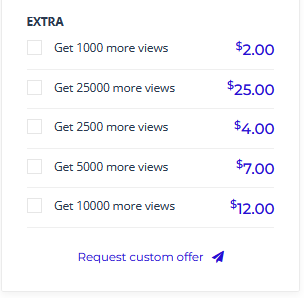
320320.PNG


The options get aligned based on name, and it doesn't look good. I want to have them aligned by price.

Here is the code:

PHP:
<?php
    global $post, $ae_post_factory;
    $post_object = $ae_post_factory->get( 'mjob_extra' );
    $current = $post_object->convert( $post );
?>
<li class="extra-item" data-id="<?php echo $current->ID; ?>">
    <div class="form-group list-item-extra">
        <div class="packge-chose">
            <div class="checkbox">
                <label>
                    <input data-id="<?php echo $current->ID; ?>" type="checkbox" value="<?php echo $current->et_budget; ?>" name="mjob_extra">
                    <span><?php echo $current->post_title; ?></span>
                </label>
            </div>
        </div>
        <div class="package-price mje-price-text"><?php echo $current->et_budget_text; ?></div>
    </div>
</li>

So this code encompasses each line (includes name and price)

PHP:
<li class="extra-item" data-id="<?php echo $current->ID; ?>">

And this code encompasses just the price block:

PHP:
<div class="package-price mje-price-text"><?php echo $current->et_budget_text; ?></div>

So if it's a simple edit to the above code to align things there by price, help a brother out. If complicated, never mind.

Thanks : )
 
What you need is sort, not align. See:
Code:
https://www.php.net/manual/en/array.sorting.php

Have you considered asking ChatGPT?

Yeah, theres no way i can implement this stuff myself, or it will take me forever. Ill be an old man by the time i do it :p

Youre right, its sorting that i need.

But actually, even sorting by price wouldn't work, unless its intelligently sorting by price. And that adds another layer of difficulty.

Id probably end up with something like this haha

Name 12
Name 2
Name 22
Name 4
Name 8

There is also a "data-id" for each li, but they are not always numbered in the order theyre created, so ordering by that wont work perfectly either.

I may have to pay someone to fix this little issue, or go old school and edit each extra to add a number in front of it, like:

1. Name price
2. Name price
3. Name price
Etc etc

That would take forever though. Plus id need to remember to add a number for any future offers/extras i create.

ChatGPT you say? No, i didnt think of that. But how would ChatGPT manage to fix this? Its complicated. AI chatbots are nothing more than glorified scrapers :p

If im wrong, then let ChatGPT tell me how to build a portal to another dimension using components from a toaster and a microwave. Can it do it? No. So you see what im saying hahaha :D
 
ChatGPT you say? No, i didnt think of that. But how would ChatGPT manage to fix this? Its complicated. AI chatbots are nothing more than glorified scrapers :p

There are some free ChatGPTs you can use. You ask the question and paste the code you need fixed. I'm not used to Wordpress so that's why can't help you.

Somewhere in the database or object should be the real price: 2.00, 25.00 etc. You need to sort the object based on that field.
Code:
https://stackoverflow.com/questions/17877691/sort-an-array-by-price-value

You can use var_dump($current); right after $current = ... and see what that object has as values.
 
There are some free ChatGPTs you can use. You ask the question and paste the code you need fixed. I'm not used to Wordpress so that's why can't help you.

Somewhere in the database or object should be the real price: 2.00, 25.00 etc. You need to sort the object based on that field.
Code:
https://stackoverflow.com/questions/17877691/sort-an-array-by-price-value

You can use var_dump($current); right after $current = ... and see what that object has as values.

Yeah, nothing happens when I do that.

I tried ChatGPT now. Add this code here, do this, do that, but nothing works. But all is not lost.

"Since the extras are being rendered on the client side using JavaScript templates, we can modify the JavaScript code to sort the extras based on prices."

That's one of the things ChatGPT told me.

So I figured out that it's code from a different file that renders the extras. This:

HTML:
(script type="text/template" id="extra-item-loop">
    <div class="form-group list-item-extra">
        <div class="packge-chose">
            <div class="checkbox">
                <label>
                    <input data-id="{{= ID }}" type="checkbox" value="{{= et_budget }}" name="mjob_extra">
                    <span>{{= post_title }}</span>
                </label>
            </div>
        </div>
        <div class="package-price">
            {{= et_budget_text }}
        </div>
    </div>
(script)

Making an edit here, like moving the div package-price on top, moves the prices to the left. So this code is responsible for rendering the extras.

But the codes ChatGPT gave me didn't work. They just made the extras disappear completely.

Any ideas looking at the code above?
 
Hm, turns out the site orders these extras based on data-id, not even the text.

202020.PNG


That means even if I edit the text of each extra, the ordering will remain the same.

Shit :D
 
Apparently, it's not (always) sorted by data-id either. I found this on one page:

987.PNG


Well, it's not sorting by name, not sorting by price. It seems to be sorting by data-id, but not all the way, not every time.

Stupid ass stupid shit :D
 
Back
Top