Geoblocking with WAF in Cloudflare?

Alf85

Elite Member
Joined
Sep 7, 2021
Messages
2,592
Reaction score
918
Does anyone have experience blocking traffic from certain countries in Cloudflare's WAF? I am interested in blocking some countries that do not benefit me at all. By blocking countries in Cloudflare can I have any impact on SEO? If it impacts my SEO in those countries I don't care because I don't want that traffic.
 
Its nearly impossible to Organic Traffic from certain country, if you gain paid traffic, you can block by setting.
 
You can do that using WAF custom rules. Here's the link to the documentation
https://developers.cloudflare.com/waf/custom-rules/
I am not sure if this is still available on the free plan. I would rather configure this from your webserver instead.
There I saw that it exists in the Free plan. I will try it, I don't think it will affect SEO. I will only block countries that do not give me income.
 
It might impact SEO if you block search engine bots from indexing. For instance, blocking US IP addresses could potentially prevent Google and Bing from indexing your content.

One way to avoid blacklisting search engine bot IP addresses is to whitelist them in your WAF or web server. You can obtain a free robot IP list from https://www.ip2location.com/free/robot-whitelist.

I hope it helps.
 
It might impact SEO if you block search engine bots from indexing. For instance, blocking US IP addresses could potentially prevent Google and Bing from indexing your content.

One way to avoid blacklisting search engine bot IP addresses is to whitelist them in your WAF or web server. You can obtain a free robot IP list from https://www.ip2location.com/free/robot-whitelist.

I hope it helps.
90% of my traffic is from the USA, Canada, Australia, and New Zealand. Of course, I will not block those countries. I plan to block other countries like India and Pakistan. I wouldn't think it would affect my SEO.
 
Hello Alf85,

I don't think blocking countries with unnecessary traffic will harm SEO. However, if you want to use this rule for antiddos, I would not recommend it.
As for creating a Cloudflare Firewall Rule to block traffic from China, you can use the following expression:
(ip.geoip.country eq "CN")
 
Hello Alf85,

I don't think blocking countries with unnecessary traffic will harm SEO. However, if you want to use this rule for antiddos, I would not recommend it.
As for creating a Cloudflare Firewall Rule to block traffic from China, you can use the following expression:
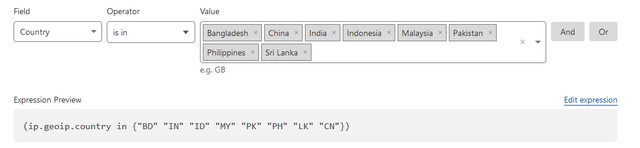
I am using this rule:

What difference does it make? I tried with VPN from those countries and it does block them.
 
u rule it does the same thing as I said. Good.
Perfect. We will see if this decreases the attacks and the increase of speed metrics in Google. People told me that when they come from countries with older devices or slower internet speed it impacts my metrics.
 
Perfect. We will see if this decreases the attacks and the increase of speed metrics in Google. People told me that when they come from countries with older devices or slower internet speed it impacts my metrics.
"slower internet speed it impacts my metrics" This is partly true. However, cloudflare cdn minimizes the slowness as much as possible. Good working.
 
Perfect. We will see if this decreases the attacks and the increase of speed metrics in Google. People told me that when they come from countries with older devices or slower internet speed it impacts my metrics.

You should be good as long as you pass the Lighthouse (PageSpeed Insights) test which is pretty f*cking strict and requires you to put in some effort to optimize your website (unless you're serving a bare-bones .html file that is haha). Blocking "slow traffic" to achieve higher rankings is very dubious.
 
Back
Top