How to enable Two-factor authentication for facebook account?

nnthien1993

Newbie
Joined
Mar 20, 2022
Messages
8
Reaction score
2
when i enable two factor authentication for facebook account. All accounts display the above message.
Do you know how to overcome error like this?
I would be happy to pay a fee to get this done.
Thank you.
2fa1.PNG

2fa2.PNG
 
Facebook needs more time to verify information and accept login changes, wait some time before trying again. Or try changing your proxy or VPN: If you're using a proxy or VPN, turn them off and try logging in again. Facebook may feel suspicious if you visit from unusual locations.
 
I have the same problem it happen when I try to turn off 2 factor authentication in incognito mode and when I try to log in it redirects me in enabling 2 factor authentication and end up in this
 
when i enable two factor authentication for facebook account. All accounts display the above message.
Do you know how to overcome error like this?
I would be happy to pay a fee to get this done.
Thank you.
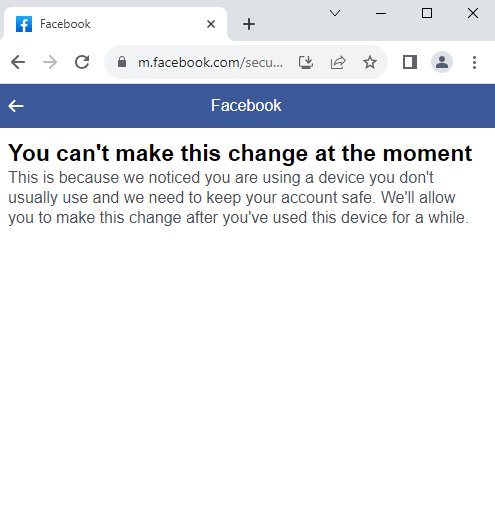
View attachment 315180
View attachment 315181
Occasionally accounts encounter this problem. you should authenticate the next day .this will help you solve this problem
 
Hi guys I already figure it out, my fb are now ok, if you encounter this kind of error you should open it in messenger and it will redirect you in that page and you can now continuously browse that to activate 2 factor authentication, problem solved!
 
when i enable two factor authentication for facebook account. All accounts display the above message.
Do you know how to overcome error like this?
I would be happy to pay a fee to get this done.
Thank you.
View attachment 315180
View attachment 315181
its because you're using the account on a new device.
you will have to keep using the account for 2-3 more days on same device, same proxy and try again.
 
Continue using your account on that device, it should be good at some point later on. Also, try not to keep changing devices with the account, at least for now.
 
i waited for 1 month and it automatically resolved the issue
 
Continue using your account on that device, it will work fine later.
 
To enable Two-Factor Authentication on Facebook:

  1. Go to Settings > Security and Login.
  2. Click on Edit next to Two-Factor Authentication.
  3. Follow the prompts to set it up.
 
Solution.
1. Change browser and clear cache
2. Change proxy

Then Facebook will give you the opportunity to install 2FA
 
Try after some time with another browser.
 
I Am having this issue.Can anyone help me please.....
 

Attachments

  • Screenshot_2024-04-03-14-11-34-81_be80aec1db9a2b53c9d399db0c602181.jpg
    Screenshot_2024-04-03-14-11-34-81_be80aec1db9a2b53c9d399db0c602181.jpg
    234.3 KB · Views: 146
Back
Top