OrderGuestPost
Junior Member
- Jun 2, 2023
- 157
- 52
You can also try zimmwritter which can do all these with more features.

i use my own wordpress user id .. for the password I generate application password ... for example it has
Slla Ekl2 pfyb ... do I need to fix the gap between password
Free solutions are always better. You can change code as you wish with open source.You can also try zimmwritter which can do all these with more features.

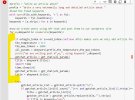
done ...still errorPaste but exactly like this: (all lines bellow should start at the same position - this is the indentation in python).
so import time i is just bellow title
Code:if e<begin_index or e>=end_index:continue #this makes sure we only add article from begin to end the_temperature = 0.7 the_max_tokens = 2000 all_params = akeyword,prefix,the_temperature,the_max_tokens print("we are writing post #",e,", using keyword:",akeyword) gptchat_article = gpt_chat(all_params) title = akeyword.title() import time time.sleep(20)
# SETTINGS
begin_index = 11
end_index = 12
your_site = "yur site url"
your_user = "your site username"
your_password = "your site application password"
wordpress_category = "" # or you can add here a category id
title_is_keyword = "yes" #cam be "yes" or "no". If yes then the title is the keyword, if no then the title is created by GPTCHAT
remove_ai_detection = "no"
#prefix = "Write an article about"
prefix = "Write a very extremelly long and detailed article about "
#load the fixed keywords
with open(file_with_keywords, 'r') as fyl:
keywords = fyl.readlines()
keywords = [x.strip() for x in keywords]
#now we create posts using GPT-chat and post them to our wordpress site
for e,akeyword in enumerate(keywords):
    if e<begin_index or e>=end_index:continue #this makes sure we only add article from begin to end
    the_temperature = 0.7
    the_max_tokens = 2000
    all_params = akeyword,prefix,the_temperature,the_max_tokens
    print("we are writing post #",e,", using keyword:",akeyword)
    gptchat_article = gpt_chat(all_params)
    title = akeyword.title()
    import time
    time.sleep(20)
try:
gptchat_article_list = gptchat_article.split("\n")
if gptchat_article_list[0].count(".")<=1 and gptchat_article_list[1].strip()=="":
title = gptchat_article_list[0]
gptchat_article = gptchat_article.replace(title,"").strip()
if title_is_keyword=="yes":
title = akeyword.title()
except:pass
#now we post to out wordpres site
try:
the_response = make_post(title,gptchat_article,your_user,your_password,your_site,wordpress_category)
the_link = the_response['guid']['rendered']
print("the_link",the_link,"word count",len(gptchat_article.split()),"the_title:",title)
except Exception as err:
print("we have an error",err)i delete the entire cell .. and copy your above code and pasted but still errorI see, you did not paste it correctly.
Here is the entire cell:
Code:# SETTINGS begin_index = 11 end_index = 12 your_site = "yur site url" your_user = "your site username" your_password = "your site application password" wordpress_category = "" # or you can add here a category id title_is_keyword = "yes" #cam be "yes" or "no". If yes then the title is the keyword, if no then the title is created by GPTCHAT remove_ai_detection = "no" #prefix = "Write an article about" prefix = "Write a very extremelly long and detailed article about " #load the fixed keywords with open(file_with_keywords, 'r') as fyl: keywords = fyl.readlines() keywords = [x.strip() for x in keywords] #now we create posts using GPT-chat and post them to our wordpress site for e,akeyword in enumerate(keywords): if e<begin_index or e>=end_index:continue #this makes sure we only add article from begin to end the_temperature = 0.7 the_max_tokens = 2000 all_params = akeyword,prefix,the_temperature,the_max_tokens print("we are writing post #",e,", using keyword:",akeyword) gptchat_article = gpt_chat(all_params) title = akeyword.title() import time time.sleep(20) try: gptchat_article_list = gptchat_article.split("\n") if gptchat_article_list[0].count(".")<=1 and gptchat_article_list[1].strip()=="": title = gptchat_article_list[0] gptchat_article = gptchat_article.replace(title,"").strip() if title_is_keyword=="yes": title = akeyword.title() except:pass #now we post to out wordpres site try: the_response = make_post(title,gptchat_article,your_user,your_password,your_site,wordpress_category) the_link = the_response['guid']['rendered'] print("the_link",the_link,"word count",len(gptchat_article.split()),"the_title:",title) except Exception as err: print("we have an error",err)
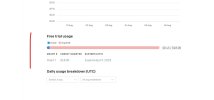
here it isThis is just OpenAI credit error, maybe you spent all the credits.
did not work , it just ran but did not add any post to the website idk what is wrong . but have added all the info and showed no error . but did not post anything
Did you rank for any keyword ? how many articles and traffic just now ? Appreciated your effort to enrich our forum. Thanks a lot.