how to publish post on linkedin without noindex?

grot86

Newbie
Joined
Apr 26, 2012
Messages
35
Reaction score
9
Hey, everyone. I want to publish an article on linkedin under /pulse/, but after publishing I see that my article is closed for indexing.
Tag:
Code:
<meta name="robots" content="noarchive, noindex, max-image-preview:large">
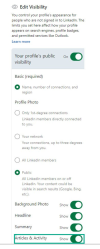
Do I have a premium account for my article to be indexed or is it all in the settings? I seem to have reviewed all the available settings and found nothing to help open the article for indexing.
 
Hey, everyone. I want to publish an article on linkedin under /pulse/, but after publishing I see that my article is closed for indexing.
Tag:
Code:
<meta name="robots" content="noarchive, noindex, max-image-preview:large">
Do I have a premium account for my article to be indexed or is it all in the settings? I seem to have reviewed all the available settings and found nothing to help open the article for indexing.
Check your LinkedIn settings to ensure that your articles are set to be publicly visible and allow search engines to index them
If there is no such option, it might fall under content restriction
 
Check your LinkedIn settings to ensure that your articles are set to be publicly visible and allow search engines to index them
If there is no such option, it might fall under content restriction
Can you show me a screenshot with these settings?
 
settings.png
Right now I have these settings and my articles have a noindex tag. What could be the problem?
 
maybe content restriction? or technical issue.. dont know
How to understand that content has restriction? I published another article, it also has a noindex tag.
 
To publish a post on LinkedIn without 'noindex,' ensure your post privacy settings are set to 'Public' to maximize visibility.
 
To publish a post on LinkedIn without 'noindex,' ensure your post privacy settings are set to 'Public' to maximize visibility.
Could you show me a screenshot where I can check this out
 
Is your account new?
I registered account about 12 years ago. The only thing is that I wasn't an active user. Didn't go there for 11 years, now I wanted to try to use linkedin articles to promote in search. Since the linkedin has been ranking pretty well on google lately.
 
I registered account about 12 years ago. The only thing is that I wasn't an active user. Didn't go there for 11 years, now I wanted to try to use linkedin articles to promote in search. Since the linkedin has been ranking pretty well on google lately.
Come DM And send me your profile. I publish articles through organization tab and mine are index,follow.
I will add you and make you contributor of the organization. Publish the article and if it is indexed then I will make you admin of that organization. Hope it will work.
 
Come DM And send me your profile. I publish articles through organization tab and mine are index,follow.
I will add you and make you contributor of the organization. Publish the article and if it is indexed then I will make you admin of that organization. Hope it will work.
Can you please send me the first message in DM. I can't find how to send you a message.
 
Glad you guys worked it out. Just to add to the discussion, LinkedIn is deindexing company pages and adding noindex to the company page articles. So there is no safe way to post articles.
What the criteria its using, I don't know, could be links in the article or could be due to using socal media plugins to share on LinkedIn, could it it's spam filter is getting triggered.
 
Here is the response from LinkedIn support Team on a similar case as yours.

"""
The reason why your Company Page is not prompting is due to the fact your page has 0 employees associated with the page.

As more members associate themselves with your page, and the more established the page it will prompt.

___

Conclusion: Follow their directive, and hope they will notify you when the NO-INDEX, and NO-archive tags are taken off.
 
Once you have a quality article, your linked account is publicly viewable, contents and articles is set to "show" in your linkedin settings, you are good to go. I dont think you should really border yourself about follow or no follow.
 
If someone wanna join my company on LinkedIn dm your LinkedIn profile I will make you admin so that we can post and get indexed.
Don't send fake profile guys and don't go ham with posting and dropping links.
 
Last edited:
To publish a post on LinkedIn without 'noindex,' ensure your post privacy settings are set to 'Public' to maximize visibility.
would you please share what's the best practice or any recommendation
 
Back
Top