
You are using an out of date browser. It may not display this or other websites correctly.
You should upgrade or use an alternative browser.
You should upgrade or use an alternative browser.
Reduce database WP
- Thread starter Matta28
- Start date

xReminisce
Elite Member
- Dec 29, 2012
- 7,333
- 36,788
Check Images
WP usually creates like sooo many versions of the same picture in so many different sizes.
Only use what you need, rest really don't matter.
WP usually creates like sooo many versions of the same picture in so many different sizes.
Only use what you need, rest really don't matter.
D
Deleted member 657006
Guest
Make sure all images are uploaded eleseware like Google drive and only use a link in the database to get them .
Don't store images locally at all, upload to another service .
Use the users database id to rewrite to the image name and added to database .
Don't store images locally at all, upload to another service .
Use the users database id to rewrite to the image name and added to database .
D
Deleted member 657006
Guest
If your running MySQL it very light .
Might need a better server if it not images doing all the pain .
Might need a better server if it not images doing all the pain .

Matta28
Jr Vip
- Jun 6, 2018
- 3,383
- 1,454
Check Images
WP usually creates like sooo many versions of the same picture in so many different sizes.
Only use what you need, rest really don't matter.
Make sure all images are uploaded eleseware like Google drive and only use a link in the database to get them .
Don't store images locally at all, upload to another service .
Use the users database id to rewrite to the image name and added to database .
Thanks for the answers guys, gonna check this out when Im back from the gym
xReminisce
Elite Member
- Dec 29, 2012
- 7,333
- 36,788
just be carefulThanks for the answers guys, gonna check this out when Im back from the gym
Google has like an request limit of 10,000 or something anymore is paid
and having constant google requests may slow down your website if you have lots of pictures on that article/page/homepage etc.
You could do something like have a CDN host it for you completely. Bunny does thta if i remember correctly,
Matta28
Jr Vip
- Jun 6, 2018
- 3,383
- 1,454
What does/is CDN host?just be careful
Google has like an request limit of 10,000 or something anymore is paid
and having constant google requests may slow down your website if you have lots of pictures on that article/page/homepage etc.
You could do something like have a CDN host it for you completely. Bunny does thta if i remember correctly,
xReminisce
Elite Member
- Dec 29, 2012
- 7,333
- 36,788
CDN is basically Content delivery networkWhat does/is CDN host?
In simple terms (super simplified) CDN is a medium to deliver website’s static content to user from nearest possible data server.
Take a dive into this, could be very beneficial for you
https://bunny.net/academy/
Matta28
Jr Vip
- Jun 6, 2018
- 3,383
- 1,454
Will take a Look for sure, Thanks!CDN is basically Content delivery network
In simple terms (super simplified) CDN is a medium to deliver website’s static content to user from nearest possible data server.
Take a dive into this, could be very beneficial for you
https://bunny.net/academy/

hideath
Elite Member
- Jun 16, 2019
- 6,620
- 7,370
You should change your hosting for sure,
At most spammy websites with 100k+, you shouldn't be getting anymore than 2-5 GB database storage taken,
Therefore, your hosting is basically limited if you struggle at such point,
Move to a VPS, you'll get 50 GB with most of the small packages and it won't cost you anything more than $10 and 15-30 mins to set things up,
Using some free panels like aaPanel would make it a piece of cake as well
At most spammy websites with 100k+, you shouldn't be getting anymore than 2-5 GB database storage taken,
Therefore, your hosting is basically limited if you struggle at such point,
Move to a VPS, you'll get 50 GB with most of the small packages and it won't cost you anything more than $10 and 15-30 mins to set things up,
Using some free panels like aaPanel would make it a piece of cake as well

TJ_Ana
Junior Member
- Nov 18, 2022
- 112
- 61
Could you please explain this? Thanks in advanceUse the users database id to rewrite to the image name and added to database .

What do you mean by that? Do we have to pay to Google? Thanks for time answeringGoogle has like an request limit of 10,000 or something anymore is paid
Matta28
Jr Vip
- Jun 6, 2018
- 3,383
- 1,454
You should change your hosting for sure,
At most spammy websites with 100k+, you shouldn't be getting anymore than 2-5 GB database storage taken,
Therefore, your hosting is basically limited if you struggle at such point,
Move to a VPS, you'll get 50 GB with most of the small packages and it won't cost you anything more than $10 and 15-30 mins to set things up,
Using some free panels like aaPanel would make it a piece of cake as well
They tried upselling me to a VPS plan, but I figured out my problem, wp automatic. I've freaking run and forgot about it on that site and had XX thousands posts when I checked now. In the process of removing posts and media and gonna see how it's going. I've been pretty happy with this host, my previous host was worse, hostgator.
xReminisce
Elite Member
- Dec 29, 2012
- 7,333
- 36,788
Google Cloud bucketnaming Storage thingo or https://console.cloud.google.com/home/dashboardWhat do you mean by that? Do we have to pay to Google? Thanks for time answering
is pretty much free to some extent, similar to AWS
Depends on what you use and how much you are using it.
https://blog.moove-it.com/how-to-set-up-a-google-cloud-cdn-for-serving-images/
Would still recommend going with a CDN service who is tailored to these needs, you can get away with somethng as cheap as $1-2 a month with them.

- Sep 10, 2010
- 11,808
- 26,660
Move your setup to something like vitess if it ever gets that serious. Or use something managed, like planet scale, which uses vitess internally.Any good tricks to reduce database, Ive tried to delte old posts but host said that the database increased after that
D
Deleted member 1393709
Guest
Warning: Before doing any steps below, please do backup is important.
How to optimize your databases of WP:
1. Login to your myPhpAdmin
2. Select your database
3. Select your tables that you wish to optimize
Then select this option
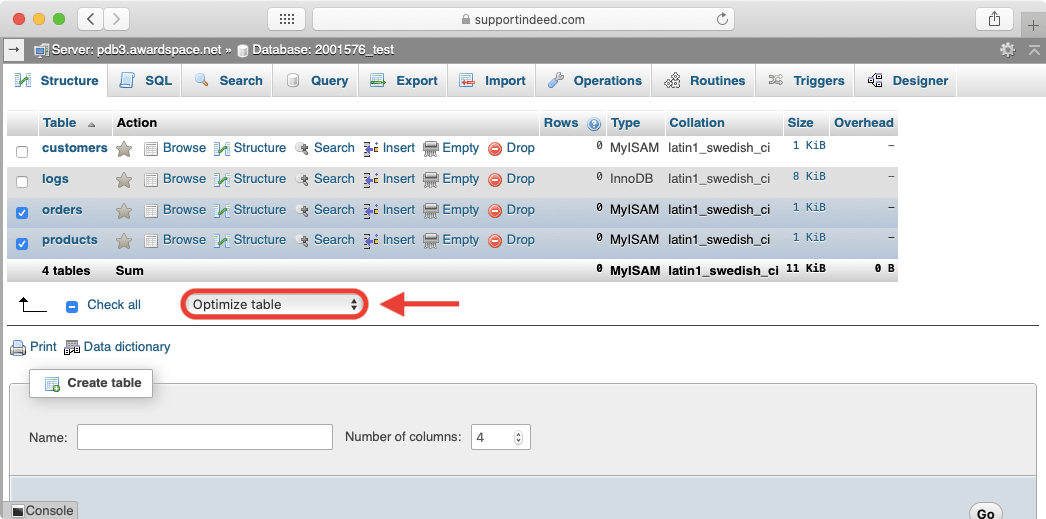
Other way to do it is by compressing images and using this plugin
https://wordpress.org/plugins/wp-optimize/ (this will optimize your database, but won't do miracles)
Consider MySQL Tuning or hire a freelancer to do it.
Cheers.
How to optimize your databases of WP:
1. Login to your myPhpAdmin
2. Select your database
3. Select your tables that you wish to optimize
Then select this option
Other way to do it is by compressing images and using this plugin
https://wordpress.org/plugins/wp-optimize/ (this will optimize your database, but won't do miracles)
Consider MySQL Tuning or hire a freelancer to do it.
Cheers.

German Rodriguez
Elite Member
- Jun 20, 2016
- 2,391
- 1,027
i will share the MYSQL query that will solve your issue
DELETE FROM `d2_posts` WHERE `post_date` BETWEEN '2020-09-01 19:10:40.000000' AND '2021-12-31 19:10:40.000000' ORDER BY `post_date` ASC
just adjust the table and date range, once you finish with until next day to see the new size
DELETE FROM `d2_posts` WHERE `post_date` BETWEEN '2020-09-01 19:10:40.000000' AND '2021-12-31 19:10:40.000000' ORDER BY `post_date` ASC
just adjust the table and date range, once you finish with until next day to see the new size
Matta28
Jr Vip
- Jun 6, 2018
- 3,383
- 1,454
I did this actually, did not help.How to optimize your databases of WP:
1. Login to your myPhpAdmin
2. Select your database
3. Select your tables that you wish to optimize
But in my case everything is fixed and work as normal


- Oct 1, 2018
- 1,166
- 328
There are several things you can try to reduce the size of your database:
- Delete unnecessary data: One way to reduce the size of your database is to delete any unnecessary data, such as old posts, comments, and media files that are no longer needed.
- Optimize your database tables: You can use a tool such as phpMyAdmin to optimize your database tables, which can help to reduce their size and improve their performance.
- Use a plugin to compress your database: There are plugins available for WordPress, such as WP-Optimize, that can help to compress your database and reduce its size.
- Enable database caching: Enabling database caching can help to reduce the number of database queries that are needed to load your website, which can help to reduce the load on your database.
- Use a database management tool: There are tools available, such as MySQL Workbench, that can help you to manage your database and identify any areas where you can optimize or reduce its size.