How to setup proxy on android?

Salamouna

Elite Member
Jr. VIP
Joined
Aug 28, 2014
Messages
11,813
Reaction score
8,685
Tested many app, the proxy work fine on pc but on the phone chrome won't load
tested the integrated proxy on my phone
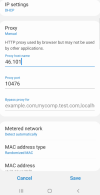
1671791286834.png

there is no place to add the user name and password for the proxy and chrome don't ask for it so internet is not working
watched many youtube videos but all useless
anyone have better solution?
 
Just put all the details in except for username and password, and open a website from that same connection. If the connection is routed through the proxy server, it will ask for username and password. If it does not, it means your browser is bypassing the proxy somehow.

orrrrr.. switch to an iphone coz iphone has this built in already. :D


Third option, use a vpn instead. It works much better for what you are trying to do.
 
Last edited:
Which is the best VPN for android in your opinion? Cost doesn't matter.
I dunno if best, but I really like mullvad vpn (i may have called it multivad in previous posts lol. I can’t even read properly as it seems hahaha). Pricing is same whether you buy for 1 month or 24.. Using it is easy and they have fair amounts of servers all over the world. :)

The same account works on all of your devices. I use it for mac, iphone and my s7 plus tab.

ps it doesn’t even have to be a third party vpn software. You could self host an openvpn server and use it on your phone. Both iphone and android support vpn connections natively.
 
Just put all the details in except for username and password, and open a website from that same connection. If the connection is routed through the proxy server, it will ask for username and password. If it does not, it means your browser is bypassing the proxy somehow.

orrrrr.. switch to an iphone coz iphone has this built in already. :D


Third option, use a vpn instead. It works much better for what you are trying to do.
I won't use it on browser
will use for app
how the app will get the user and pass
 
If you are looking for a browser that supports socks5 on android look for Kiwi Browser.
It's like Google Chrome and you can add chrome extentions for socks5 like FireProxy etc from the chrome store.
 
I won't use it on browser
will use for app
how the app will get the user and pass
Hmmm that will be a problem. If you use vpn, this won’t be a problem. All your app connections will be routed through the vpn only.
 
try SocksDroid been using for years no problem, also there you can add authentication (user and pass), download through play store
 
Hmmm that will be a problem. If you use vpn, this won’t be a problem. All your app connections will be routed through the vpn only.
IP on the VPN is shared that's why I bought a clean proxy so I'm sure that it's only me and need to use it on app
is there a vpn where you can add your own proxy
 
try SocksDroid been using for years no problem, also there you can add authentication (user and pass), download through play store
That's what I was working with
added ip+port and username password turned it on and no internet on my browser
 
IP on the VPN is shared that's why I bought a clean proxy so I'm sure that it's only me and need to use it on app
is there a vpn where you can add your own proxy
umm no idea man. May be try what the poster exactly above your post said (socksdroid).

edit: I see you tried it already.
 
That's what I was working with
added ip+port and username password turned it on and no internet on my browser
I have been using it for socks5, and also forwarding through 911 when was alive back, everything worked good, please check again if you make any mistakes step by step
 
There are many apps on the PlayStore which allow the users to setup their Proxies but if they're not working for your device then you should try using them on another android device and see if they work because the issue might be with your specific android device.
 
Just use specific apps like ProxyDroid or Droni, one of them should wrk 100%. If not, then there is should be a problem with your proxy or something on your device doesn't let you use proxies
 
usually its

  1. Open your Android's Settings.
  2. Tap Wi-Fi.
  3. Tap and hold the Wi-Fi Network Name.
  4. Select Modify Network.
  5. Click Advanced Options.
  6. Tap Manual.
  7. Change your proxy's settings. Enter the hostname and proxy port (e.g. us.smartproxy.com:10101). You can find the full list in your dashboard.
  8. Tap Save.
 
Back
Top