

Vlad2012
Elite Member
- Dec 28, 2012
- 1,824
- 725
Using Firefox portable as an example, i will show how to become more anonymous.
To get to the settings, you can enter "about:config" in the address bar or do it through the settings file "prefs.js":
1. preferred languages > Remove all languages except English from the list - the browser will become less unique.
2. Fonts > By default, the browser sends a list of installed fonts. Change browser.display.use_document_fonts to 0.
3. local storage > By default, the browser has a unique ID and sites can write information to local storage, so change the dom.storage.enabled value to false.
4. cache > You can hide the fact that you have already visited this page by disabling the cache in your browser. For this change browser.cache.disk.enable and browser.cache.memory.enable to false.
5. DNS queries > Configure your browser to make requests through a SOCKS5 proxy. To do this, change network.proxy.socks_remote_dns to true.
6. Information about visited sites > Set browser.safebrowsing.enabled and browser.safebrowsing.malware.enabled to falsew to disable data transfer.
7. user agent > You don't even need to use special extensions to change this setting. Just go to general.useragent.over and set it to the most common value.
8. Cookies for third party sites > Disable third party cookies. To do this, set network.cookie.cookieBehavior to 1.
9. HTTP referrer > Set the HTTP reffer header to not be passed. For network.http.sendRefererHeader we prescribe zero.
10. java > Disable Java by setting security.enable_java to false.
You can also use various add-ons for anonymity:
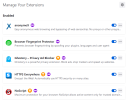

Also try not to use various rare plugins as this makes your fingerprint unique like CanvasBlocker :
https://addons.mozilla.org/en-US/firefox/addon/canvasblocker/
To get to the settings, you can enter "about:config" in the address bar or do it through the settings file "prefs.js":
1. preferred languages > Remove all languages except English from the list - the browser will become less unique.
2. Fonts > By default, the browser sends a list of installed fonts. Change browser.display.use_document_fonts to 0.
3. local storage > By default, the browser has a unique ID and sites can write information to local storage, so change the dom.storage.enabled value to false.
4. cache > You can hide the fact that you have already visited this page by disabling the cache in your browser. For this change browser.cache.disk.enable and browser.cache.memory.enable to false.
5. DNS queries > Configure your browser to make requests through a SOCKS5 proxy. To do this, change network.proxy.socks_remote_dns to true.
6. Information about visited sites > Set browser.safebrowsing.enabled and browser.safebrowsing.malware.enabled to falsew to disable data transfer.
7. user agent > You don't even need to use special extensions to change this setting. Just go to general.useragent.over and set it to the most common value.
8. Cookies for third party sites > Disable third party cookies. To do this, set network.cookie.cookieBehavior to 1.
9. HTTP referrer > Set the HTTP reffer header to not be passed. For network.http.sendRefererHeader we prescribe zero.
10. java > Disable Java by setting security.enable_java to false.
You can also use various add-ons for anonymity:
Also try not to use various rare plugins as this makes your fingerprint unique like CanvasBlocker :
https://addons.mozilla.org/en-US/firefox/addon/canvasblocker/


