
You are using an out of date browser. It may not display this or other websites correctly.
You should upgrade or use an alternative browser.
You should upgrade or use an alternative browser.
Where do you store your site backups?
- Thread starter Cryptochick007
- Start date


Cryptochick007
Junior Member
- May 9, 2022
- 135
- 51
Which VPS provider can you recommend for this?For my Directadmin I use one external vps for daily backup, one external vps for weekly backup.
For CyberPanel I use Google Cloud.
I just changed my backup options to bold grid, who make W3 total cache, and they provide a good premium cloud backup for $2.50 a month (annual payment though)
Its a set and forget, and backs up pre-plugin or wp update. Sends you any error reports.
Interesting and to be fair $2.50 a month for this type of peace of mind is not expensive at all.
Dropping you a PM too @Panther28

leechesBleechin
Supreme Member
- Feb 16, 2017
- 1,218
- 3,224
Can never have too many backups, and i keep them *everywhere*. And every time i read a thread like this i get an impulse to make another batch of backups, so guess that's what I'll be doing today 


USB is often slow, how much data u have?I also want to download compressed zip file of my sites to my own machine to put them on a USB, but it takes days :s. Is there anything else I can do to speed this up?

xReminisce
Elite Member
- Dec 29, 2012
- 7,333
- 36,788
Multiple Google drive
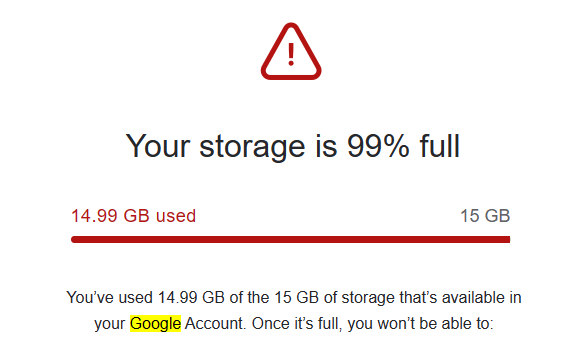
since it auto deletes and adds new ones every week, i get this email so regularly for all the accounts lol
gotta make sure to squeeze every acc up to it's last GB worth
since it auto deletes and adds new ones every week, i get this email so regularly for all the accounts lol
gotta make sure to squeeze every acc up to it's last GB worth
Backing up your backups? That's some serious dedication! To keep everything safe, consider cloud storage services like Amazon S3 or Google Cloud Storage. They offer secure, off-site storage for your data. Plus, you can set up automated backup routines for peace of mind. Give it a try and kiss backup worries goodbye.Of course, I always have backups on my dedicated server, but I am looking for a solution to store my backups outside that.
What do you guys do to keep everything safe?
Thanks in advance for helping me out!

- Oct 29, 2021
- 8,386
- 3,597
Well planned and perfect solution to backup issues. But as you said, it is really tough to continue with manual backup.I recently saw a thread in BHW where the guy said his HDD got corrupt and he was having VPS hosting. He lost all his sites and he had not kept the backups in his local drive as well. This was really sad and alarming for many.
In the past I used vaultpress to get automatic backups of my money websites but that is also a costly option, especially when you have too many sites and only few sites are generating revenue.
So I made it a habit to download all the data on a monthly basis or twice a month and save in a local HDD as well as in backup laptop.
It is ideal to use a cloud backup service but what I do is feasible for those with too many sites and do not want to spend extra money on backups.
One just need to be proactive and punctual to take regular backups, that's all.

Comet's backup solutions are good depending on your data volumes pricing as varies according to that and other factors. There are many other possibilities too, I can give you some possibilities if you like?Acronis and comet backup are also popular tools for taking backup
As for Acronis, don't especially if you have any confidential data (above all if it's personal data such as financial, medical or anything that would cause embarrasement)! I'll explain, I am a consultant doing vendor evaluations for the EU and other big organizations. We recently looked into several backup companies on behalf of a customer and we rapidly came to the conclusion that we weren't even going to present Acronis as a viable option as no serious IT project or purchasing manager would even consider them given our findings unless they wanted to get fired (even though it's not really Acronis' fault but all the same). There are many reasons for this and I'll go through them; if you type "Acronis hacked" into Google, you will see many many references to an incident in March this year where an Acronis customer's account got hacked and their backups published on the dark web. Acronis' explanation was that a customer's account got compromized outside of their systems (whatever that means). We did not find this explanation very convincing as the group that did the hack is a state sponsored Russian hacking group that has the stated aim of attacking all anti Russian companies and institutions. This appeared to us as a clearly targetted and successful attack. Acronis is unfortunately top of the list that Russian groups want to hack.
Many people think that Acronis is still a Russian company as it was founded by Russians (most of their staff are still Russian even though "officially" it is a Swiss / Singaporean company). Recently, the founder of the company moved aside to allow a non Russian to take over and they moved their operations out of Russia some years ago to avoid sanctions and to appear "less Russian". The founder even went to the extent of changing his name to something more "European" to sound less Russian (https://en.wikipedia.org/wiki/Serg_Bell). Bell has taken a strong anti Russian stance with Acronis even donating very large sums of money to the Ukraine. There have also been other reports in the Press such as the Washington Post about Acronis' real connections with Russia, Putin reportedly stating that "Bell is more useful to him from abroad". There is also a risk in that the company could face being banned in Western countries at some stage.
If you are a nationalist Russian hacking group with the aim of attacking "anti Russian" sentiments and actions, you can just imagine how they perceive a Russian individual and company that changes their name, moves their company, strongly criticizes Russia and then donates money to the "enemy"! We follow dark web hacking forums and Telegram accounts to see what is going on. Acronis is under constant attack and they will get in sooner or later (as they have already done), they are relentless with massive resources. When they get your data, they will keep it until it suits them to release it. There were apparently references from Russian groups about Acronis's technical center based in Bulgaria. They seemed to hint that they have insiders in there which seems credible given that Bulgaria is an old Soviet satelite.
Most people still think the company is Russian, this can cause problems with management and customers when this is brought up ( ).
As I said before, all of this is not really their fault but you would be mad to take the risk when there are other excellent solutions available that don't come with the same risk (take a look at backups solutions such as VEEAM or Azure for example).

Kiarataylor
Newbie
- Oct 2, 2023
- 3
- 2
Could you provide me with more information about NAS or Enterprise NAS?NAS might be a viable option.
Scenario : 1 x NAS in the office, 1 x NAS at home.
NAS1 pulls the back up from your site and replicates it to NAS2 for redundancy.
Depending on your RAID setup. This should give you a peace of mind from hard drive corruption and acts of god.

Walter Cox2015
Registered Member
- May 15, 2023
- 53
- 12
I store my site backups on a secure offsite server.