Puppeteer [Need Help]

Dresden

Elite Member
Joined
Mar 10, 2014
Messages
2,657
Reaction score
1,605
I made a pretty functional facebook bot but now I hit a roadblock and I don't know what to do from here. I'm new and only started using puppeteer a few days ago.

I want to upload a profile picture to my facebook account but it's uploading the picture into the banner area. Both the banner area and the profile picture share the same selector. I tried using a different selector like an arial label out of a div instead of an input but I get an error: 'Node is not a file input element'

From my understanding it has to be an input but I don't know how to make it unique. Is there a way to have puppeteer go to the second input selector on the page instead of the first one?

Here's some code:
Code:
    // post image
    await page.waitForSelector('[aria-label="Update profile picture"]').then(selector => selector.click());
    const file2 = rndFile2();
    await page.waitForSelector('input[type=file]');
    const elementHandle = await page.$("input[type=file]");
    await elementHandle.uploadFile(file2);

Here's also that input field that I need it to upload to.
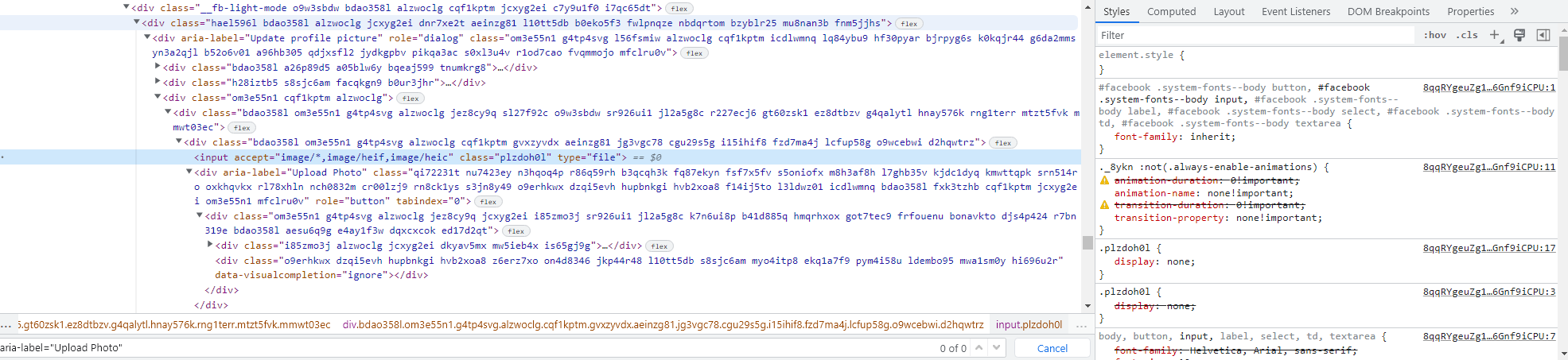
Screenshot 2022-09-09 145140.png
 
if you know that both have the same selector why not grab both and call either the first or second?

I tried doing it but it's not uploading into the profile picture. Not sure what I'm doing wrong.
 
I made a pretty functional facebook bot but now I hit a roadblock and I don't know what to do from here. I'm new and only started using puppeteer a few days ago.

I want to upload a profile picture to my facebook account but it's uploading the picture into the banner area. Both the banner area and the profile picture share the same selector. I tried using a different selector like an arial label out of a div instead of an input but I get an error: 'Node is not a file input element'

From my understanding it has to be an input but I don't know how to make it unique. Is there a way to have puppeteer go to the second input selector on the page instead of the first one?

Here's some code:
Code:
    // post image
    await page.waitForSelector('[aria-label="Update profile picture"]').then(selector => selector.click());
    const file2 = rndFile2();
    await page.waitForSelector('input[type=file]');
    const elementHandle = await page.$("input[type=file]");
    await elementHandle.uploadFile(file2);

Here's also that input field that I need it to upload to.
View attachment 224863
find the other img <input select > what does the code on that look like?
 
I tried doing it but it's not uploading into the profile picture. Not sure what I'm doing wrong.
Based on the code shared I can only see it targeting the one selector on the page. Are you able to share more?

as far as I can see there is only one input field inside of Update profile picture container, maybe change your scope from page to the container

something like below (apologies I am guessing at the node syntax based on what you have written)


JavaScript:
await page.waitForSelector('[aria-label="Update profile picture"]').then(selector => selector.click());

 const file2 = rndFile2();

const profileUploadContainer = await page.$x('[aria-label="Update profile picture"]')

const elementHandle = profileUploadContainer.$("input[type=file]")

 await elementHandle.uploadFile(file2);
 
OMG :) Valid selectors for input above

Code:
const input = await page.$(`input[accept="image/*,image/heif,image/heic"][type="file"]`)

or

Code:
const input = await page.$(`input.plzoh0l`)

or
Code:
const input = await page.$(`input.plzoh0l`)

or

Code:
const inputs = await page.$$('input')

Code:
// now use second element in array like this
await inputs[1].click()

Hoping some of the snippets above helped a little bit.
 
find the other img <input select > what does the code on that look like?
This is the first one for the banner:
The one it goes to.png

This is the one I need.
the one i need.png


There are a few more on the page for other things like the posts. This one is the 3rd input field from the top. How can I make it unique?
Based on the code shared I can only see it targeting the one selector on the page. Are you able to share more?

as far as I can see there is only one input field inside of Update profile picture container, maybe change your scope from page to the container

something like below (apologies I am guessing at the node syntax based on what you have written)


JavaScript:
await page.waitForSelector('[aria-label="Update profile picture"]').then(selector => selector.click());

 const file2 = rndFile2();

const profileUploadContainer = await page.$x('[aria-label="Update profile picture"]')

const elementHandle = profileUploadContainer.$("input[type=file]")

 await elementHandle.uploadFile(file2);

This what I am getting now: Cannot read properties of null (reading 'uploadFile').

OMG :) Valid selectors for input above

Code:
const input = await page.$(`input[accept="image/*,image/heif,image/heic"][type="file"]`)

or

Code:
const input = await page.$(`input.plzoh0l`)

or
Code:
const input = await page.$(`input.plzoh0l`)

or

Code:
const inputs = await page.$$('input')

Code:
// now use second element in array like this
await inputs[1].click()

Hoping some of the snippets above helped a little bit.

Thanks, I'll be trying all of these.

Thank you for the help everyone. After I complete this I will be going back and learning more about picking the right selectors as I jumped into this without too much research which is my fault.
 
This one seems to be working:

await page.waitForSelector('.gvxzyvdx > input[type=file]');
const elementHandle = await page.$(".gvxzyvdx > input[type=file]");

Thank you for all the help.
 
This one seems to be working:

await page.waitForSelector('.gvxzyvdx > input[type=file]');
const elementHandle = await page.$(".gvxzyvdx > input[type=file]");

Thank you for all the help.

You should not rely on the class names, because probably are generated on the fly.
 
You should not rely on the class names, because probably are generated on the fly.

So far most elegant way is @TomTheCat

Code:
const [,secondInput] = profileUploadContainer.$("input[type=file]");
await secondInput.uploadFile(secondInput);

This. Facebook users react so the classes will change.

For now I just need it to go into a new account and do a few specific options then just log out. I'll look into this though, thank you for the tips everyone.
 
Back
Top