Not Seeing Optimized Meta Tags in Shopify or Google SERPs

cdnbigd

Newbie
Joined
May 20, 2013
Messages
49
Reaction score
1
In my few years of digital marketing, I haven't run into this problem. A new client has a site on Shopify. Some pages have decent meta tags (ie. page title & description) written but when looking at the mozbar or even the page source, those meta tags are not found anywhere. I see tags from the shopify app: SEO Product Optimizer in the source code (for facebook / twitter) but that's it.

Even when hovering over the Chrome tab, usually you'd at least see the page title but not here. Instead, you see the URL only. Example below:
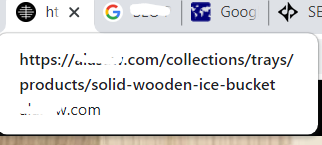
1660418775540.png


This is driving me crazy. I've written new meta tags and had Google re-crawl via the search console too.

Google is ignoring the meta tags and using random text from the page or even from a popup on the page instead.

I'm not sure why Google wouldn't use any of the meta tags on any page of the website. They are all very relevant to the search query and have the query in the tags. They are not too short or too long, not keyword stuffed etc.

PM me for the URL (don't want it to be visible on Google if I post it in this thread)

Thanks!
 

Attachments

  • example.png
    example.png
    17.6 KB · Views: 50
@cdnbigd - ok, i saw the url in pm. at surface, do not see any issues on your site that would cause this. need to look at it in more detail.

have you thought about changing your shopify theme and waiting for few days to see what google shows?

also, can you please add a description to the "our-story" page? it seems most of your pages do not have any descriptions.

suggest to run screamingfrog to find out all the tag issues and fixing them

update: found something. install https://chrome.google.com/webstore/detail/meta-seo-inspector/ibkclpciafdglkjkcibmohobjkcfkaef and run it on your homepage and do the same on another domain that is showing correct description in serp.

when you run this, you will notice that your description tag is only showing in FACEBOOK section of this extension and not in COMMON section. i think your shopify seo plugin (SEO Product Optimizer) is the culprit here. see if you can make some adjustments or use another plugin so that you can have description text in the COMMON area of this crhome plugin.
 
Last edited:
@cdnbigd - ok, i saw the url in pm. at surface, do not see any issues on your site that would cause this. need to look at it in more detail.

have you thought about changing your shopify theme and waiting for few days to see what google shows?

also, can you please add a description to the "our-story" page? it seems most of your pages do not have any descriptions.

suggest to run screamingfrog to find out all the tag issues and fixing them

update: found something. install https://chrome.google.com/webstore/detail/meta-seo-inspector/ibkclpciafdglkjkcibmohobjkcfkaef and run it on your homepage and do the same on another domain that is showing correct description in serp.

when you run this, you will notice that your description tag is only showing in FACEBOOK section of this extension and not in COMMON section. i think your shopify seo plugin (SEO Product Optimizer) is the culprit here. see if you can make some adjustments or use another plugin so that you can have description text in the COMMON area of this crhome plugin.

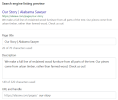
Yeah, the thing is that every page does have meta tags written, including the Our Story page (see attachment). But when looking at the page source or in tools like mozbar, it says the tags are missing and the only tags found are for Facebook and/or Twitter via the SEO Product Optimizer plugin.

Okay, I'll have a look at that plugin. Thanks!
 

Attachments

  • our story.png
    our story.png
    39 KB · Views: 71
Yeah, the thing is that every page does have meta tags written, including the Our Story page (see attachment). But when looking at the page source or in tools like mozbar, it says the tags are missing and the only tags found are for Facebook and/or Twitter via the SEO Product Optimizer plugin.

Okay, I'll have a look at that plugin. Thanks!
suggest to delete that image or hide the URL.
 
Back
Top