How many plugins are safe to install WordPress site?

SERP Thinker

Regular Member
Joined
Jun 6, 2022
Messages
333
Reaction score
82
Hi there,

We know using too many plugins can slow down any website.

So how many plugins are recommended to use any WordPress blog?

Anyone here?
 
It's not about 'how many'. Install only those plugins that you absolutely need.
 
Hi there,
Hi back!

We know using too many plugins can slow down any website.

So how many plugins are recommended to use any WordPress blog?
There isn´t a number!

It depends on a few factors, for example, how fast is the server where your site is hosted, and whether or not you´re using a CDN.

I´ve optimized the site´s page loading speed with 52 active/installed plugins on a crappy shared hosting plan.

Another element that you need to take into account it´s how good are you when it comes to optimizing the site´s loading speed.

If you aren´t that experienced or your site is hosted on a crappy shared hosting plan, I would keep the number of plugins to a bare minimum and avoid sacrificing performance over functionality/design.

Unless you have the budget to hire an expert for this. My best bet would be @kindablack
 
it depends on your server. the less plugins you install the better
 
it depends on your server. the less plugins you install the better

Same reply applies here as https://www.blackhatworld.com/seo/should-i-build-a-pet-blog-in-2022.1413159/post-15336484. These threads are PCI and nonsense.
 
It is not often a numbers game, it is more about picking the right plugin with high standards of coding. Big shiny plugins can be a real resource eating monsters. Check for quality/size loaded instead of numbers of plugins installed.
 
Only the plugins you need. The fewer of them, the better. There is also a dependence on the optimization of plugins, the number of database calls and how correct these queries are.
Not a little important role is played by the power of the server.
 
It is not often a numbers game, it is more about picking the right plugin with high standards of coding. Big shiny plugins can be a real resource eating monsters. Check for quality/size loaded instead of numbers of plugins installed.
Also THIS!

There are many plugins that cause more harm than good.

Many of these plugins are very popular because of the functionalities and/or features they offer and people often get carried away for this totally forgetting the impact they have on performance.

I´ll give you a quick example...Contact Form 7.

One of the most (if not THE most) popular contact form plugins on the market but, this is one of those plugins I personally like to label as "site-wide" plugins.

Why?

Once you start using them it will inject code into every single page and post on your site regardless of whether you´re using an opt-in form on that page/post creating a hell lot of a "bloat" on your site in a form of unused CSS and render-blocking issues.

So, you often need to rely on a plugin manager plugin like Asset Cleanup or Perfmatters to fix this.

Take a moment to go through this article that lists 70+ of the worse plugins on the market you need to avoid and some alternatives for each of them...

https://onlinemediamasters.com/slow-wordpress-plugins/
Remember, I want to make it VERY clear I am not saying plugins like Contact Form 7 or RevSlider are "bad" plugins, I am just stating that I personally give performance preference over functionality. Especially, if there are better and more efficient alternatives on the market that will allow me to replicate the same functions.

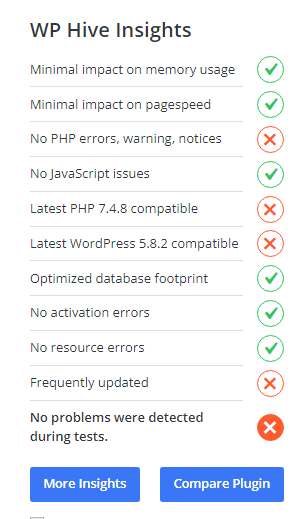
You can also install this chrome extension that will give you some important insights whenever you search for a plugin inside the WordPress repository...

https://chrome.google.com/webstore/detail/wp-hive-a-better-wordpres/hbbcblcogociooaeodndcimehhchadka
After installation, whenever you run a search for a plugin you should be able to see a sidebar on the right side that should look like this...

03ec7b168026c3a541a31eadb7f641b5.png


...and that should help you identify potential harmful plugins.

I hope this makes sense.

Cache cache cache!!!
This only help with recurrent visitors and NOT for "first-timers".
 
Many :)

P.S. A very strange question.
 
You should avoid installing a lot of plugins. Sometimes we just hear about a new plugin benefits and add it without thinking of consequences.
 
Fewer plugins are recommended. Still, it depends on your hosting server capacity.
 
Hi back!


There isn´t a number!

It depends on a few factors, for example, how fast is the server where your site is hosted, and whether or not you´re using a CDN.

I´ve optimized the site´s page loading speed with 52 active/installed plugins on a crappy shared hosting plan.

Another element that you need to take into account it´s how good are you when it comes to optimizing the site´s loading speed.

If you aren´t that experienced or your site is hosted on a crappy shared hosting plan, I would keep the number of plugins to a bare minimum and avoid sacrificing performance over functionality/design.

Unless you have the budget to hire an expert for this. My best bet would be @kindablack
Pls I have issue optimizing my mobile speed, I have used bunny cdn and wp3 cache. It's still stuck at 64. I have very few plugins. Though I am using the host koala medium plan. Any tips?
 
You can install as many plugins as you want but with high number of plugins, site will start loading slow.
 
Pls I have issue optimizing my mobile speed, I have used bunny cdn and wp3 cache. It's still stuck at 64. I have very few plugins. Though I am using the host koala medium plan. Any tips?
  • Use a lightweight theme
    • Astra Pro, GeneratePress, OceanWP, Neve, or Kadence
  • Avoid shared hosting or, at least, get a cloud-based one.
    • Namecheap it's a great option if you´re on a budget - It´s $25
    • Cloudways Vultr High-Frequency Plan it´s a top choice as well
  • Avoid using Page builders - Try using Gutenberg
  • Use a paid/premium performance plugin
    • WP Rocket or FlyingPress would be my top choice
    • Perfmatters it´s also a very solid choice and works amazing with either of the two plugins above. In fact, I get great results using Perfmatters with any free plugin that offers caching and modification like W3 Total Cache (For caching and modification), Autoptimize (To optimize CSS delivery), and Async (Optimize JS delivery).
  • Fully optimize images
    • Resize them to effectively fit the viewport for both desktop and mobile users (Responsive Images)
    • Compress them to make the image file lighter
    • Convert and serve them in WebP format
    • Use a CDN - Cloudflare APO it´s amazing and it´s $5 p/month
    • Lazy load BELOW the fold images
    • Exclude the above the fold images from lazy loading - Preload then instead
    • Download and host fonts locally
  • Go easy on the external apps on your site - Things like instant messaging, tracking and monitoring apps, ads, etc
Also, you can start reading these...

https://www.blackhatworld.com/seo/genuine-wordpress-site-speed-experts.1413257/#post-15334305https://www.blackhatworld.com/seo/how-to-increase-website-speed.1354232/#post-14651089
Alternatively, you can share your site´s URL and I will gladly run a performance audit of it and share my insights and findings here with you and what I believe would be the best way to address them.

Cheers!
 
Back
Top