
You are using an out of date browser. It may not display this or other websites correctly.
You should upgrade or use an alternative browser.
You should upgrade or use an alternative browser.
Free tool to choose title
- Thread starter slimshade
- Start date


Roger Marquez
Elite Member
- Apr 17, 2017
- 5,126
- 7,822
I would NOT trust a tool to do this for you. Most AI writing assistants do generate decent article titles/topics but none of them will beat the creativity of a human.what can I use to do some SEO on my articles titles and subtitles?
I´ve done some decent research on this topic and I find this video to be EXTREMELY helpful in that regard...
https://www.wordstream.com/blog/ws/2014/07/17/headline-writinghttps://www.ryrob.com/how-to-write-a-headline/
Lastly, an alternative you can also try is to do what @tiiberius mentions above and I absolutely agree with him.
Running a topic/keyword on Google and checking what´s already ranking will give you all the insights you want as to what Google is "favoring" and, therefore, you should follow that same editorial line.
One thing I like to do is leverage the power of the SEO Minion Chrome extension.
How can you do that?
After you run a search on Google for any given keyword, check the top 3 or 5 relevant results and click on the SEO Minion extension icon.
This will open a sidebar on the right, all you need to do is head over to the "Analyze On-Page SEO" tab and scroll down to where it says "Headings" and follow these steps...
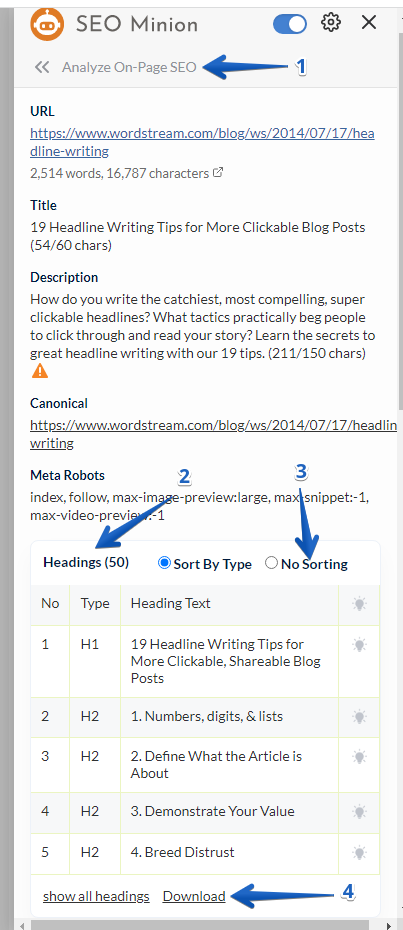
- Select Analyze On-Page SEO from the main menu
- Scroll down to where it says "Headings"
- Click on "No Sorting" - This will allow you to export all the headings and subheadings in the order they appear on the page
- Click on "Download"
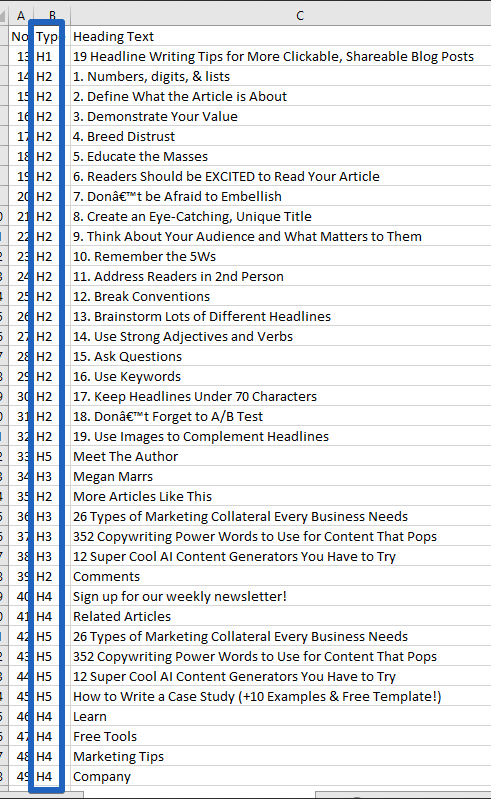
After you clean it up by removing all non-relevant subheadings you should have the way that site has structured a piece of content that is ranking at the top of Google.
Now, as I mentioned above, if you do this for the most relevant results ranking in the top 3 to 5 position in Google and paste all that info into a single spreadsheet, you will be in a much better position to better structure your content´s headings and subheadings.
I hope this helps, cheers!!
