

Aleksandar916
Power Member
- Nov 29, 2017
- 774
- 1,101
You (usually) got to spend money to earn money. But don't be reckless in spending, trust me, I've been there, not knowing where my money went and wondering how I'm broke.
I became a freak for spreadsheets, I like to create them for life expenses, income, even tracking progress in video games or workout. @Willyfish recently mentioned that the forum lacks resources for budgeting and scaling, so I thought I’d adapt and translate one of my sheets and share it with everyone.
It is originally made for building a website from scratch, but it can easily be customized for any other project. The sheet can be downloaded and used in Microsoft Excel too.
You start with this:

To get this:
Now that I’ve answered what (I think) are the FAQ, here’s the spreadsheet:
LINK IS HERE
Please note that the spreadsheet is in view only mode, so you will not see options for dropdown menus and similar. Once you copy it to your drive, it will work.
Short guide on how to use it:
This spreadsheet is meant to be used for a single calendar year, when you enter a new year, simply duplicate the current sheet and start the 2022 one.
Cost - Obviously, how much you paid for something. It will be automatically added to the selected category and month
Category - Drop down menu of most used categories I could think of. Once you select, the amount from the “cost” category will be automatically added. This list can be modified.
Month - Another drop down menu, will allow you to track expenses per month, the amount from the “cost” category will be automatically added.
Date - Just add date for more clarity on when you’ve purchased something. Could be useful to track TAT of a service, for example. Remove if you don’t need it.
Total per category - This will automatically add the sum of all costs per category.
Total per month - Same as above, just for months
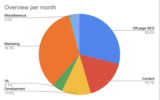
Overview charts - Visualization of the two tables above, also showing percentage of cost per category.
Balance - This is useful if you have a fixed budget for a project. “Starting balance” is your budget and “Balance” is automatically calculated based on expenses added.
IF YOU NEED CHANGES OR HELP WITH THE SHEET:
Please feel free to contact me. If you don’t know how to change something (for example drop down menu for categories), don’t hesitate to leave a comment here or to reach out to me and I’d be happy to help you as much as the time allows me to.
More sheets coming soon
If you find this sheet useful, I’ll be creating more of these. I’m happy if it helps even just one member. The first ones I think of are income tracking and life expenses tracking (already ready and using this one). I am happy to hear more suggestions and to create new ones.
LINK TO THE SPREADSHEET IS HERE
Thanks for reading!
I became a freak for spreadsheets, I like to create them for life expenses, income, even tracking progress in video games or workout. @Willyfish recently mentioned that the forum lacks resources for budgeting and scaling, so I thought I’d adapt and translate one of my sheets and share it with everyone.
What’s this:
It’s a Google Sheet spreadsheet template designed to track expenses for your projects. Don't want to read further? LINK IS HEREIt is originally made for building a website from scratch, but it can easily be customized for any other project. The sheet can be downloaded and used in Microsoft Excel too.
You start with this:
To get this:
Who needs this?
If you ask me, everyone. Tracking expenses on anything is very important for a number of reasons:- Know how much you’ve invested
- Plan further expenses
- Evaluate website worth better*
- Scale future projects
But OP, I’m not spending anything on my website
Good for you for being resourceful, but there’s always expenses like overheads (hosting, domain, software subscriptions, electricity and internet) and your time. Track your own hours as expenses (how much you’d like to be paid for per hour and add it as an expense).Now that I’ve answered what (I think) are the FAQ, here’s the spreadsheet:
LINK IS HERE
Please note that the spreadsheet is in view only mode, so you will not see options for dropdown menus and similar. Once you copy it to your drive, it will work.
Short guide on how to use it:
- Copy it to your Google Drive or Download as Excel file
- Delete sample items I've added
- Start adding numbers.
This spreadsheet is meant to be used for a single calendar year, when you enter a new year, simply duplicate the current sheet and start the 2022 one.
Glossary:
Item - Place where you put whatever you bought. Put any words, it does not affect the sheet and pie chart. Be descriptive (For example bought backlinks from someone, you can put in what backlink, from who and what websites)Cost - Obviously, how much you paid for something. It will be automatically added to the selected category and month
Category - Drop down menu of most used categories I could think of. Once you select, the amount from the “cost” category will be automatically added. This list can be modified.
Month - Another drop down menu, will allow you to track expenses per month, the amount from the “cost” category will be automatically added.
Date - Just add date for more clarity on when you’ve purchased something. Could be useful to track TAT of a service, for example. Remove if you don’t need it.
Total per category - This will automatically add the sum of all costs per category.
Total per month - Same as above, just for months
Overview charts - Visualization of the two tables above, also showing percentage of cost per category.
Balance - This is useful if you have a fixed budget for a project. “Starting balance” is your budget and “Balance” is automatically calculated based on expenses added.
IF YOU NEED CHANGES OR HELP WITH THE SHEET:
Please feel free to contact me. If you don’t know how to change something (for example drop down menu for categories), don’t hesitate to leave a comment here or to reach out to me and I’d be happy to help you as much as the time allows me to.
More sheets coming soon
If you find this sheet useful, I’ll be creating more of these. I’m happy if it helps even just one member. The first ones I think of are income tracking and life expenses tracking (already ready and using this one). I am happy to hear more suggestions and to create new ones.
LINK TO THE SPREADSHEET IS HERE
Thanks for reading!


