Messed up with Flatsome theme - All elements in products page removed, tab missing in customize

Zakch93

Elite Member
Joined
Mar 7, 2020
Messages
2,309
Reaction score
856
Got someone to help with the theme and they messed up.

He sent me these screenshots as indication. So you normally go Product Catalog > , but after that from my end I don't have the little tabs "title" "price" etc...
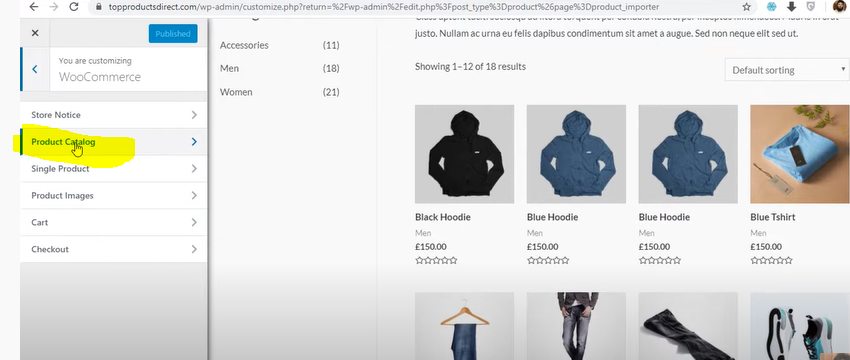
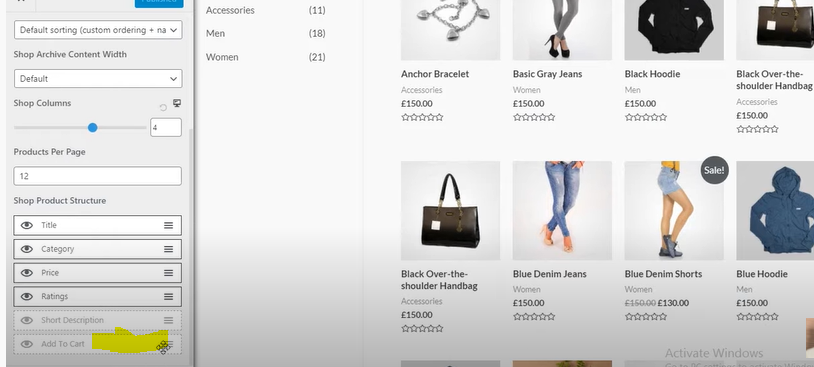
image (8).png


image (7).png


Also weird thing the url shown in the screenshot is not my site.

@duyano @emind1 @mrbios @WebGenix maybe u guys have an idea
 
up still need help
 
I would try to reinstall the theme or reset is settings to default.
 
Reinstall it is, but I noticed elements missing in other themes as well!

You think the freelancer guy did it on purpose with some php code? And what's with that topproductsddirect url on the screen he sent me, that's not my site.

Sounds like meta are hidden on site
 
Reinstall it is, but I noticed elements missing in other themes as well!

You think the freelancer guy did it on purpose with some php code? And what's with that topproductsddirect url on the screen he sent me, that's not my site.

Sounds like meta are hidden on site
If you think the freelancer messed up with your site, change your wp admin password.
Then, install Wordfence and use it to scan your site. It will check all the core, plugins and themes files and compare them to the official versions from the repositories. If some are compromised, it will restore them.
You can also check the active plugins and see if the freelancer installed something suspicious. One way they could have put malicious code is through a plugin like Code Snippets.
If you have FTP access, also check the .htaccess file and see if there are malicious redirects there. If you don't, you can access .htaccess through a plugin like Htaccess File Editor.
Last but not least, make sure the WooCommerce database version matches the plugin version. You can check it from WooCommerce -> Status.
 
If you think the freelancer messed up with your site, change your wp admin password.
Then, install Wordfence and use it to scan your site. It will check all the core, plugins and themes files and compare them to the official versions from the repositories. If some are compromised, it will restore them.
You can also check the active plugins and see if the freelancer installed something suspicious. One way they could have put malicious code is through a plugin like Code Snippets.
If you have FTP access, also check the .htaccess file and see if there are malicious redirects there. If you don't, you can access .htaccess through a plugin like Htaccess File Editor.
Last but not least, make sure the WooCommerce database version matches the plugin version. You can check it from WooCommerce -> Status.
Duly noted tx for the in-depth clean up tutorial.

Priority right now is to fix site appareance for the client. Apparently it's site wide not theme related, elements hidden with all themes. Your ideas?

Seems he just disabled some option
 
Duly noted tx for the in-depth clean up tutorial.

Priority right now is to fix site appareance for the client. Apparently it's site wide not theme related, elements hidden with all themes. Your ideas?

Seems he just disabled some option
I can't know for sure unless you show me the site.
 
Back
Top