

Links Indexing
Power Member
- Apr 14, 2015
- 651
- 482
Hello
Do guys missing my step by step link building guides?
Here is link of my previous guides
1. Step By Step Guide To GET DR 90 Do-follow Link
2. [Guide] DR 64 Do-follow High Quality Contextual Link Better Than PBN Link
3. Step By Step Guide To GET DR 72 Contextual Link
4. [Step-by-Step] Get some juicy contextual links
5. Step By Step Guide To GET FREE DR 72 Contextual Link
6. [Step by Step] Guide to Get Free DA 55 Contextual Link
Here i came again with another Do Follow DR 88 guide.
This guide is similar @Ranking Expert method so i am going use few of his steps & img.
I am fucking too lazy
1. Go to https://azure.microsoft.com/en-us/services/devops/ Then Click On "Sign in to Azure DevOps". Login with your existing Microsoft account or create a new one.

2. Continue

3. Click Continue

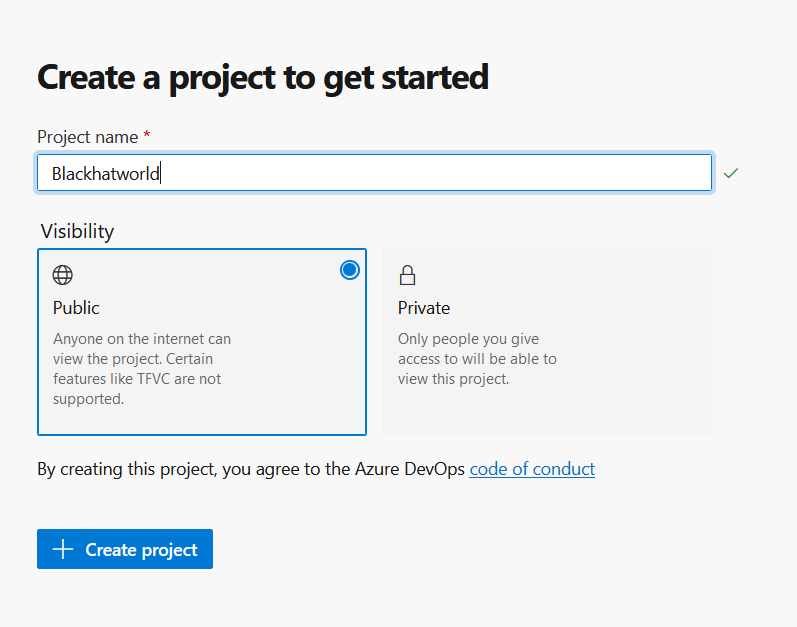
4. Enter Project name, Make visibility "Public" and hit Create project
Ok now my part starts
5. After Project your screen will look like this click on wiki

5. Create wiki project

6. Final click on save button
Your final link will be
Enjoy!
- Social Pracharak
Do guys missing my step by step link building guides?
Here is link of my previous guides
1. Step By Step Guide To GET DR 90 Do-follow Link
2. [Guide] DR 64 Do-follow High Quality Contextual Link Better Than PBN Link
3. Step By Step Guide To GET DR 72 Contextual Link
4. [Step-by-Step] Get some juicy contextual links
5. Step By Step Guide To GET FREE DR 72 Contextual Link
6. [Step by Step] Guide to Get Free DA 55 Contextual Link
Here i came again with another Do Follow DR 88 guide.
This guide is similar @Ranking Expert method so i am going use few of his steps & img.
I am fucking too lazy
1. Go to https://azure.microsoft.com/en-us/services/devops/ Then Click On "Sign in to Azure DevOps". Login with your existing Microsoft account or create a new one.
2. Continue
3. Click Continue
4. Enter Project name, Make visibility "Public" and hit Create project
Ok now my part starts
5. After Project your screen will look like this click on wiki
5. Create wiki project
6. Final click on save button
Your final link will be
Code:
https://dev.azure.com/brocksrose/Blachhatworld/_wiki/wikis/Blachhatworld.wiki/2/This-is-demo-titleEnjoy!
- Social Pracharak


