tal klinger
Banned - Multiple Rules Violations
- May 16, 2019
- 730
- 60
JARVEE SETTINGS 2021
If you are thinking about how to start doing Jarvee automation, it is very important to prepare things you need before you begin the journey. Social media platforms are getting stricter now and the right way to automate accounts is a crucial thing to do as if it is done wrongly, they might get compromised.
Today, one of the most common social media platforms that businesses use for advertising is Instagram. Hence, here is a quick and easy-to-follow guide for you on how to build the settings for your IG account before running it on Jarvee.
GENERAL JARVEE SETTINGS

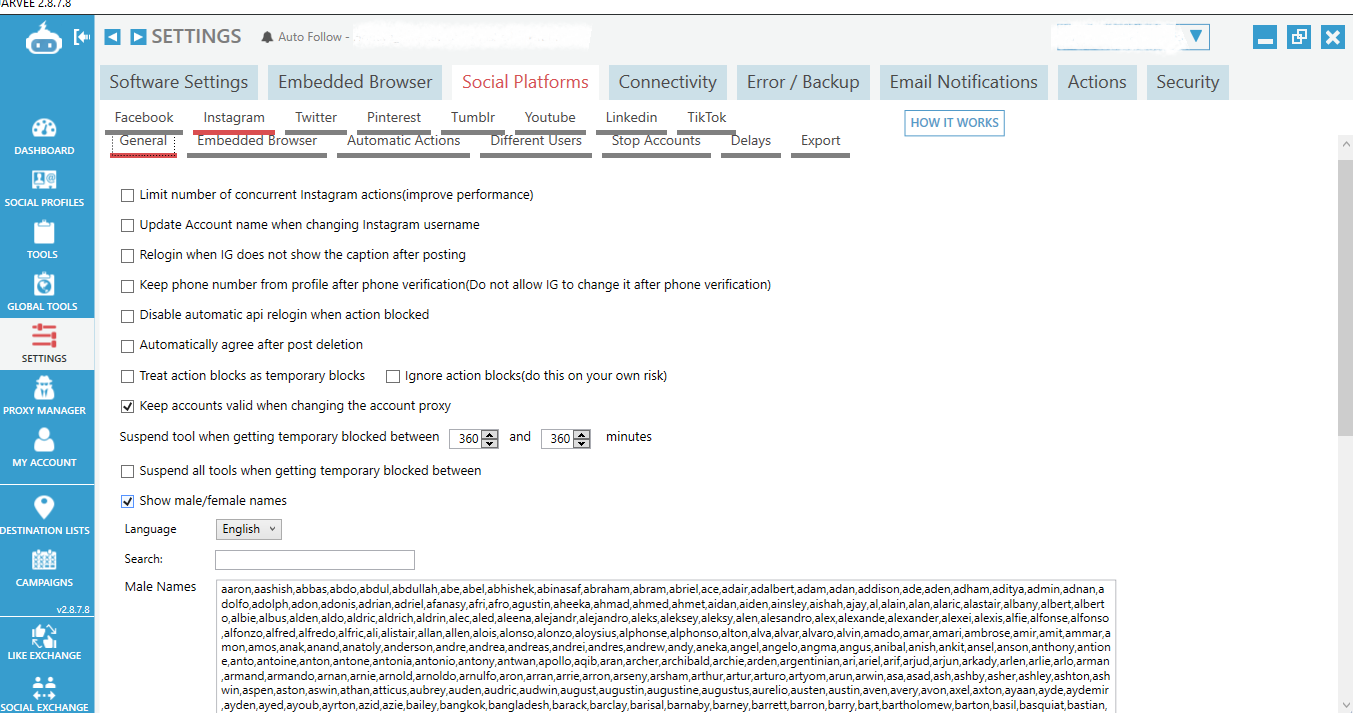
2. General. Tick the appropriate boxes as shown on the screenshot below. You have to tick the box “keep accounts valid when changing the account proxy” to refrain from verifying the account again if you need to change its proxy. You can also see the female/male names below by language. It’s your responsibility to research and compile the names list you need as a basis for filtering out users to be followed according to location and country of origin.
a. Scrapers
When running Instagram accounts, it is important to make sure that you utilize scrapers for without them the IG profiles will not make any actions. Scrapers are “blank” IG accounts that are programmed to send signals to the main accounts prompting them to make actions.
Tick the appropriate boxes as shown below and write the tag names of your scraper accounts. It is a must to do so your main accounts will not do the scraping themselves (which may result in your account being disabled by IG due to suspicious actions).

3. Embedded Browser. Tick the box “do not clear cookies when logging out”. Please make sure that this will be done before starting to run the accounts. Automating IG accounts means you will be logged out without warning from time to time and if you fail to click the “box” , the account’s cookies will be deleted too. That means the data embedded on the account will be erased.

Moreover, kindly copy the settings you can see below.

4. Stop Accounts. Tick the appropriate boxes as shown below. The purpose of this is to automatically stop all the accounts in case there are 3 accounts with temporary locked issues. In this case, you are helping the other accounts to avoid experiencing being compromised too.

Kindly copy the settings you can see below.

5. Export. The ticked box as shown below must be clicked if you want to export data of the accounts that did not reach the daily follow limit (which you set in your follow tool filters).

ADVANCED PROFILE SETTINGS
The first step to running Instagram accounts after the connection of the profiles is to set-up your Advanced Profile Settings. Decide whether you want to use the full Embedded Browser or API when running the accounts. On our side, we highly recommend using the embedded browser. Tick the appropriate boxes as shown in the pictures below.


FOLLOW TOOL SETTINGS
Make sure to do the right number of actions for the Follow Tool Settings. We usually recommend a maximum of 150 follow actions per day. However, right after the “wave” (where Instagram had a downtime for a few days), we intended to decrease it to 130 as its maximum so we can avoid the account from being flagged by IG due to many actions taken. Tick the appropriate boxes and set the right “numbers” as shown in the pictures below.


UNFOLLOW TOOL SETTINGS
Apart from setting up the Follow Tool, it is also essential to build the Unfollow Tool Settings. Instagram has a limit of 7500 followings per account. Hence, if we just keep doing follow actions, by the time we get to the limit the account will not run anymore. Thus, we should also do unfollow actions at the same time. Tick the appropriate boxes and set the right “numbers” as shown in the pictures below.

During the “unfollowing” of users, most of the time, clients request to not unfollow “original followings” (users the account followed outside Jarvee). In this case, you may use “Use whitelist setting” and do “Auto extract users followed outside Jarvee every 1400 minutes”. Those users will be automatically extracted and whitelisted in the unfollow tool.

Additionally, kindly copy the settings as well for the “Other Options”.

HOW TO COPY SETTINGS FROM ONE ACCOUNT TO ANOTHER
If you need to copy settings from one account to another, use “Global Copy Settings”.


Note: Be sure to write on the filter the usernames of the accounts you want to copy the settings to and on the filter by tag, choose the name of the tag where the accounts belong to for an easier way in finding your target accounts. Tick only the boxes that correspond to the settings you want to copy. In this example, we only need to copy follow and unfollow settings. When you’re done, click “ok” to start the copying process.
PROXY SETTINGS
To avoid your account being flagged by Instagram, it is very important to use proxies.
A proxy server serves as a connection between your computer and the internet. It's an intermediate server that sits between end users and the websites they visit. Depending on your use case, requirements, or company policy, proxy servers provide varying levels of availability, protection, and privacy. We specifically recommend the use of 4G proxies as they have been proven effective in doing social media automation.
How to Set Up Proxies on Jarvee
a. When you connect an account, the proxy settings are usually blank at first.
b. Go to Proxy Manager to add an account to a specific proxy. Each 4G proxy can hold up to 10 accounts.
c. Add your account to the proxy and make sure it’s valid.
d. Go back to the account and make sure that the proxy details are reflected before clicking the “verify account”.
Those are the basic settings we use in automating Instagram accounts. If you have questions or if you have trouble setting the accounts up, you may leave your comments so we can further assist you.
If you are thinking about how to start doing Jarvee automation, it is very important to prepare things you need before you begin the journey. Social media platforms are getting stricter now and the right way to automate accounts is a crucial thing to do as if it is done wrongly, they might get compromised.
Today, one of the most common social media platforms that businesses use for advertising is Instagram. Hence, here is a quick and easy-to-follow guide for you on how to build the settings for your IG account before running it on Jarvee.
GENERAL JARVEE SETTINGS
- Go to Jarvee Settings.
2. General. Tick the appropriate boxes as shown on the screenshot below. You have to tick the box “keep accounts valid when changing the account proxy” to refrain from verifying the account again if you need to change its proxy. You can also see the female/male names below by language. It’s your responsibility to research and compile the names list you need as a basis for filtering out users to be followed according to location and country of origin.
a. Scrapers
When running Instagram accounts, it is important to make sure that you utilize scrapers for without them the IG profiles will not make any actions. Scrapers are “blank” IG accounts that are programmed to send signals to the main accounts prompting them to make actions.
Tick the appropriate boxes as shown below and write the tag names of your scraper accounts. It is a must to do so your main accounts will not do the scraping themselves (which may result in your account being disabled by IG due to suspicious actions).
3. Embedded Browser. Tick the box “do not clear cookies when logging out”. Please make sure that this will be done before starting to run the accounts. Automating IG accounts means you will be logged out without warning from time to time and if you fail to click the “box” , the account’s cookies will be deleted too. That means the data embedded on the account will be erased.
Moreover, kindly copy the settings you can see below.
4. Stop Accounts. Tick the appropriate boxes as shown below. The purpose of this is to automatically stop all the accounts in case there are 3 accounts with temporary locked issues. In this case, you are helping the other accounts to avoid experiencing being compromised too.
Kindly copy the settings you can see below.
5. Export. The ticked box as shown below must be clicked if you want to export data of the accounts that did not reach the daily follow limit (which you set in your follow tool filters).
ADVANCED PROFILE SETTINGS
The first step to running Instagram accounts after the connection of the profiles is to set-up your Advanced Profile Settings. Decide whether you want to use the full Embedded Browser or API when running the accounts. On our side, we highly recommend using the embedded browser. Tick the appropriate boxes as shown in the pictures below.
FOLLOW TOOL SETTINGS
Make sure to do the right number of actions for the Follow Tool Settings. We usually recommend a maximum of 150 follow actions per day. However, right after the “wave” (where Instagram had a downtime for a few days), we intended to decrease it to 130 as its maximum so we can avoid the account from being flagged by IG due to many actions taken. Tick the appropriate boxes and set the right “numbers” as shown in the pictures below.
UNFOLLOW TOOL SETTINGS
Apart from setting up the Follow Tool, it is also essential to build the Unfollow Tool Settings. Instagram has a limit of 7500 followings per account. Hence, if we just keep doing follow actions, by the time we get to the limit the account will not run anymore. Thus, we should also do unfollow actions at the same time. Tick the appropriate boxes and set the right “numbers” as shown in the pictures below.
During the “unfollowing” of users, most of the time, clients request to not unfollow “original followings” (users the account followed outside Jarvee). In this case, you may use “Use whitelist setting” and do “Auto extract users followed outside Jarvee every 1400 minutes”. Those users will be automatically extracted and whitelisted in the unfollow tool.
Additionally, kindly copy the settings as well for the “Other Options”.
HOW TO COPY SETTINGS FROM ONE ACCOUNT TO ANOTHER
If you need to copy settings from one account to another, use “Global Copy Settings”.
- Go to the account where you want to copy settings from.
- Go to the account Tools.
- Go to Global Copy Settings.
Note: Be sure to write on the filter the usernames of the accounts you want to copy the settings to and on the filter by tag, choose the name of the tag where the accounts belong to for an easier way in finding your target accounts. Tick only the boxes that correspond to the settings you want to copy. In this example, we only need to copy follow and unfollow settings. When you’re done, click “ok” to start the copying process.
PROXY SETTINGS
To avoid your account being flagged by Instagram, it is very important to use proxies.
A proxy server serves as a connection between your computer and the internet. It's an intermediate server that sits between end users and the websites they visit. Depending on your use case, requirements, or company policy, proxy servers provide varying levels of availability, protection, and privacy. We specifically recommend the use of 4G proxies as they have been proven effective in doing social media automation.
How to Set Up Proxies on Jarvee
- Go to the Proxy Manager.
- Click Add Proxy.
- Fill in the proxy details. (proxy IP: Port, proxy username then proxy password)
- Click Verify Proxy and make sure it turns valid.
a. When you connect an account, the proxy settings are usually blank at first.
b. Go to Proxy Manager to add an account to a specific proxy. Each 4G proxy can hold up to 10 accounts.
c. Add your account to the proxy and make sure it’s valid.
d. Go back to the account and make sure that the proxy details are reflected before clicking the “verify account”.
Those are the basic settings we use in automating Instagram accounts. If you have questions or if you have trouble setting the accounts up, you may leave your comments so we can further assist you.