Scrapebox 0 Results from URL Harvester

Dark Sky

Banned - leaving fake reviews.
Joined
Apr 3, 2019
Messages
1,610
Reaction score
2,729
I'm struggling to find this info anywhere.

My URL harvester was working fine, but all my files were being saved to my desktop as scrapebox icon was on my desktop.

I closed it down, extracted scrapebox to a folder and launched from there, now whenever I use the URL harvester, I get 0 results for any keyword. Same with yahoo ect..

Tried relaunching from desktop, but issue still occurs.

I'm not using any proxies. Can someone help please?
 
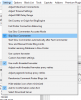
Go to Settings >> Harvester Engines Configuration >> Import >> Download Default Engines From Server.

This will update the engines file to ensure you have the latest version
 
Go to Settings >> Harvester Engines Configuration >> Import >> Download Default Engines From Server.

This will update the engines file to ensure you have the latest version

Tried that :(

Is there anyway to find out why it's not getting any results? E.G anyway to see error codes from google?

@loopline Any ideas on this please?
 
Last edited:
I have also the same Problem .
I've tried everything possible.
I bought proxies, they work perfectly, but my results are still 0, Still looking for a solution
 
I have also the same Problem .
I've tried everything possible.
I bought proxies, they work perfectly, but my results are still 0, Still looking for a solution

Same... what's frustrating is the keyword scraper works fine, everything works fine, just not the URL harvester. And it's ever since I moved it into a folder... so frustrating wish I never tried to clean up my desktop now...
 
I'm struggling to find this info anywhere.

My URL harvester was working fine, but all my files were being saved to my desktop as scrapebox icon was on my desktop.

I closed it down, extracted scrapebox to a folder and launched from there, now whenever I use the URL harvester, I get 0 results for any keyword. Same with yahoo ect..

Tried relaunching from desktop, but issue still occurs.

I'm not using any proxies. Can someone help please?
Even I have the same problem.
Hoping to get a solution on this thread
 
Same... what's frustrating is the keyword scraper works fine, everything works fine, just not the URL harvester. And it's ever since I moved it into a folder... so frustrating wish I never tried to clean up my desktop now...
I've tried everything so far, but nothing has helped me
 
Meanwhile check if the proxies working. This could be because of proxies not working.
 
I've fixed my issue.

Turns out my IP was banned temporarily due to the harvester. However I couldn't see this until I tried the google competition addon and it gave me the 429 error. Was a bit frustrating how it wouldn't display any error codes in the harvester though, hours and hours of stress for nothing :D

Bought some proxies to test it and it worked. (Really didn't want to buy any proxies though as only had a little scrape to do)

I also didn't realise that keyword scraper would work but google bans your IP for harvesting separately, so it looks like the IP is fine, but it's really not.
 
I've fixed my issue.

Turns out my IP was banned temporarily due to the harvester. However I couldn't see this until I tried the google competition addon and it gave me the 429 error. Was a bit frustrating how it wouldn't display any error codes in the harvester though, hours and hours of stress for nothing :D

Bought some proxies to test it and it worked. (Really didn't want to buy any proxies though as only had a little scrape to do)

I also didn't realise that keyword scraper would work but google bans your IP for harvesting separately, so it looks like the IP is fine, but it's really not.
You can go to help >> show error log >> harvester

and that is the error log for the harvester.
 
You can go to help >> show error log >> harvester

and that is the error log for the harvester.

Yah I tried that but it showed no errors, checked both harvester error log and detailed harvester error log. I assumed it may have been for different types of errors, but now your saying that I guess for some reason it wasn't writing to the file.
 
Yah I tried that but it showed no errors, checked both harvester error log and detailed harvester error log. I assumed it may have been for different types of errors, but now your saying that I guess for some reason it wasn't writing to the file.
It overwrites the log each time you scrape. So you may need to do it again.

Also you can go to settings >> harvester engine configuration >> and click on the engine and then try the test. Does it work and is the next page marker found?
 
I got the same problem

and i got not an option for Harvester engine configuration
download.png
 
That screenshot is from a version of scrapebox that is older then Bill Gates. lol

Your so far out of date Im surprised it even loads.

You need to download the latest version.

http://scrapebox.com/payment-received


Woops, i am not up to date about that lol :p
 
Even with Bing no results.

go to settings >> harvester engine configuration >> import >> download default engines.

If that does not work, then for bing, in that same area, click on bing and then click additiona header/settings tab

then for the user agent change it to

Mozilla/5.0 (Windows NT 10.0; Win64; x64; rv:86.0) Gecko/20100101 Firefox/86.0
 
Hi! I am facing a major issue with SB for OSX and Harvest Engines: I get a "-1 Could Not load SSL library" error. Have you faced an error like this? ScrapeBox official support can't find the answer yet and I am quite lost. If you are in a position to help, please refer to https://www.blackhatworld.com/seo/s...-mac-os-dead-engines-so-cant-harvest.1366854/
Try the update its working for someone else. The ssl libs were optimized for Monteray but seems they were not backwards compatible with older versions of mac. Seems like its working now.
 
Back
Top