

RichKIDLK
BANNED
- Aug 30, 2020
- 1,198
- 1,157
My friends, I need to center this items in this codes, how to do that proper way?
When I used <center> code in above examples to center those items yes, it do the job properly. That mean it centered the items I wanted. But it give an error in https://validator.w3.org/. I wanna fix that.
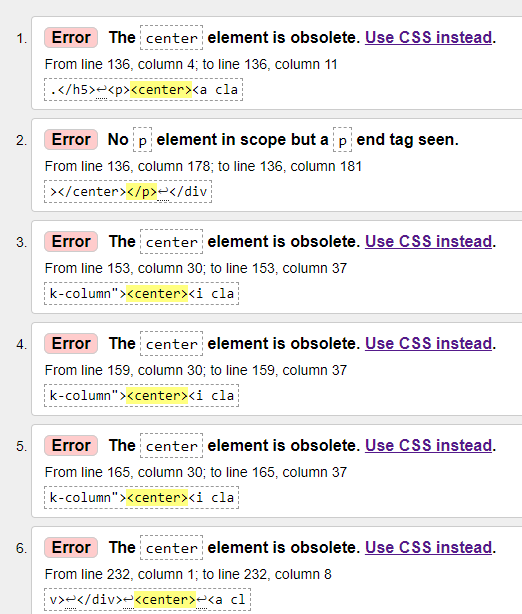
Thank you so much for help.
Code:
<!-- wp:columns -->
<div class="wp-block-columns"><!-- wp:column -->
<div class="wp-block-column"><center><!-- wp:shortcode --> [icon name="diamond" class="fa-3x"] <!-- /wp:shortcode --></center><!-- wp:heading {"textAlign":"center","level":4} -->
<h4 class="has-text-align-center">EXAMPLE TEXT</h4>
<!-- /wp:heading -->
Code:
<!-- wp:column -->
<div class="wp-block-column"><center><!-- wp:shortcode --> [icon name="address-card" class="fa-3x"] <!-- /wp:shortcode --></center><!-- wp:heading {"textAlign":"center","level":4} -->
<h4 class="has-text-align-center">EXAMPLE TEXT</h4>
<!-- /wp:heading -->
Code:
<!-- wp:column -->
<div class="wp-block-column"><center><!-- wp:shortcode --> [icon name="gift" class="fa-3x"] <!-- /wp:shortcode --></center><!-- wp:heading {"textAlign":"center","level":4} -->
<h4 class="has-text-align-center">EXAMPLE TEXT</h4>
<!-- /wp:heading -->
Code:
<p><!-- /wp:paragraph --></p>
</div>
</div>
<center>
<p>[maxbutton id="2"]</p>
</center>
<p> </p>When I used <center> code in above examples to center those items yes, it do the job properly. That mean it centered the items I wanted. But it give an error in https://validator.w3.org/. I wanna fix that.
Thank you so much for help.


