[FREE] Get DA 92 Web 2.0 Site Do-Follow Backlink

vinayseo

Power Member
Joined
Jun 15, 2020
Messages
738
Reaction score
379
Hello BHW Members,

After getting good knowledge from the BHW World here is my chance to giving back to this amazing community

Site: livedoor.com

Here are the site stats

0.jpg


Create Account on Livedoor
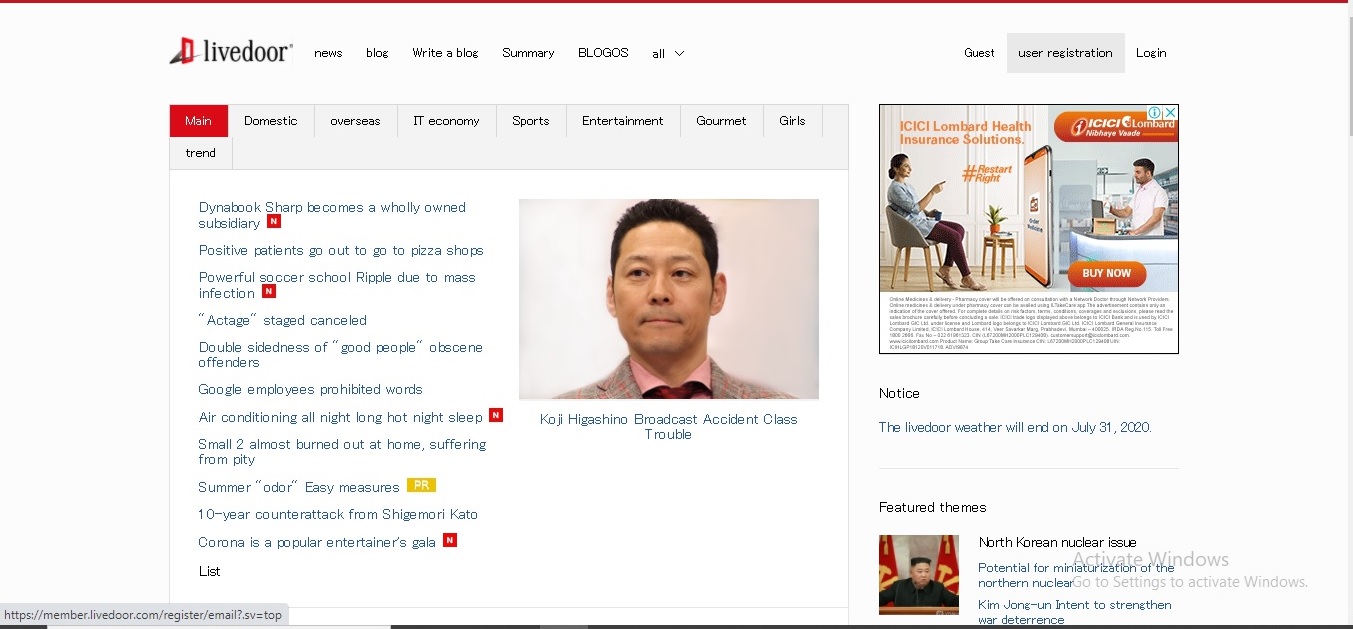
Go to the livedoor.com and click on user registration.(You need to translate the page to English)
1.jpg

Or you can directly follow below link for registration page
Code:
https://member.livedoor.com/register/input?.sv=top

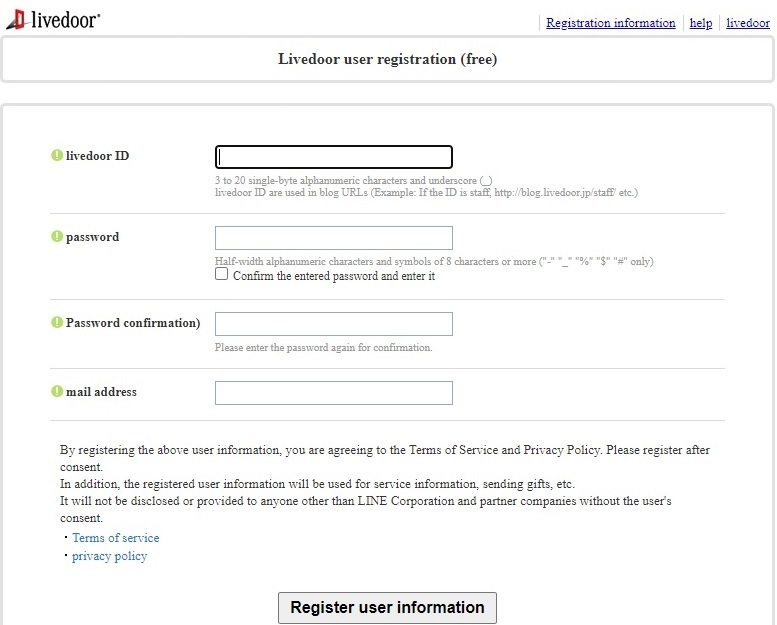
You will land on below page

Choose your livedoor id just like user id and it can be later used for your blogurl so choose wisely.
2.jpg


Here comes the interesting part
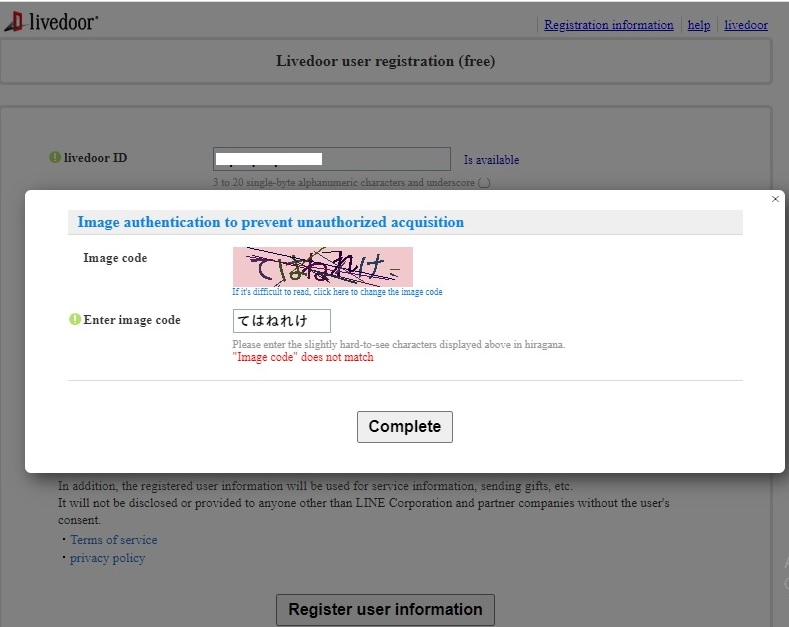
After filling above information you will prompt by their captcha page
This captcha code is in Japanese language so here is the crack
Code:
https://www.freejapaneselessons.com/lesson01.cfm
Go to above site and copy paste the appropriate alphabets to image code box. I know it is little bit hard for first timers but in 2-3 attempts you will get through it.
4.jpg


Even I never made it on my first attempt too, But after few attempts you will registered successfully.

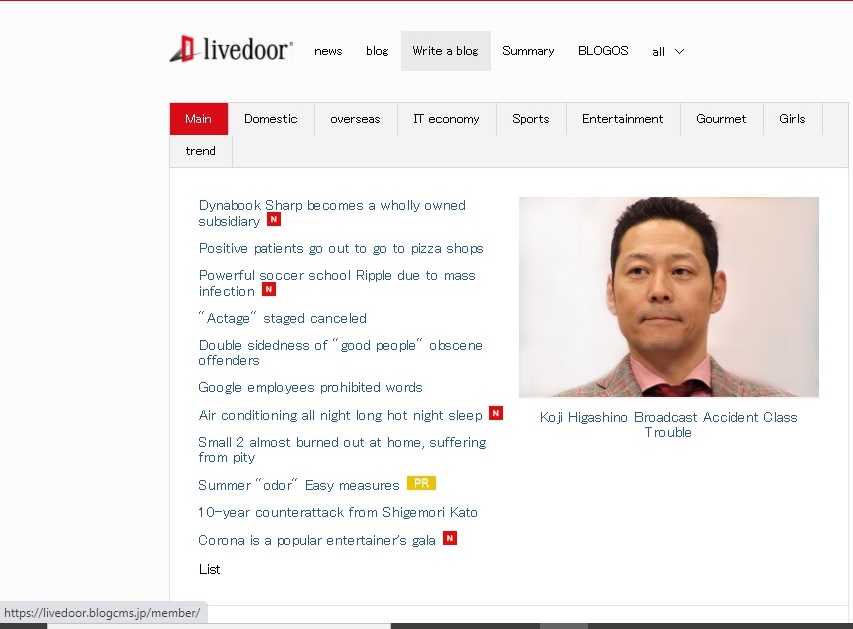
After registration verify your email id and click on "write a blog"
7.jpg


Here is the direct link
Code:
https://livedoor.blogcms.jp/member

Create your Web 2.0 Blog
You will land on below page where you can put title of the blog and choose subdomain URL for the blog.
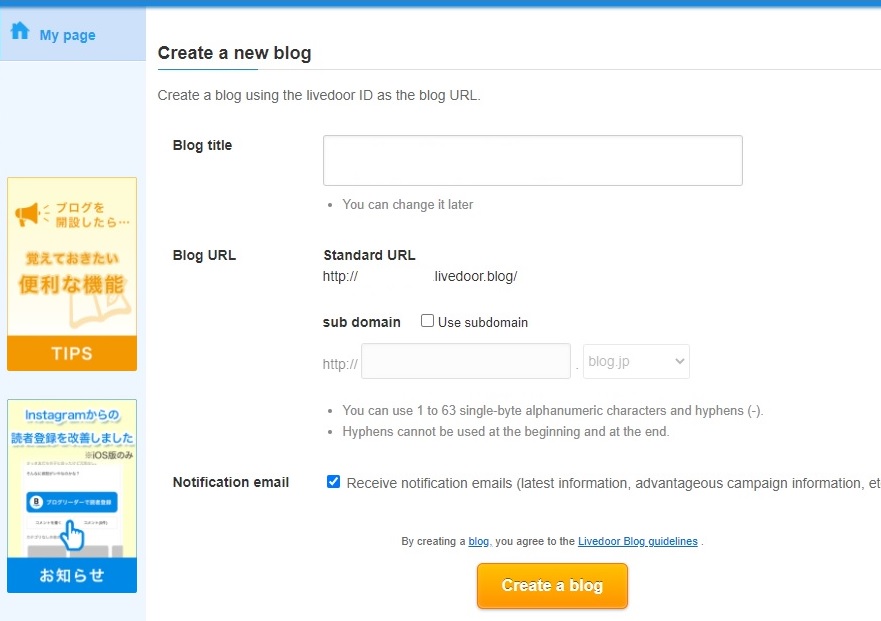
8.jpg


There are plenty of options for subdomain and from one account your can create multiple blogs
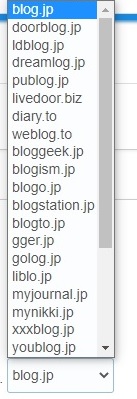
9.jpg


After creating blog you can just start publishing your post just like Blogspot and WordPress CMS sites easy to handle. The link in the post will be do-follow and indexable.
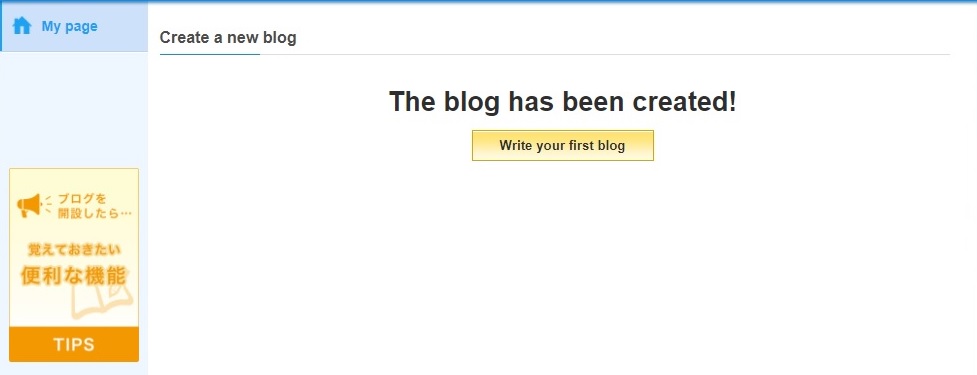
10.jpg


There is many customization you can do with this livedoor blog right from setting analytics, webmaster to design and many more.
Here is the glimpse of blog settings
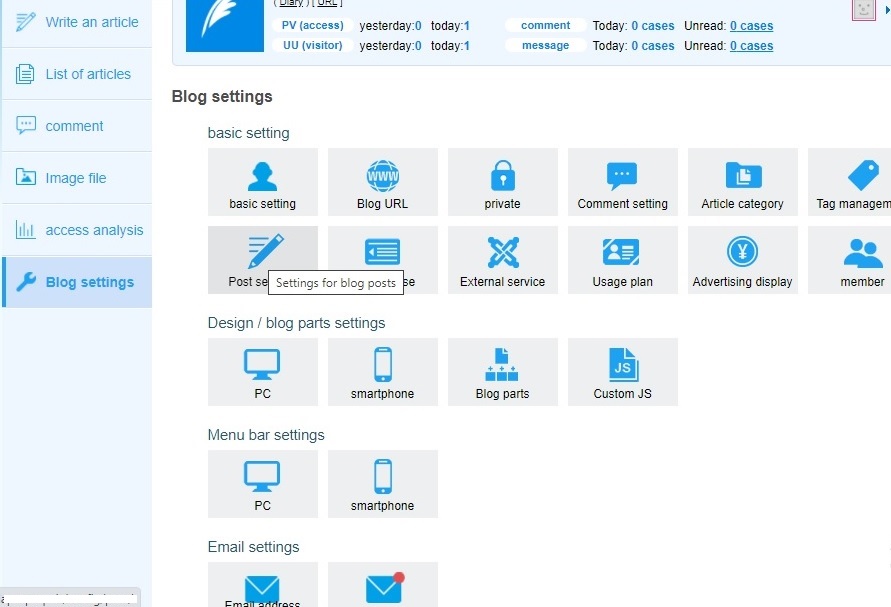
11.jpg


Indexing
The site has good indexing rate and your web 2.0 can be indexed within a week or 2.
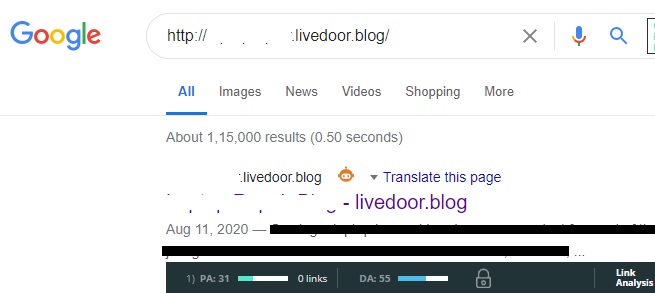
index.jpg


For faster indexing you can try tier 2-tier 3 links to it, pinging sites, premium indexing services. Also verify your analytics and webmaster so when google enabled the index URL feature you can index from there too.

After searching for this site on BHW only one result I got and that too old post so I assume most of the don't know how to create blog on this site or they do but didn't share it here.

And that's how I celebrated my 100th post and first thread on BHW :)

Thanks.
 
Great method, just need only few mintes and we can get a lot backlink
that's will be normal on articles as it is different language and not so niche specific?
 
I cannot pass security verification. I am using a Q keyboard and these letters are not on the keyboard. :)
 
Nice post. Thanks for the idea
Thank you.
Great method, just need only few mintes and we can get a lot backlink
that's will be normal on articles as it is different language and not so niche specific?
Thank you. It is not niche specific you can create any type of blog.
I cannot pass security verification. I am using a Q keyboard and these letters are not on the keyboard. :)
I don't think you read whole post:suspicious: I mention the method how you can pass the security verification:)
 
Looks good, thanks. Would you recommend building tier 2? What kind of backlinks?
 
Nice one, thanks for sharing.
Welcome.
Looks good, thanks. Would you recommend building tier 2? What kind of backlinks?
Didn't get your question exactly... I will not recommend building tier 2 for it as it is indexable link but if you want you can create it for fast indexing.
You can also update ping settings in post settings section where you can update below ping sites for fast search engine indexing
Code:
http://blogsearch.google.com/ping/RPC2
http://api.my.yahoo.co.jp/RPC2
http://blog.goo.ne.jp/XMLRPC
http://blogsearch.google.com/ping/RPC2
http://blogsearch.google.ae/ping/RPC2
http://blogsearch.google.at/ping/RPC2
http://blogsearch.google.be/ping/RPC2
http://blogsearch.google.bg/ping/RPC2
http://blogsearch.google.ch/ping/RPC2
http://blogsearch.google.cl/ping/RPC2
http://blogsearch.google.co.id/ping/RPC2
http://blogsearch.google.co.il/ping/RPC2
http://blogsearch.google.co.in/ping/RPC2
http://blogsearch.google.co.jp/ping/RPC2
http://blogsearch.google.co.ma/ping/RPC2
http://blogsearch.google.co.nz/ping/RPC2
http://blogsearch.google.co.th/ping/RPC2
http://blogsearch.google.co.uk/ping/RPC2
http://blogsearch.google.co.ve/ping/RPC2
http://blogsearch.google.co.za/ping/RPC2
http://blogsearch.google.com.ar/ping/RPC2
http://blogsearch.google.com.au/ping/RPC2
http://blogsearch.google.com.br/ping/RPC2
http://blogsearch.google.com.co/ping/RPC2
http://blogsearch.google.com.mx/ping/RPC2
http://blogsearch.google.com.my/ping/RPC2
http://blogsearch.google.com.pe/ping/RPC2
http://blogsearch.google.com.sa/ping/RPC2
http://blogsearch.google.com.sg/ping/RPC2
http://blogsearch.google.com.tr/ping/RPC2
http://blogsearch.google.com.tw/ping/RPC2
http://blogsearch.google.com.ua/ping/RPC2
http://blogsearch.google.com.uy/ping/RPC2
http://blogsearch.google.com.vn/ping/RPC2
http://blogsearch.google.de/ping/RPC2
http://blogsearch.google.es/ping/RPC2
http://blogsearch.google.fi/ping/RPC2
http://blogsearch.google.fr/ping/RPC2
http://blogsearch.google.gr/ping/RPC2
http://blogsearch.google.hr/ping/RPC2
http://blogsearch.google.ie/ping/RPC2
http://blogsearch.google.it/ping/RPC2
http://blogsearch.google.jp/ping/RPC2
http://blogsearch.google.lt/ping/RPC2
http://blogsearch.google.nl/ping/RPC2
http://blogsearch.google.pl/ping/RPC2
http://blogsearch.google.pt/ping/RPC2
http://blogsearch.google.ro/ping/RPC2
http://blogsearch.google.ru/ping/RPC2
http://blogsearch.google.se/ping/RPC2
http://blogsearch.google.sk/ping/RPC2
http://blogsearch.google.us/ping/RPC2
http://blogsearch.google.ca/ping/RPC2
http://blogsearch.google.co.cr/ping/RPC2
http://blogsearch.google.co.hu/ping/RPC2
http://blogsearch.google.com.do/ping/RPC2
http://blogsearch.google.lk/ping/RPC2
http://blogsearch.google.ws/ping/RPC2
http://blogsearch.google.vu/ping/RPC2
http://blogsearch.google.vg/ping/RPC2
http://blogsearch.google.tt/ping/RPC2
http://blogsearch.google.tp/ping/RPC2
http://blogsearch.google.to/ping/RPC2
http://blogsearch.google.tm/ping/RPC2
http://blogsearch.google.tl/ping/RPC2
http://blogsearch.google.tk/ping/RPC2
http://blogsearch.google.st/ping/RPC2
http://blogsearch.google.sn/ping/RPC2
http://blogsearch.google.sm/ping/RPC2
http://blogsearch.google.si/ping/RPC2
http://blogsearch.google.sh/ping/RPC2
http://blogsearch.google.sc/ping/RPC2
http://blogsearch.google.rw/ping/RPC2
http://blogsearch.google.pn/ping/RPC2
http://blogsearch.google.nu/ping/RPC2
http://blogsearch.google.nr/ping/RPC2
http://blogsearch.google.no/ping/RPC2
http://blogsearch.google.mw/ping/RPC2
http://blogsearch.google.mv/ping/RPC2
http://blogsearch.google.mu/ping/RPC2
http://blogsearch.google.ms/ping/RPC2
http://blogsearch.google.mn/ping/RPC2
http://blogsearch.google.md/ping/RPC2
http://blogsearch.google.lu/ping/RPC2
http://blogsearch.google.li/ping/RPC2
http://blogsearch.google.la/ping/RPC2
http://blogsearch.google.kz/ping/RPC2
http://blogsearch.google.kg/ping/RPC2
http://blogsearch.google.jo/ping/RPC2
http://blogsearch.google.je/ping/RPC2
http://blogsearch.google.is/ping/RPC2
http://blogsearch.google.im/ping/RPC2
http://blogsearch.google.hu/ping/RPC2
http://blogsearch.google.ht/ping/RPC2
http://blogsearch.google.hn/ping/RPC2
 
Hello!

I am kind of new in this, if i do this should i post like a blog post in that website about my main blog and make back link to it (my main site post) right?

Thanks for sharing!
 
Hello!

I am kind of new in this, if i do this should i post like a blog post in that website about my main blog and make back link to it (my main site post) right?

Thanks for sharing!
Yes you can create your own blog just like the WordPress and blogspot with livedoor subdomain and you can post articles in it with link back to your site.
Thanks for sharing :)
Welcome :)
Thanks for sharing, works great.
Good to know that you tried the method :)
 
Thank you for that... Captcha code was not that tough actually...

Created a Web 2.0... Will update when it gets indexed... Also thank you for the ping settings.. :)
 
Thank you for that... Captcha code was not that tough actually...

Created a Web 2.0... Will update when it gets indexed... Also thank you for the ping settings.. :)
Yep it wasn't that tough. I just shared the method so that anyone can do this when they came across captcha codes other than English or numbers.
With the google webmaster tool I indexed my web 2.0 site within minutes but as currently it is disabled just wait for week or 2. Ping the site in all pinging tools. It will get indexed within short time.
 
thanks for sharing
if the domain have high DA, is that mean my blog will have the same DA?
i guess the answer will be no, so how come the new blog will help?
is the article have to be original or just a copied one will do the job?
if this help, that mean if i create some blogs at blogspot that just have one or more articles linked to my main blog will help the main blog ranking?
but google doesn't count backlink made by the owner itself?
do i should create new blogs from different email?
sorry for many questions, i am new in the business...
 
Thanks for sharing. Got the captcha right the first time with the other site help. Created inner page links and sent some pings. Let's see when it gets indexed.
 
thanks for sharing
if the domain have high DA, is that mean my blog will have the same DA?
i guess the answer will be no, so how come the new blog will help?
is the article have to be original or just a copied one will do the job?
if this help, that mean if i create some blogs at blogspot that just have one or more articles linked to my main blog will help the main blog ranking?
but google doesn't count backlink made by the owner itself?
do i should create new blogs from different email?
sorry for many questions, i am new in the business...
if the domain have high DA, is that mean my blog will have the same DA?
No. Sometimes sites offering subdomain not pass the DA authority to it like wordpress and blogspot but in the case of livedoor I am getting DA 55(not that bad) for my subdomain created.(Please check it with the tools on your own)

i guess the answer will be no, so how come the new blog will help?
As I mention this is web 2.0 site and it will help you to create do-follow backlink for your site. The site have good indexing rate.

is the article have to be original or just a copied one will do the job?
Never submit copied content. The article has to be original or you can even use spin content but you will get the result as per your article quality. The article I submitted on livedoor also got few impressions and clicks which I can see in the webmaster so if you treat it as your main blog it will definitely gives you good results.

if this help, that mean if i create some blogs at blogspot that just have one or more articles linked to my main blog will help the main blog ranking?
Why are you just want to create more than one blogs at blogspot only? Try to get the backlinks from different domains rather than getting many links from one domain. The ranking is not depends on only backlinks. There are other factors too which you have to consider. You can search in the BHW for all on page and off page knowledge and implement it.

but google doesn't count backlink made by the owner itself?
I didn't get this question. May I know why do you think google doesn't count backlink made by the owner? If you are using same ip, same email, same webmaster tools then google will know you are the same owner creating backlinks so change it. There are tools you can use it. And every owner is creating backlinks.

do i should create new blogs from different email?
Yes. Just one blog from your webmaster email id is enough or I am not even going to suggest that. Create new email id's for backlink submission. Change often so it can not seen as spam.
I tried my best to give you all the answers as per my knowledge. You can do your own research, read the BHW forum, implement it and then you will come to know what works and what not. Remember SEO is not about what you do but how you do it.

Great, thank you very much for sharing ! ;-)
Welcome :)

Thanks for sharing. Got the captcha right the first time with the other site help. Created inner page links and sent some pings. Let's see when it gets indexed.
Great. Let us know the current index rate of site so the others also will get benefited.
 
if the domain have high DA, is that mean my blog will have the same DA?
No. Sometimes sites offering subdomain not pass the DA authority to it like wordpress and blogspot but in the case of livedoor I am getting DA 55(not that bad) for my subdomain created.(Please check it with the tools on your own)

i guess the answer will be no, so how come the new blog will help?
As I mention this is web 2.0 site and it will help you to create do-follow backlink for your site. The site have good indexing rate.

is the article have to be original or just a copied one will do the job?
Never submit copied content. The article has to be original or you can even use spin content but you will get the result as per your article quality. The article I submitted on livedoor also got few impressions and clicks which I can see in the webmaster so if you treat it as your main blog it will definitely gives you good results.

if this help, that mean if i create some blogs at blogspot that just have one or more articles linked to my main blog will help the main blog ranking?
Why are you just want to create more than one blogs at blogspot only? Try to get the backlinks from different domains rather than getting many links from one domain. The ranking is not depends on only backlinks. There are other factors too which you have to consider. You can search in the BHW for all on page and off page knowledge and implement it.

but google doesn't count backlink made by the owner itself?
I didn't get this question. May I know why do you think google doesn't count backlink made by the owner? If you are using same ip, same email, same webmaster tools then google will know you are the same owner creating backlinks so change it. There are tools you can use it. And every owner is creating backlinks.

do i should create new blogs from different email?
Yes. Just one blog from your webmaster email id is enough or I am not even going to suggest that. Create new email id's for backlink submission. Change often so it can not seen as spam.
I tried my best to give you all the answers as per my knowledge. You can do your own research, read the BHW forum, implement it and then you will come to know what works and what not. Remember SEO is not about what you do but how you do it.

Thanks a lot for your help and for your time to answer my many questions
you successfully clarify all points
thanks again
 
Yep it wasn't that tough. I just shared the method so that anyone can do this when they came across captcha codes other than English or numbers.
With the google webmaster tool I indexed my web 2.0 site within minutes but as currently it is disabled just wait for week or 2. Ping the site in all pinging tools. It will get indexed within short time.

I think the recaptcha demands that you enter only 5 letters or less. But there is no way you can enter only 5 letters for japanese in English alphabets. Most japanese letters contain more than one alphabet in English version, so the recaptcha was not successful.

I don't know if there is any way around this?
 
Back
Top