
I am trying to automate creating GMX accounts. But i am unable to click this Button.
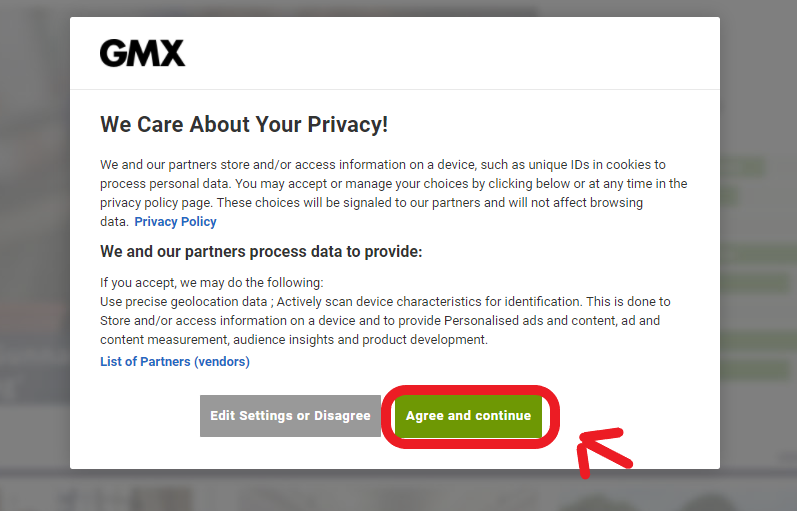
Selecting the button id 'onetrust-accept-btn-handler' doesn't work, nore does the xpath.
I cant only select one iframe out of 4 and it doesn't seem to be the right one.
Here is my current code. I attempted to use javascript to click the button but that hasn't worked either.
Selecting the button id 'onetrust-accept-btn-handler' doesn't work, nore does the xpath.
I almost instantly get a selenium.common.exceptions.TimeoutException however, and not a ElementNotInteractableException or NoSuchElementException.
Selecting the button id 'onetrust-accept-btn-handler' doesn't work, nore does the xpath.
I cant only select one iframe out of 4 and it doesn't seem to be the right one.
Here is my current code. I attempted to use javascript to click the button but that hasn't worked either.
Selecting the button id 'onetrust-accept-btn-handler' doesn't work, nore does the xpath.
Code:
url = 'https://www.gmx.co.uk/'

I cant only select one iframe out of 4 and it doesn't seem to be the right one.

Here is my current code. I attempted to use javascript to click the button but that hasn't worked either.

url = 'https://www.gmx.co.uk/'

chrome_options = webdriver.ChromeOptions()
driver = webdriver.Chrome(
    executable_path=r'.\chromedriver.exe', options=chrome_options)

driver.get(url)


#this counts the iframes, and even though the output says '1', their are 3 others I selenium interact with.

time.sleep(5)
seq = driver.find_elements_by_tag_name('iframe')
print("Number of frames present in the web page are: ", len(seq))

iframe = WebDriverWait(driver, 5).until(expected_conditions.presence_of_element_located((By.TAG_NAME, 'iframe')))
driver.switch_to.frame(iframe)

element = WebDriverWait(driver, 10).until(expected_conditions.presence_of_element_located((By.XPATH, '/html/body/div/div[3]/div/div/div[2]/div/div/button')))
element.click()
driver.execute_script("arguments[0].click();", element)
I almost instantly get a selenium.common.exceptions.TimeoutException however, and not a ElementNotInteractableException or NoSuchElementException.


