How do I stop TikTok from drastically increasing my Video Size?

Fadi946

Power Member
Joined
Mar 25, 2009
Messages
621
Reaction score
93
When I upload a 4MB video into TikTok, I check the uploaded file size (It's auto saved to my camera roll), and I see that it's 39MB.

I care about the size because I believe that some people can't even load some of my videos. And my friend is one of them. I told him how do you like my new video and he said that it's loading really slow, while other videos in FYP are working smoothly.
Does anyone know anything about this?

I tried uploading with different resolutions, but nothing seemed to work.

Thanks in advance!
 
Use another platform? I do not use them, but I bet $5 that they re encode the videos to some specific quality/frame rate. Unless there is a setting in the app itself, you can't do it.
 
Use another platform? I do not use them, but I bet $5 that they re encode the videos to some specific quality/frame rate. Unless there is a setting in the app itself, you can't do it.

This is what I need to know.

When I render my video via Premiere, what specific quality/frame rate or whatever I need to do so TikTok won't increase the size?

Yes, I've watched all the Premiere export setting videos for TikTok, they're all the same and they do not fix my problem.

Thank you for the reply though! Would appreciate any kind of help.
 
This is what I need to know.

When I render my video via Premiere, what specific quality/frame rate or whatever I need to do so TikTok won't increase the size?

Yes, I've watched all the Premiere export setting videos for TikTok, they're all the same and they do not fix my problem.

Thank you for the reply though! Would appreciate any kind of help.
You really can't decrease the size anymore. I am working on a similar project right now (I use ffmpeg, not sure what tiktok uses). There are a few things the script has to merge. Watermark, custom sound (if any) and text overlay (if any). So, I am almost sure tiktok has to re-encode the videos. That has it's effects on the size.

Another thing about these video platforms is that fact that they have cdns for storing the videos. Which could mean that the user might actually get it served quickly enough. Sometimes, they even have tieups with the internet providers sometime (I have seen this with YT as well. YT plays much faster than some of the other video platforms, because of some kind of tieup/vlan caching). So, I don't think it should be a problem atall. Nevertheless, it's your method, and you know your users more than anyone else.

Edit: The best you could do is check what frame rate and resolution other videos have, and render your videos using the same settings. Convert them to mp4, as I believe tiktok converts them to mp4 anyway.
 
Last edited:
You really can't decrease the size anymore. I am working on a similar project right now (I use ffmpeg, not sure what tiktok uses). There are a few things the script has to merge. Watermark, custom sound (if any) and text overlay (if any). So, I am almost sure tiktok has to re-encode the videos. That has it's effects on the size.

Another thing about these video platforms is that fact that they have cdns for storing the videos. Which could mean that the user might actually get it served quickly enough. Sometimes, they even have tieups with the internet providers sometime (I have seen this with YT as well. YT plays much faster than some of the other video platforms, because of some kind of tieup/vlan caching). So, I don't think it should be a problem atall. Nevertheless, it's your method, and you know your users more than anyone else.
Thank you for your answer.

I do not add any custom sound, overlay or effect of any sort on the TikTok app.. I just upload my video as it is.

There IS a way to keep the size as it is, without getting it increased, I just dont know how. I keep watching 1 min TikTok videos with really high quality, and when I download them to see the size, it's 3-4MB max. And I'm pretty sure they use an external editing software such as Premiere, since it's all so well edited with 3D effects and stuff.
 
Thank you for your answer.

I do not add any custom sound, overlay or effect of any sort on the TikTok app.. I just upload my video as it is.

There IS a way to keep the size as it is, without getting it increased, I just dont know how. I keep watching 1 min TikTok videos with really high quality, and when I download them to see the size, it's 3-4MB max. And I'm pretty sure they use an external editing software such as Premiere, since it's all so well edited with 3D effects and stuff.
It could be true. There must be a setting for this if so. Point noted by the way. I will be sure to keep an option in my app for this. :D
 
Can anyone still help me with this? I've been trying so many rendering settings, but nothing seems to work!
Let's look at this guy for example: This video it's longer than mine and it's only 2.91MB with such perfect quality.
I noticed that he has less Data rate and Total bitrate than mine, even though I put the lowest bitrate possible for myself.
I'm sure someone knows something about this and can help out :( It's affecting my whole TikTok journey, I'd really appreciate it!
 
Download a video from the app and check the details with something like Mediainfo.

Here's how it looks like:
Code:
General
Complete name             : Black.Water.Abyss.2020.1080p.AMZN.WEB-DL.DDP5.1.H.264-NTG.mkv
Format                    : Matroska
Format version            : Version 4
File size                 : 5.77 GiB
Duration                  : 1 h 38 min
Overall bit rate          : 8 410 kb/s
Encoded date              : UTC 2020-08-07 04:32:03
Writing application       : mkvmerge v21.0.0 ('Tardigrades Will Inherit The Earth') 64-bit
Writing library           : libebml v1.3.5 + libmatroska v1.4.8

Video
ID                        : 1
Format                    : AVC
Format/Info               : Advanced Video Codec
Format profile            : High
Format level              : 4
Format settings, CABAC    : Yes
Format settings, Referenc : 4 frames
Codec ID                  : V_MPEG4/ISO/AVC
Duration                  : 1 h 38 min
Bit rate mode             : Constant
Bit rate                  : 7 768 kb/s
Nominal bit rate          : 10 000 kb/s
Width                     : 1 920 pixels
Height                    : 800 pixels
Display aspect ratio      : 2.40:1
Frame rate mode           : Constant
Frame rate                : 23.976 FPS
Color space               : YUV
Chroma subsampling        : 4:2:0
Bit depth                 : 8 bits
Scan type                 : Progressive
Bits/(Pixel*Frame)        : 0.211
Stream size               : 5.33 GiB (92%)
Default                   : Yes
Forced                    : No
Color range               : Limited
Color primaries           : BT.709
Transfer characteristics  : BT.709
Matrix coefficients       : BT.709

Audio
ID                        : 2
Format                    : E-AC-3
Format/Info               : Enhanced AC-3
Commercial name           : Dolby Digital Plus
Format settings           : Big
Codec ID                  : A_EAC3
Duration                  : 1 h 38 min
Bit rate mode             : Constant
Bit rate                  : 640 kb/s
Channel(s)                : 6 channels
Channel layout            : L R C LFE Ls Rs
Sampling rate             : 48.0 kHz
Frame rate                : 31.250 FPS (1536 SPF)
Compression mode          : Lossy
Stream size               : 450 MiB (8%)
Language                  : English
Default                   : Yes
Forced                    : No

Text #1
ID                        : 3
Format                    : UTF-8
Codec ID                  : S_TEXT/UTF8
Duration                  : 1 h 33 min
Bit rate                  : 24 b/s
Count of elements         : 785
Stream size               : 16.8 KiB (0%)
Language                  : English
Default                   : No
Forced                    : No

Text #2
ID                        : 4
Format                    : UTF-8
Codec ID                  : S_TEXT/UTF8
Duration                  : 1 h 37 min
Bit rate                  : 28 b/s
Count of elements         : 985
Stream size               : 20.5 KiB (0%)
Title                     : SDH
Language                  : English
Default                   : No
Forced                    : No

I can't tell you exactly, what settings/codecs or whatever you need to use, but if you check the video with Mediainfo, you will have more than enough data to figure out the appropriate settings.
I assume most people don't use softwares to edit the videos, but they upload them how they recorded them with their phones, so that's another thing you can look into, the default video recording format of phones.
 
Download a video from the app and check the details with something like Mediainfo.

Here's how it looks like:
Code:
General
Complete name             : Black.Water.Abyss.2020.1080p.AMZN.WEB-DL.DDP5.1.H.264-NTG.mkv
Format                    : Matroska
Format version            : Version 4
File size                 : 5.77 GiB
Duration                  : 1 h 38 min
Overall bit rate          : 8 410 kb/s
Encoded date              : UTC 2020-08-07 04:32:03
Writing application       : mkvmerge v21.0.0 ('Tardigrades Will Inherit The Earth') 64-bit
Writing library           : libebml v1.3.5 + libmatroska v1.4.8

Video
ID                        : 1
Format                    : AVC
Format/Info               : Advanced Video Codec
Format profile            : High
Format level              : 4
Format settings, CABAC    : Yes
Format settings, Referenc : 4 frames
Codec ID                  : V_MPEG4/ISO/AVC
Duration                  : 1 h 38 min
Bit rate mode             : Constant
Bit rate                  : 7 768 kb/s
Nominal bit rate          : 10 000 kb/s
Width                     : 1 920 pixels
Height                    : 800 pixels
Display aspect ratio      : 2.40:1
Frame rate mode           : Constant
Frame rate                : 23.976 FPS
Color space               : YUV
Chroma subsampling        : 4:2:0
Bit depth                 : 8 bits
Scan type                 : Progressive
Bits/(Pixel*Frame)        : 0.211
Stream size               : 5.33 GiB (92%)
Default                   : Yes
Forced                    : No
Color range               : Limited
Color primaries           : BT.709
Transfer characteristics  : BT.709
Matrix coefficients       : BT.709

Audio
ID                        : 2
Format                    : E-AC-3
Format/Info               : Enhanced AC-3
Commercial name           : Dolby Digital Plus
Format settings           : Big
Codec ID                  : A_EAC3
Duration                  : 1 h 38 min
Bit rate mode             : Constant
Bit rate                  : 640 kb/s
Channel(s)                : 6 channels
Channel layout            : L R C LFE Ls Rs
Sampling rate             : 48.0 kHz
Frame rate                : 31.250 FPS (1536 SPF)
Compression mode          : Lossy
Stream size               : 450 MiB (8%)
Language                  : English
Default                   : Yes
Forced                    : No

Text #1
ID                        : 3
Format                    : UTF-8
Codec ID                  : S_TEXT/UTF8
Duration                  : 1 h 33 min
Bit rate                  : 24 b/s
Count of elements         : 785
Stream size               : 16.8 KiB (0%)
Language                  : English
Default                   : No
Forced                    : No

Text #2
ID                        : 4
Format                    : UTF-8
Codec ID                  : S_TEXT/UTF8
Duration                  : 1 h 37 min
Bit rate                  : 28 b/s
Count of elements         : 985
Stream size               : 20.5 KiB (0%)
Title                     : SDH
Language                  : English
Default                   : No
Forced                    : No

I can't tell you exactly, what settings/codecs or whatever you need to use, but if you check the video with Mediainfo, you will have more than enough data to figure out the appropriate settings.
I assume most people don't use softwares to edit the videos, but they upload them how they recorded them with their phones, so that's another thing you can look into, the default video recording format of phones.
Thank you for your help.
I do use a software to check all the details, I've compared my video with many others. As I said before, when I put the lowest bitrate, my quality reduces drastically but STILL has higher MB than these other TikTokers with 3MB videos and perfect quality. But my main issue is that TikTok is just increasing my file size by A LOT. And I use the exact same settings as these other TikTokers. I'm VERY confused.

And true that many people upload straight from TikTok without an external editor, but I am comparing my videos to those who DO use external editors. Their videos include 3D effects and many other things that the TikTok editor cannot do.
 
Thank you for your help.
I do use a software to check all the details, I've compared my video with many others. As I said before, when I put the lowest bitrate, my quality reduces drastically but STILL has higher MB than these other TikTokers with 3MB videos and perfect quality. But my main issue is that TikTok is just increasing my file size by A LOT. And I use the exact same settings as these other TikTokers. I'm VERY confused.

And true that many people upload straight from TikTok without an external editor, but I am comparing my videos to those who DO use external editors. Their videos include 3D effects and many other things that the TikTok editor cannot do.
Probably it's not just the bitrate, what about other parameters? The codec itself, frame rate, color space, bit depth, scan type etc?

Or when you edit a video using a software, that leaves a trace. For instance in the above example the writing application is mkvmerge. These flags can be present in the metadata of the video, the app might be looking for these and automatically re-encodes everything, which has a 3rd party video editor flag. I'm just shooting in the dark though, but if it's the case, you can try to strip the metadata.
 
Probably it's not just the bitrate, what about other parameters? The codec itself, frame rate, color space, bit depth, scan type etc?

Or when you edit a video using a software, that leaves a trace. For instance in the above example the writing application is mkvmerge. These flags can be present in the metadata of the video, the app might be looking for these and automatically re-encodes everything, which has a 3rd party video editor flag. I'm just shooting in the dark though, but if it's the case, you can try to strip the metadata.
Thanks for the reply.

I only mentioned the Bitrate because that's the only thing I see which is different. All the info you mentioned about are the exact same as mine.

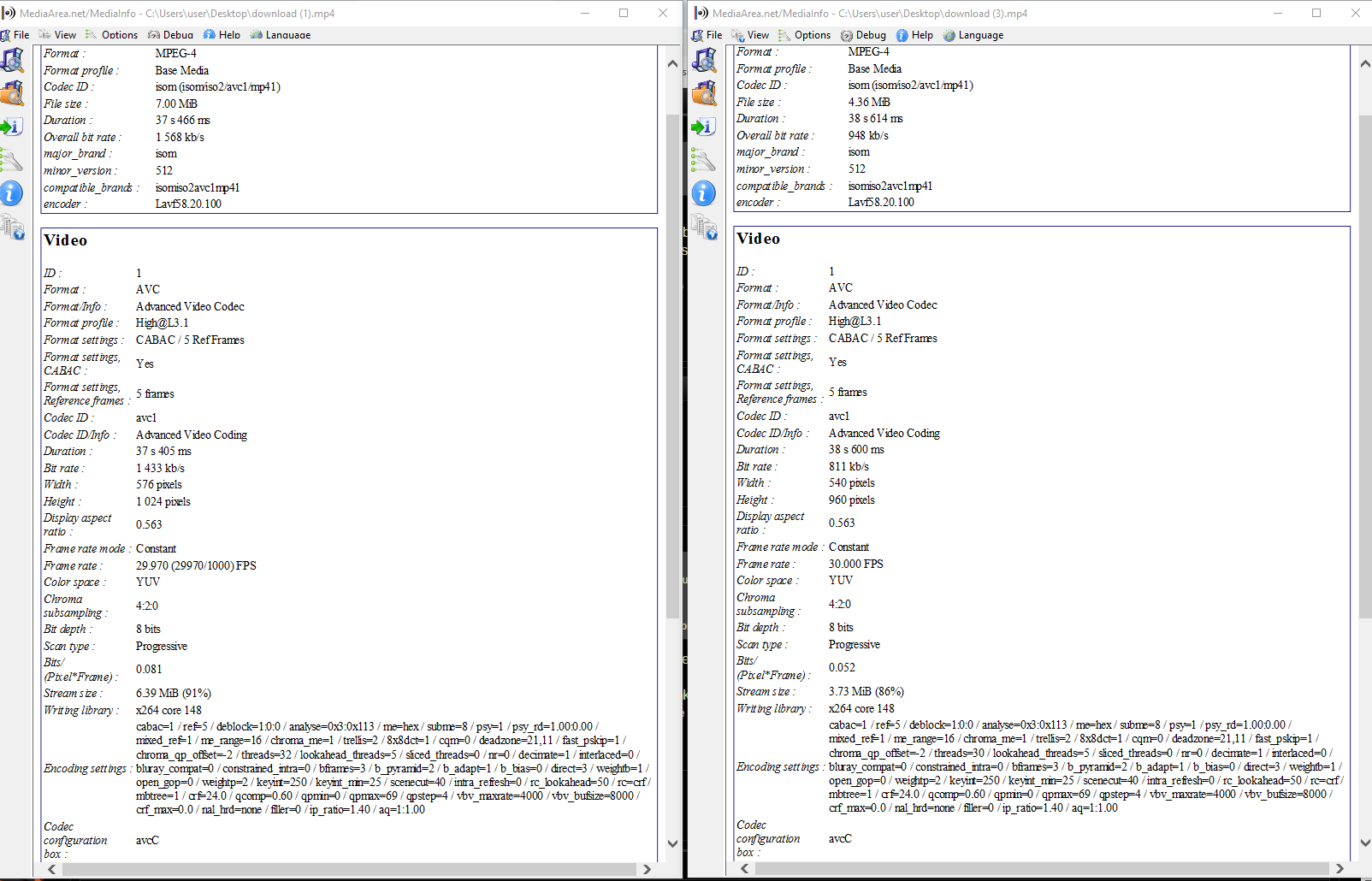
Here I made a comparison image. The Left side is my video, the right one is some viral TikTok video.

The Width and Height and Frame rate of my video are not the same as his, but I also when I changed them to his, it did not work.

NOTE that my video is 7MB, but once it's uploaded to TikTok, it's 39MB or so...

MINE ............................................. .............................................................................................................................................--------........... HIS

83601376c08072b4a7e70899429ec8d0.png
 
Thanks for the reply.

I only mentioned the Bitrate because that's the only thing I see which is different. All the info you mentioned about are the exact same as mine.

Here I made a comparison image. The Left side is my video, the right one is some viral TikTok video.

The Width and Height and Frame rate of my video are not the same as his, but I also when I changed them to his, it did not work.

NOTE that my video is 7MB, but once it's uploaded to TikTok, it's 39MB or so...

MINE ............................................. .............................................................................................................................................--------........... HIS

83601376c08072b4a7e70899429ec8d0.png
Well, that's quite similar. Apart from what you mentioned, there's a slight difference in the frame rate. Have you tried to make that exactly the same?

What difference do you see between the video you upload and the video converted by the app besides the size in MB?
How are you uploading the videos? Via the app/site or something else?

Edit: i just stumbled upon something. If you have your Data Saver (the last entry under Privacy and settings) in the app turned on, it affects not just watching, but uploading too. Is it on or off for you? If it's on, disable it, close the app completely and relaunch it.
 
Thank you for mentioning the Data Saver, I did not know about this. Though, it IS turned off as default. So I kept it off.

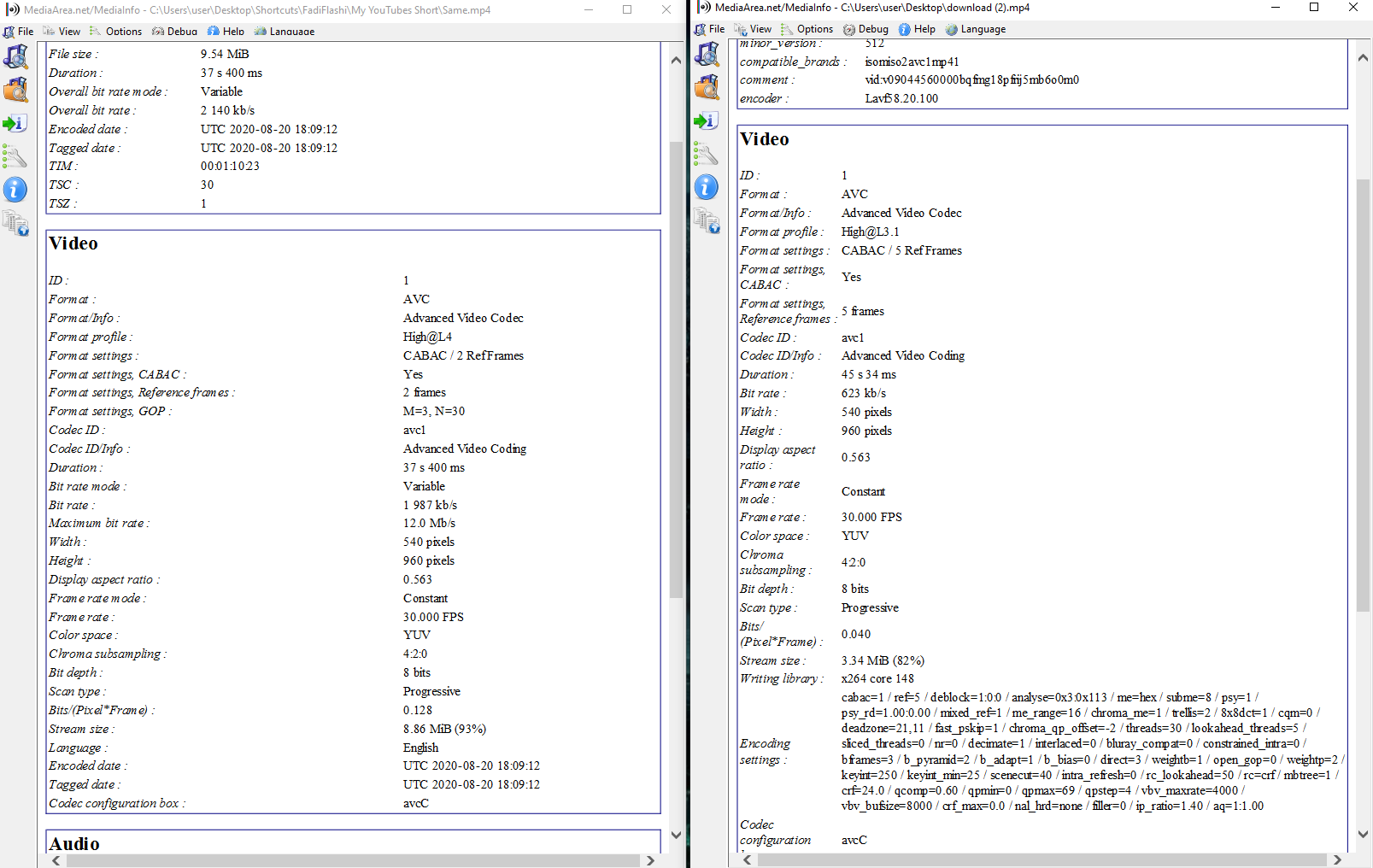
Here are the settings I rendered with the same proprieties as one of the TikTokers:
MINE----------------------........................-----------------------------.................................-----------------------------------.....................................TikToker

cb84c6033310803aff96ca3a04032dab.png


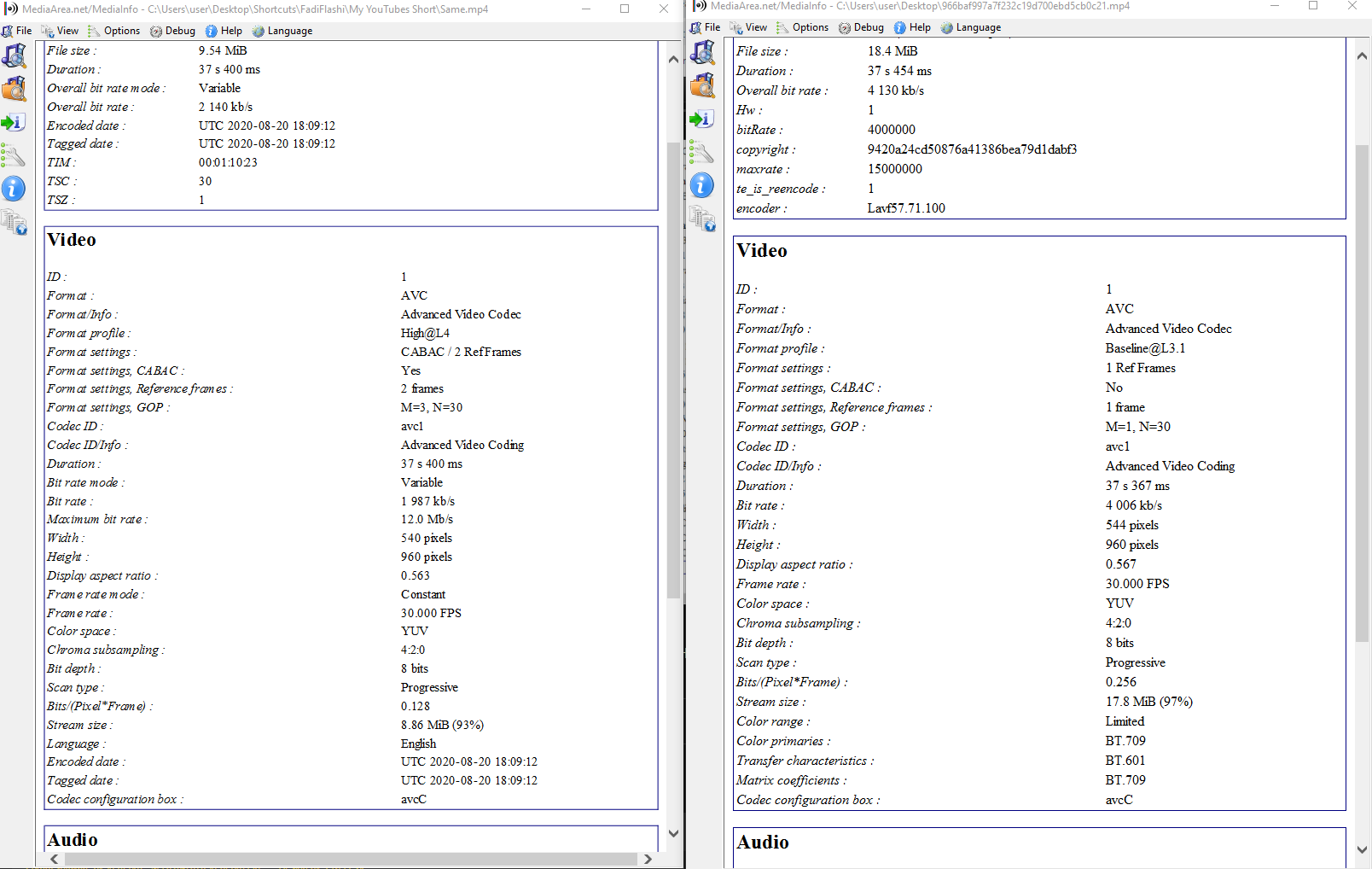
And here are the settings of the video I just exported VS How it turns out to be on TikTok after I upload it.
-----Original---------....................------------------------...........................-----------------------..........................----------------------........After uploaded to TikTok

da243ab6eda98ace8007d71c159b8806.png


Thank you in advance!
 
I hope more people can take a look at this... I'm working for days on my videos and they just turn out to be blurry AF and extremely large on TikTok... =/
 
I just tried re-uploading a video of a tiktoker, it's 1MB. when I uploaded, it converted to 8MB.. Da hell is happening??? It has nothing to do with resolution or settings I guess? idk I'm extremely confused.
 
Back
Top