What productivity tools and methods do you use?

Productivity tools


  • Total voters
    63

yakuzaemme

Senior Member
Joined
Sep 18, 2016
Messages
1,005
Reaction score
2,930
I'm a productivity junkie - always exploring new methods in order to be more productive, focused and reach my goals.

Daily to-do list: Todoist
Time logger: RescueTime
Browser: Stack (highly recommend - thanks @X)
Focus method: Pomodoro timer (Pomotodo)
Email client: Mailbird + Sanebox (always 0 unread emails, zero spam)

What do you use? Trying to add the most common ones in the poll above.

PS: I can recommend to take the quiz by Todoist, and see what type of productivity method would work best for you.
https://todoist.com/productivity-methods
 
I Will look into yours, my personal is sticky notes all around my desk...
I may start using todoist :)

Stack is available for windows also?
 
1. Trello - it integrates with Pomello (Pomodoro app) so I know which task is taking how much time. Delegating to VAs/writers etc is quite seemless
2. Notion - Mainly to plan out projects, create SOPs for VAs, note important stuff etc
3. Warmap calendar: Trying to use this recently. Inspired by Sam Ovens
 
I Will look into yours, my personal is sticky notes all around my desk...
I may start using todoist :)

Stack is available for windows also?

Sticky notes? Damn, that's hard core.

Yeah, Stack is available on Windows - works great. Highly highly recommend it.

1. Trello - it integrates with Pomello (Pomodoro app) so I know which task is taking how much time. Delegating to VAs/writers etc is quite seemless
2. Notion - Mainly to plan out projects, create SOPs for VAs, note important stuff etc
3. Warmap calendar: Trying to use this recently. Inspired by Sam Ovens

Notion is wonderful for that. I've used it for internal wikis, perfect when onboarding new staff as you say yourself.

I like the idea behind WarMap, but how does it play out when used?
You chunk your subprojects into dates and sprints, but there is no 'set and forget' in business as things always need attention.
Would love to hear more about it and how you use it!
 
I take an A4 sheet of paper and fold it twice so once in half and half again... I only work 4 days a week and folding it like that means it fits in the back pocket so each pannel Mon - Thurs

I make notes or a list for what needs doing then I add to the following day or I can make a note for the following week.

Anything I don't cross off gets carried over. I don't always have a computer or phone on me due to the nature of work but pen/pencil in pocket and paper in my back pocket always comes with me.
 
I take an A4 sheet of paper and fold it twice so once in half and half again... I only work 4 days a week and folding it like that means it fits in the back pocket so each pannel Mon - Thurs

I make notes or a list for what needs doing then I add to the following day or I can make a note for the following week.

Anything I don't cross off gets carried over. I don't always have a computer or phone on me due to the nature of work but pen/pencil in pocket and paper in my back pocket always comes with me.

Old but gold!
 
For my To Do list I use 'My To Do List' - https://todo.dj50.ro/

Not been updated in a while, but works with Windows 10.

It displays on the desktop of my PC. It's simple, and for a to-do list, that's what you want. I then just tick them off as the day goes on, and deselect them ready for the next day, as a lot of my list is what I do every working day.

That + diary, is all I need in terms of staying organised.
 
Notion is wonderful for that. I've used it for internal wikis, perfect when onboarding new staff as you say yourself.

I like the idea behind WarMap, but how does it play out when used?
You chunk your subprojects into dates and sprints, but there is no 'set and forget' in business as things always need attention.
Would love to hear more about it and how you use it!

I have only started using Warmap past 3-4 weeks or so. I only use it for tasks which really move the needle which is essentially 1 or 2 tasks a day.

The monthly calendar view helps me visualize how much progress I have made in a single view towards a particular project and accordingly plan out future tasks. I use different color for each project. Still playing around with it.

The maintenance regular day to day tasks (Todo list) go in my Trello. Major tasks also go there since I use Pomello to track the number of Pomodoros I do for each task. Here is what my weekly Trello looks like: https://prnt.sc/u11s3f
 
Last edited:
Recently bought a flip board and been using it to jot down, ideas, plans etc

It is weird, since i see that everyday (it is in center of my room) the whole idea/plan is kinda mapped in my brain - super powerful stuff

Other than that - i stopped obsessing over productivity and just do the things when and how it makes sense , sometimes i come across a way of doing something i like and i just incorporate it my daily tasks..

What's more important for me is the mindset - and how motivated I am to do something.
 
For myself: A journal + Pen. I write my weekly 'big idea' tasks I want to get done. Every day gets 5 tasks added to it from the main list. This is the Ivy Lee method.

For working: "Pomodoro", although I like to credit Eugene Schwartz for the 33:33 method. Same idea, but he did it before Pomodoro was a trademarked thing. He'd just press the '3' button 4 times on his kitchen timer, and hit go.

For managing contractors: Freedcamp. Amazing and underrated project management platform. And it's free.

For distractions: No social media on my phone. I use the Siteblock chrome extension to prevent reflexive time wasting (new tab + whatever time waster site). "Oh I'll just check for a second..." NOPE! It redirects me to my Freedcamp dashboard so I can see what's really important.

Then I drink a lot of water and coffee :)
 
Initially I used Hitask for me and my team but moved to clickup (it's much better)
 
I keep it simple: Pen and paper. Writing down everything I need to accomplish and then work the list.

What also helps me: Getting up in the early morning and getting the most annoying shit done first - for example writing articles, building backlinks etc.

For boring and repeating work (like copy-pasting stuff etc.) I am listening to music in the background, which helps me to focus on the work.

At the moment my biggest problems are I have too many things to do and I keep switching between the different tasks. Also, Facebook, Twitter etc. are way too annoying.
 
At the moment my biggest problems are I have too many things to do and I keep switching between the different tasks. Also, Facebook, Twitter etc. are way too annoying.

So many things are there to distract me. Facebook, Twitter, footy messageboard, someone pinging me on Skype/Facebook, checking email even though I just checked the bloody thing 3 minutes ago, texts/whatsapp, Fifa 20...

But most of the time I'll get the work done, it just will take longer than if I had no distractions at all. It's rare that happens.
 
What kind of automation do you use?

By this point you should know I automate most of the things in my life :D

I've recently finished turning my entire house 'smart' - every lightbulb and outlet is smart, every room has Google Home (don't tell @bartosimpsonio), every room has sensors etc.

I'm still tweaking the setup, but as of now, every room lights up when I walk in and turns off when I walk out.
The coffee starts brewing the first time I walk into the kitchen that day after 6 AM
When I walk into the office, Google plays the daily news while I sip my morning coffee

That sort of stuff. IFTTT has helped me tons as they've got integrations with Google and Philips Hue (lights), and some needed custom automation code

I have only started using Warmap past 3-4 weeks or so. I only use it for tasks which really move the needle which is essentially 1 or 2 tasks a day.

The monthly calendar view helps me visualize how much progress I have made in a single view towards a particular project and accordingly plan out future tasks. I use different color for each project. Still playing around with it.

The maintenance regular day to day tasks (Todo list) go in my Trello. Major tasks also go there since I use Pomello to track the number of Pomodoros I do for each task. Here is what my weekly Trello looks like: https://prnt.sc/u11s3f

Holy fuck - you really do utilize pomodoro timers. I try to use 'as many as possible', but rarely reach my daily goal.
Any tips on how to stay so consistent?
 
I use Webwork. helps me to improve my productivity and my employees.
 
At the moment my biggest problems are I have too many things to do and I keep switching between the different tasks. Also, Facebook, Twitter etc. are way too annoying.

So many things are there to distract me. Facebook, Twitter, footy messageboard, someone pinging me on Skype/Facebook, checking email even though I just checked the bloody thing 3 minutes ago, texts/whatsapp, Fifa 20...

But most of the time I'll get the work done, it just will take longer than if I had no distractions at all. It's rare that happens.

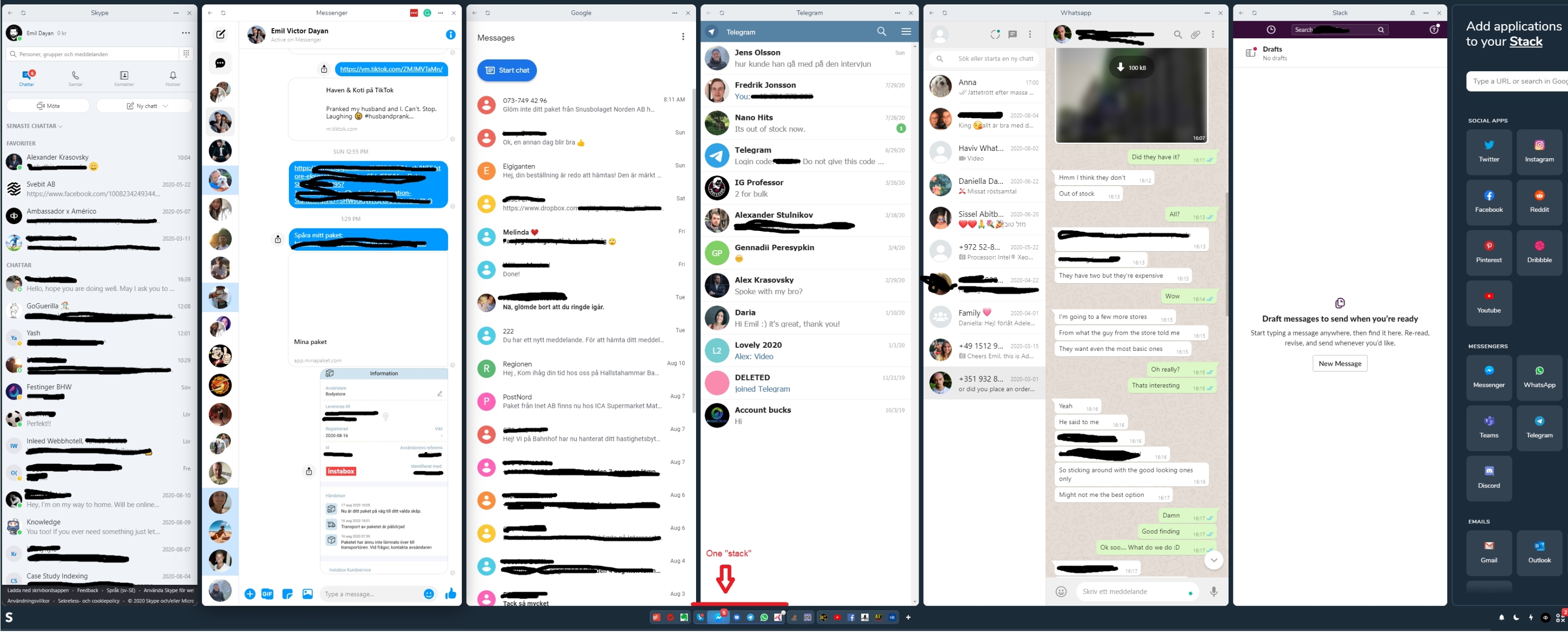
Stack browser solves all this for me.
I've placed all communication-apps into one Stack - which I can mute completely.
When I'm on break, I can open that Stack of apps, see which ones has notifications and respond accordingly.

What it handles beautifully is (for my large monitor) shows all the apps within that Stack, which boost productivity by a ton. No need to fiddle around trying to find each notification.

A picture is worth a thousand words...
3cfe1352253e5c6df62435c95e28c1d3.jpg
 
Back
Top