Autoptimize slowing down site?

ThaiDreamer

Senior Member
Joined
Apr 24, 2018
Messages
838
Reaction score
403
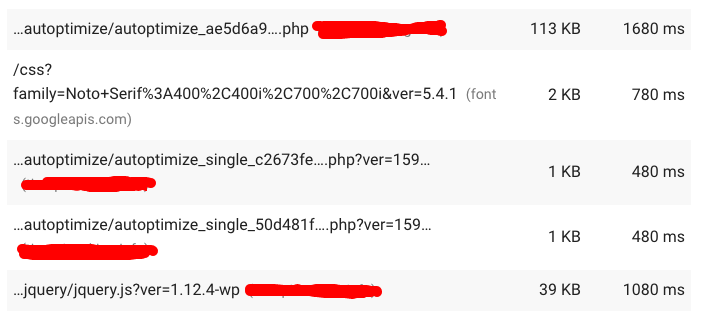
I've been testing the speed of my site for all pages and it seems that on all Autoptimize is slowing down the load time.

Does anyone know what might be causing this and is there a way to fix it? After all, I installed it to improve the speed :D

autoptimize.png
 
Not sure on the cause, but I have also noticed autoptimize causing a few different issues recently. I am planning to move away from this plugin and use wp rocket instead.
 
Not sure on the cause, but I have also noticed autoptimize causing a few different issues recently. I am planning to move away from this plugin and use wp rocket instead.

yea it does cause issue but wp rocket alone won’t speed up your siye, you should use both together to unlock best speed potential
 
I've been testing the speed of my site for all pages and it seems that on all Autoptimize is slowing down the load time.

Does anyone know what might be causing this and is there a way to fix it? After all, I installed it to improve the speed :D

autoptimize.png


Do you use any other optimization plugins?

Based on what source you are thinking your site has slowed down?

Many have had good results with wprocket
I also have had good result with so fastest cache pro.
 
Do you use any other optimization plugins?

Based on what source you are thinking your site has slowed down?

Many have had good results with wprocket
I also have had good result with so fastest cache pro.

This is the only one I've been using (for the last 2-3 months).

In the beginning there were no issues at all but as the screenshot shows, it does seem to slow down the load time.
 
This is the only one I've been using (for the last 2-3 months).

In the beginning there were no issues at all but as the screenshot shows, it does seem to slow down the load time.

autoptimze by itself will not help. it needs a cache plugin as well.
 
Not sure on the cause, but I have also noticed autoptimize causing a few different issues recently. I am planning to move away from this plugin and use wp rocket instead.

I was using a combination of WP Rocket and Autoptimize to achieve great scores, my combination was so powerful that I was really motivated to write a document about it, so I can resell this service.

Basically, you use WP Rocket for caching, and Autoptimize for the rest.

However this has started failing me recently, I still haven't figured it out yet.

I realized this was happening worse with my Divi websites.
 
I was using a combination of WP Rocket and Autoptimize to achieve great scores, my combination was so powerful that I was really motivated to write a document about it, so I can resell this service.

Basically, you use WP Rocket for caching, and Autoptimize for the rest.

However this has started failing me recently, I still haven't figured it out yet.

I realized this was happening worse with my Divi websites.

Thanks for the tip, I will try to figure out the best combo settings then.
 
autoptimze by itself will not help. it needs a cache plugin as well.

Asset CleanUp Pro: Page Speed Booster to disable individual scripts and styles from loading on certain pages.

WP Rocket for caching
Autoptimize for everything else
CAOS
Favicon by RealFaviconGenerator
Imagify
OMGF
Swap Google Fonts Display
Cache-control

WP HTaccess Editor and add this

## EXPIRES CACHING ##
<IfModule mod_expires.c>
ExpiresActive On
ExpiresByType image/jpg "access plus 1 month"
ExpiresByType image/jpeg "access plus 1 month"
ExpiresByType image/gif "access plus 1 month"
ExpiresByType image/png "access plus 1 month"
ExpiresByType text/css "access plus 1 month"
ExpiresByType application/pdf "access plus 1 month"
ExpiresByType text/x-javascript "access plus 1 month"
ExpiresByType application/x-shockwave-flash "access plus 1 month"
ExpiresByType image/x-icon "access plus 1 year"
ExpiresDefault "access plus 2 days"
</IfModule>
## EXPIRES CACHING ##
 
Asset CleanUp Pro: Page Speed Booster to disable individual scripts and styles from loading on certain pages.

WP Rocket for caching
Autoptimize for everything else
CAOS
Favicon by RealFaviconGenerator
Imagify
OMGF
Swap Google Fonts Display
Cache-control

WP HTaccess Editor and add this

## EXPIRES CACHING ##
<IfModule mod_expires.c>
ExpiresActive On
ExpiresByType image/jpg "access plus 1 month"
ExpiresByType image/jpeg "access plus 1 month"
ExpiresByType image/gif "access plus 1 month"
ExpiresByType image/png "access plus 1 month"
ExpiresByType text/css "access plus 1 month"
ExpiresByType application/pdf "access plus 1 month"
ExpiresByType text/x-javascript "access plus 1 month"
ExpiresByType application/x-shockwave-flash "access plus 1 month"
ExpiresByType image/x-icon "access plus 1 year"
ExpiresDefault "access plus 2 days"
</IfModule>
## EXPIRES CACHING ##

out of curiosity, why are using wp-rocket, cache control and updates to your htaccess all at the same time? isn't there a major lap by these 3 thigns?

thanks in advance
 
Not using it gives me less headache. Unless your website is not super mega ultra slow, you will be fine.
 
Anything you'd recommend in particular, mate?

i recently have had a very good results with just using wp fastest cach pro version. you would need an image optimization one at the same time. i use imagify

try these 2 and see how it goes. also try imagify with wp-rocket and see which one gives a better result.
 
Back
Top