
You are using an out of date browser. It may not display this or other websites correctly.
You should upgrade or use an alternative browser.
You should upgrade or use an alternative browser.
how can fix those ??
- Thread starter sasa22233
- Start date
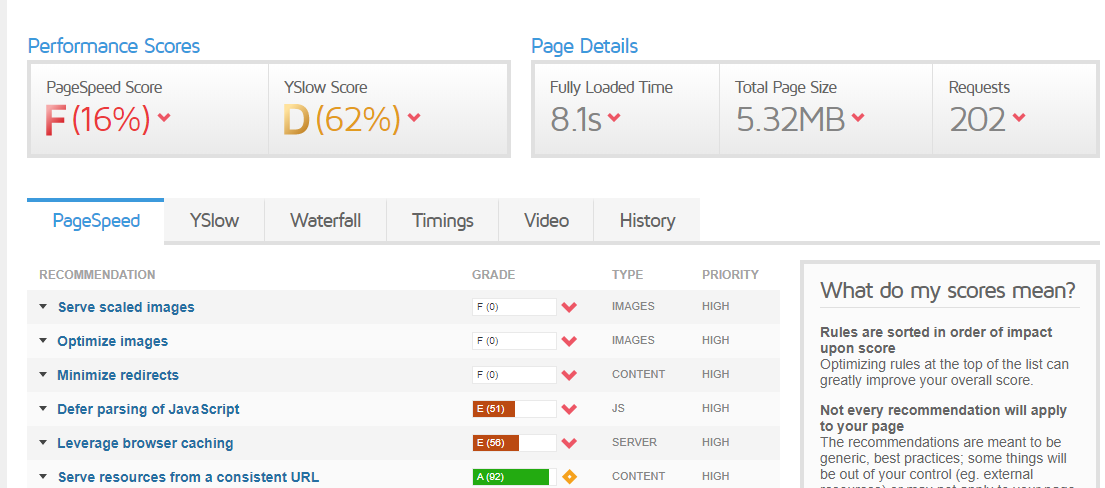
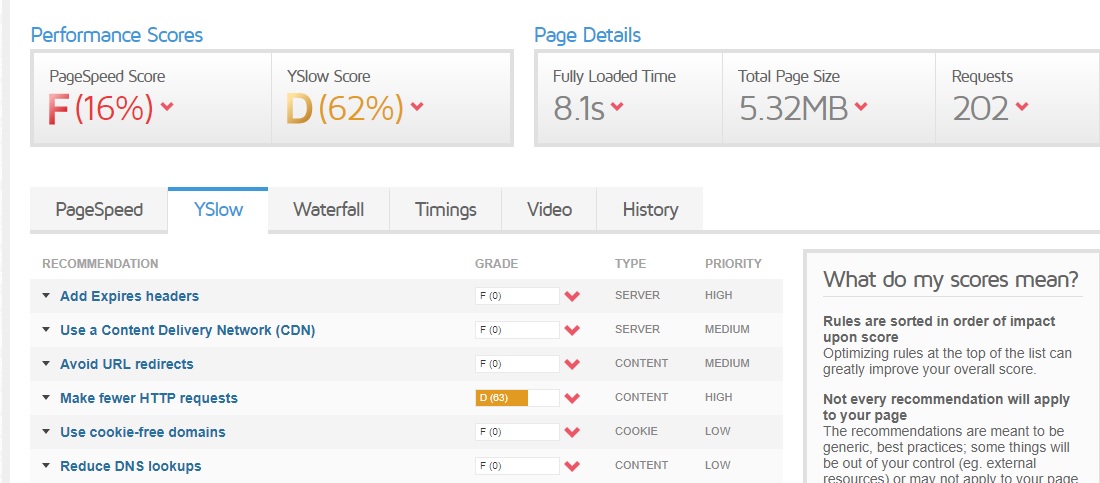

its all about hosting ? im using wordpress ? maybe some plugins cause this ?Maybe consider looking for a different host for your website?

QuiteRude0
BANNED
- May 12, 2020
- 217
- 165
Hey! Look for @FatBee - he has a tutorial on how to completely fix everything. ( CHECK ON BHW - How to optimize a website 3 to 1 second)
I am pretty sure he can also do it for you in exchange for a fee (his profile description)
I am pretty sure he can also do it for you in exchange for a fee (his profile description)
its all about hosting ? im using wordpress ? maybe some plugins cause this ?
i will check thxHey! Look for @FatBee - he has a tutorial on how to completely fix everything. ( CHECK ON BHW - How to optimize a website 3 to 1 second)
I am pretty sure he can also do it for you in exchange for a fee (his profile description)

u know what happened i just used a plugin to resize them and it worked and i didnt see any change in metrix or website speed - then i deleted all the images on media library and then i found that all images has deleted off the website and cant undo that .. at the end the website speed the sameYour images are too big and not optimized, install shortpixel or any similar plugin to solve those issue


FatBee
Elite Member
- Apr 4, 2015
- 3,146
- 3,098
Hey, you can follow my guidei will check thx
thx - i like u nickname btwHey, you can follow my guide
 fatbee
- May 10, 2012
- 9,541
- 7,560
Image optimization is one thing, but those results are brutal. I have site with probably 1000 images in homepage and it loads much faster than that.
First of all, enable lazy load by any means. 5.32mb load is absolutely not okay. Use either wp rocket or w3 total cache. Google a guide on how to set them up properly. Then of course, get a decent server. Chemicloud has been working pretty well for me, Siteground was a total shit.
Then get a decent CDN, something like Stackpath, those are pretty alright.
Then get Imagify and convert your images into WebP format.
Or go through @FatBee's tutorial, he has most of these things covered there and something extra.
First of all, enable lazy load by any means. 5.32mb load is absolutely not okay. Use either wp rocket or w3 total cache. Google a guide on how to set them up properly. Then of course, get a decent server. Chemicloud has been working pretty well for me, Siteground was a total shit.
Then get a decent CDN, something like Stackpath, those are pretty alright.
Then get Imagify and convert your images into WebP format.
Or go through @FatBee's tutorial, he has most of these things covered there and something extra.
i use cloudfare cdn - and i use lazyloadImage optimization is one thing, but those results are brutal. I have site with probably 1000 images in homepage and it loads much faster than that.
First of all, enable lazy load by any means. 5.32mb load is absolutely not okay. Use either wp rocket or w3 total cache. Google a guide on how to set them up properly. Then of course, get a decent server. Chemicloud has been working pretty well for me, Siteground was a total shit.
Then get a decent CDN, something like Stackpath, those are pretty alright.
Then get Imagify and convert your images into WebP format.
Or go through @FatBee's tutorial, he has most of these things covered there and something extra.

HustleTong
Elite Member
- May 30, 2019
- 13,466
- 10,661
This might help in most cases.Your images are too big and not optimized, install shortpixel or any similar plugin to solve those issue

- Mar 30, 2018
- 12,093
- 14,357
Get a fast host, use cache plugins use @FatBee guide or hire @kindablack service

- Apr 4, 2014
- 6,453
- 4,860
202 requests??? DAMN... why so many?
Total page is still only 5MB. Compressing images will help but it's taking 8 seconds for more reasonsYou should compress the image,
Try wp rocket and any compressing plugin, like imagify