

fasttrak
Elite Member
- Sep 12, 2016
- 3,516
- 3,970
As Ahrefs have thrown us a curve ball and decided to remove all social media stats from their Content Explorer reports, except Twitter. I thought we could use that to our advantage for Part 3 of the Ahrefs Hacks Guide.
After all, there is always a silver lining if you look hard enough!
If you missed any of my previous guides over the last few weeks, you can follow the links below to catch up.
Part 3 - Twitter Hack
So Ahrefs have decided to focus on Twitter only, no problem, this quick and simple hack will help you use that to your advantage in getting retweets and potentially new links from some great accounts and sites.
Immediate uses of this hack:
1. Search for a broad topic in Content Explorer
I changed from Baseball Bats to Snowboarding in this guide, as baseball bats found mostly tweets of people being attacked with baseball bats, which as an indictment of humanity was too depressing for an IM guide!
2. Add a filter for Twitter social shares - Depending on Niche, something like >5
3. Add a filter to only show people who Tweeted content in the last 7 days.

The 7 day filter is applied so you only get people who remember tweeting the content. Otherwise, your outreach might fall on deaf ears.
4. From the results, you are looking for something which is related to your broad topic that you could harvest Twitter users from.
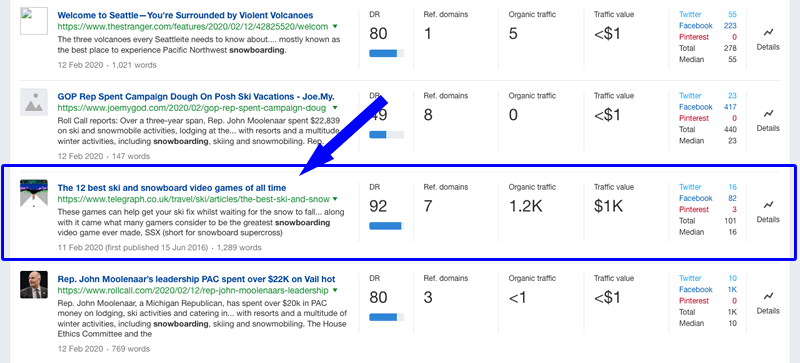
In this example, I have simply chosen a tweet at random, as it does not matter for the purposes of this guide. Obviously you will want something which is either similar to some of your existing content, something you can write about fairly easily, or something which will have some quality Twitter users to harvest.
5. Click on to Twitter on the right of your chosen result to expand details.
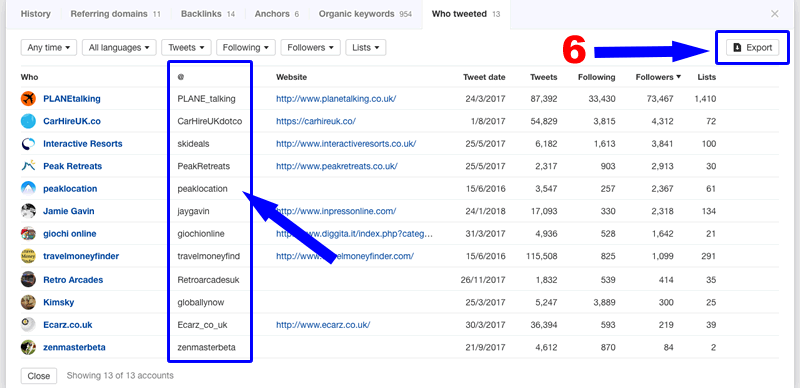
Here you can see everything you need to know about people who have Tweeted this content. Not only can you see their Twitter handles, you get their website, the date they tweeted and general Twitter account info.
6. Click on to Export on the right hand side (as shown in the image) and download the data.
You can use this data to create custom audiences for advertising, make lists for outreach or anything else you can think of...
Tip - Use tools like Tweet Binder to get a larger export and a LOT more information.
Conclusion
Ahrefs opens up a whole new world of Twitter marketing opportunities, if you know how to use it. You just need to think outside the box!
Let me know what you think and stay tuned for Part 4 of the Ahrefs Hacks Guide.
After all, there is always a silver lining if you look hard enough!
If you missed any of my previous guides over the last few weeks, you can follow the links below to catch up.
Part 3 - Twitter Hack
So Ahrefs have decided to focus on Twitter only, no problem, this quick and simple hack will help you use that to your advantage in getting retweets and potentially new links from some great accounts and sites.
Immediate uses of this hack:
- Creating custom audiences for Twitter growth campaigns or advertising. After all, If they have retweeted content on a specific topic previously, they will likely do so again for yours.
- Make Twitter lists for manual outreach later. In your research, you will discover influential accounts which you can export to research further at a later date, and then use for outreach.
- Make your use of Twitter more effective. Analyse personas, related followers, related interests, the best time to tweet, etc. by sending the data you collect to any of the various Twitter tools for analysis.
1. Search for a broad topic in Content Explorer
I changed from Baseball Bats to Snowboarding in this guide, as baseball bats found mostly tweets of people being attacked with baseball bats, which as an indictment of humanity was too depressing for an IM guide!
2. Add a filter for Twitter social shares - Depending on Niche, something like >5
3. Add a filter to only show people who Tweeted content in the last 7 days.
The 7 day filter is applied so you only get people who remember tweeting the content. Otherwise, your outreach might fall on deaf ears.
4. From the results, you are looking for something which is related to your broad topic that you could harvest Twitter users from.
In this example, I have simply chosen a tweet at random, as it does not matter for the purposes of this guide. Obviously you will want something which is either similar to some of your existing content, something you can write about fairly easily, or something which will have some quality Twitter users to harvest.
5. Click on to Twitter on the right of your chosen result to expand details.
6. Click on to Export on the right hand side (as shown in the image) and download the data.
You can use this data to create custom audiences for advertising, make lists for outreach or anything else you can think of...
Tip - Use tools like Tweet Binder to get a larger export and a LOT more information.
Conclusion
Ahrefs opens up a whole new world of Twitter marketing opportunities, if you know how to use it. You just need to think outside the box!
Let me know what you think and stay tuned for Part 4 of the Ahrefs Hacks Guide.


