

fasttrak
Elite Member
- Sep 12, 2016
- 3,516
- 3,971
Following my recent Ahrefs guides (Part 1, Part 2 & Bonus), a lot of members asked if I had any hacks for free tools as Ahrefs is not within their budget.
So, given that we all get a FREE 30 day trial of SEMrush from BHW, I thought this would be a good place to start + even if you have Ahrefs, SEMrush does things that Ahrefs cannot, which you will love.
Part 1 - On Page Checker, Content Hacks
Most SEMRush users focus on competitor analysis and KW research, and for some reason never look at the On Page Checker. Which is a shame, as it is a hugely powerful tool in its own right.
So, continuing with the Baseball Bats example, as I am lazy and it works nicely!
1. Create a Project for your money site, if you have not done so already.
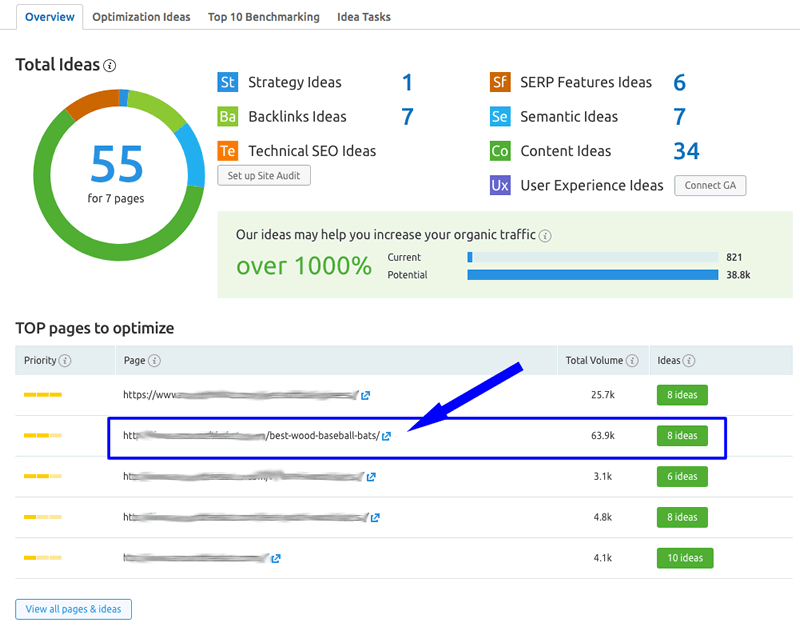
2. From the SEO Dashboard, click on the Setup Button in the On Page Checker section.
I have used a website in this example which is not ranking, but is not a million miles away, just needs a little push (sound familiar? ).
).

3. Remove any non money pages from the auto import and click on the Collect Ideas button.

4. Click on On Page SEO Checker and choose the money page which is stuck outside the top 10 on Google.
Now for the clever stuff.
You are now presented with lots actionable SEO ideas or advice to improve your money page and help it rank higher. The area I want to focus on today is the Content section.
Content Ideas
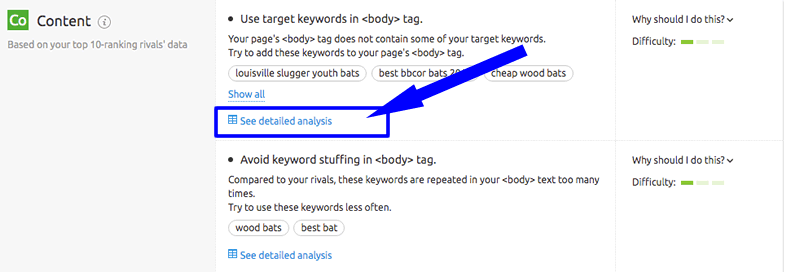
In this section you can see both onpage SEO elements which are optimised and potential content issues stopping your money page from ranking. Choose any of the issues and click on to See detailed analysis.
Does any of the below sound good?

Keyword Usage
It is easy to see from here some of the reasons why this page is not ranking as well as it could be.
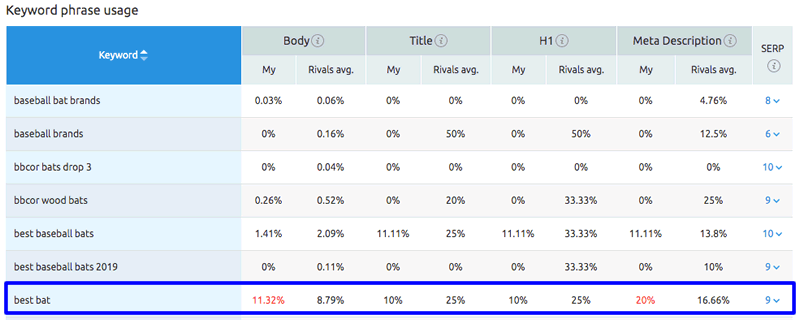
Your competitors rank right? So obviously they are doing something right. So reducing the KW frequency within the article main text will align your content to what is ranking. Easy win.

This report is really easy to read and shows you where you are going wrong, reducing the effort you would normally take to check this manually or using other tools.
The semantic report shows related KW's that the Google top 10 are also targeting, and most likely ranking for.

If you see the majority of your competitors targeting a word and you are not, then YOU SHOULD BE!
Its an easy fix that will bring more traffic to the site. No brainer.
Content Length
How many times do we see someone asking how many words their article should have? And our answer is always the same, it should be at least the same as the current top 10 and ideally a bit more.
So, how can we check this out quickly? Yep, you guess it, with the Content Length report.

As you can see, this particular article certainly has enough words, when compared to its competitors, but as we saw in the Semantic report, this page is not targeting the right words.
Video Usage
Do you need videos in your articles for them to rank? Good question and obviously a very common one asked when planning a money page.

What I love about this report is firstly the simplicity, it is extremely easy to see who does and does not use videos in their articles, so you can pickup on requirements quickly, and secondly the fact it shows you all of this by KW. That is really cool.
Readability
I personally tend to use this report as a gauge, as readability is subjective. Basically it allows me to quickly see if I am in the right ball park compared to the current top 10. I aim to be at least the average.

Again, a super easy report to get the information you need quickly, with minimal effort.
Backlinks
I have left this report till last as I am not convinced that it is particularly helpful. As you can see, it is a quick view showing any common links your competitors have in common. The vast majority of these are rubbish, but you can discover a few gems every now and again.

Conclusion
Having now seen what the On Page Checker can do for you and how easy it is to use. You will probably want to test all your money sites to see if there are any quick wins to improve your rankings.
It really is a powerful tool and presents the information you need in a super easy way, saving you hours of wasted effort.
If you are stuck on page 2, it is definitely worth a look.
Let me know what you think and stay tuned for Part 2 of the Semrush Hacks Guide.
So, given that we all get a FREE 30 day trial of SEMrush from BHW, I thought this would be a good place to start + even if you have Ahrefs, SEMrush does things that Ahrefs cannot, which you will love.
- BHW 30 day SEMrush trial signup
- Already used it? You can find LOTS of free trials with a simple Google search and a new email address.... just saying
Part 1 - On Page Checker, Content Hacks
Most SEMRush users focus on competitor analysis and KW research, and for some reason never look at the On Page Checker. Which is a shame, as it is a hugely powerful tool in its own right.
So, continuing with the Baseball Bats example, as I am lazy and it works nicely!
1. Create a Project for your money site, if you have not done so already.
2. From the SEO Dashboard, click on the Setup Button in the On Page Checker section.
I have used a website in this example which is not ranking, but is not a million miles away, just needs a little push (sound familiar?
).
You are now presented with lots actionable SEO ideas or advice to improve your money page and help it rank higher. The area I want to focus on today is the Content section.
Content Ideas
In this section you can see both onpage SEO elements which are optimised and potential content issues stopping your money page from ranking. Choose any of the issues and click on to See detailed analysis.
- Would you like to see how your KW density compares to your competitors?
- Or what about how the length of your article matches up to the top 10?
- Perhaps video content would help you rank, do the top 10 pages use them?
- Have you included the same semantic words as the top 10, are you missing any?
- What about easy backlinks which your competitors are using to rank?
It is easy to see from here some of the reasons why this page is not ranking as well as it could be.
Your competitors rank right? So obviously they are doing something right. So reducing the KW frequency within the article main text will align your content to what is ranking. Easy win.
SemanticThe semantic report shows related KW's that the Google top 10 are also targeting, and most likely ranking for.
If you see the majority of your competitors targeting a word and you are not, then YOU SHOULD BE!
Its an easy fix that will bring more traffic to the site. No brainer.
Content Length
How many times do we see someone asking how many words their article should have? And our answer is always the same, it should be at least the same as the current top 10 and ideally a bit more.
So, how can we check this out quickly? Yep, you guess it, with the Content Length report.
As you can see, this particular article certainly has enough words, when compared to its competitors, but as we saw in the Semantic report, this page is not targeting the right words.
Video Usage
Do you need videos in your articles for them to rank? Good question and obviously a very common one asked when planning a money page.
Readability
I personally tend to use this report as a gauge, as readability is subjective. Basically it allows me to quickly see if I am in the right ball park compared to the current top 10. I aim to be at least the average.
Again, a super easy report to get the information you need quickly, with minimal effort.
Backlinks
I have left this report till last as I am not convinced that it is particularly helpful. As you can see, it is a quick view showing any common links your competitors have in common. The vast majority of these are rubbish, but you can discover a few gems every now and again.
Conclusion
Having now seen what the On Page Checker can do for you and how easy it is to use. You will probably want to test all your money sites to see if there are any quick wins to improve your rankings.
It really is a powerful tool and presents the information you need in a super easy way, saving you hours of wasted effort.
If you are stuck on page 2, it is definitely worth a look.
Let me know what you think and stay tuned for Part 2 of the Semrush Hacks Guide.
Last edited:





