Lucky? I still have 0’visitors lolYou're lucky man ! I'd like to see the same

You are using an out of date browser. It may not display this or other websites correctly.
You should upgrade or use an alternative browser.
You should upgrade or use an alternative browser.
Sudden Ranked Drop? Google Algo Update?
- Thread starter wawangjan
- Start date
now in GSC they have breadcrumbs and I got all warnings for all of my URLs
they said I am still using data-vocabulary, they now only accept schema.org breadcrumbs.
I don't think this could be the issue of indexing but, I think its connected somehow?
Any idea how to migrate from data-vocabulary to schema.org ? is there's any wordpress plugins ?
I tried 2 plugins but when I check, nothing changed
they said I am still using data-vocabulary, they now only accept schema.org breadcrumbs.
I don't think this could be the issue of indexing but, I think its connected somehow?
Any idea how to migrate from data-vocabulary to schema.org ? is there's any wordpress plugins ?
I tried 2 plugins but when I check, nothing changed
florisdebaas
Newbie
- Jul 4, 2018
- 30
- 11
Anyone else has this going back and forth for days? It's jumping ALL positions to like 40 - 200 positions lower and within 1 - 2 days it comes back up.

P.S. Graph is not updated with today -> all positions dropped "again"...

Also noticed I can't click "See index coverage"
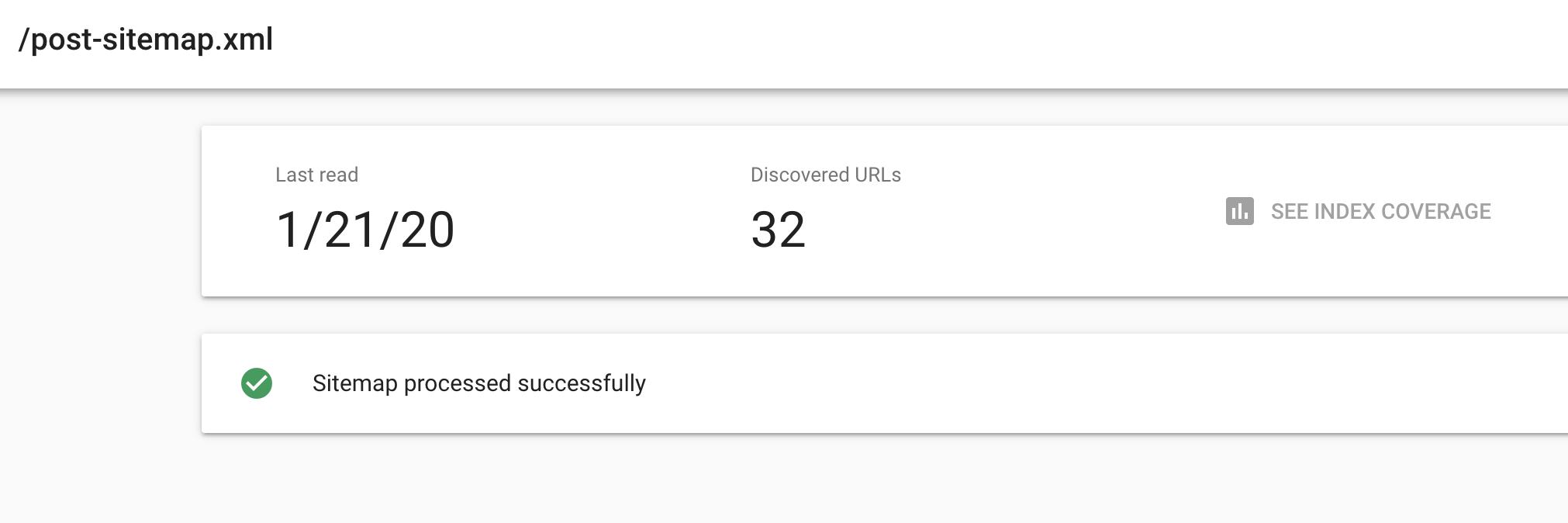
P.S. Graph is not updated with today -> all positions dropped "again"...
Also noticed I can't click "See index coverage"
Last edited:
We already told you, Change the themenow in GSC they have breadcrumbs and I got all warnings for all of my URLs
they said I am still using data-vocabulary, they now only accept schema.org breadcrumbs.
I don't think this could be the issue of indexing but, I think its connected somehow?
Any idea how to migrate from data-vocabulary to schema.org ? is there's any wordpress plugins ?
I tried 2 plugins but when I check, nothing changed
Florian67X
Registered Member
- Jan 12, 2020
- 88
- 31

is there's any wordpress plugin for the schema.org breadcrumbs ?We already told you, Change the theme
Yoast or Google XML sitemap?blank sitemap too... and also 60 indexed, All NOT read in Sitemap.....
Ow, we have a Qlue here. Google ignores our sitemaps, but why...
Can I ask the guys who have this problem if you are using WordPress?
If yes what's your cache plugin and what SEO plugin are you guys using.
Please all drop your data so we can make some conclusions here.
Can I ask the guys who have this problem if you are using WordPress?
If yes what's your cache plugin and what SEO plugin are you guys using.
Please all drop your data so we can make some conclusions here.
Florian67X
Registered Member
- Jan 12, 2020
- 88
- 31
Yoast, but I'm changing right now for RankmathYoast or Google XML sitemap?
Florian67X
Registered Member
- Jan 12, 2020
- 88
- 31
Litespeed cache, Wordpress, and I was using Yoast but switching to RankmathOw, we have a Qlue here. Google ignores our sitemaps, but why...
Can I ask the guys who have this problem if you are using WordPress?
If yes what's your cache plugin and what SEO plugin are you guys using.
Please all drop your data so we can make some conclusions here.
Guys, if you have sitemap problem try this:
1- Remove the currently sitemap you have.
2- Open your sitemap (example mywebsite.com/sitemap.xml)
3- Copy one by one all sitemap inside the main sitemap (I mean, if you have sitemap.xml copy all sub sitemap inside the main) and add it to Google Webmaster Sitemap.
4- Check if the url now are correctly see.
1- Remove the currently sitemap you have.
2- Open your sitemap (example mywebsite.com/sitemap.xml)
3- Copy one by one all sitemap inside the main sitemap (I mean, if you have sitemap.xml copy all sub sitemap inside the main) and add it to Google Webmaster Sitemap.
4- Check if the url now are correctly see.
mondoinweb
Newbie
- Jan 20, 2020
- 4
- 1
Ow, we have a Qlue here. Google ignores our sitemaps, but why...
Can I ask the guys who have this problem if you are using WordPress?
If yes what's your cache plugin and what SEO plugin are you guys using.
Please all drop your data so we can make some conclusions here.
we don't use wordpress, it's a site written in native php
Florian67X
Registered Member
- Jan 12, 2020
- 88
- 31
I use Rankmath sitemap....does what you say work?Guys, if you have sitemap problem try this:
1- Remove the currently sitemap you have.
2- Open your sitemap (example mywebsite.com/sitemap.xml)
3- Copy one by one all sitemap inside the main sitemap (I mean, if you have sitemap.xml copy all sub sitemap inside the main) and add it to Google Webmaster Sitemap.
4- Check if the url now are correctly see.
I've quite lost you on point 3 - Copy one by one all sitemap inside the main sitemap??
My sitemap is mincirplaisir.[fr]/sitemap_index.xml (remove the [ ] )
Ye all different problems, but the fact is here that Google does not see our sitemaps.
I changed from plugins removed the sitemap and fetched the new one.
Result: It makes no sense, I have still the same problem.
Maybe someone should send this screenshot to that boring Google guy John on Twitter. Maybe he can look into it and give us an answer that makes no sense again xD
I changed from plugins removed the sitemap and fetched the new one.
Result: It makes no sense, I have still the same problem.
Maybe someone should send this screenshot to that boring Google guy John on Twitter. Maybe he can look into it and give us an answer that makes no sense again xD
Florian67X
Registered Member
- Jan 12, 2020
- 88
- 31

I mean this. Remove "sitemap_index.xml" this from the sitamp section in webmaster tool And add one by one this:I use Rankmath sitemap....does what you say work?
I've quite lost you on point 3 - Copy one by one all sitemap inside the main sitemap??
My sitemap is mincirplaisir.[fr]/sitemap_index.xml (remove the [ ] )
post-sitemap.xml
and then add
page-sitemap.xml
and then add
category-sitemap.xml
Try my method:Ye all different problems, but the fact is here that Google does not see our sitemaps.
I changed from plugins removed the sitemap and fetched the new one.
Result: It makes no sense, I have still the same problem.
1- Remove the currently sitemap you have.
2- Open your sitemap (example mywebsite.com/sitemap.xml)
3- Copy one by one all sitemap inside the main sitemap (I mean, if you have sitemap.xml copy all sub sitemap inside the main) and add it to Google Webmaster Sitemap.
4- Check if the url now are correctly see.
Florian67X
Registered Member
- Jan 12, 2020
- 88
- 31
What you did?EDIT : after updating it, it now reads the sitemaps inside the sitemap.
Indeed what did you doEDIT : after updating it, it now reads the sitemaps inside the sitemap.