• Please take a moment to look over the Suggestions & Feedback rules before making a post: READ RULES HERE

BHW Notifications Are Broken

Status
Not open for further replies.

A7strohhut

Power Member
Joined
Mar 8, 2015
Messages
772
Reaction score
316
Since 1 to 2 weeks I do not receive any email notifications on watched forums.

I have not changed any setting & my email is working fine + emails also didnt go into the spam folder. So, has anyone experienced this as well? &' how can it be fixed?

I dont even receive notifications when someone is pming me which is really bad...
 
Even the alerts do not work in some cases. I miss replies in my sale threads because of this.
 
Even the alerts do not work in some cases. I miss replies in my sale threads because of this.

I have tested it - I activated email notification for this thread - I did not receive an email for your reply... thats again proof the notifications are broken.
 
You are right OP - I am facing same issue, its a bug that needs to be managed on urgent basis.
 
Yeah I too sometimes have issues with the notifications.
Example 1: If someone likes a reply of mine before 12 AM, and I open BHW after 12 AM; the notification normally doesn't show.
Example 2: If 5 people like a reply of mine, it will show notification for 1-2; but not for all.

Not sure if anyone else faced this though.

Also... BHW 2.0 is coming soon as I have heard.. So I guess the problem has already been fixed in the new version.. Fingers crossed.
 
When people quote me, pm me, post in watched forums or give me a like - I NEVER receive notifications. Its good to know that I am npt the only one but still I am sorry for those that also do not receive notifications.

Maybe the servers need an upgrade.. server might be overloaded and maybe thats why notifications are not processed right??
 
Thread Moved

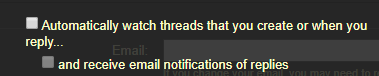
@A7strohhut, I checked your account. Go to your preferences settings, look under browsing preferences, and check the box "Automatically watch threads that you create or when you reply..." and "and receive email notifications of replies" boxes shown in the image below.
scMJSl4


Let me know if that fixes the issue.
 
Maybe the servers need an upgrade.. server might be overloaded and maybe thats why notifications are not processed right??

Are you using content-filtering/ad-blocking plugins with your browser?
 
Thread Moved

@A7strohhut, I checked your account. Go to your preferences settings, look under browsing preferences, and check the box "Automatically watch threads that you create or when you reply..." and "and receive email notifications of replies" boxes shown in the image below.
scMJSl4


Let me know if that fixes the issue.

Done but it wont help the main problem.

Danke/Thanks for trying to help me but I its not just threads - its pm's & watched forums - i dont receive notifications anymore and some others experience the same. Hope it can be fixed.

I RECEIVE ALTERS INSIDE BHW BUT NOT BY EMAIL. Maybe that info helps resolving the issue.

It seems to be a problem to more than just a few people. Hope its getting fixed :)


Are you using content-filtering/ad-blocking plugins with your browser?

No - I am on my mobile where I only use the normal browser apps & adblock wouldnt even affect notifications by email.
 
No - I am on my mobile where I only use the normal browser apps & adblock wouldnt even affect notifications by email.

You mentioned likes (thanks) and I don't think email notifications are sent for those.

Microsoft sends nearly all my BHW notification emails (from [email protected]) to my junk folder. It might be worth testing a different email account to see if your current email provider is just bouncing the emails back.
 
Done but it wont help the main problem.
It's a start. ;)
Danke/Thanks for trying to help me but I its not just threads - its pm's & watched forums - i dont receive notifications anymore and some others experience the same. Hope it can be fixed.

I RECEIVE ALTERS INSIDE BHW BUT NOT BY EMAIL. Maybe that info helps resolving the issue.

It seems to be a problem to more than just a few people. Hope its getting fixed :)
This might be an issue that's outside of what I can control on the forum. I did take a look at the email address I have on BHW and I seem to be receiving email alerts just fine. However, I have heard this issue come up from time to time on the forum, so I'm not doubting the issue you're experiencing here.

It's a bit late where I'm at, so I won't be online much longer, but try the following:
  • Go with @Sephrata's suggestion and temporarily use a different email address by a different provider.
  • Remove and re-add your current email address.
Remember to check your spam folder with both suggestions. Remember to whitelist the email address (e.g., Gmail has an option to create filters and a "never send to spam" button you can check).
 
Since 1 to 2 weeks I do not receive any email notifications on watched forums.

I have not changed any setting & my email is working fine + emails also didnt go into the spam folder. So, has anyone experienced this as well? &' how can it be fixed?

I dont even receive notifications when someone is pming me which is really bad...

Great suggestions @Zwielicht

@A7strohhut
I've pm'd you with delivery logs to your email account, displaying delivery stats for the email notifications. If you still can't find them at the time and dates allocated please reach out by replying to the pm and we'll dig into it.

Cheers
 
You mentioned likes (thanks) and I don't think email notifications are sent for those.

Microsoft sends nearly all my BHW notification emails (from [email protected]) to my junk folder. It might be worth testing a different email account to see if your current email provider is just bouncing the emails back.

Correct - thanks are not notified via email notifications, these will appear in your alerts only.

If you mark as not spam that usually fixes it, due to the unique subject lines that appear in the email notifications we sometimes run into issues with spam filters. The safest thing to do is manage it on your spam filters and just mark our emails as not spam ;)
 
It's a start. ;)

This might be an issue that's outside of what I can control on the forum. I did take a look at the email address I have on BHW and I seem to be receiving email alerts just fine. However, I have heard this issue come up from time to time on the forum, so I'm not doubting the issue you're experiencing here.

It's a bit late where I'm at, so I won't be online much longer, but try the following:
  • Go with @Sephrata's suggestion and temporarily use a different email address by a different provider.
  • Remove and re-add your current email address.
Remember to check your spam folder with both suggestions. Remember to whitelist the email address (e.g., Gmail has an option to create filters and a "never send to spam" button you can check).

Thanks to both of you!

Great suggestions @Zwielicht

@A7strohhut
I've pm'd you with delivery logs to your email account, displaying delivery stats for the email notifications. If you still can't find them at the time and dates allocated please reach out by replying to the pm and we'll dig into it.

Cheers

I have changed the email and now I am receiving emails again! Somehow the emails did not show in my inbox and also not in my spam folder but when I have changed the email - suddenly I started receiving emails again. Thanks for the help.

I am surprised about the support! Really great support! wow!
 
Status
Not open for further replies.
Back
Top