Firefox disable add-on for specific site?

Scorpion Ghost

Elite Member
Executive VIP
Jr. VIP
Joined
Mar 22, 2013
Messages
9,150
Reaction score
10,489
I use this extension - https://addons.mozilla.org/en-US/firefox/addon/user-agent-switcher-revived/

I like it, it works good. And it has an option to where you can choose on which domains it's active.

But it doesn't have a way to add exceptions. So if I want the extension to be active on all sites except one specific one, I can't do it.

Any ideas on how I can prevent it from being applied only on 1 specific site?

Thanks
 
So in the area where you can set for which domains you want the extensions to work on, by default it says - "all_urls"

I looked through the extensions files, and in manifest.json I found:

{
"version": "0.2.6",
"manifest_version": 2,
"name": "User-Agent Switcher",
"short_name": "useragent-switcher",
"background": {"page": "lib/chrome/background.html"},
"homepage_url": "http://mybrowseraddon.com/useragent-switcher.html",
"description": "Quickly and easily switch between popular user-agent strings.",
"permissions": ["tabs", "storage", "<all_urls>", "webRequest", "webRequestBlocking"],
"browser_action": {
"default_title": "User-Agent Switcher",
"default_popup": "data/popup/popup.html",
"default_icon": {
"16": "data/icons/16.png",
"32": "data/icons/32.png",
"48": "data/icons/48.png",
"64": "data/icons/64.png"
}
},
"content_scripts": [{
"all_frames": true,
"matches": ["<all_urls>"],
"run_at": "document_start",
"js": ["data/content_script/inject.js"]
}],
"commands": {
"toggle-default-mode": {
"description": "Toggle Default UA Mode",
"suggested_key": {
"mac": "Command+Shift+D",
"default": "Ctrl+Shift+D"
}
}
},
"icons": {
"16": "data/icons/16.png",
"32": "data/icons/32.png",
"48": "data/icons/48.png",
"64": "data/icons/64.png",
"128": "data/icons/128.png"
}
}

See the parts in Red.

Does anyone have a wild idea of what I can add to this code to add an exception for 1 domain, so that the extension is applied to all url's except one?
 
I use this extension - https://addons.mozilla.org/en-US/firefox/addon/user-agent-switcher-revived/

I like it, it works good. And it has an option to where you can choose on which domains it's active.

But it doesn't have a way to add exceptions. So if I want the extension to be active on all sites except one specific one, I can't do it.

Any ideas on how I can prevent it from being applied only on 1 specific site?

Thanks
you have to create another browser profile to use it then.
 
you have to create another browser profile to use it then.

I don't want to do that. I just want to add an exception so that the user agent add on is not applied on one domain.

Whether by editing the user agent extension, or somehow from within Firefox, or by using a second addon to do it, I don't care how, but I need to get it done.
 
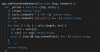
If I understood you correctly, you want the extension activated on ALL domains except the one you set. The dirty and quick way to do this is edit how the addon works. The extension is a simple zip archive you can unpack.

The file you have to edit is lib\common.js

Before:

upload_2019-8-7_16-41-7.png

after
upload_2019-8-7_16-41-18.png

We simply reversed the logic to always set the user agent except if the url is found. You can then deactivate/remove the older extension and import the new one by typing about:debugging in the URL bar. This will only temporary load the extension (until you close your firefox). To always have it imported I believe you would need to have it signed by Mozilla. Unsigned extensions could be imported in the Firefox Developer Edition.

https://developer.mozilla.org/en-US/docs/Mozilla/Add-ons/Distribution


upload_2019-8-7_17-2-12.png


If you want to skip the work, here's the fixed extension which you can import using addons:debugging

http://s000.tinyupload.com/index.php?file_id=92094187532306750320
 

Attachments

  • upload_2019-8-7_17-1-53.png
    upload_2019-8-7_17-1-53.png
    8.9 KB · Views: 3
  • upload_2019-8-7_17-2-3.png
    upload_2019-8-7_17-2-3.png
    8.9 KB · Views: 3
Last edited:
If I understood you correctly, you want the extension activated on ALL domains except the one you set. The dirty and quick way to do this is edit how the addon works. The extension is a simple zip archive you can unpack.

The file you have to edit is lib\common.js

Before:

View attachment 119172

after
View attachment 119173

We simply reversed the logic to always set the user agent except if the url is found. You can then deactivate/remove the older extension and import the new one by typing about:debugging in the URL bar. This will only temporary load the extension (until you close your firefox). To always have it imported I believe you would need to have it signed by Mozilla. Unsigned extensions could be imported in the Firefox Developer Edition.

https://developer.mozilla.org/en-US/docs/Mozilla/Add-ons/Distribution


View attachment 119176


If you want to skip the work, here's the fixed extension which you can import using addons:debugging

http://s000.tinyupload.com/index.php?file_id=92094187532306750320

That is genius! Thank you.

It works perfectly for Soundcloud, Facebook and Youtube. But for some reason it won't work for Pinterest. It's like Pinterest ignores the exception and just opens the mobile version anyway.

I tried all the noob stuff - restart browser, clear cookies, logout of Pinterest and login again, and it keeps serving me the mobile version (mobile is the user agent I'm trying to use).

In fact, even Soundcloud still "recognizes" that I'm using a mobile device, because when I try to login using one of the 6 mobile options (Nokia Symbian) it won't let me, tells me their robots think I'm a robot. But if I try to login using Apple iOS or Google Android or any of the other options, Soundcloud works fine.

So there must be like a deeper way to exclude a site from being affected. Any ideas?

What you gave me works like a charm for the other sites though. Very very elegant solution, I love it.
 
That is genius! Thank you.

It works perfectly for Soundcloud, Facebook and Youtube. But for some reason it won't work for Pinterest. It's like Pinterest ignores the exception and just opens the mobile version anyway.

I tried all the noob stuff - restart browser, clear cookies, logout of Pinterest and login again, and it keeps serving me the mobile version (mobile is the user agent I'm trying to use).

In fact, even Soundcloud still "recognizes" that I'm using a mobile device, because when I try to login using one of the 6 mobile options (Nokia Symbian) it won't let me, tells me their robots think I'm a robot. But if I try to login using Apple iOS or Google Android or any of the other options, Soundcloud works fine.

So there must be like a deeper way to exclude a site from being affected. Any ideas?

What you gave me works like a charm for the other sites though. Very very elegant solution, I love it.

No problem. Glad I could help.

I've checked both sites and the extension works as expected. I'm not sure what Pinterest is doing for you, but you can press F12 and open the network tab. There you can see the requests your browser is sending and there you will see the UserAgent header that is being sent.

That way you can be sure that the extension works 100%.

Those were the settings I used

upload_2019-8-9_13-17-28.png
 
No problem. Glad I could help.

I've checked both sites and the extension works as expected. I'm not sure what Pinterest is doing for you, but you can press F12 and open the network tab. There you can see the requests your browser is sending and there you will see the UserAgent header that is being sent.

That way you can be sure that the extension works 100%.

Those were the settings I used

View attachment 119249

Yes it does work as expected for all sites I tried it, but not for Pinterest.

I don't see much in the network tab:

K87f9EP


But if you'll look into it note that on the first 2-3 refreshes Pinterest will open the desktop version, but on third and forth and all subsequent refreshes it will load the mobile version.

Then if you switch to one of the desktop/browsers in the extension, Pinterest will load the mobile version for 2-3 refreshes, but then it will switch you back to desktop version.

I can't for the life of me figure out why it's doing it. Facebook, Youtube, Soundcloud all respect the exclusion, but not Pinterest.
 
Yes it does work as expected for all sites I tried it, but not for Pinterest.

I don't see much in the network tab:

K87f9EP


But if you'll look into it note that on the first 2-3 refreshes Pinterest will open the desktop version, but on third and forth and all subsequent refreshes it will load the mobile version.

Then if you switch to one of the desktop/browsers in the extension, Pinterest will load the mobile version for 2-3 refreshes, but then it will switch you back to desktop version.

I can't for the life of me figure out why it's doing it. Facebook, Youtube, Soundcloud all respect the exclusion, but not Pinterest.

When you select a request, a window should appear next to the request where the request headers are visible.

https://developer.mozilla.org/en-US/docs/Tools/Network_Monitor

Network_Monitor_Closeup.png


How do you know that Pinterest is displaying the mobile page? Is it when the bottom navigation bar appears? It's been pretty random for me, it could be pinterest caching something and then keep displaying the bottom navigation bar. But not really sure, but they are doing wonky things.
 
When you select a request, a window should appear next to the request where the request headers are visible.

https://developer.mozilla.org/en-US/docs/Tools/Network_Monitor

Network_Monitor_Closeup.png


How do you know that Pinterest is displaying the mobile page? Is it when the bottom navigation bar appears? It's been pretty random for me, it could be pinterest caching something and then keep displaying the bottom navigation bar. But not really sure, but they are doing wonky things.

Yes the bottom navigation bar shows it. But also if you visit any pin link or profile link it looks different on mobile than on desktop.

There seems to be a caching thing going on.

So you have the user agent extension turned on and on mobile, and you visit Pinterest and it shows mobile.

You turn off the user agent extension, open Pinterest in a new tab 3/4/5 times, eventually shows the desktop version.

You turn on the user agent extension and set it on mobile, open Pinterest in a new tab 3/4/5 times, eventually shows the mobile version.

And the behavior is pretty consistent.

So the solution you gave me gets ignored. And I also had another solution, where I added this in common.js

Code:
    var l = document.createElement("a");
    l.href = top;
    if (l.hostname === 'soundcloud.com' || l.hostname === 'www.soundcloud.com') {
      return false;
    }

And that works for Soundcloud. But for Pinterest it doesn't, I tried multiple variations.

For some reason no matter what I do Pinterest just recognizes the extension and ignores the exception :suspicious:
 
Hey @hatemachine,

Just to let you know that I found a solution to my problem.

I didn't want to do this, as I like to stay consistent, but I'll use this other addon - https://addons.mozilla.org/en-US/firefox/addon/uaswitcher/

For this addon when I add Pinterest as exception then Pinterest actually respects it and doesn't serve mobile version.

I have multiple Firefox Portable browsers I use for various things, and I REALLY wanted to use the same user agent extension on all of them. You know, just stay consistent. But in this case I'll have to make an exception for some of them and use this other extension where I can actually exclude Pinterest and it works.

Cheers :)
 
Back
Top