Website speed for Wordpress

staypositive

Supreme Member
Joined
Jul 28, 2015
Messages
1,433
Reaction score
225
my BHW buddies

My wordpress site slow as snail
And have google page speed score of 10/100

Any good suggestion how to make it faster ?
I already had

SiteGround optimiser all boxes ticked on
Cloudflare
Dynamic Cache
 
r
my BHW buddies

My wordpress site slow as snail
And have google page speed score of 10/100

Any good suggestion how to make it faster ?
I already had

SiteGround optimiser all boxes ticked on
Cloudflare
Dynamic Cache
right i had this issue recently...i used wp the fastest cache and got a great improvement!
 
my BHW buddies

My wordpress site slow as snail
And have google page speed score of 10/100

Any good suggestion how to make it faster ?
I already had

SiteGround optimiser all boxes ticked on
Cloudflare
Dynamic Cache

How many plug ins are you using and is the theme a fast theme?
 
google page speed score of 10/100

There could be many reasons for a slow WordPress site. Are you just checking the homepage? What about inner pages? How many MB are your pages? How decent is your hosting package?

Try creating a text-only page and disabling all plugins and test the speed of that page using a tool like WebPageTest. You will see what assets are holding you back.
 
my BHW buddies

My wordpress site slow as snail
And have google page speed score of 10/100

Any good suggestion how to make it faster ?
I already had

SiteGround optimiser all boxes ticked on
Cloudflare
Dynamic Cache

lemme tell you underground seo knowledge

install wp rocket plugin AND litespeed cache
set all options to max in both, but test thoroughly.
generally installing 2 cache plugins aint best idea but if you do tests and disable buggy options then u will make it

set cloudflare, set all options to max

pick light theme

convert all images to JPG or WEBP even better
you can do it in GIMP or online. make sure each image doesnt exceed 30-50kb maybe except very wide images like header (u can set image quality in GIMP)
dont use gifs

enjoy the profit

YO1VqPa


7b39ICz


yeah thats on slow theme, page with 3k words, ton of html and images
 
Generally, just with WP-Rocket or Swift Performance + a CDN like KeyCDN (that is pretty cheap) you could speed everything up
The problem is that this solution is not free.

Appsumo had a recent offer with Shortpixel but has finished recently. Anyway you can still install their plugin and get some credits for free. If your project is big, consider going for a better CDN that covers both JS/CSS + Images.

Go to Gtmetrix.com and do the test to see where are you failing. It's more comprehensive (at least for me) that Page Speed Insights or Lighthouse.
 
Check using GTMetrix or Lighthouse. They will show the issues which you need to fix. Optimize your images, use CDN and any cache plugin will help to boost the speed.
 
Does the site you are running 'need' to be on WordPress? If not, just use a static site generator like Jekyll or plain old html/css. The amount of fucking about I see some people do on basic company websites that aren't even using the blog features of WordPress, just to avoid having to learn a little bit of basic web development is astonishing
 
You have to work on lot if things to speed up site.
First find out what is slowing down site and find the solution for that on google is the best and easiest way rather than doing everything..
 
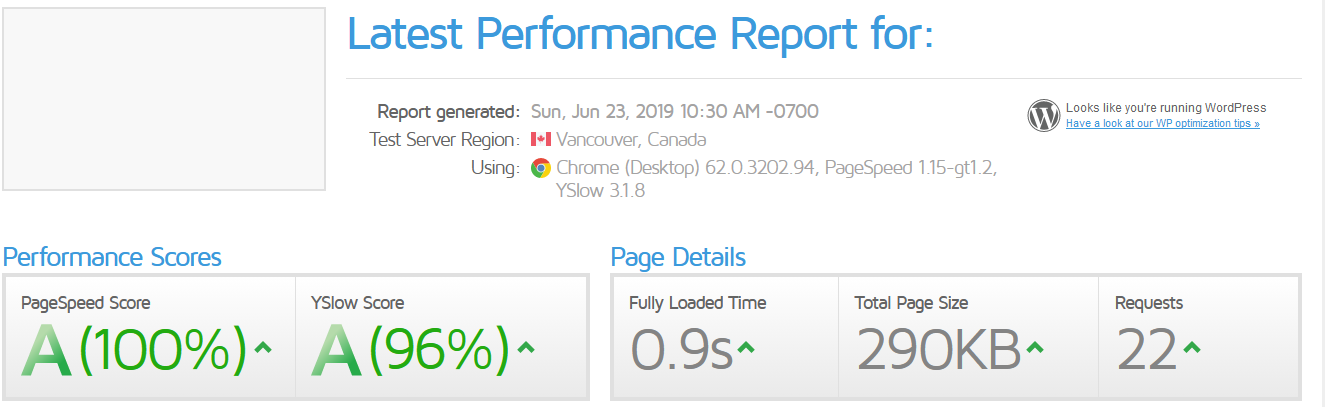
To achieve this results:
nBfksEh


I am using:
  • Plugins: Merge + Minify + Refresh & WP Rocket
  • CDN: Cloudflare and Keycdn
In WP Rocket you can Minify the CSS & JS, also you can combine the files that means it will take less requests to load the page.
 
I only use 2 plugins to help speed up my website. I use Cache Enabler, and
Autoptimize. Those two have never let me down.

This brings the site speed below 3 seconds even when I use the Divi theme, which is a slow theme in my opinion.
 
lemme tell you underground seo knowledge

install wp rocket plugin AND litespeed cache
set all options to max in both, but test thoroughly.
generally installing 2 cache plugins aint best idea but if you do tests and disable buggy options then u will make it

set cloudflare, set all options to max

pick light theme

convert all images to JPG or WEBP even better
you can do it in GIMP or online. make sure each image doesnt exceed 30-50kb maybe except very wide images like header (u can set image quality in GIMP)
dont use gifs

enjoy the profit

YO1VqPa


7b39ICz


yeah thats on slow theme, page with 3k words, ton of html and images


amazing results!! can you please post a screen shot of your result from https://webpagetest.org/


thanks in advance
 
To achieve this results:
nBfksEh


I am using:
  • Plugins: Merge + Minify + Refresh & WP Rocket
  • CDN: Cloudflare and Keycdn
In WP Rocket you can Minify the CSS & JS, also you can combine the files that means it will take less requests to load the page.


congrats as well. can you please post a screen shot of your result from https://webpagetest.org/

thanks in advance
 
I advice you to test all the plugins because it really depends on the website. Some tricks:
— do not set custom favicon url, just put favicon.ico to root directory
— check if there is any 4xx/3xx requests when you website loading and remove them
— defer google fonts scripts
— locally host GA js snippet
— remove unneccesary scripts on spesific pages (a.k.a. Asset cleanup)
— disable all features if you dont use -like emojis, trackbacks etc.
— stop hearthbeat
— combine js and css files to decrease requests
— implement lazy loading (there are 3 plugins, test to find that works with your website)

Ask anything if you need any help when implementing. Just keep in mind all solutions should be customized for your website.
 
I advice you to test all the plugins because it really depends on the website. Some tricks:
— do not set custom favicon url, just put favicon.ico to root directory
— check if there is any 4xx/3xx requests when you website loading and remove them
— defer google fonts scripts
— locally host GA js snippet
— remove unneccesary scripts on spesific pages (a.k.a. Asset cleanup)
— disable all features if you dont use -like emojis, trackbacks etc.
— stop hearthbeat
— combine js and css files to decrease requests
— implement lazy loading (there are 3 plugins, test to find that works with your website)

Ask anything if you need any help when implementing. Just keep in mind all solutions should be customized for your website.


great feedback. safe to assume from your tests that having google analytics does slow down the website? i have deleted google analytics from my side, since I hardly ever looked at it and wanted to ensure that I have the best possible speed.

also, what is your favorite cache plugin in wordpress? what combination of plugins do you use for most wordpress sites? thanks in advance
 
To achieve this results:
nBfksEh


I am using:
  • Plugins: Merge + Minify + Refresh & WP Rocket
  • CDN: Cloudflare and Keycdn
In WP Rocket you can Minify the CSS & JS, also you can combine the files that means it will take less requests to load the page.

High scores don't mean a thing when your page takes 4 seconds to load (unless your TTFB is very low).
 
great feedback. safe to assume from your tests that having google analytics does slow down the website? i have deleted google analytics from my side, since I hardly ever looked at it and wanted to ensure that I have the best possible speed.

also, what is your favorite cache plugin in wordpress? what combination of plugins do you use for most wordpress sites? thanks in advance

Yes, Google affects load time in a bad way. But there are plugins that help you host it locally. OR you can do it manually.

My favorite ones:
WP Rocket > W3 Total Cache > WP Fastest Cache

But, you should test them all to see which one works best for you. Since it depends on your website structure (plugins + theme + content) -- for example, WP Rocket is good for third-party heavy websites while W3 is good for media heavy websites, etc.
 
Back
Top