Rachmaninoff
Elite Member
- Jan 19, 2011
- 3,634
- 5,427
I’ve searched it here on BHW and couldn’t find a guide how to get do-follow contextual backlinks on Fandom, so I created this thread.
Here is how:
1. Register first at fandom.com/register?
2. Go to fandom.com/explore and search for a wiki page you’re looking for. They have Lifestyle, Music, Books, Games, etc.
I’m going to use “Red Dead Redemption” here as an example.
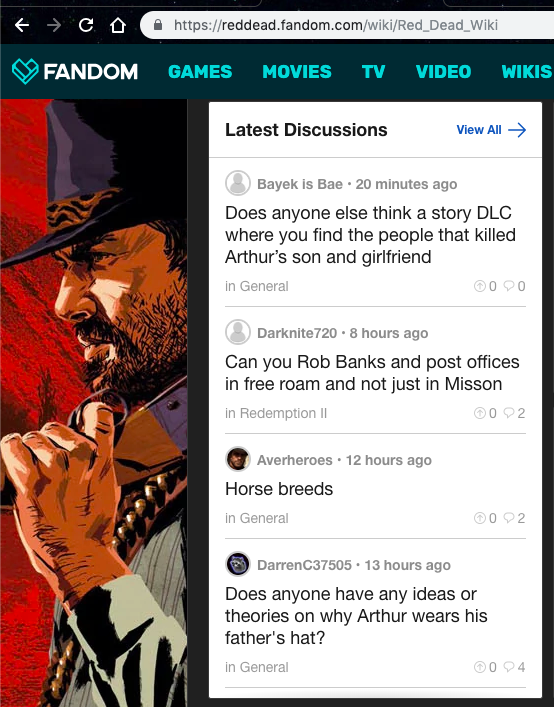
3. Scroll down the page until you found “Latest Discussions” like sample below. Then click View all.
4. Then you will see something like this. A text post.

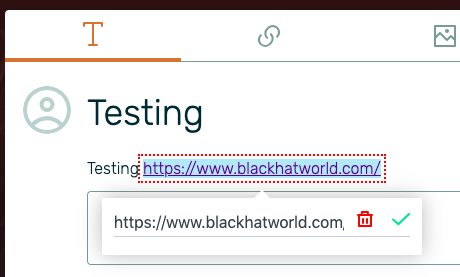
5. Place your article there along with your URL. Then hover your URL and hit the delete button. This is very important as your link will turn from no-follow to do-follow by doing this.
Tips: Post a related article there and you will get replies and vote that will push your article to “Hot” section. Which means TRAFFIC!!
6. Click Next, Add tags, then hit the Create Post.
Here is what it looks like

Bonus:
There’s another way to get a do-follow link, that is by creating a link post. Just add a caption (max 100 words) and paste your URL. You don’t need to hover the link and delete it like the one above. All links will be do-follow.
Please keep in mind, DO NOT spam or else your post will be deleted!
FAQs
Is this link indexed on Google?
Yes, it is.

Why not post the article on the Blog section on my dashboard account?
Because your post will be flagged as spam immediately. Guaranteed. Besides the “Latest Discussions” section has a higher indexing rate than the Blog section imo. You can get your link indexed in just two days without tier 2 links.
Hope this useful.
Here is how:
1. Register first at fandom.com/register?
2. Go to fandom.com/explore and search for a wiki page you’re looking for. They have Lifestyle, Music, Books, Games, etc.
I’m going to use “Red Dead Redemption” here as an example.
3. Scroll down the page until you found “Latest Discussions” like sample below. Then click View all.
4. Then you will see something like this. A text post.
5. Place your article there along with your URL. Then hover your URL and hit the delete button. This is very important as your link will turn from no-follow to do-follow by doing this.
Tips: Post a related article there and you will get replies and vote that will push your article to “Hot” section. Which means TRAFFIC!!
6. Click Next, Add tags, then hit the Create Post.
Here is what it looks like
Bonus:
There’s another way to get a do-follow link, that is by creating a link post. Just add a caption (max 100 words) and paste your URL. You don’t need to hover the link and delete it like the one above. All links will be do-follow.
Please keep in mind, DO NOT spam or else your post will be deleted!
FAQs
Is this link indexed on Google?
Yes, it is.
Why not post the article on the Blog section on my dashboard account?
Because your post will be flagged as spam immediately. Guaranteed. Besides the “Latest Discussions” section has a higher indexing rate than the Blog section imo. You can get your link indexed in just two days without tier 2 links.
Hope this useful.