
You are using an out of date browser. It may not display this or other websites correctly.
You should upgrade or use an alternative browser.
You should upgrade or use an alternative browser.
Need Free Recording Audio Software
- Thread starter ep2002
- Start date

EarthboundImmortal
Regular Member
- Sep 20, 2015
- 248
- 134
Audacity is only good to a point. Just get cheap version or free trial of Pro Tools, Reaper, or a good DAW.


blogzandstuff
Elite Member
- Jan 1, 2015
- 10,759
- 6,921
Unfortunately you don't on here, reportedi buy webshell/shell backdoor price pershell 1$
payment via : perfect money only
contact fb : facebook.com/profile.php?id=100021315856286
email : m

eternalwarrior
Senior Member
- Oct 7, 2012
- 1,012
- 397
You can try VSDC free video editor. Though it's for video editing, it has audio recording option too. You can download it from this link http://www.videosoftdev.com/free-video-editor
Last edited:


ep2002
Junior Member
- Aug 1, 2010
- 125
- 28
What do you mean it keeps cutting in & out?
Ok, so first of all I'm not a geek. I need something simple.
But I clicked on the red record button, I did a test recording & it was choppy. Same issue on the other computer of mine.
When I tried to do a 3rd test I couldn't b/c I don't know how to bloody delete the first recording LOL so when I recorded, it put the recording at the end, but then when I tried to delete the first recording (don't ask me what I did), it didn't, & it wouldn't play the 3rd test.
And I tried to find the instructions on how to delete the first recording, but in their knowledgebase there was nothing.
I thought MAYBE it was my video card causing problems. I have 2 new videos cards (different types) in both computers, but the odds of them both being corrupt are slim, so I don't think it's that.
Thanks
ep2002
Junior Member
- Aug 1, 2010
- 125
- 28
I'm using my ☎
You really shouldn't. Cell phones are VERY VERY toxic.
ep2002
Junior Member
- Aug 1, 2010
- 125
- 28
I use audacity for my animations and it works really good. Lots of various functions like noise reduction etc.
I wish it worked for me. I don't understand much of anything on the software.
Audacity is only good to a point. Just get cheap version or free trial of Pro Tools, Reaper, or a good DAW.
What's DAW?
Thanks
ep2002
Junior Member
- Aug 1, 2010
- 125
- 28
You can try VSDC free video editor. Though it's for video editing, it has audio recording option too. You can download it from this link http://www.videosoftdev.com/free-video-editor
Thank you. I'm hoping this one will work.
I tried to "thank your suggestion" but I don't see a link here for that.


MonteCarlos
BANNED
- Aug 1, 2015
- 520
- 844
Here comes the cavalry, lol!
https://www.audacityflex.com/1002.html
https://www.audacityflex.com/1002.html
EarthboundImmortal
Regular Member
- Sep 20, 2015
- 248
- 134
Digital audio workstationI wish it worked for me. I don't understand much of anything on the software.
What's DAW?
Thanks

kveldulv
Regular Member
- Aug 19, 2009
- 223
- 91
Audacity is fine, a DAW would be total overkill for your purposes.
Check your recording devices, and ideally, buy a decent ($20-50) microphone. Sennheiser make nice stuff at the low end.
Also turn off auto-levels on your mike as it will ruin your levels.
PS. when you're finished your recordings, normalise to level the volumes levels out a bit. Don't push it over 0db.
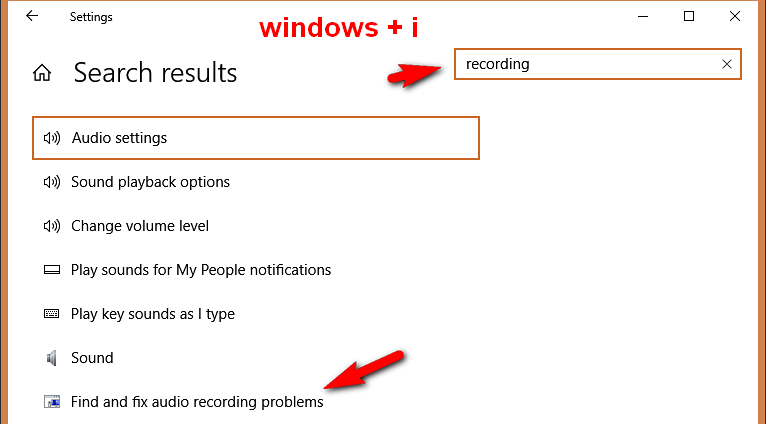
Check your recording devices, and ideally, buy a decent ($20-50) microphone. Sennheiser make nice stuff at the low end.
Also turn off auto-levels on your mike as it will ruin your levels.
PS. when you're finished your recordings, normalise to level the volumes levels out a bit. Don't push it over 0db.
EarthboundImmortal
Regular Member
- Sep 20, 2015
- 248
- 134
How is a workstation overkill? You can easily learn about them with YouTube. Workstation has better effects, access to multiple VST, faster editing, audio fading, etc. Pro Tools is excellent for recording with videos. Pro Tools also has a better interface. His videos will be good with Audacity, but with a DAW above average. A cheap mic and interface sound crisp as well. If he is recording with computer sound card will not sound as good. You can easily find free version. To each their own though.Audacity is fine, a DAW would be total overkill for your purposes.
Check your recording devices, and ideally, buy a decent ($20-50) microphone. Sennheiser make nice stuff at the low end.
Also turn off auto-levels on your mike as it will ruin your levels.
PS. when you're finished your recordings, normalise to level the volumes levels out a bit. Don't push it over 0db.
View attachment 115712
ep2002
Junior Member
- Aug 1, 2010
- 125
- 28
You can try VSDC free video editor. Though it's for video editing, it has audio recording option too. You can download it from this link http://www.videosoftdev.com/free-video-editor
WOW, this is a great little piece of software. Very intuitive & no cutting in & out. Plus I can delete a test recording.
Digital audio workstation
Thanks.
No clue what that is, but thanks LOL
Audacity is fine, a DAW would be total overkill for your purposes.
Check your recording devices, and ideally, buy a decent ($20-50) microphone. Sennheiser make nice stuff at the low end.
Also turn off auto-levels on your mike as it will ruin your levels.
PS. when you're finished your recordings, normalise to level the volumes levels out a bit. Don't push it over 0db.
View attachment 115712
I may get a more professional MIC later on, but right now I'm using a Plantronics USB headset & it's fine. Unfortunately, the volume buttons do not work (never did) & so I can't even change anything with it.
I don't know what 0db is. I'll have to ask a friend to translate what you said LOL
Thanks


kveldulv
Regular Member
- Aug 19, 2009
- 223
- 91
If you were going to record a 2 bar kickdrum loop, would you rather this:How is a workstation overkill?
Get a decent mic, and start with good, clear recordings. EQ a bit and normalise, get on with life.
Protools is great, but overkill for OP's use case.
Does anyone still read ?You can easily learn about them with YouTube.
https://www.soundonsound.com/techniques/recording
Someone mentioned Audacity, it's excellent. Reaper is decent, but probably confusing to someone new.
Another simple wav editor.
https://www.nch.com.au/wavepad/index.html
