
You are using an out of date browser. It may not display this or other websites correctly.
You should upgrade or use an alternative browser.
You should upgrade or use an alternative browser.
Dude's Journey to 1000$ per day
- Thread starter Jeepy
- Start date
- Status
- Not open for further replies.

Jeepy
Elite Member
- Jan 22, 2013
- 1,994
- 1,975
Grat stats. i would like to ask you 2 questions :
1- is 700+ traffic monthly or all time?
2- how you get d0f0ll0w backlinks?
1. Ahrefs traffic is something weird, I'm getting ~110 visits per day, so approx 3000 per month.
2. Just like all the other links, but I have my own secrets

Hi Jeepy,
Today I read both of your threads from start to finish. Amazin!
Question for you: How would you define a quality link? What factors/elements are important to you? (Examples on what I mean: number of words in the article linking to your website, topical relevancy of the article linking to your website, placement of the backling, like is it in the first paragraph, etc... there may be many factors that are important... )
I would say that quality link is the one you will not disavow if you get google penalty. It does not matter how much content or relevancy, just the fact that it comes from authority (or soon to be or ex authority) sites.
If I'm buying links, like PBN's then for me important is that they are with SSL certificate, not spammed to death (max 30 OBL) and with legit stats at Ahrefs (don't care about DA,PA,CF,TF, they are useless). Also, for PBN's the content would be nice to be longer than 500 words + relevancy. I have found that these cheap PBN's where everything is together don't work as well as for the same price niche related. Google likes related stuff, so for PBN"s topic relevancy matters.
One more important thing - no more Footer links for me
It's shady, but reeealllyy powerful game. If your competitor will see those links you can say goodbye to your site. For the placement: No, I think it does not matter as a few years ago there was this Google Rule - First come, first serve. It means the first link found in the article will get all the link juice, but nowadays I think it's not the case anymore.
Hi, nice journey thread!
My question was if you have ever used an expired domain to give more authority to your site by redirecting it to your portal.
If yes, do you have any tips besides using ahref to find good expired domains?
Yes, I have been doing it, but I can't give any tips as it's a dark game. But one think I can say - relevancy.
Awesome stuff, thanks for sharing!
Thanks!
Good luck bro <3
But, I have still not understood you sell products or just earning from another way?
I'm earning from Amazon Affiliate.

Sheepp
Senior Member
- Jan 15, 2018
- 935
- 566
One more important thing - no more Footer links for me
Didn't got that point, could you explain it a little bit further ? What can your competitor do .. ?
Jeepy
Elite Member
- Jan 22, 2013
- 1,994
- 1,975
Didn't got that point, could you explain it a little bit further ? What can your competitor do .. ?
If you link your sites together at footer, it takes one message to google and you have penalty

- Apr 15, 2017
- 2,314
- 3,081
Pretty Strong BacklinksThis week got a few new d0f0ll0w backlinks.

You're building authority af! Which is awesome

florisdebaas
Newbie
- Jul 4, 2018
- 30
- 11
This really looks awesome, great job.
Would you mind sharing a bit more information on how to gather such awesome backlink opportunities without spending a lot of dough?
Would you mind sharing a bit more information on how to gather such awesome backlink opportunities without spending a lot of dough?
Jeepy
Elite Member
- Jan 22, 2013
- 1,994
- 1,975
Weekly update:
Ahrefs:
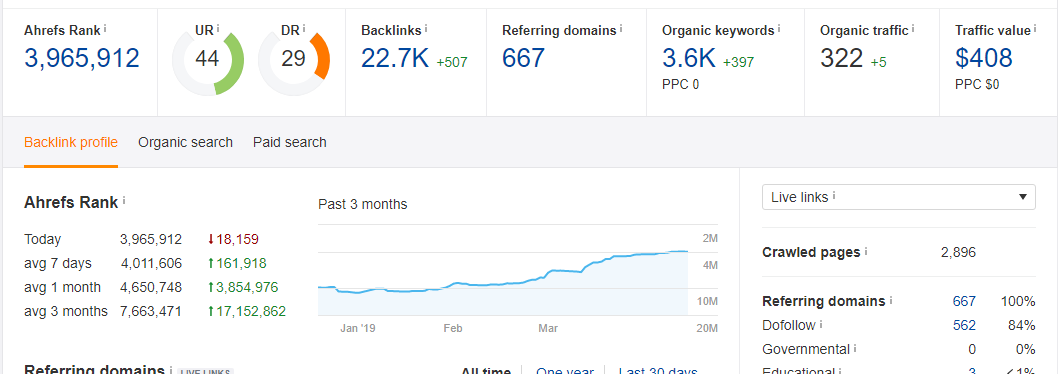
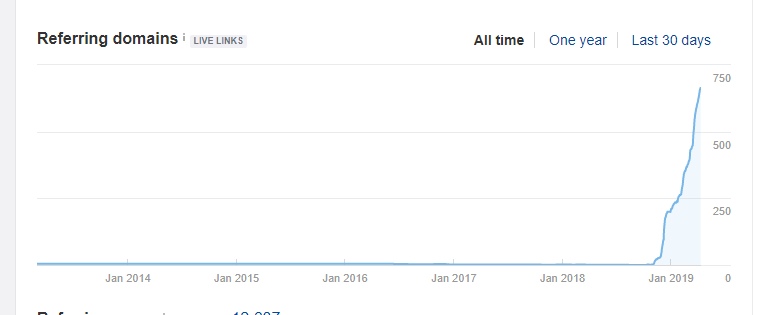
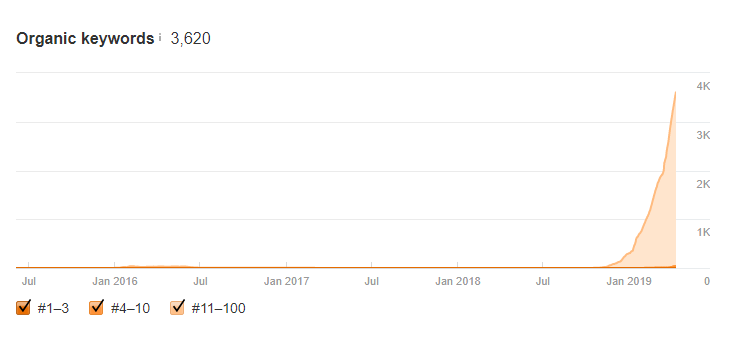
Majestics:
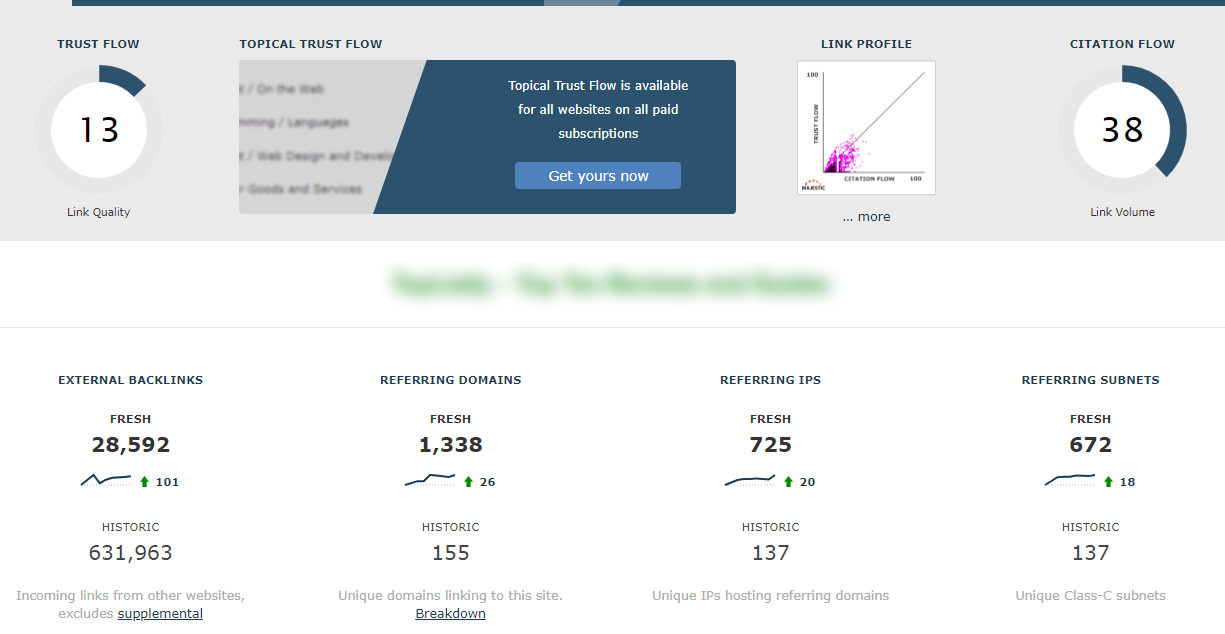
Semrush:
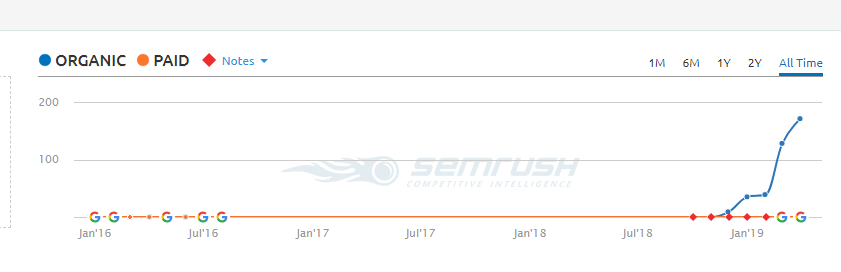
Google Webmasters
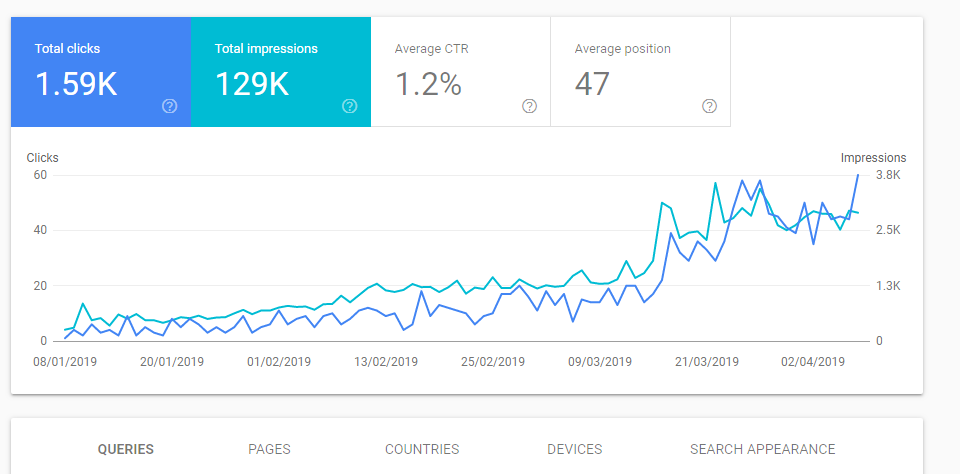
Amazon:
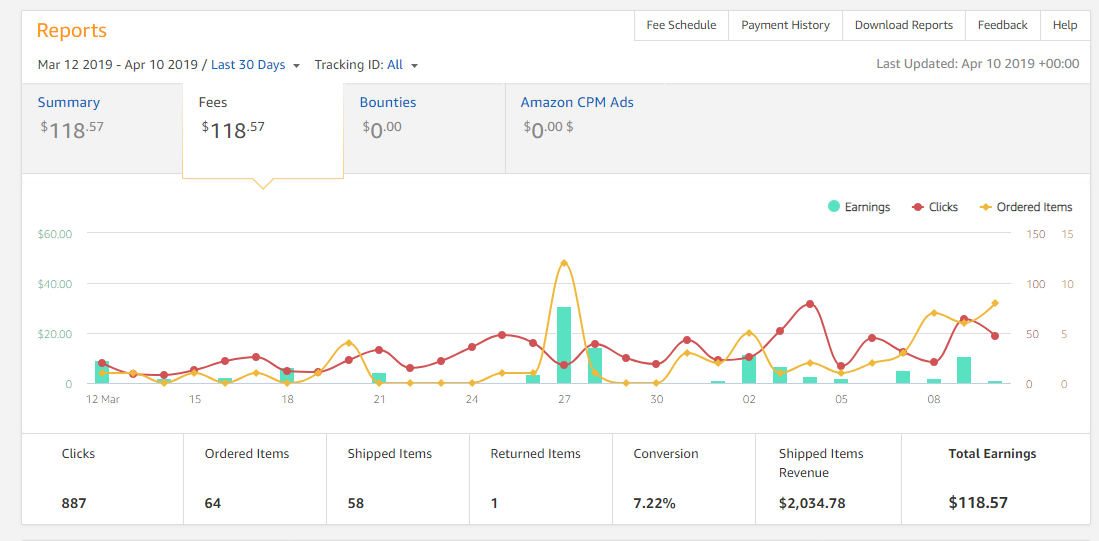
Here are my dropshipping Instagram account stats after ~1 month. Still building and soon will order shoutouts to my store.

!! Caution !!
I made a thread here about Yuzo Related posts plugin vulnerability, please check it out if you are using it.
https://www.blackhatworld.com/seo/beware-of-yuzo-related-posts-plugin.1111679/
--------------------------------------------------------------------------------------------------------
Things I learned this week!
If you are launching a new site with a lot of content, do not add sitemap at Google Webmasters. A sitemap will help you index the posts but it will also limit Google Crawl Bot Budget.
The best thing to do is to publish everything and then build some links or get ping service for your articles. You will see results at least 300% faster and wayy better than with sitemap included. Later you can add it like after 1-3 months, but also no need.
The other thing.
The SEO world is such bullshit IMHO. All the "big" guys are inventing some bullshit and all the other guys are making hype around it even if the thing is a total bullshiat. SEO is one of the biggest money spending businesses ever and yet it's regulated by a couple of guys who do not know shit.
What I meant by that is that you can read sooo many articles only about SEO, inventions, etc, mostly covered by 3-5 websites. And yet it's 70% bullshit. They are saying these 200+ ranking factors exist but I think there are like 10-15 max and content is not one of them.
I'm also getting angry about these guys spreading bullshit when 8 biggest companies (Purch, Time, Ziff Davis, Hearst, Evolve Media, Verizon, Vox and CBS) are dominating biggest keyword SERPS and for smaller keywords, Google are making featured snippets and thus stealing clicks from us.
I hope one day SEO will become a little bit more honest game and authority won't matter that much and Google will diversify SERP's and allow real review websites go above tech websites who rewrite Amazon reviews. (I understand that this will never happen, but who knows).
Just my two cents.
----------------------------------------------------------------------------------------------------
P.s
Shoutout to @nodyguy for his great Wikipedia service which helped me getting authority up and thus ranking smaller articles without links (I'm not saying I had ONLY Wikipedia links), but they help a LOT.
Also, I want to thank you guys who ordered my speed optimization service, it helped me to get money for my dropshipping journey ( https://www.blackhatworld.com/seo/t...py-helps-edition.1078951/page-4#post-11968860 ). I'm closing it this month anyway.
I want to thank @Geasy for pretty good link suggestions and other information, this is the first time I ordered links some other guys are suggesting hehe.
Check out @Billy Batts Journey thread, it's AWESOME! https://www.blackhatworld.com/seo/a...ives-you-an-extra-push-long-ass-read.1111098/
.
.
.
Elvis has left the building
Ahrefs:
Majestics:
Semrush:
Google Webmasters
Amazon:
Here are my dropshipping Instagram account stats after ~1 month. Still building and soon will order shoutouts to my store.
!! Caution !!
I made a thread here about Yuzo Related posts plugin vulnerability, please check it out if you are using it.
https://www.blackhatworld.com/seo/beware-of-yuzo-related-posts-plugin.1111679/
--------------------------------------------------------------------------------------------------------
Things I learned this week!
If you are launching a new site with a lot of content, do not add sitemap at Google Webmasters. A sitemap will help you index the posts but it will also limit Google Crawl Bot Budget.
The best thing to do is to publish everything and then build some links or get ping service for your articles. You will see results at least 300% faster and wayy better than with sitemap included. Later you can add it like after 1-3 months, but also no need.
The other thing.
The SEO world is such bullshit IMHO. All the "big" guys are inventing some bullshit and all the other guys are making hype around it even if the thing is a total bullshiat. SEO is one of the biggest money spending businesses ever and yet it's regulated by a couple of guys who do not know shit.
What I meant by that is that you can read sooo many articles only about SEO, inventions, etc, mostly covered by 3-5 websites. And yet it's 70% bullshit. They are saying these 200+ ranking factors exist but I think there are like 10-15 max and content is not one of them.
I'm also getting angry about these guys spreading bullshit when 8 biggest companies (Purch, Time, Ziff Davis, Hearst, Evolve Media, Verizon, Vox and CBS) are dominating biggest keyword SERPS and for smaller keywords, Google are making featured snippets and thus stealing clicks from us.
I hope one day SEO will become a little bit more honest game and authority won't matter that much and Google will diversify SERP's and allow real review websites go above tech websites who rewrite Amazon reviews. (I understand that this will never happen, but who knows).
Just my two cents.
----------------------------------------------------------------------------------------------------
P.s
Shoutout to @nodyguy for his great Wikipedia service which helped me getting authority up and thus ranking smaller articles without links (I'm not saying I had ONLY Wikipedia links), but they help a LOT.
Also, I want to thank you guys who ordered my speed optimization service, it helped me to get money for my dropshipping journey ( https://www.blackhatworld.com/seo/t...py-helps-edition.1078951/page-4#post-11968860 ). I'm closing it this month anyway.
I want to thank @Geasy for pretty good link suggestions and other information, this is the first time I ordered links some other guys are suggesting hehe.
Check out @Billy Batts Journey thread, it's AWESOME! https://www.blackhatworld.com/seo/a...ives-you-an-extra-push-long-ass-read.1111098/
.
.
.
Elvis has left the building

Billy Batts
BANNED
- Dec 16, 2016
- 5,883
- 11,015
Good job man!

BHG
Regular Member
- Apr 10, 2019
- 208
- 47
Also - I don't agree about your statement that long 4000 word buyers guides don't work I sold a niche site for $10k last year and started a very similar journey on a broad health site monetized with Amazon. Started maybe 8 months ago. All of my "money" articles are information-dense and the affiliate links only start about 1000 words in typically. But I see ~10% conversion rate.
I don't do the bestreviews tables or anything either. But maybe once my site grows I'll start adding them. At first, for me, content is king.. and careful link building
I sold a niche site for $10k last year and started a very similar journey on a broad health site monetized with Amazon. Started maybe 8 months ago. All of my "money" articles are information-dense and the affiliate links only start about 1000 words in typically. But I see ~10% conversion rate.I don't do the bestreviews tables or anything either. But maybe once my site grows I'll start adding them. At first, for me, content is king.. and careful link building
Jeepy
Elite Member
- Jan 22, 2013
- 1,994
- 1,975
Also - I don't agree about your statement that long 4000 word buyers guides don't work
I don't do the bestreviews tables or anything either. But maybe once my site grows I'll start adding them. At first, for me, content is king.. and careful link building
Congrats on the sale, but where did I. Say that 4000 word buying guides don't work?
Jeepy
Elite Member
- Jan 22, 2013
- 1,994
- 1,975
I think it was page 8 or 9 you or someone else said table + q&a is the way to go. I might also just be mistaken.
You were mistaken because I said the otherwise, don't go lower than 3500 words

Jeepy
Elite Member
- Jan 22, 2013
- 1,994
- 1,975
Today I want to talk about plugins I'm using. I'm more about the less the better but sometimes it's easier to install a small plugin in place for fuckng with the code which disappears after theme or core update lol. I'll be talking about plugins which are not required by the theme so I won't include them in the list.
1. (FREE) Akismet Anti-Spam - this is almost as a wheel for a car, it does not slow down your site, it's small, but quite good works with spam comments, so after installing your WordPress leave this enabled.
2. (FREE) All 404 Redirect to Homepage - This is quite good if sometimes to forget to add 301 to an article which changed URL, so you won't lose any link juice.
3. (PAID) Amazon Affiliate for WordPress - https://getaawp.com/ - this is a really great plugin for building Amazon Product rich websites. I'm always including products within the text and after the article, it has amazing Conversion Rate and looks amazing.
4. (FREE) AmazonJS - https://wordpress.org/plugins/amazonjs/ - I was using this plugin since I started to learn about Amazon Niche sites and it's working great even it's abandoned. I'm always including product with this plugin under the images and it converts also amazing. I got ~40% of product sales only with this plugin alone.
5. (FREE) Attachment Pages Redirect - https://wordpress.org/plugins/attachment-pages-redirect/ - I don't use any stupid SEO plugins so I need to Redirect attachment pages manually. I was doping it by adding a small image.php file in the root of my WordPress before, but it disappears after each update of the theme, and this plugin does the same exact thing. In case you don't know why you need this - attachment pages are the page which opens when you click on an image (if you set it in the settings) and it's just a post page with just an image. Google considers it as a thin content page and if you have thousands of images you can get a thin content penalty just by using these pages.
6. (FREE) Contact Form 7 - https://wordpress.org/plugins/contact-form-7/ - It's exactly what the title says.
7. (FREE) Contextual Related Posts - https://wordpress.org/plugins/contextual-related-posts/ - For better internal linking, this shows ~5 related posts at the end of an article.
8. (FREE) Disable Google Fonts - https://wordpress.org/plugins/disable-google-fonts/- It disables Google Fonts and speeds up a site quite a lot
9. (FREE) External Links - https://wordpress.org/plugins/sem-external-links/ - I'm using this to nofollow all outgoing links and allow only specific links to be d0f0ll0w
10. (FREE) Jetpack - I'm using this only for Site Stats and all other features are disabled as they slow down your site for 60% and are stupid features.
11. (FREE) Redirection - https://wordpress.org/plugins/redirection/ - I'm using this plugin so I can 301 redirect URL changes.
12. (FREE) Remove Category URL - https://wordpress.org/plugins/remove-category-url/ - This plugin removes stupid "category" from the URL like - page.com/category/cats.
13. (FREE) Schema - https://wordpress.org/plugins/schema/ - I'm using this for SiteLinks and rich snippets.
14. (FREE) Shortcodes Ultimate - https://wordpress.org/plugins/shortcodes-ultimate/ - I'm using this because it's rich in featured and shortcodes.
15. (FREE) TinyMCE Advanced - https://wordpress.org/plugins/tinymce-advanced/ - This is must have for all WordPress websites and are not questionable IMHO.
16. (FREE) Two Factor Authentication - https://wordpress.org/plugins/two-factor-authentication/ - I'm quite careful about my websites as well as for security so 2FA is must have for me!
17. (FREE) Wordfence Security - https://wordpress.org/plugins/wordfence/ - Also Good Firewall and overall virus protection from hacked plugins or cyber attacks.
18. (FREE) WP Word Count - https://wordpress.org/plugins/wp-word-count/ - For counting how many words I have posted and how many are in the draft.
19. (FREE) WPS Hide Login - https://wordpress.org/plugins/wps-hide-login/ -Also a security trick - hide your default wp-admin with something more related to you. This is good for bruteforce attack protection.
And that's it. I'm using almost the basic plugins and doing it for all my sites. Of course, I could live without some of these but sometimes it's easier to install a small plugin that trying to achieve the thing without it.!
1. (FREE) Akismet Anti-Spam - this is almost as a wheel for a car, it does not slow down your site, it's small, but quite good works with spam comments, so after installing your WordPress leave this enabled.
2. (FREE) All 404 Redirect to Homepage - This is quite good if sometimes to forget to add 301 to an article which changed URL, so you won't lose any link juice.
3. (PAID) Amazon Affiliate for WordPress - https://getaawp.com/ - this is a really great plugin for building Amazon Product rich websites. I'm always including products within the text and after the article, it has amazing Conversion Rate and looks amazing.
4. (FREE) AmazonJS - https://wordpress.org/plugins/amazonjs/ - I was using this plugin since I started to learn about Amazon Niche sites and it's working great even it's abandoned. I'm always including product with this plugin under the images and it converts also amazing. I got ~40% of product sales only with this plugin alone.
5. (FREE) Attachment Pages Redirect - https://wordpress.org/plugins/attachment-pages-redirect/ - I don't use any stupid SEO plugins so I need to Redirect attachment pages manually. I was doping it by adding a small image.php file in the root of my WordPress before, but it disappears after each update of the theme, and this plugin does the same exact thing. In case you don't know why you need this - attachment pages are the page which opens when you click on an image (if you set it in the settings) and it's just a post page with just an image. Google considers it as a thin content page and if you have thousands of images you can get a thin content penalty just by using these pages.
6. (FREE) Contact Form 7 - https://wordpress.org/plugins/contact-form-7/ - It's exactly what the title says.
7. (FREE) Contextual Related Posts - https://wordpress.org/plugins/contextual-related-posts/ - For better internal linking, this shows ~5 related posts at the end of an article.
8. (FREE) Disable Google Fonts - https://wordpress.org/plugins/disable-google-fonts/- It disables Google Fonts and speeds up a site quite a lot
9. (FREE) External Links - https://wordpress.org/plugins/sem-external-links/ - I'm using this to nofollow all outgoing links and allow only specific links to be d0f0ll0w
10. (FREE) Jetpack - I'm using this only for Site Stats and all other features are disabled as they slow down your site for 60% and are stupid features.
11. (FREE) Redirection - https://wordpress.org/plugins/redirection/ - I'm using this plugin so I can 301 redirect URL changes.
12. (FREE) Remove Category URL - https://wordpress.org/plugins/remove-category-url/ - This plugin removes stupid "category" from the URL like - page.com/category/cats.
13. (FREE) Schema - https://wordpress.org/plugins/schema/ - I'm using this for SiteLinks and rich snippets.
14. (FREE) Shortcodes Ultimate - https://wordpress.org/plugins/shortcodes-ultimate/ - I'm using this because it's rich in featured and shortcodes.
15. (FREE) TinyMCE Advanced - https://wordpress.org/plugins/tinymce-advanced/ - This is must have for all WordPress websites and are not questionable IMHO.
16. (FREE) Two Factor Authentication - https://wordpress.org/plugins/two-factor-authentication/ - I'm quite careful about my websites as well as for security so 2FA is must have for me!
17. (FREE) Wordfence Security - https://wordpress.org/plugins/wordfence/ - Also Good Firewall and overall virus protection from hacked plugins or cyber attacks.
18. (FREE) WP Word Count - https://wordpress.org/plugins/wp-word-count/ - For counting how many words I have posted and how many are in the draft.
19. (FREE) WPS Hide Login - https://wordpress.org/plugins/wps-hide-login/ -Also a security trick - hide your default wp-admin with something more related to you. This is good for bruteforce attack protection.
And that's it. I'm using almost the basic plugins and doing it for all my sites. Of course, I could live without some of these but sometimes it's easier to install a small plugin that trying to achieve the thing without it.!

- Apr 15, 2017
- 2,314
- 3,081
Today I want to talk about plugins I'm using. I'm more about the less the better but sometimes it's easier to install a small plugin in place for fuckng with the code which disappears after theme or core update lol. I'll be talking about plugins which are not required by the theme so I won't include them in the list.
1. (FREE) Akismet Anti-Spam - this is almost as a wheel for a car, it does not slow down your site, it's small, but quite good works with spam comments, so after installing your WordPress leave this enabled.
2. (FREE) All 404 Redirect to Homepage - This is quite good if sometimes to forget to add 301 to an article which changed URL, so you won't lose any link juice.
3. (PAID) Amazon Affiliate for WordPress - https://getaawp.com/ - this is a really great plugin for building Amazon Product rich websites. I'm always including products within the text and after the article, it has amazing Conversion Rate and looks amazing.
4. (FREE) AmazonJS - https://wordpress.org/plugins/amazonjs/ - I was using this plugin since I started to learn about Amazon Niche sites and it's working great even it's abandoned. I'm always including product with this plugin under the images and it converts also amazing. I got ~40% of product sales only with this plugin alone.
5. (FREE) Attachment Pages Redirect - https://wordpress.org/plugins/attachment-pages-redirect/ - I don't use any stupid SEO plugins so I need to Redirect attachment pages manually. I was doping it by adding a small image.php file in the root of my WordPress before, but it disappears after each update of the theme, and this plugin does the same exact thing. In case you don't know why you need this - attachment pages are the page which opens when you click on an image (if you set it in the settings) and it's just a post page with just an image. Google considers it as a thin content page and if you have thousands of images you can get a thin content penalty just by using these pages.
6. (FREE) Contact Form 7 - https://wordpress.org/plugins/contact-form-7/ - It's exactly what the title says.
7. (FREE) Contextual Related Posts - https://wordpress.org/plugins/contextual-related-posts/ - For better internal linking, this shows ~5 related posts at the end of an article.
8. (FREE) Disable Google Fonts - https://wordpress.org/plugins/disable-google-fonts/- It disables Google Fonts and speeds up a site quite a lot
9. (FREE) External Links - https://wordpress.org/plugins/sem-external-links/ - I'm using this to nofollow all outgoing links and allow only specific links to be d0f0ll0w
10. (FREE) Jetpack - I'm using this only for Site Stats and all other features are disabled as they slow down your site for 60% and are stupid features.
11. (FREE) Redirection - https://wordpress.org/plugins/redirection/ - I'm using this plugin so I can 301 redirect URL changes.
12. (FREE) Remove Category URL - https://wordpress.org/plugins/remove-category-url/ - This plugin removes stupid "category" from the URL like - page.com/category/cats.
13. (FREE) Schema - https://wordpress.org/plugins/schema/ - I'm using this for SiteLinks and rich snippets.
14. (FREE) Shortcodes Ultimate - https://wordpress.org/plugins/shortcodes-ultimate/ - I'm using this because it's rich in featured and shortcodes.
15. (FREE) TinyMCE Advanced - https://wordpress.org/plugins/tinymce-advanced/ - This is must have for all WordPress websites and are not questionable IMHO.
16. (FREE) Two Factor Authentication - https://wordpress.org/plugins/two-factor-authentication/ - I'm quite careful about my websites as well as for security so 2FA is must have for me!
17. (FREE) Wordfence Security - https://wordpress.org/plugins/wordfence/ - Also Good Firewall and overall virus protection from hacked plugins or cyber attacks.
18. (FREE) WP Word Count - https://wordpress.org/plugins/wp-word-count/ - For counting how many words I have posted and how many are in the draft.
19. (FREE) WPS Hide Login - https://wordpress.org/plugins/wps-hide-login/ -Also a security trick - hide your default wp-admin with something more related to you. This is good for bruteforce attack protection.
And that's it. I'm using almost the basic plugins and doing it for all my sites. Of course, I could live without some of these but sometimes it's easier to install a small plugin that trying to achieve the thing without it.!
Pretty good list. Will help a lot of people with some plugins.
Would recommend you to copy paste this into a new thread. So that more people can see this.
This post is awesome.
- Status
- Not open for further replies.