[METHOD] Qualifying Huge Link Building Prospects in Minutes

Sburator

Junior Member
Joined
Jun 28, 2016
Messages
184
Reaction score
83
This would be my first attempt to give something back to this wonderful community, wherefrom I got so much help delivered with such great generosity. Hope my post will help you get your jobs done faster, so you will have more time for other, more pleasant things.

So.....


How to filter that huge list of link building prospects in just a few minutes and save time - Big Time!


Link builders know that qualifying prospects is extremely time-consuming, and a tool that helps you find the relevant prospects fast is gold. This guide will teach you a simple method to obtain a list of relevant prospects in several minutes rather than days, or weeks of manual work.

You either have time, either money, usually; or maybe you are short of both of them, which is a very challenging situation, yet not hopeless. However, these two resources - money & time - relate, and one way to increase your profit is to actually make many things in less time. The faster you solve problems, the more clients you can help; the more customers you get, well... you’ve got the idea… you make more money. This is why doing things by hand is not an option if you consider SEO more than just a hobby; you simply waste too much time this way. So you will have to use some tools, and two very powerful pieces of software for getting and processing large amounts of data are
Scrapebox, Screaming Frog and Microsoft Excel.

If you are a freelancer or a small SEO agency you should know that Screaming Frog is not a cheap solution; the software itself is not very expensive (not expensive at all, actually), but to use it at its full potential - parsing huge websites, or lists of URLs - requires a quite powerful PC configuration (however, you can eat an elephant one bite at a time, as they say, so here is a guide that will teach How To Crawl Large Websites Using The Screaming Frog SEO Spider). A free alternative is Xenu's Link Sleuth, but this cute little program is getting older, and older - it hasn’t been updated for almost a decade; however, Xenu is free and fast. As for Excel, some quite decent free alternatives are Google Sheets and Open Office.

Handling Excel sheets with hundreds of hundreds of rows also requires a powerful PC. A computer with a generous amount of memory and a vigorous processor will allow you to run Screaming Frog properly and also to sort and filter
huge amount of data in Excel. So, if you plan to take your SEO business serious, you will have to spend some money to save time, but it is going to be a great investment in the long run. In case you want to have a PC well configured for Screaming Frog, here is the recommended hardware for it.

Anyway, let’s get back to our main topic -
how to qualify link building prospects fast.

How to generate this list with prospects?
1. Searching for relevant websites


First things first - in order to get what you want, you actually have to know first what you need. So what are you looking for?

Let’s say we want to start a “broken links” type link building campaign for a website about aircraft modelling. In this case, we will try to find some relevant pages from relevant websites.

But what does “relevant” mean actually? Well, for you it means that the ideal prospects should be websites containing pages with:

  • the “links” or “resources” terms in the URL, and
  • the “aircraft modelling” related keywords in the title tag, in the body, and/or inside the anchors; basic on-page SEO, actually.
Tip - the links page are not only good link building opportunities, but also gates to even more relevant prospects; those external links with relevant keywords in their anchors could take you to even more relevant prospects.

Now that we know what we want, it is time to search for those ideal websites. We could do that in a couple of ways:

● Just search for aircraft modelling - you will get quantity, but not the best relevance (a large list containing many websites including a lot of not so relevant results too).

If we want some more relevant results we should narrow a bit the search using the advanced operators as follows:

  • aircraft modelling inurl:links.htm - to get websites containing the term “links.htm” in the URLs.
  • aircraft modelling intitle:”aircraft modelling” - to get websites containing your keywords in the title tags
  • aircraft modelling intext:”aircraft modelling” - to get websites containing your keywords somewhere in the body.
Another somewhat useful search operator was inanchor: used to search for websites containing certain keywords in their anchors. Unfortunately, Google abandoned this operator a few years ago, but we are going to use Screaming Frog to extract those anchors.

Personally, I usually use the first variant, that offers me those links pages from relevant websites, and do the rest of filtering with Screaming Frog and Excell, as you will see below. However, feel free to experiment.

2. Getting the Links Pages with ScrapeBox
1. Footprints list

Create a list of footprints that will help you find those pages containing links to relevant websites similar to yours.

This list can have only a handful of entries such as:
"%KW%" "links"
"%KW%" "*links*"
"%KW%" "*links"
"%KW%" "links*"
"%KW%" "resources"
"%KW%" "*resources*"
"%KW%" "*resources"
"%KW%" "resources*"


Or it can be more complex, something like this:
bskcVUd


2. Insert the Keywords
IbJHTwx


3. Merge the Keywords and the Footprints List

FV4lJfp


4. You will get something like this

XgHu0GM


5. Start Harvesting

yUWXk5P


lWKvNGz


6. Trim the list


You can filter out URLs that are not containing a certain keywords, footprints (like
links and/or resources) or extension; this is very useful when you target a particular country (such as .uk, .ca, .au, etc.).
QYgPKDe


That’s it. In about a couple of minutes, you have managed to create a list of some hundreds of links pages from possible relevant websites. This is the point where the hard work of qualifying prospects usually begins, only that this time Screaming Frog will do this for you.


Tip – If you can’t afford ScrapeBox, here is another version of this post, where I describe how to get that list prospects using only Google and a couple of free Chrome extensions.

How to find relevant prospects from our list?

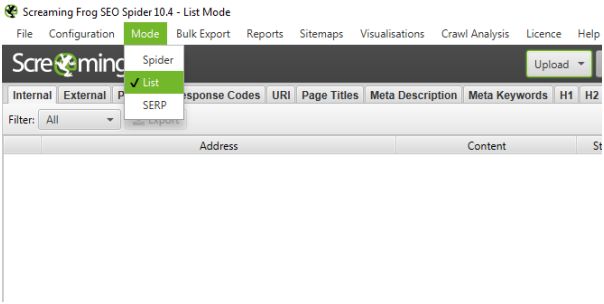
1. Set the List mode in Screaming Frog
SCeHcOy


2.
In Configuration/Spider/Limits set the Crawl Depth to 0 - you want Screaming Frog to read and extract data from that list only, not to crawl the URLs.
gnKwNfp


3.
Paste the URLs in Screaming Frog and hit Start.
fWiV3wa


Tip - Optionally you can enter some relevant keywords in the Custom/Search fields - this will display the pages containing those keywords (something like intext:keywords).
Ws3VIsa


4. When Screaming Frog hit 100%,
export All Outlinks, and you will see all the links, both internal and external, (this is that inanchor: operator I have mentioned above), along with their anchors and the "Source" pages;
o3xiiPc


Tip - If you want to select only the external links, simply Bulk Export the External Links
9Fzabsk


5.
Import the list in Excel. Now, you will use the Advanced Filters in Excel. If you want to learn more about using filters, this guide could be helpful (it was for me).

The process of sorting is not that complicated. You just need to enter the criteria of sorting above the URLs. These criteria will contain the relevant keywords to your website (something like =*model aircraft*).
Qngf9AN


The logic behind this is that the links with relevant keywords in their anchors are signs of both relevance (to your website) and interest (in your website).

  • relevant pages usually have links with keywords in their anchors pointing to relevant websites.
  • if a website has already linked to a site similar to yours, it should be interested in your site too.
6. Select the Anchors to be filtered
n22x4hn


7. Select the criteria
YHgu4cu


8. Hit OK and
Voilà! Now you have a list full of probably up to 90% relevant prospects. Just get rid of the duplicate URLs, and you are ready to do some outreach.
1oJZ8qa


Conclusion

There is a great variety of software these days that allow you to crunch huge volumes of data. Three of them are ScrapeBox, Screaming Frog and Excel. So a possible shortage is in no case related to the number or complexity of the tools available, but rather to our ability to make the right choices and learn how to get the most out of them.

This is why you should be proud of yourself now, after reading this guide; you have just learnt no only how to better use your time, but also several new things you can do with these three powerful pieces of software.

And remember - time is the only un-renewable resource, so use it wisely!

Got any more tips to do things even faster? Feel free to share them with us.
 
Last edited by a moderator:
Thank you for taking the time to write this post. It was epic!
 
I never knew that Screaming frog could be used to audit backlinks. I've only used it for on-site SEO and it's undoubtedly best.
 
Really great tutorial OP, gonna try this today! :)
 
Great thread but sounds like this is lot of works for the same things you can do with ahref in a couple of clicks. but for those seo newbies can do it easily who can not afford seo software
 
This would be my first attempt to give something back to this wonderful community, wherefrom I got so much help delivered with such great generosity. Hope my post will help you get your jobs done faster, so you will have more time for other, more pleasant things.

So.....


How to filter that huge list of link building prospects in just a few minutes and save time - Big Time!


Link builders know that qualifying prospects is extremely time-consuming, and a tool that helps you find the relevant prospects fast is gold. This guide will teach you a simple method to obtain a list of relevant prospects in several minutes rather than days, or weeks of manual work.

You either have time, either money, usually; or maybe you are short of both of them, which is a very challenging situation, yet not hopeless. However, these two resources - money & time - relate, and one way to increase your profit is to actually make many things in less time. The faster you solve problems, the more clients you can help; the more customers you get, well... you’ve got the idea… you make more money. This is why doing things by hand is not an option if you consider SEO more than just a hobby; you simply waste too much time this way. So you will have to use some tools, and two very powerful pieces of software for getting and processing large amounts of data are
Scrapebox, Screaming Frog and Microsoft Excel.

If you are a freelancer or a small SEO agency you should know that Screaming Frog is not a cheap solution; the software itself is not very expensive (not expensive at all, actually), but to use it at its full potential - parsing huge websites, or lists of URLs - requires a quite powerful PC configuration (however, you can eat an elephant one bite at a time, as they say, so here is a guide that will teach How To Crawl Large Websites Using The Screaming Frog SEO Spider). A free alternative is Xenu's Link Sleuth, but this cute little program is getting older, and older - it hasn’t been updated for almost a decade; however, Xenu is free and fast. As for Excel, some quite decent free alternatives are Google Sheets and Open Office.

Handling Excel sheets with hundreds of hundreds of rows also requires a powerful PC. A computer with a generous amount of memory and a vigorous processor will allow you to run Screaming Frog properly and also to sort and filter
huge amount of data in Excel. So, if you plan to take your SEO business serious, you will have to spend some money to save time, but it is going to be a great investment in the long run. In case you want to have a PC well configured for Screaming Frog, here is the recommended hardware for it.

Anyway, let’s get back to our main topic -
how to qualify link building prospects fast.

How to generate this list with prospects?
1. Searching for relevant websites


First things first - in order to get what you want, you actually have to know first what you need. So what are you looking for?

Let’s say we want to start a “broken links” type link building campaign for a website about aircraft modelling. In this case, we will try to find some relevant pages from relevant websites.

But what does “relevant” mean actually? Well, for you it means that the ideal prospects should be websites containing pages with:

  • the “links” or “resources” terms in the URL, and
  • the “aircraft modelling” related keywords in the title tag, in the body, and/or inside the anchors; basic on-page SEO, actually.
Tip - the links page are not only good link building opportunities, but also gates to even more relevant prospects; those external links with relevant keywords in their anchors could take you to even more relevant prospects.

Now that we know what we want, it is time to search for those ideal websites. We could do that in a couple of ways:

● Just search for aircraft modelling - you will get quantity, but not the best relevance (a large list containing many websites including a lot of not so relevant results too).

If we want some more relevant results we should narrow a bit the search using the advanced operators as follows:

  • aircraft modelling inurl:links.htm - to get websites containing the term “links.htm” in the URLs.
  • aircraft modelling intitle:”aircraft modelling” - to get websites containing your keywords in the title tags
  • aircraft modelling intext:”aircraft modelling” - to get websites containing your keywords somewhere in the body.
Another somewhat useful search operator was inanchor: used to search for websites containing certain keywords in their anchors. Unfortunately, Google abandoned this operator a few years ago, but we are going to use Screaming Frog to extract those anchors.

Personally, I usually use the first variant, that offers me those links pages from relevant websites, and do the rest of filtering with Screaming Frog and Excell, as you will see below. However, feel free to experiment.

2. Getting the Links Pages with ScrapeBox
1. Footprints list

Create a list of footprints that will help you find those pages containing links to relevant websites similar to yours.

This list can have only a handful of entries such as:
"%KW%" "links"
"%KW%" "*links*"
"%KW%" "*links"
"%KW%" "links*"
"%KW%" "resources"
"%KW%" "*resources*"
"%KW%" "*resources"
"%KW%" "resources*"


Or it can be more complex, something like this:
bskcVUd


2. Insert the Keywords
IbJHTwx


3. Merge the Keywords and the Footprints List

FV4lJfp


4. You will get something like this

XgHu0GM


5. Start Harvesting

yUWXk5P


lWKvNGz


6. Trim the list


You can filter out URLs that are not containing a certain keywords, footprints (like
links and/or resources) or extension; this is very useful when you target a particular country (such as .uk, .ca, .au, etc.).
QYgPKDe


That’s it. In about a couple of minutes, you have managed to create a list of some hundreds of links pages from possible relevant websites. This is the point where the hard work of qualifying prospects usually begins, only that this time Screaming Frog will do this for you.


Tip – If you can’t afford ScrapeBox, here is another version of this post, where I describe how to get that list prospects using only Google and a couple of free Chrome extensions.

How to find relevant prospects from our list?

1. Set the List mode in Screaming Frog
SCeHcOy


2.
In Configuration/Spider/Limits set the Crawl Depth to 0 - you want Screaming Frog to read and extract data from that list only, not to crawl the URLs.
gnKwNfp


3.
Paste the URLs in Screaming Frog and hit Start.
fWiV3wa


Tip - Optionally you can enter some relevant keywords in the Custom/Search fields - this will display the pages containing those keywords (something like intext:keywords).
Ws3VIsa


4. When Screaming Frog hit 100%,
export All Outlinks, and you will see all the links, both internal and external, (this is that inanchor: operator I have mentioned above), along with their anchors and the "Source" pages;
o3xiiPc


Tip - If you want to select only the external links, simply Bulk Export the External Links
9Fzabsk


5.
Import the list in Excel. Now, you will use the Advanced Filters in Excel. If you want to learn more about using filters, this guide could be helpful (it was for me).

The process of sorting is not that complicated. You just need to enter the criteria of sorting above the URLs. These criteria will contain the relevant keywords to your website (something like =*model aircraft*).
Qngf9AN


The logic behind this is that the links with relevant keywords in their anchors are signs of both relevance (to your website) and interest (in your website).

  • relevant pages usually have links with keywords in their anchors pointing to relevant websites.
  • if a website has already linked to a site similar to yours, it should be interested in your site too.
6. Select the Anchors to be filtered
n22x4hn


7. Select the criteria
YHgu4cu


8. Hit OK and
Voilà! Now you have a list full of probably up to 90% relevant prospects. Just get rid of the duplicate URLs, and you are ready to do some outreach.
1oJZ8qa


Conclusion

There is a great variety of software these days that allow you to crunch huge volumes of data. Three of them are ScrapeBox, Screaming Frog and Excel. So a possible shortage is in no case related to the number or complexity of the tools available, but rather to our ability to make the right choices and learn how to get the most out of them.

This is why you should be proud of yourself now, after reading this guide; you have just learnt no only how to better use your time, but also several new things you can do with these three powerful pieces of software.

And remember - time is the only un-renewable resource, so use it wisely!

Got any more tips to do things even faster? Feel free to share them with us.
thank you .

This is the basic footprints

"%KW%" "links"
"%KW%" "*links*"
"%KW%" "*links"
"%KW%" "links*"
"%KW%" "resources"
"%KW%" "*resources*"
"%KW%" "*resources"
"%KW%" "resources*"

can you now post the advance/complex list of footprints aswell so we can copy and paste cheers .
 
can you now post the advance/complex list of footprints aswell so we can copy and paste cheers .

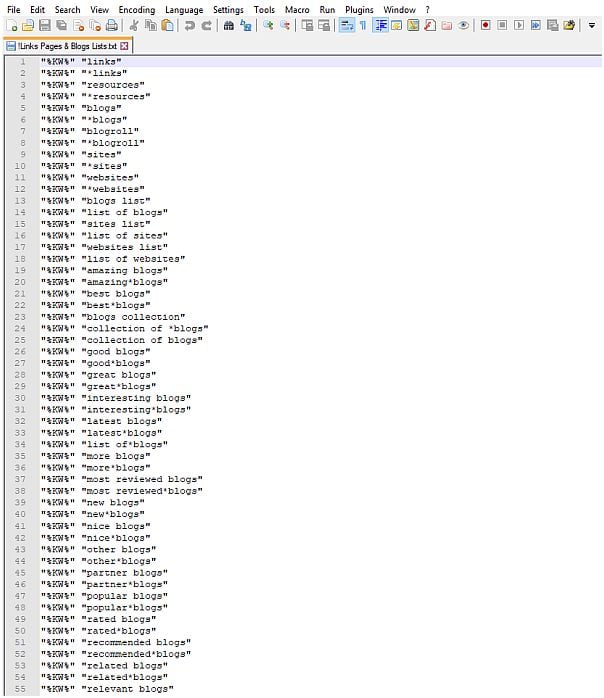
Sure. This is the list with all the footprints I use for scraping links/resources pages

"%KW%" "links"
"%KW%" "*links"
"%KW%" "resources"
"%KW%" "*resources"
"%KW%" "blogs"
"%KW%" "*blogs"
"%KW%" "blogroll"
"%KW%" "*blogroll"
"%KW%" "sites"
"%KW%" "*sites"
"%KW%" "websites"
"%KW%" "*websites"
"%KW%" "blogs list"
"%KW%" "list of blogs"
"%KW%" "sites list"
"%KW%" "list of sites"
"%KW%" "websites list"
"%KW%" "list of websites"
"%KW%" "amazing blogs"
"%KW%" "amazing*blogs"
"%KW%" "best blogs"
"%KW%" "best*blogs"
"%KW%" "blogs collection"
"%KW%" "collection of *blogs"
"%KW%" "collection of blogs"
"%KW%" "good blogs"
"%KW%" "good*blogs"
"%KW%" "great blogs"
"%KW%" "great*blogs"
"%KW%" "interesting blogs"
"%KW%" "interesting*blogs"
"%KW%" "latest blogs"
"%KW%" "latest*blogs"
"%KW%" "list of*blogs"
"%KW%" "more blogs"
"%KW%" "more*blogs"
"%KW%" "most reviewed blogs"
"%KW%" "most reviewed*blogs"
"%KW%" "new blogs"
"%KW%" "new*blogs"
"%KW%" "nice blogs"
"%KW%" "nice*blogs"
"%KW%" "other blogs"
"%KW%" "other*blogs"
"%KW%" "partner blogs"
"%KW%" "partner*blogs"
"%KW%" "popular blogs"
"%KW%" "popular*blogs"
"%KW%" "rated blogs"
"%KW%" "rated*blogs"
"%KW%" "recommended blogs"
"%KW%" "recommended*blogs"
"%KW%" "related blogs"
"%KW%" "related*blogs"
"%KW%" "relevant blogs"
"%KW%" "relevant*blogs"
"%KW%" "suggested blogs"
"%KW%" "suggested*blogs"
"%KW%" "scored blogs"
"%KW%" "scored*blogs"
"%KW%" "useful blogs"
"%KW%" "useful*blogs"
"%KW%" "%KW%" blogs"
"%KW%" blogs"
"%KW%*blogs"
"%KW%" "*blogs on %KW%"
"blogs on %KW%"
"*blogs on %KW%"
"%KW%" "blogs about %KW%"
"blogs about %KW%"
"*blogs about %KW%"
"%KW%" "amazing sites"
"%KW%" "amazing*sites"
"%KW%" "best sites"
"%KW%" "best*sites"
"%KW%" "blog collection"
"%KW%" "blog roll"
"%KW%" "sites collection"
"%KW%" "collection of *sites"
"%KW%" "collection of sites"
"%KW%" "good sites"
"%KW%" "good*sites"
"%KW%" "great sites"
"%KW%" "great*sites"
"%KW%" "interesting sites"
"%KW%" "interesting*sites"
"%KW%" "latest sites"
"%KW%" "latest*sites"
"%KW%" "list of*sites"
"%KW%" "more sites"
"%KW%" "more*sites"
"%KW%" "most reviewed sites"
"%KW%" "most reviewed*sites"
"%KW%" "new sites"
"%KW%" "new*sites"
"%KW%" "nice sites"
"%KW%" "nice*sites"
"%KW%" "other sites"
"%KW%" "other*sites"
"%KW%" "partner sites"
"%KW%" "partner*sites"
"%KW%" "popular sites"
"%KW%" "popular*sites"
"%KW%" "rated sites"
"%KW%" "rated*sites"
"%KW%" "recommended sites"
"%KW%" "recommended*sites"
"%KW%" "related sites"
"%KW%" "related*sites"
"%KW%" "relevant sites"
"%KW%" "relevant*sites"
"%KW%" "suggested sites"
"%KW%" "suggested*sites"
"%KW%" "scored sites"
"%KW%" "scored*sites"
"%KW%" "useful sites"
"%KW%" "useful*sites"
"%KW%" "%KW%" sites"
"%KW%" "%KW%*sites"
"%KW%" sites"
"%KW%*sites"
"%KW%" "*sites on %KW%"
"sites on %KW%"
"*sites on %KW%"
"%KW%" "sites about %KW%"
"%KW%" "*sites about %KW%"
"sites about %KW%"
"*sites about %KW%"
"%KW%" "amazing websites"
"%KW%" "amazing*websites"
"%KW%" "best websites"
"%KW%" "best*websites"
"%KW%" "websites collection"
"%KW%" "collection of *websites"
"%KW%" "collection of websites"
"%KW%" "good websites"
"%KW%" "good*websites"
"%KW%" "great websites"
"%KW%" "great*websites"
"%KW%" "interesting websites"
"%KW%" "interesting*websites"
"%KW%" "latest websites"
"%KW%" "latest*websites"
"%KW%" "list of*websites"
"%KW%" "more websites"
"%KW%" "more*websites"
"%KW%" "most reviewed websites"
"%KW%" "most reviewed*websites"
"%KW%" "new websites"
"%KW%" "new*websites"
"%KW%" "nice websites"
"%KW%" "nice*websites"
"%KW%" "other websites"
"%KW%" "other*websites"
"%KW%" "partner websites"
"%KW%" "partner*websites"
"%KW%" "popular websites"
"%KW%" "popular*websites"
"%KW%" "rated websites"
"%KW%" "rated*websites"
"%KW%" "recommended websites"
"%KW%" "recommended*websites"
"%KW%" "related websites"
"%KW%" "related*websites"
"%KW%" "relevant websites"
"%KW%" "relevant*websites"
"%KW%" "suggested websites"
"%KW%" "suggested*websites"
"%KW%" "scored websites"
"%KW%" "scored*websites"
"%KW%" "useful websites"
"%KW%" "useful*websites"
"%KW%" "%KW%" websites"
"%KW%" websites"
"%KW%*websites"
"%KW%" "*websites on %KW%"
"websites on %KW%"
"*websites on %KW%"
"%KW%" "websites about %KW%"
"%KW%" "*websites about %KW%"
"websites about %KW%"
"*websites about %KW%"
"%KW%" "*web*sites"
"%KW%" "web*sites"
"%KW%" "amazing web*sites"
"%KW%" "amazing*web*sites"
"%KW%" "best web*sites"
"%KW%" "best*web*sites"
"%KW%" "web*sites collection"
"%KW%" "web*sites list"
"%KW%" "collection of *web*sites"
"%KW%" "collection of web*sites"
"%KW%" "good web*sites"
"%KW%" "good*web*sites"
"%KW%" "great web*sites"
"%KW%" "great*web*sites"
"%KW%" "interesting web*sites"
"%KW%" "interesting*web*sites"
"%KW%" "latest web*sites"
"%KW%" "latest*web*sites"
"%KW%" "list of web*sites"
"%KW%" "list of*web*sites"
"%KW%" "more web*sites"
"%KW%" "more*web*sites"
"%KW%" "most reviewed web*sites"
"%KW%" "most reviewed*web*sites"
"%KW%" "new web*sites"
"%KW%" "new*web*sites"
"%KW%" "nice web*sites"
"%KW%" "nice*web*sites"
"%KW%" "other web*sites"
"%KW%" "other*web*sites"
"%KW%" "partner web*sites"
"%KW%" "partner*web*sites"
"%KW%" "popular web*sites"
"%KW%" "popular*web*sites"
"%KW%" "rated web*sites"
"%KW%" "rated*web*sites"
"%KW%" "recommended web*sites"
"%KW%" "recommended*web*sites"
"%KW%" "related web*sites"
"%KW%" "related*web*sites"
"%KW%" "relevant web*sites"
"%KW%" "relevant*web*sites"
"%KW%" "suggested web*sites"
"%KW%" "suggested*web*sites"
"%KW%" "scored web*sites"
"%KW%" "scored*web*sites"
"%KW%" "useful web*sites"
"%KW%" "useful*web*sites"
"%KW%" "%KW% web*sites"
"%KW%" "%KW%*web*sites"
"%KW% web*sites"
"%KW%*web*sites"
"web*sites on %KW%"
"*web*sites on %KW%"
"%KW%" "*web*sites about %KW%"
"web*sites about %KW%"
"*web*sites about %KW%"
"%KW%" "*links"
"%KW%" "amazing links"
"%KW%" "amazing*links"
"%KW%" "best links"
"%KW%" "best*links"
"%KW%" "links collection"
"%KW%" "links list"
"%KW%" "collection of *links"
"%KW%" "collection of links"
"%KW%" "good links"
"%KW%" "good*links"
"%KW%" "great links"
"%KW%" "great*links"
"%KW%" "interesting links"
"%KW%" "interesting*links"
"%KW%" "latest links"
"%KW%" "latest*links"
"%KW%" "list of links"
"%KW%" "list of*links"
"%KW%" "more links"
"%KW%" "more*links"
"%KW%" "most reviewed links"
"%KW%" "most reviewed*links"
"%KW%" "new links"
"%KW%" "new*links"
"%KW%" "nice links"
"%KW%" "nice*links"
"%KW%" "other links"
"%KW%" "other*links"
"%KW%" "partner links"
"%KW%" "partner*links"
"%KW%" "popular links"
"%KW%" "popular*links"
"%KW%" "rated links"
"%KW%" "rated*links"
"%KW%" "recommended links"
"%KW%" "recommended*links"
"%KW%" "related links"
"%KW%" "related*links"
"%KW%" "relevant links"
"%KW%" "relevant*links"
"%KW%" "suggested links"
"%KW%" "suggested*links"
"%KW%" "scored links"
"%KW%" "scored*links"
"%KW%" "useful links"
"%KW%" "useful*links"
"%KW%" "%KW%" links"
"%KW%" "%KW%*links"
"%KW%" links"
"%KW%*links"
"links on %KW%"
"*links on %KW%"
"%KW%" "links about %KW%"
"links about %KW%"
"*links about %KW%"
"%KW%" "amazing resources"
"%KW%" "amazing*resources"
"%KW%" "best resources"
"%KW%" "best*resources"
"%KW%" "resources collection"
"%KW%" "resources list"
"%KW%" "collection of *resources"
"%KW%" "collection of resources"
"%KW%" "good resources"
"%KW%" "good*resources"
"%KW%" "great resources"
"%KW%" "great*resources"
"%KW%" "interesting resources"
"%KW%" "interesting*resources"
"%KW%" "latest resources"
"%KW%" "latest*resources"
"%KW%" "list of resources"
"%KW%" "list of*resources"
"%KW%" "more resources"
"%KW%" "more*resources"
"%KW%" "most reviewed resources"
"%KW%" "most reviewed*resources"
"%KW%" "new resources"
"%KW%" "new*resources"
"%KW%" "nice resources"
"%KW%" "nice*resources"
"%KW%" "other resources"
"%KW%" "other*resources"
"%KW%" "partner resources"
"%KW%" "partner*resources"
"%KW%" "popular resources"
"%KW%" "popular*resources"
"%KW%" "rated resources"
"%KW%" "rated*resources"
"%KW%" "recommended resources"
"%KW%" "recommended*resources"
"%KW%" "related resources"
"%KW%" "related*resources"
"%KW%" "relevant resources"
"%KW%" "relevant*resources"
"%KW%" "suggested resources"
"%KW%" "suggested*resources"
"%KW%" "scored resources"
"%KW%" "scored*resources"
"%KW%" "useful resources"
"%KW%" "useful*resources"
"%KW% resources"
"%KW%*resources"
"%KW%" "resources on %KW%"
"%KW%" "*resources on %KW%"
"resources on %KW%"
"*resources on %KW%"
"%KW%" "resources about %KW%"
"resources about %KW%"
"*resources about %KW%"
"%KW%" "%KW%*blogs"
"%KW%" "blogs on %KW%"
"%KW%" "*blogs about %KW%"
"%KW%" "sites on %KW%"
"%KW%" "%KW%*websites"
"%KW%" "websites on %KW%"
"%KW%" "web*sites on %KW%"
"%KW%" "*web*sites on %KW%"
"%KW%" "web*sites about %KW%"
"%KW%" "links on %KW%"
"%KW%" "*links on %KW%"
"%KW%" "*links about %KW%"
"%KW%" "%KW% resources"
"%KW%" "%KW%*resources"
"%KW%" "*resources about %KW%"
 
Last edited:
An updated list:

"%KW%" "links"
"%KW%" "*links"
"%KW%" "resources"
"%KW%" "*resources"
"%KW%" "blogs"
"%KW%" "*blogs"
"%KW%" "blogroll"
"%KW%" "*blogroll"
"%KW%" "sites"
"%KW%" "*sites"
"%KW%" "websites"
"%KW%" "*websites"
"%KW%" "blogs list"
"%KW%" "list of blogs"
"%KW%" "sites list"
"%KW%" "list of sites"
"%KW%" "websites list"
"%KW%" "list of websites"
"%KW%" "amazing blogs"
"%KW%" "amazing*blogs"
"%KW%" "best blogs"
"%KW%" "best*blogs"
"%KW%" "blogs collection"
"%KW%" "collection of *blogs"
"%KW%" "collection of blogs"
"%KW%" "good blogs"
"%KW%" "good*blogs"
"%KW%" "great blogs"
"%KW%" "great*blogs"
"%KW%" "interesting blogs"
"%KW%" "interesting*blogs"
"%KW%" "latest blogs"
"%KW%" "latest*blogs"
"%KW%" "list of*blogs"
"%KW%" "more blogs"
"%KW%" "more*blogs"
"%KW%" "most reviewed blogs"
"%KW%" "most reviewed*blogs"
"%KW%" "new blogs"
"%KW%" "new*blogs"
"%KW%" "nice blogs"
"%KW%" "nice*blogs"
"%KW%" "other blogs"
"%KW%" "other*blogs"
"%KW%" "partner blogs"
"%KW%" "partner*blogs"
"%KW%" "popular blogs"
"%KW%" "popular*blogs"
"%KW%" "rated blogs"
"%KW%" "rated*blogs"
"%KW%" "recommended blogs"
"%KW%" "recommended*blogs"
"%KW%" "related blogs"
"%KW%" "related*blogs"
"%KW%" "relevant blogs"
"%KW%" "relevant*blogs"
"%KW%" "suggested blogs"
"%KW%" "suggested*blogs"
"%KW%" "scored blogs"
"%KW%" "scored*blogs"
"%KW%" "useful blogs"
"%KW%" "useful*blogs"
"%KW%" "%KW% blogs"
"%KW% blogs"
"%KW%*blogs"
"%KW%" "*blogs on %KW%"
"blogs on %KW%"
"*blogs on %KW%"
"%KW%" "blogs about %KW%"
"blogs about %KW%"
"*blogs about %KW%"
"%KW%" "amazing sites"
"%KW%" "amazing*sites"
"%KW%" "best sites"
"%KW%" "best*sites"
"%KW%" "blog collection"
"%KW%" "blog roll"
"%KW%" "sites collection"
"%KW%" "collection of *sites"
"%KW%" "collection of sites"
"%KW%" "good sites"
"%KW%" "good*sites"
"%KW%" "great sites"
"%KW%" "great*sites"
"%KW%" "interesting sites"
"%KW%" "interesting*sites"
"%KW%" "latest sites"
"%KW%" "latest*sites"
"%KW%" "list of*sites"
"%KW%" "more sites"
"%KW%" "more*sites"
"%KW%" "most reviewed sites"
"%KW%" "most reviewed*sites"
"%KW%" "new sites"
"%KW%" "new*sites"
"%KW%" "nice sites"
"%KW%" "nice*sites"
"%KW%" "other sites"
"%KW%" "other*sites"
"%KW%" "partner sites"
"%KW%" "partner*sites"
"%KW%" "popular sites"
"%KW%" "popular*sites"
"%KW%" "rated sites"
"%KW%" "rated*sites"
"%KW%" "recommended sites"
"%KW%" "recommended*sites"
"%KW%" "related sites"
"%KW%" "related*sites"
"%KW%" "relevant sites"
"%KW%" "relevant*sites"
"%KW%" "suggested sites"
"%KW%" "suggested*sites"
"%KW%" "scored sites"
"%KW%" "scored*sites"
"%KW%" "useful sites"
"%KW%" "useful*sites"
"%KW%" "%KW% sites"
"%KW%" "%KW%*sites"
"%KW% sites"
"%KW%*sites"
"%KW%" "*sites on %KW%"
"sites on %KW%"
"*sites on %KW%"
"%KW%" "sites about %KW%"
"%KW%" "*sites about %KW%"
"sites about %KW%"
"*sites about %KW%"
"%KW%" "amazing websites"
"%KW%" "amazing*websites"
"%KW%" "best websites"
"%KW%" "best*websites"
"%KW%" "websites collection"
"%KW%" "collection of *websites"
"%KW%" "collection of websites"
"%KW%" "good websites"
"%KW%" "good*websites"
"%KW%" "great websites"
"%KW%" "great*websites"
"%KW%" "interesting websites"
"%KW%" "interesting*websites"
"%KW%" "latest websites"
"%KW%" "latest*websites"
"%KW%" "list of*websites"
"%KW%" "more websites"
"%KW%" "more*websites"
"%KW%" "most reviewed websites"
"%KW%" "most reviewed*websites"
"%KW%" "new websites"
"%KW%" "new*websites"
"%KW%" "nice websites"
"%KW%" "nice*websites"
"%KW%" "other websites"
"%KW%" "other*websites"
"%KW%" "partner websites"
"%KW%" "partner*websites"
"%KW%" "popular websites"
"%KW%" "popular*websites"
"%KW%" "rated websites"
"%KW%" "rated*websites"
"%KW%" "recommended websites"
"%KW%" "recommended*websites"
"%KW%" "related websites"
"%KW%" "related*websites"
"%KW%" "relevant websites"
"%KW%" "relevant*websites"
"%KW%" "suggested websites"
"%KW%" "suggested*websites"
"%KW%" "scored websites"
"%KW%" "scored*websites"
"%KW%" "useful websites"
"%KW%" "useful*websites"
"%KW%" "%KW% websites"
"%KW% websites"
"%KW%*websites"
"%KW%" "*websites on %KW%"
"websites on %KW%"
"*websites on %KW%"
"%KW%" "websites about %KW%"
"%KW%" "*websites about %KW%"
"websites about %KW%"
"*websites about %KW%"
"%KW%" "*web*sites"
"%KW%" "web*sites"
"%KW%" "amazing web*sites"
"%KW%" "amazing*web*sites"
"%KW%" "best web*sites"
"%KW%" "best*web*sites"
"%KW%" "web*sites collection"
"%KW%" "web*sites list"
"%KW%" "collection of *web*sites"
"%KW%" "collection of web*sites"
"%KW%" "good web*sites"
"%KW%" "good*web*sites"
"%KW%" "great web*sites"
"%KW%" "great*web*sites"
"%KW%" "interesting web*sites"
"%KW%" "interesting*web*sites"
"%KW%" "latest web*sites"
"%KW%" "latest*web*sites"
"%KW%" "list of web*sites"
"%KW%" "list of*web*sites"
"%KW%" "more web*sites"
"%KW%" "more*web*sites"
"%KW%" "most reviewed web*sites"
"%KW%" "most reviewed*web*sites"
"%KW%" "new web*sites"
"%KW%" "new*web*sites"
"%KW%" "nice web*sites"
"%KW%" "nice*web*sites"
"%KW%" "other web*sites"
"%KW%" "other*web*sites"
"%KW%" "partner web*sites"
"%KW%" "partner*web*sites"
"%KW%" "popular web*sites"
"%KW%" "popular*web*sites"
"%KW%" "rated web*sites"
"%KW%" "rated*web*sites"
"%KW%" "recommended web*sites"
"%KW%" "recommended*web*sites"
"%KW%" "related web*sites"
"%KW%" "related*web*sites"
"%KW%" "relevant web*sites"
"%KW%" "relevant*web*sites"
"%KW%" "suggested web*sites"
"%KW%" "suggested*web*sites"
"%KW%" "scored web*sites"
"%KW%" "scored*web*sites"
"%KW%" "useful web*sites"
"%KW%" "useful*web*sites"
"%KW%" "%KW% web*sites"
"%KW%" "%KW%*web*sites"
"%KW% web*sites"
"%KW%*web*sites"
"web*sites on %KW%"
"*web*sites on %KW%"
"%KW%" "*web*sites about %KW%"
"web*sites about %KW%"
"*web*sites about %KW%"
"%KW%" "*links"
"%KW%" "amazing links"
"%KW%" "amazing*links"
"%KW%" "best links"
"%KW%" "best*links"
"%KW%" "links collection"
"%KW%" "links list"
"%KW%" "collection of *links"
"%KW%" "collection of links"
"%KW%" "good links"
"%KW%" "good*links"
"%KW%" "great links"
"%KW%" "great*links"
"%KW%" "interesting links"
"%KW%" "interesting*links"
"%KW%" "latest links"
"%KW%" "latest*links"
"%KW%" "list of links"
"%KW%" "list of*links"
"%KW%" "more links"
"%KW%" "more*links"
"%KW%" "most reviewed links"
"%KW%" "most reviewed*links"
"%KW%" "new links"
"%KW%" "new*links"
"%KW%" "nice links"
"%KW%" "nice*links"
"%KW%" "other links"
"%KW%" "other*links"
"%KW%" "partner links"
"%KW%" "partner*links"
"%KW%" "popular links"
"%KW%" "popular*links"
"%KW%" "rated links"
"%KW%" "rated*links"
"%KW%" "recommended links"
"%KW%" "recommended*links"
"%KW%" "related links"
"%KW%" "related*links"
"%KW%" "relevant links"
"%KW%" "relevant*links"
"%KW%" "suggested links"
"%KW%" "suggested*links"
"%KW%" "scored links"
"%KW%" "scored*links"
"%KW%" "useful links"
"%KW%" "useful*links"
"%KW%" "%KW% links"
"%KW%" "%KW%*links"
"%KW% links"
"%KW%*links"
"links on %KW%"
"*links on %KW%"
"%KW%" "links about %KW%"
"links about %KW%"
"*links about %KW%"
"%KW%" "amazing resources"
"%KW%" "amazing*resources"
"%KW%" "best resources"
"%KW%" "best*resources"
"%KW%" "resources collection"
"%KW%" "resources list"
"%KW%" "collection of *resources"
"%KW%" "collection of resources"
"%KW%" "good resources"
"%KW%" "good*resources"
"%KW%" "great resources"
"%KW%" "great*resources"
"%KW%" "interesting resources"
"%KW%" "interesting*resources"
"%KW%" "latest resources"
"%KW%" "latest*resources"
"%KW%" "list of resources"
"%KW%" "list of*resources"
"%KW%" "more resources"
"%KW%" "more*resources"
"%KW%" "most reviewed resources"
"%KW%" "most reviewed*resources"
"%KW%" "new resources"
"%KW%" "new*resources"
"%KW%" "nice resources"
"%KW%" "nice*resources"
"%KW%" "other resources"
"%KW%" "other*resources"
"%KW%" "partner resources"
"%KW%" "partner*resources"
"%KW%" "popular resources"
"%KW%" "popular*resources"
"%KW%" "rated resources"
"%KW%" "rated*resources"
"%KW%" "recommended resources"
"%KW%" "recommended*resources"
"%KW%" "related resources"
"%KW%" "related*resources"
"%KW%" "relevant resources"
"%KW%" "relevant*resources"
"%KW%" "suggested resources"
"%KW%" "suggested*resources"
"%KW%" "scored resources"
"%KW%" "scored*resources"
"%KW%" "useful resources"
"%KW%" "useful*resources"
"%KW% resources"
"%KW%*resources"
"%KW%" "resources on %KW%"
"%KW%" "*resources on %KW%"
"resources on %KW%"
"*resources on %KW%"
"%KW%" "resources about %KW%"
"resources about %KW%"
"*resources about %KW%"
"%KW%" "%KW%*blogs"
"%KW%" "blogs on %KW%"
"%KW%" "*blogs about %KW%"
"%KW%" "sites on %KW%"
"%KW%" "%KW%*websites"
"%KW%" "websites on %KW%"
"%KW%" "web*sites on %KW%"
"%KW%" "*web*sites on %KW%"
"%KW%" "web*sites about %KW%"
"%KW%" "links on %KW%"
"%KW%" "*links on %KW%"
"%KW%" "*links about %KW%"
"%KW%" "%KW% resources"
"%KW%" "%KW%*resources"
"%KW%" "*resources about %KW%"
 
Back
Top