Rachel.online
Newbie
- May 18, 2018
- 13
- 2
Normally, what's the lifespan of a laptop? Mine works slower this time, but only 1yr old. Everything was updated. Anyone can suggest what to check on my laptop?



Normally, what's the lifespan of a laptop? Mine works slower this time, but only 1yr old. Everything was updated. Anyone can suggest what to check on my laptop?
On average maybe 2-4 years. Depends how much heat you expose it to. Cooling pads will help increase the lifespan
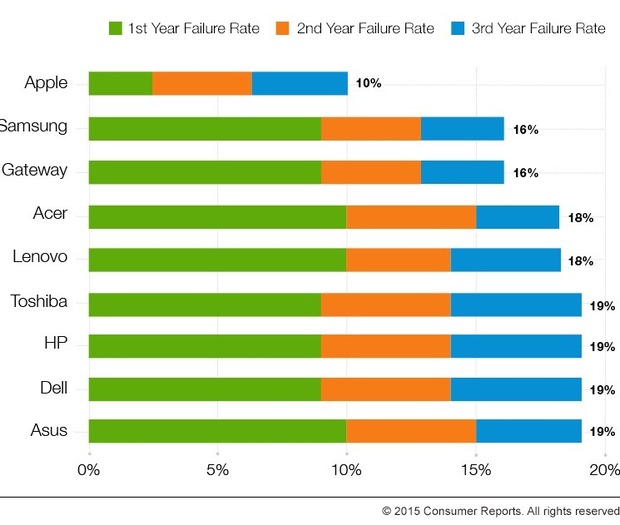
Below picture is just an example, since I doubt that apple has such good failure rates

Quantity of free disk space is generally not the main bottleneck for older computers that have started to slow down.Go to Control Panel and uninstall everything you don't need
On average maybe 2-4 years. Depends how much heat you expose it to. Cooling pads will help increase the lifespan
Below picture is just an example, since I doubt that apple has such good failure rates
So , the RAM deteriorates with time ?Quantity of free disk space is generally not the main bottleneck for older computers that have started to slow down.
Very broadly, there are two common issues that people run into with old computers:
Easiest way to check these is to open a window of System Monitor / Task Manager / whatever monitoring panel your OS uses and open the tab that shows graphs for RAM, CPU, and other system resource usage. When your computer starts to lag, look at the graph.
- Running out of RAM
- Having insufficient CPU/processing power
The more common of the two issues tends to be lack of RAM. And the biggest reason why it ends up being a problem is because people generally don't monitor how much RAM they are using and/or don't know how to monitor RAM usage.
- If you're experiencing performance issues when RAM is capped out, then your computer can't handle the quantity of programs that are open. This can potentially be fixed by adding more RAM to your computer, if your motherboard supports it. Or close some fucking Chrome tabs.
- If your CPU threads are capping out, the individual tasks/applications that you're trying to run are probably too strenuous for your computer. It's difficult to solve for this without upgrading to a new machine.
No, not much. RAM is one thing you can buy used even blindfold.So , the RAM deteriorates with time ?
It doesn't deteriorate, but it can seem like it does. Newer applications (including newer websites) tend to use more and more RAM as time goes on. 8GB of RAM is still the same volume of RAM, but newer applications may use more RAM and make that volume seem smaller.So , the RAM deteriorates with time ?

Any problem ? Is the DVD R/W working fine ? It goes bad in 1-2 years on all laptops.I have had my laptop for 6 years and haven't had any problem til now
I don't use DVD at all but other things are working greatAny problem ? Is the DVD R/W working fine ? It goes bad in 1-2 years on all laptops.
All keyboard buttons are intact ?I don't use DVD at all but other things are working great
Yes. It's a lenovoAll keyboard buttons are intact ?
They come for $10-$15. Keyboard and battery you have to change every 2-4 years.All keyboard buttons are intact ?

