Paypal buttons and PHP

TheSerpSlayer

Registered Member
Joined
Sep 28, 2017
Messages
75
Reaction score
8
I am making a script from scratch that uses PHP and paypal buttons. The script is for a site that does IQ tests. So, the way it works is someone clicks a paypal button and makes a payment and then pp takes their name, address and email and validates their payment.

After payment, pp then redirects the buyer to mysite.com/thankyou.php(after they click the return to merchant link on PP) and then PP separately and simultaneously sends an http POST with lots of metadata gathered from the payment in the post parameters to a fixed url also, which could be mysite.com/success.php.


What I want to do is when they land on thankyou.php to redirect them to mysite.com/take-the-quiz.php?foo=bar where bar is a pseudorandom number to make the URL unique.

I ran an http sniffer on the site while clicking the button and making the payment and picked up stuff including in the header:

Content-Type: application/x-www-form-urlencoded
User-Agent: PayPal IPN ( https://www.paypal.com/ipn )

and in the body stuff like:

mc_gross=2.00&protection_eligibility=Eligible&address_status=confirmed&payer_id=92NT7TFMWKU76&address_street=1+Main+St&payment_date=22%3A33%3A38+Nov+21%2C+2017+PST&payment_status=Completed&charset=windows-1252&address_zip=95131&first_name=

which I assume is part of an http POST send by paypal?


My noob question is, how do I capture all the parameters of the http POST data that pp sends to mysite.com/success.php such as address_street= address_country= address_zip= and then send it to a mysql table?
 
My noob question is, how do I capture all the parameters of the http POST data that pp sends to mysite.com/success.php such as address_street= address_country= address_zip= and then send it to a mysql table?

$_POST is the array that has all that. $_GET if it's a GET request.

Try this in your IPN listener php file:
Code:
file_put_contents( "log.txt", print_r( $_POST, true ) . "\n-----\n", FILE_APPEND );

This should log all the POST variables into log.txt, each request's POST variable list will be followed by "-----", and it will append them to the file, not overwrite. This should give you enough information to proceed with your project. Post here if you need further help.

Good luck.


EDIT: print_r has true in the second parameter so it returns the text to file_put_contents, instead of outputting it to the webpage (or to the PayPal IPN bot in this case).
 
$_POST is the array that has all that. $_GET if it's a GET request.

Try this in your IPN listener php file:
Code:
file_put_contents( "log.txt", print_r( $_POST, true ) . "\n-----\n", FILE_APPEND );

This should log all the POST variables into log.txt, each request's POST variable list will be followed by "-----", and it will append them to the file, not overwrite. This should give you enough information to proceed with your project. Post here if you need further help.

Good luck.


EDIT: print_r has true in the second parameter so it returns the text to file_put_contents, instead of outputting it to the webpage (or to the PayPal IPN bot in this case).

Thanks that will be useful to create debugging log data. However, supposing I want to grab the value of a variable called "custom=" from the entire array then how would I do that? Reason being I want to process the value of custom= and then send that to a mysql table.
 
$_POST is the array that has all that. $_GET if it's a GET request.

Try this in your IPN listener php file:
Code:
file_put_contents( "log.txt", print_r( $_POST, true ) . "\n-----\n", FILE_APPEND );

This should log all the POST variables into log.txt, each request's POST variable list will be followed by "-----", and it will append them to the file, not overwrite. This should give you enough information to proceed with your project. Post here if you need further help.

Good luck.


EDIT: print_r has true in the second parameter so it returns the text to file_put_contents, instead of outputting it to the webpage (or to the PayPal IPN bot in this case).
Thanks for this! I needed it for my website
 
Thanks that will be useful to create debugging log data. However, supposing I want to grab the value of a variable called "custom=" from the entire array then how would I do that? Reason being I want to process the value of custom= and then send that to a mysql table.

No problem! This is what you want:
Code:
if( isset( $_POST['custom'] ) ){
     echo "custom is set to: " . $_POST['custom'];
} else {
     echo "custom is not set";
}

Thanks for this! I needed it for my website
No problem.
 
if you setup ipn properly should of updated your database with the info from the paypal payment .....

did you set up a database yet to return sucecess of payment and put info in your database .

that was the whole idea of ipn
 
if you setup ipn properly should of updated your database with the info from the paypal payment .....

did you set up a database yet to return sucecess of payment and put info in your database .

that was the whole idea of ipn

Correct me if I am wrong but the way IPN works is that an entire paypal account is devoted to one URL from one domain only. I did not enable my paypal account for IPN, but what I did was make a buy now button and the wizard allowed me to input an URL unique to this button alone where paypal would send a big POST request after the payment cleared.

So I am not sure I am even using IPN. Go ahead and log into your paypal real account or sandbox account and create a test button. Choose buy now and go down to the bottom where it allows you to customize the button and you'll see a paramater called notifyurl= and that's where I put those URL. Is the button using IPN? Maybe a stripped down form of it where it only sends one notification. I like this setup better because you can make buttons gallore on multiple domains.

Now in answer to your question I am setting up a mysql database locally which is currently able to store the IP address of the client, the unix epoch timestamp and a boolean tinyint for whether the quizz has been taken or not and another boolean as to whether the payment went through or not.

I'm currently in the process of deciding whether or not to learn about the $_SESSION function to invoke a cookie in the client but not sure I have enough time to master that.
 
If you are not using IPN, you run the risk of people figuring out your "success" path and just going to it. Use IPN if you don't want to manually verify stuff.
 
If you are not using IPN, you run the risk of people figuring out your "success" path and just going to it. Use IPN if you don't want to manually verify stuff.

Will not work because I am already logging the IP address of each successful payment and in mysql I have a boolean value that just allows one quiz from that IP. And paypal is pinging me back via IPN at a secret URL; this is one of the features of button code.

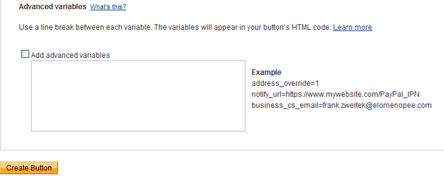
https://www.tipsandtricks-hq.com/wo...yment-button-to-accept-membership-payment-146

paypal_add_extra_variable.gif
 
Not sure if you're using IPN, please clarify.

The guy in the video is definitely using IPN. Go to the end of the video where he expands Step 3 of creating a button. When you say you're not sure if you're using IPN, then your only alternative is to use the "Take customers to this URL when they finish checkout". This is a bad idea for the reason I specified above.

But you did say you got PayPal IPN user agent directly from the PayPal server, so I assume you are using IPN.
 
Not sure if you're using IPN, please clarify.

The guy in the video is definitely using IPN. Go to the end of the video where he expands Step 3 of creating a button. When you say you're not sure if you're using IPN, then your only alternative is to use the "Take customers to this URL when they finish checkout". This is a bad idea for the reason I specified above.

But you did say you got PayPal IPN user agent directly from the PayPal server, so I assume you are using IPN.

I'm going to take a guess and say yes I am using IPN. However, I think this is not your regular IPN where paypal pings the server until the server handshakes and acknowledges the IPN POST came through. With regular IPN if your recieving URL is not accessible by paypal then the paypal IPN server tries repeatedly to reach the IPN URL and if it cannot do so for 24 hours then it emails you a warning and even threatens to disable IPN altogether on your paypal account if you do not fix the issue.

The IPN that comes with paypal buttons is different. It just goes and posts to the URL one time and one time only and does not care about any confirmations or even care if the notify url is 404.

So yes, and no.
 
Gotcha; the IPN callback URL is not set on your account, it's set on the button like in the video.

Be sure to use the "encrypt my button" or whatever the option is called, or use the hosted button feature in PayPal. That way no one can look at your success string and fake PayPal's IPN calls. This is not an issue if you use PayPal's API to verify the transaction number after receiving the IPN.

A while back I was too lazy to do IPN, so I made customers paste their transaction number into my form, then I used PayPal's API to look it up and confirm it. It's easier for you, but inconvenient for your customers.
 
The buttons automatically encrypt all the urls. It's actually not any type of encryption they just store the values on their own server and just give you a button ID which references everything. The only thing I am not encrypting is the custom= field because that's going to be a function of their IP and the epoch timestamp. The URL that paypal IPNs back to will never be revealed to any customer through any action or any form.
 
Back
Top