

- Apr 23, 2012
- 2,876
- 5,898
It's 7.30 on a beautiful Saturday morning. People are heading out for a wonderful weekend.
And what is @BlogPro doing? Well, he's about to help a dude download nasty videos from Youtube.
Okay listen,
These are age-restricted videos and are therefore under an authentication wall, which makes it difficult for most tools to fetch them.
It's doable though. And can be automated as well.
You will need 3 things, these are all 1-time setup - they may sound complex, but won't take more than a few minutes
Step 1 - YT-DLP
This is a fork of the popular Youtube-DL - much better IMO. This will make your life infinitely easy if you frequently download videos.
Go here https://github.com/yt-dlp/yt-dlp?tab=readme-ov-file#release-files
And under click Release files, click on
Now let's keep it in a file. I use the
STEP 2 - FFMPEG
Youtube messes with the videos a lot (like having audio and video seperated) - FFMPEG ensures everything is seamless
Go to the Github link below and download
https://github.com/GyanD/codexffmpeg/releases/tag/2024-11-13-git-322b240cea
Once downloaded, extract it and look inside the bin folder - you should find 3 files -
So in my case, I copy them to
3. Cookie Editor (Only needed for Age Restricted Videos)
Visit https://cookie-editor.com/ and download the extension for your browser
Once downloaded, login to Youtube with an age verified account, then click on the cookie-editor extension.
It'll show you your cookies, at the bottom you'll find 4 options. Click on "Export" and select "Netscape". This will copy your cookies to the clipboard. Simply create a new file called
That's it! You're done!
For Age Restricted Videos
Simply open command prompt, navigate to your
Then run
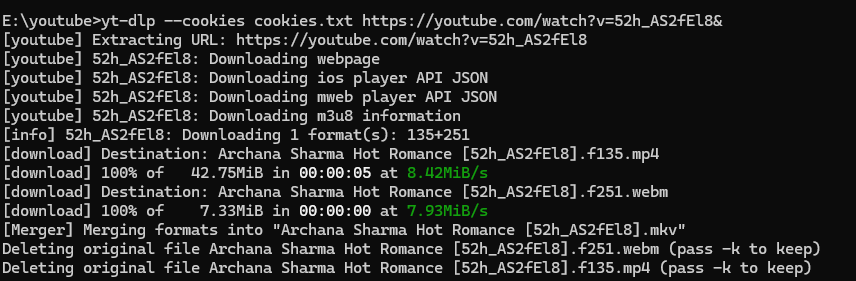
So in your case, I ran
And et voila!
For Regular Videos
You don't need the cookies. Just run
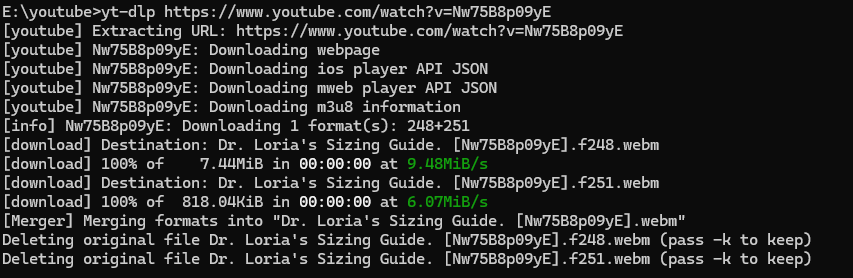
So like this
And what is @BlogPro doing? Well, he's about to help a dude download nasty videos from Youtube.
Okay listen,
These are age-restricted videos and are therefore under an authentication wall, which makes it difficult for most tools to fetch them.
It's doable though. And can be automated as well.
You will need 3 things, these are all 1-time setup - they may sound complex, but won't take more than a few minutes
Step 1 - YT-DLP
This is a fork of the popular Youtube-DL - much better IMO. This will make your life infinitely easy if you frequently download videos.
Go here https://github.com/yt-dlp/yt-dlp?tab=readme-ov-file#release-files
And under click Release files, click on
yt-dlp.exe it should download instantly.Now let's keep it in a file. I use the
E:\ drive on my PC for nasty things. So I saved it in E:\youtube - you can save it anywhere. Just create a folder and drop it in. STEP 2 - FFMPEG
Youtube messes with the videos a lot (like having audio and video seperated) - FFMPEG ensures everything is seamless
Go to the Github link below and download
ffmpeg-2024-11-13-git-[B]322b240cea-essentials_build[/B].ziphttps://github.com/GyanD/codexffmpeg/releases/tag/2024-11-13-git-322b240cea
Once downloaded, extract it and look inside the bin folder - you should find 3 files -
ffmpeg.exe, ffprobe.exe, and ffplay.exe - copy them to the same folder as yt-dlpSo in my case, I copy them to
E:\youtube3. Cookie Editor (Only needed for Age Restricted Videos)
Visit https://cookie-editor.com/ and download the extension for your browser
Once downloaded, login to Youtube with an age verified account, then click on the cookie-editor extension.
It'll show you your cookies, at the bottom you'll find 4 options. Click on "Export" and select "Netscape". This will copy your cookies to the clipboard. Simply create a new file called
cookies.txt and paste these cookies in it. Save it in the same folder as yt-dlpThat's it! You're done!
For Age Restricted Videos
Simply open command prompt, navigate to your
yt-dlp directory with the cd command. Then run
yt-dlp --cookies cookies.txt <your-youtube-URL>So in your case, I ran
yt-dlp --cookies cookies.txt https://youtube.com/watch?v=52h_AS2fEl8&And et voila!
For Regular Videos
You don't need the cookies. Just run
yt-dlp <your-youtube-url>So like this
yt-dlp https://www.youtube.com/watch?v=Nw75B8p09yE
