UBot - Scraping xhr response (Javascript help needed)

yagami-iori

Regular Member
Joined
Nov 13, 2009
Messages
204
Reaction score
318
Hi,

I just got a copy of ubot and I'm trying to learn by scrapping Pinterest, may be not the easiest one, but I'm facing a big issue.
I've scrapped the search people page with success, but scrapping the followers of those profiles is another story. In fact the data is send updated with Ajax after every scroll. I want to extract the username in the body response, I don't care if it all the body that is extracted as I can use a regex for that.
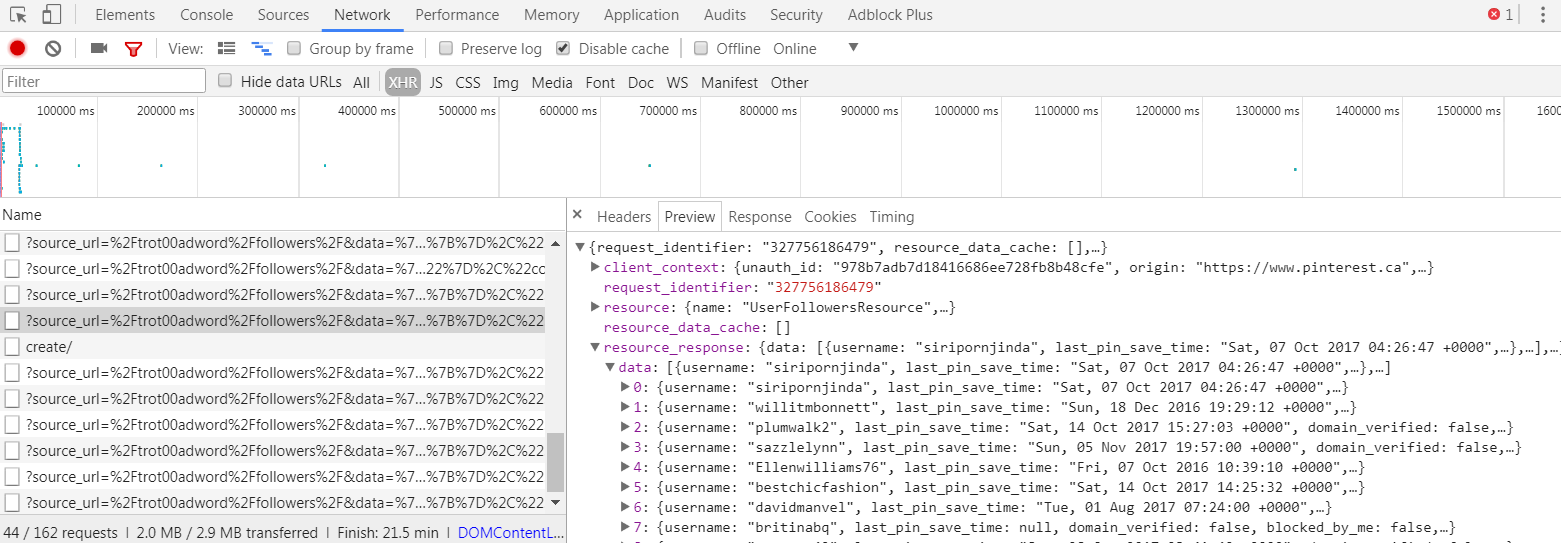
upload_2017-11-8_22-24-30.png


I'm a beginner in Javascript/jQuery and I don't know where to start. Can you guys tell me where to look? I can't find the information I'm looking for, I've already succeeded at extracting the header, but unfortunately not the data.

Your help is really appreciated. Thank you.
 
i don't know what ubot is, but here is a script that can parse the response if you can figure out how to feed the response into the response_json variable. just something I typed up real quick.
Code:
    //feed response from url into this response_json variable. example response been copied for example only. truncated cause long
    var response_json = '{"request_identifier":"574823109051","resource_data_cache":[],"resource":{"name":"UserFollowersResource".........';

    // loads json response and turns into javascript object/variable
    var response_obj = JSON.parse(response_json);

    // get resource_response subset
    var resource_response = response_obj.resource_response;

    // get data subset
    var data = resource_response.data;

    // variables for usernames to be put in. starts empty
    var usernames = [];

    // cycle through user entries, extract username, and add to username list
    for (var i = 0; i < data.length; i++) {
        // current entry
        var entry = data[i];

        // current username
        var username = entry.username;

        // add current username to username list
        usernames.push(username);
    }

    // the 'usernames' variable should now be a list/array of all usernames from that request
    // console.log(usernames); would output list of names to console.
 
Last edited:
i don't know what ubot is, but here is a script that can parse the response if you can figure out how to feed the response into the response_json variable. just something I typed up real quick.
Code:
    //feed response from url into this response_json variable. example response been copied for example only. truncated cause long
    var response_json = '{"request_identifier":"574823109051","resource_data_cache":[],"resource":{"name":"UserFollowersResource".........';

    // loads json response and turns into javascript object/variable
    var response_obj = JSON.parse(response_json);

    // get resource_response subset
    var resource_response = response_obj.resource_response;

    // get data subset
    var data = resource_response.data;

    // variables for usernames to be put in. starts empty
    var usernames = [];

    // cycle through user entries, extract username, and add to username list
    for (var i = 0; i < data.length; i++) {
        // current entry
        var entry = data[i];

        // current username
        var username = entry.username;

        // add current username to username list
        usernames.push(username);
    }

    // the 'usernames' variable should now be a list/array of all usernames from that request
    // console.log(usernames); would output list of names to console.
Hi Veloncia,

Thank you for taking the time to reply. In fact what I realy want is to extract what you have put in your var response_json. I don't want to do it manually but extarct with js or jQuery. Do you now ho to do that?
Thanks again :)
 
Go an register on the ubot forum, you'll get a better answer there.
There are many great ubot experts there.
 
Last edited:
Hi Veloncia,

Thank you for taking the time to reply. In fact what I realy want is to extract what you have put in your var response_json. I don't want to do it manually but extarct with js or jQuery. Do you now ho to do that?
Thanks again :)

If I understand correctly: you don't have the response string stored yet, and this is the step you're struggling with.

Unfortunately, I've never used UBot, but I hope this helps in another way.

Option 1: Figure out how the (scrolling the page) async HTTP request is built. Rebuild and send it yourself, then you'll have the response to mess with how you please. Veloncia's code above would work. Regex is another option.

Option 2: Forget the ajax bullshit. UBot runs like a browser, so let it run the stupid ajax request and process the response to expand the page. Then run some javascript to capture all the usernames. For example if usernames get formatted on the page like this:
Code:
<a class="user" href="#pathtouser">Username</a>

Then you can (assuming jQuery available):
Code:
$(".user").each(
  function(){
    //do whatever you need here, the username is in $(this).html()
    alert( "username:" + $(this).html() );
  }
);

If you don't have jQuery, just use javascript's querySelectorAll, and do a normal for loop (instead of jquery's .each function);
 
Thank you for your kind help. My answers below.
Option 1: Figure out how the (scrolling the page) async HTTP request is built. Rebuild and send it yourself, then you'll have the response to mess with how you please. Veloncia's code above would work. Regex is another option.

I'm not working with sockets so the browser is opened in front of me and I can see everything I have coded working like I want. I can easily scrape the first results that load the first time the page is called and I can scroll 100 times if I want to. But, I can't scrape more than the first results. The results that load with each scroll are passed through the header response hence I can't scrape them. If I scroll 10 times and I look into the source code I will still see only the first results. I'have no other choice than send a http POST to the page and scrape the response and that is were I'm stuck. I can't find a way to emulate the POST to the page. All the tutorial that I've looked into are taking examples that have something like ?page=x in the header and they can easily create their POST command. For Pinterest it's different and I'm stuck. If you can help me with that I would grateful for say, 2 days :D Joke aside, I would really appreciate it.
You have to go to a profil page and click on "followers" and it's there where I want to pull the data. You can go here directely and scroll a few times and take a look at the header response https://www.pinterest.ca/hairaccessorie8/followers/

Thanks a lot.
 
Forget about that guys. I've found the error. I was putting my add to list command outsite my loop. Thanks a lot for taking the time to replay I appreciate it a lot.
 
Forget about that guys. I've found the error. I was putting my add to list command outsite my loop. Thanks a lot for taking the time to replay I appreciate it a lot.

Hi Bro, I have the same problem, I'm trying to scrap Instagram's hashtag with selenium, I change the scroll interactions , but always I see the same information, this is my code, I hope you can Help me:

import time
from selenium import webdriver
from bs4 import BeautifulSoup as bs
from webdriver_manager.chrome import ChromeDriverManager
import json
import requests

from selenium.webdriver.common.keys import Keys # for necessary browser action
from selenium.webdriver.common.by import By # For selecting html code
import time

browser = webdriver.Chrome(ChromeDriverManager().install())
browser.implicitly_wait(30)
browser.get('LINK_OF_THE_WEB_PAGE')

for i in range(0,5):
browser.execute_script("window.scrollTo(0, document.body.scrollHeight);")
time.sleep(3)

Source =browser.page_source
 
If I remember well, the JS scroll was working, the information was there but won't display unless I use the mouse or the wheel to scroll the page. Try to scrape the information you want despite the information not showing.
 
Back
Top