
moonlighsunligh
Elite Member
- May 1, 2010
- 2,442
- 454
- It takes less that 30 mins to start posting 150 posts to your wordpress site, and it should not take more than 1 hour to have them all online.
- 100% free method except that we need an GPTChat api key. But you can get a free 5 usd trial so this can be free as well
- We create 150 keywords using ahrefs free tool - https://ahrefs.com/keyword-generator
- We paste some code in Google colab.
- Make sure to not make your Google colab public for safety. It should be private by default, but it is better to check that all the time.
- This code is responsible for creating posts via GPTChat API and posting to your wordpress site.
- We create credential for wordpress site to be able to post there
- We decide how much posts we want and then click a button
- It posts automatically after we click a button.
Please note this is my first tutorial so If I broken any rules let me know and I will fix that. I have google colab file with code, I am not sure how to upload it.
Lets start...
1) Go to https://ahrefs.com/keyword-generator and add any keyword you want. Select both the keywords and the questions exactly like this, and paste them to a txt file.

keyword file is going to look like this, it is messy, but we will format it automatically using python.

02) Now we need to create out own Google Colab (which is also 100% free to use)
go to https://colab.google/ and click on New Notebook

This is how it looks like, we just need to add a few lines of code, create file and we are ready to go

Add this code to first line, this install openai:
Code:
!pip install openai --quietThis code need to be added to the second line, it formats keywords and contain all the functions:
Code:
import openai
import os
openai.api_key = "your_open_ai_api_key"

def make_post(the_title,the_text,your_user,your_password,your_site,wordpress_category):
        import requests
        import base64
        your_credentials = your_user + ":" + your_password
        your_token = base64.b64encode(your_credentials.encode())
        your_header = {'Authorization': 'Basic ' + your_token.decode('utf-8')}

        api_url = your_site+'/wp-json/wp/v2/posts'
        if not wordpress_category == "":
            data = {
                'title' : the_title,
                'status': 'publish',
                'content': the_text,
                'categories': 3
                ##'slug' : 'example-post',
                }
        else:
            data = {
                'title' : the_title,
                'status': 'publish',
                'content': the_text,
                }

        response = requests.post(api_url,headers=your_header, json=data)
        return response.json()

def gpt_chat(all_params):
    the_keyword,the_prefix,the_temperature,the_max_tokens = all_params
    the_text = the_prefix + the_keyword + ":"
        #the_text =  the_prefix + the_text
    response = openai.ChatCompletion.create(
        model="gpt-3.5-turbo",
        messages=[{"role": "user", "content": the_text}],
        temperature=the_temperature,
        max_tokens=the_max_tokens
        )

    the_result = response["choices"][0]["message"]["content"]

    return the_result

def fix_ahrefs_keywords(file_with_keywords):
    #remove empty lines and non keyword lines from output of https://ahrefs.com/keyword-generator
    with open(file_with_keywords, 'r') as fyl:
        lines = fyl.readlines()

    good_lines = []
    for aline in lines:
        aline = aline.strip()
        if (not any(str.isdigit(x) for x in aline) or len(aline.split())>3) and not aline.strip()=="" and not "Sign up" in aline and not "N/A" in aline:
            good_lines.append(aline)


    with open(file_with_keywords, 'w') as f:
        for line in good_lines:
            f.write(f"{line}\n")

#load file with your keywords
file_with_keywords = "sample_data/keywords.txt"
#this step fixes the file with keywords from https://ahrefs.com/keyword-generator
fix_ahrefs_keywords(file_with_keywords)
Add this code to the third line:
Code:
# SETTINGS
begin_index = 11
end_index = 12
your_site = "yur site url"
your_user = "your site username"
your_password = "your site application password"
wordpress_category = "" # or you can add here a category id
title_is_keyword = "yes" #cam be "yes" or "no". If yes then the title is the keyword, if no then the title is created by GPTCHAT
remove_ai_detection = "no"


#prefix = "Write an article about"
prefix = "Write a very extremelly long and detailed article about "
#load the fixed keywords
with open(file_with_keywords, 'r') as fyl:
    keywords = fyl.readlines()
keywords = [x.strip() for x in keywords]

#now we create posts using GPT-chat and post them to our wordpress site
for e,akeyword in enumerate(keywords):

    if e<begin_index or e>=end_index:continue #this makes sure we only add article from begin to end
    the_temperature = 0.7
    the_max_tokens = 2000
    all_params = akeyword,prefix,the_temperature,the_max_tokens
    print("we are writing post #",e,", using keyword:",akeyword)
    gptchat_article = gpt_chat(all_params)
    title = akeyword.title()

    try:
        gptchat_article_list = gptchat_article.split("\n")
        if gptchat_article_list[0].count(".")<=1 and gptchat_article_list[1].strip()=="":
            title = gptchat_article_list[0]
            gptchat_article = gptchat_article.replace(title,"").strip()
            if title_is_keyword=="yes":
                title = akeyword.title()
    except:pass


    #now we post to out wordpres site
    try:
        the_response = make_post(title,gptchat_article,your_user,your_password,your_site,wordpress_category)
        the_link = the_response['guid']['rendered']
        print("the_link",the_link,"word count",len(gptchat_article.split()),"the_title:",title)
    except Exception as err:
        print("we have an error",err)
This should look like this:

03) The next step is to create a file with keyword and paste the keywords we already have. We click on folder on the left, and create a file in folder sample_data called keywords. Then we click on keywords and there we add out keywords.

05) So now the keyword part is done we just need to add out WordPress credentials and we are ready to go.

We go to Users/profile in the WordPress dashboard and then we create New Application Password Name. This is just name of password, we do not use it anywhere else. So after we add it, we click on Add New Application Password. This is the password that we need to copy and add to the Google Colab.
06) Then we add our settings that we have just created:
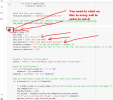
To control how many posts to you post you change begin_index and end_index. For example if begin_index=0 and end_index=1 it will post just the first posts. To post to your site, you need to click on run button in every cell. There are 3 cells, so you need to click each time.
Edit: 8/17/2023
Now lets add image post function.
It uses openai API as wee (dalle api), so you should check how much does it cost, but I believe it is pretty cheap.
Here are the main settings, you can choose if you want to add images, and also if you wanna make them features images, or just put them at the end of post. Quality of Dalle images is pretty good, but sometimes you need to play with prompt to be able to create exactly the image you want.
Code:
create_and_add_an_image = "yes" #can be yes or no
make_the_image_featured = "yes" #can be yes or no
image_prefix = "A detailed high quality natural image about: "
image_resolution="512x512"
if you choose create_and_add_an_image and make_the_image_featured it will post the image as featured and add it to the post at the top left. You can also change HTML from the code as per your needs.
Here is complete code, which consist of 2 parts, the same as before:
#cell 1
Code:
import openai
import os
openai.api_key = "your_open_ai_api_key"

def upload_image(filename,your_site,your_user,your_password):
    import requests, json
    api_url_image = your_site+'/wp-json/wp/v2/media'
    the_pic = open(filename, 'rb').read()
    fnm = os.path.basename(filename)
    result = requests.post(
        url=api_url_image,
        data=the_pic,
        headers={ 'Content-Type': 'image/jpg','Content-Disposition' : 'attachment; filename=%s'% fnm},
        auth=(your_user, your_password)
        )

    response =result.json()
    the_image_id = response.get('id')
    the_image_url = response.get('guid').get("rendered")
    return (the_image_id, the_image_url)

def make_post(the_title,the_text,your_user,your_password,your_site,wordpress_category,the_image_id):
        import requests
        import base64
        your_credentials = your_user + ":" + your_password
        your_token = base64.b64encode(your_credentials.encode())
        your_header = {'Authorization': 'Basic ' + your_token.decode('utf-8')}

        api_url = your_site+'/wp-json/wp/v2/posts'

        if the_image_id>0:
            if not wordpress_category == "":
                data = {
                    'title' : the_title,
                    'status': 'publish',
                    'content': the_text,
                    'categories': 3,
                    'featured_media': the_image_id
                    ##'slug' : 'example-post',
                    }
            else:
                data = {
                    'title' : the_title,
                    'status': 'publish',
                    'content': the_text,
                    'featured_media': the_image_id
                    ##'slug' : 'example-post',
                    }
        else:
            if not wordpress_category == "":
                data = {
                    'title' : the_title,
                    'status': 'publish',
                    'content': the_text,
                    'categories': 3,
                    }
            else:
                data = {
                    'title' : the_title,
                    'status': 'publish',
                    'content': the_text,
                    }


        response = requests.post(api_url,headers=your_header, json=data)
        return response.json()

def gpt_chat(all_params):
    the_keyword,the_prefix,the_temperature,the_max_tokens = all_params
    the_text = the_prefix + the_keyword + ":"
        #the_text =  the_prefix + the_text
    response = openai.ChatCompletion.create(
        model="gpt-3.5-turbo",
        messages=[{"role": "user", "content": the_text}],
        temperature=the_temperature,
        max_tokens=the_max_tokens
        )

    the_result = response["choices"][0]["message"]["content"]

    return the_result

def fix_ahrefs_keywords(file_with_keywords):
    #remove empty lines and non keyword lines from output of https://ahrefs.com/keyword-generator
    with open(file_with_keywords, 'r') as fyl:
        lines = fyl.readlines()

    good_lines = []
    for aline in lines:
        aline = aline.strip()
        if (not any(str.isdigit(x) for x in aline) or len(aline.split())>3) and not aline.strip()=="" and not "Sign up" in aline and not "N/A" in aline:
            good_lines.append(aline)


    with open(file_with_keywords, 'w') as f:
        for line in good_lines:
            f.write(f"{line}\n")

#load file with your keywords
file_with_keywords = "sample_data/keywords.txt"
#this step fixes the file with keywords from https://ahrefs.com/keyword-generator
fix_ahrefs_keywords(file_with_keywords)
#cell 2
Code:
# SETTINGS
begin_index = 11
end_index = 12
your_site = "yur site url"
your_user = "your site username"
your_password = "your site application password"
wordpress_category = "" # or you can add here a category id
title_is_keyword = "yes" #cam be "yes" or "no". If yes then the title is the keyword, if no then the title is created by GPTCHAT
remove_ai_detection = "no"

create_and_add_an_image = "yes" #can be yes or no
make_the_image_featured = "yes" #can be yes or no
image_prefix = "A detailed high quality natural image about: "
image_resolution="512x512"


#prefix = "Write an article about"
prefix = "Write a very extremelly long and detailed article about "
#load the fixed keywords
with open(file_with_keywords, 'r') as fyl:
    keywords = fyl.readlines()
keywords = [x.strip() for x in keywords]

#now we create posts using GPT-chat and post them to our wordpress site
for e,akeyword in enumerate(keywords):

    if e<begin_index or e>=end_index:continue #this makes sure we only add article from begin to end
    the_temperature = 0.7
    the_max_tokens = 2000
    all_params = akeyword,prefix,the_temperature,the_max_tokens
    print("we are writing post #",e,", using keyword:",akeyword)
    gptchat_article = gpt_chat(all_params)
    title = akeyword.title()


    the_image_url = ""
    the_image_id = -1
    if create_and_add_an_image == "yes":
        response = openai.Image.create(
            prompt= image_prefix + akeyword,
            n=1,
            size=image_resolution
            )

        image_url = response['data'][0]['url']
        image_file = "sample_data/" + str(e)+'.jpeg'
        import urllib.request

        #download the image to file image_file
        urllib.request.urlretrieve(image_url, image_file)

        if not make_the_image_featured=="yes":the_image_id = -1

        try:
            the_image_id,the_image_url = upload_image(image_file,your_site,your_user,your_password)
            print("image_url",the_image_url)
        except Exception as error:
            print("we could not upload image",error)


    try:
        gptchat_article_list = gptchat_article.split("\n")
        if gptchat_article_list[0].count(".")<=1 and gptchat_article_list[1].strip()=="":
            title = gptchat_article_list[0]
            gptchat_article = gptchat_article.replace(title,"").strip()
            if title_is_keyword=="yes":
                title = akeyword.title()
    except:pass

    if not the_image_url.strip()=="":
        if make_the_image_featured=="yes":
            image_insert_html_code =  '<img src="'+the_image_url +'" alt="'+akeyword+'" style="float: left; margin-right: 10px;">'
            gptchat_article = image_insert_html_code + gptchat_article
        else:
            image_insert_html_code =  '<img src="'+the_image_url +'" alt="'+akeyword+'" style="margin:10px;">'
            gptchat_article =  gptchat_article + image_insert_html_code


    #now we post to out wordpres site
    try:
        the_response = make_post(title,gptchat_article,your_user,your_password,your_site,wordpress_category
,the_image_id
)
        the_link = the_response['guid']['rendered']
        print("the_link",the_link,"word count",len(gptchat_article.split()),"the_title:",title)
    except Exception as err:
        print("we have an error",err)
Last edited by a moderator:


