

Society Girl
Elite Member
- Feb 20, 2014
- 3,164
- 2,627
So you're looking to reset your password, eh?
You can reset your password on your Blackhatworld.com profile.

Very simple, you put your old password in the first field and then your new one in the next two fields. You can also use the first option to enable/disable Two-step verification.
Please note: Two-step verification is forced for paid accounts. You can learn more in our Two-factor thread.
Tips for creating a strong password:
- Use a unique mix of upper- and lower-case letters, symbols (like @ # $ % ^ &), and numbers
- Try and make it at least eight characters long
- Don’t use common words or personal information
It’s best to have a different password for each service you use. If you’ve got the same password for other services, websites or apps, it’s a good idea to consider changing them.
Blackhatworld will occasionally force a reset of passwords as a precaution.
Your privacy is important to us and we are committed to being proactive when it comes to protecting your data. Just to reiterate, if this happens, this doesn't mean Blackhatworld or your data is compromised in any way. We'll do this reset every now and then just as a precaution and is good security practice across the industry - and this is all to protect you and your data. If and when we do a reset, it'll look like the below (with your username of course):
Make sure you check the 'From' is [email protected].
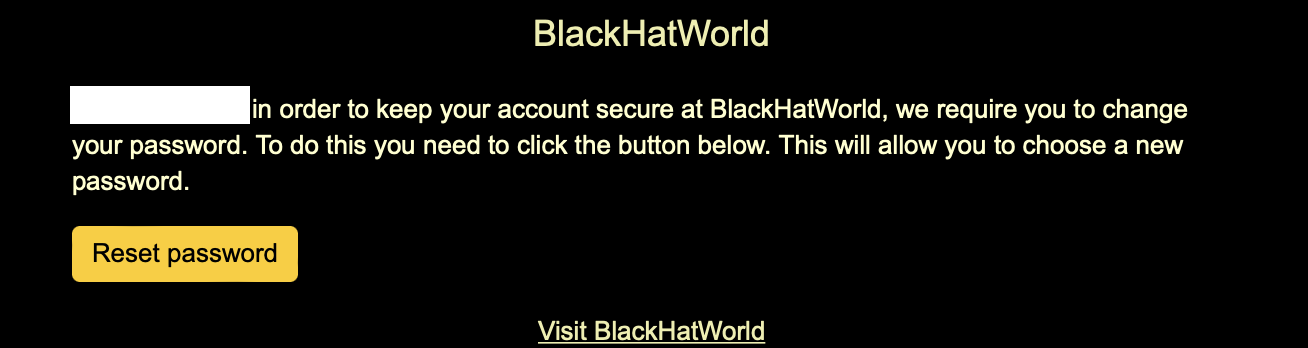
OR you may see:

To complete the reset, please click the 'Reset password' button and follow the website instructions. Once done, you'll see the below:

You can find more information on our support page.
You can reset your password on your Blackhatworld.com profile.
Very simple, you put your old password in the first field and then your new one in the next two fields. You can also use the first option to enable/disable Two-step verification.
Please note: Two-step verification is forced for paid accounts. You can learn more in our Two-factor thread.
Tips for creating a strong password:
- Use a unique mix of upper- and lower-case letters, symbols (like @ # $ % ^ &), and numbers
- Try and make it at least eight characters long
- Don’t use common words or personal information
It’s best to have a different password for each service you use. If you’ve got the same password for other services, websites or apps, it’s a good idea to consider changing them.
Blackhatworld will occasionally force a reset of passwords as a precaution.
Your privacy is important to us and we are committed to being proactive when it comes to protecting your data. Just to reiterate, if this happens, this doesn't mean Blackhatworld or your data is compromised in any way. We'll do this reset every now and then just as a precaution and is good security practice across the industry - and this is all to protect you and your data. If and when we do a reset, it'll look like the below (with your username of course):
Make sure you check the 'From' is [email protected].
OR you may see:
To complete the reset, please click the 'Reset password' button and follow the website instructions. Once done, you'll see the below:
You can find more information on our support page.
Last edited by a moderator: