
Introduction
If you create YouTube Shorts, TikToks or Instagram Reels from podcasts, interviews, talking-head videos or other long-form content, you probably know how much time clipping can take.
You have to find the interesting parts, cut them, reframe the video for vertical, follow the speaker, add captions, export, and then repeat the process.
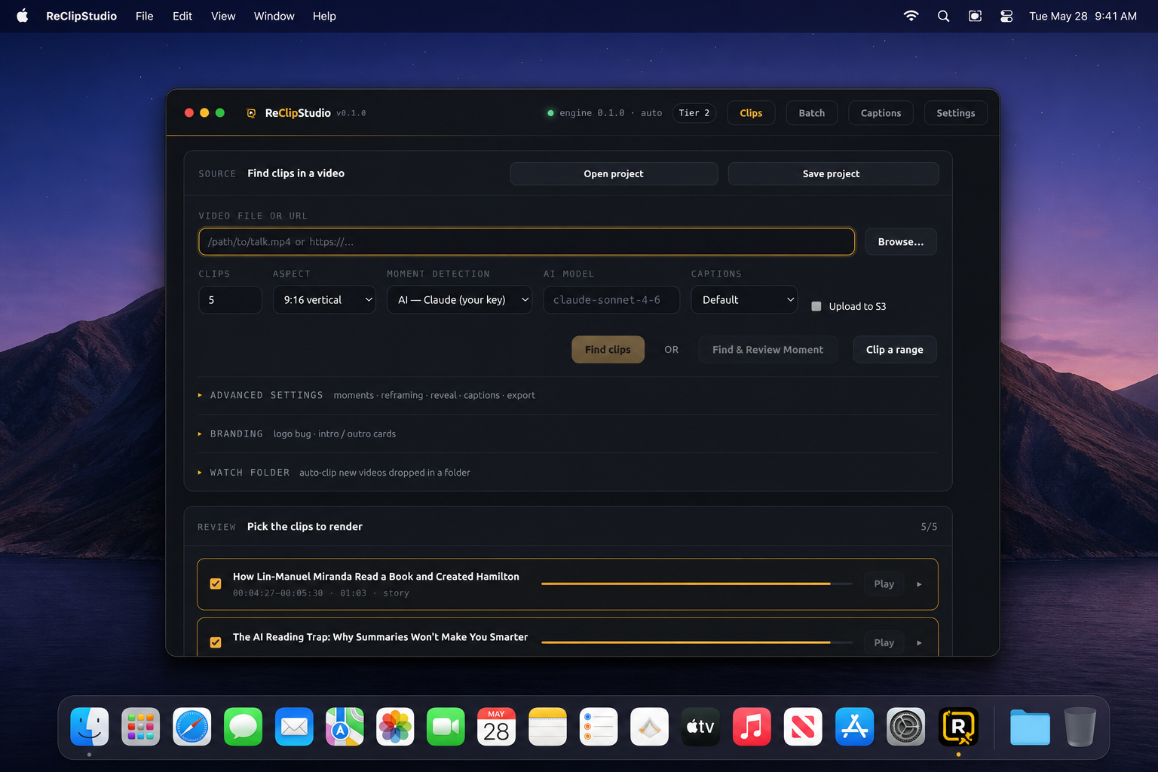
But not anymore because with clipstudio desktop app. You simply need to drop in a long video (podcast, stream, interview etc). It auto-clips the best moments, does speaker-tracking, reframe to vertical, also burns in animated captions. All on your consumer grade laptop/pc (Linux, Windows, MAC) no GPU required.
Features of Clipstudio:
Pricing
Free/Trial Version - $0
(For testing whether it works for your type of videos.)
$149 | BHW Launch Discount Price $99
Pro —$199 | BHW Launch Discount Price $129
One payment and you keep the software.
Delivery
Activation code emailed instantly after payment → download → activate.
Payment:
Stripe (card) or crypto direct.
Refunds:
Refunds will only be issued within 7 days of the purchase date. Please provide a reason of any technical issues or failures that prevent you from using the tool as intended. You can also download the trial version which comes with a watermark.
FAQ
Telegram: https://t.me/clipstudio_support
How Do I Start
Click the button below. Then download the software and pay for the activation code, the code is sent to your email
If you create YouTube Shorts, TikToks or Instagram Reels from podcasts, interviews, talking-head videos or other long-form content, you probably know how much time clipping can take.
You have to find the interesting parts, cut them, reframe the video for vertical, follow the speaker, add captions, export, and then repeat the process.
But not anymore because with clipstudio desktop app. You simply need to drop in a long video (podcast, stream, interview etc). It auto-clips the best moments, does speaker-tracking, reframe to vertical, also burns in animated captions. All on your consumer grade laptop/pc (Linux, Windows, MAC) no GPU required.
Features of Clipstudio:
- On device Auto Clip Interesting Moment : Automatically find and clip potentially interesting moments
- Multiple aspect ratio (9:16, 16:9, 1:1, 4:5) : Turn your videos into vertical, square clips etc.
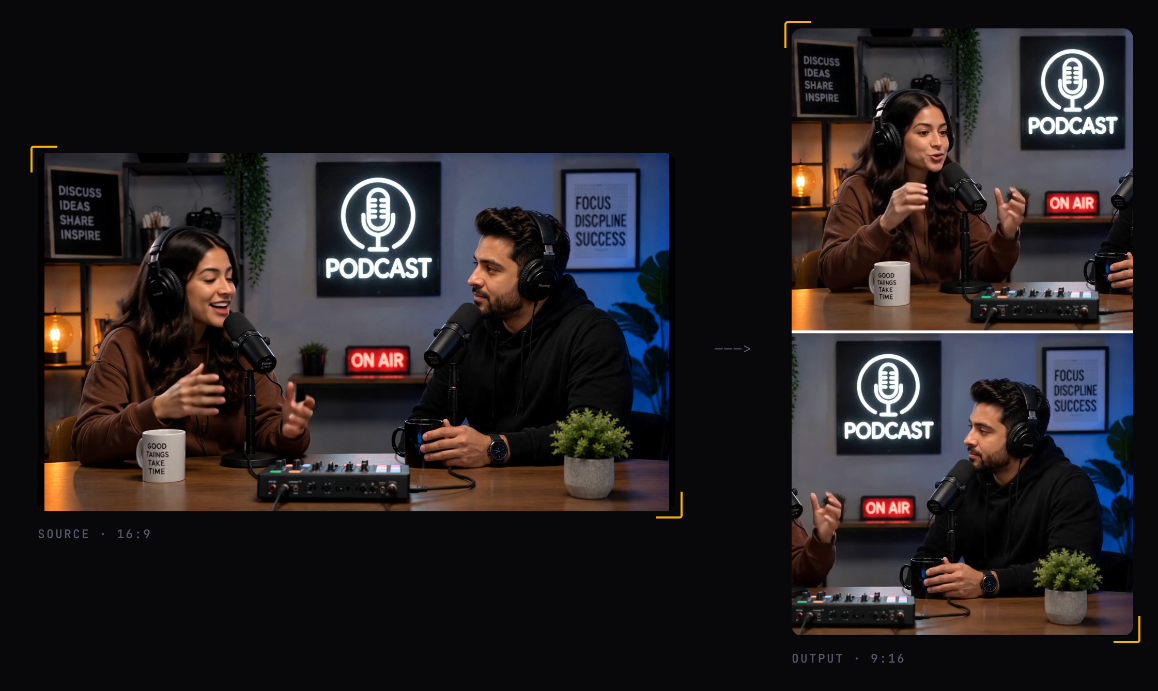
- Active speaker tracking : Automatically follow/reframe the current active speaker
- Multispeaker tracking : Support Multi-speaker with split-screen or speaker-switch layouts.
- Object tracking : Track dominant subjects/objects if no speaker is in view
- Subtitle & Captions : Create and use different animated captions for your videos
- Branding : Include your own personal logo, intro and outro title cards, and caption styles on the final clipped videos.
- Batch & watch: Process multiple clips in batches or watch a folder; any video dropped into the folder get clipped
- S3 delivery: Optionally upload clipped videos to your s3 buckets
- Openai & Claude Support: Use openai and claude for clipping interesting moment in your video (requires the ai platform key)
- One payment : No monthly subscription/fee and no per-export credits
- Works offline: Everything totally works offline no internet required for clipping.
- No GPU Required: Clipstudio works on consumer grade laptops and pc. no GPU required.
Pricing
Free/Trial Version - $0
(For testing whether it works for your type of videos.)
- Watermarked Clips and Video
- Manual Range Clipping
- Word-By-Word Animated Captions
- Custom Caption Fonts & Styles
- Active-Speaker Tracking & Auto-Reframe
- Watermark-Free Exports
- Automatic Detection & Clipping of Interesting Moment In Video (On-Device)
- Video Reframe Only Option
- Word-By-Word Animated Captions
- Custom Caption Fonts & Styles
- Active-Speaker Tracking & Auto-Reframe
- Multi-speaker tracking detection
- Dominant Subject/Object Tracking for no speaker or 0 active speaker videos
- Lower-Third Reveal & Reframe Edit
- Emoji, Sound Effects & Overlay Text
- Manual Reframe & Range Clipping
Pro —
- Everything In Creator
- Use OpenAI & Claude For Clipping & Moment Detection (Needs Your API Key)
- Find & Review Moments Before Rendering
- Batch Processing & Watch-Folder Automation
- All Aspect Ratios + Multi-Ratio Export
- Brand Kit — Logo, Intro & Outro Cards
- AI Titles, Descriptions & Hashtags
- Re-Style Finished Clips Instantly
- Per-Platform Export Filenames
- Cloud Upload To Your S3 Bucket
One payment and you keep the software.
Delivery
Activation code emailed instantly after payment → download → activate.
Payment:
Stripe (card) or crypto direct.
Refunds:
Refunds will only be issued within 7 days of the purchase date. Please provide a reason of any technical issues or failures that prevent you from using the tool as intended. You can also download the trial version which comes with a watermark.
FAQ
- Subscription? No — one payment, updates included.
- Uploads my footage? No, all local.
- API key needed? No — built-in local models; add your own OpenAI/Claude key optionally.
- Platforms? Windows, macOS, Linux.
- Can i test ? You can get the watermarked trial version
Telegram: https://t.me/clipstudio_support
How Do I Start
Click the button below. Then download the software and pay for the activation code, the code is sent to your email
