

- Jul 3, 2016
- 1,211
- 5,851
Keyword Reinforcement Block... Easy Setup Guide
This php file/code adds a small helpful SEO section, with a heading, a short answer, and a few questions, to the pages you pick. You can optimize it for local SEO and AI mentions by using this question format included. It matches the look of your site on its own. I tested on a few different sites and included screenshots below showing it on different themes, but no guarantees to work with every setup, so please backup file/site before using it. There is a plugin file included if you do not want to edit your themes functions.php, use code snippets plugin, or other methods.
PHP File/Raw Code Method...
* Just add this code from mediafire above to bottom of functions.php file in child theme or main theme, or add the file to mu-plugins or other folder you use.
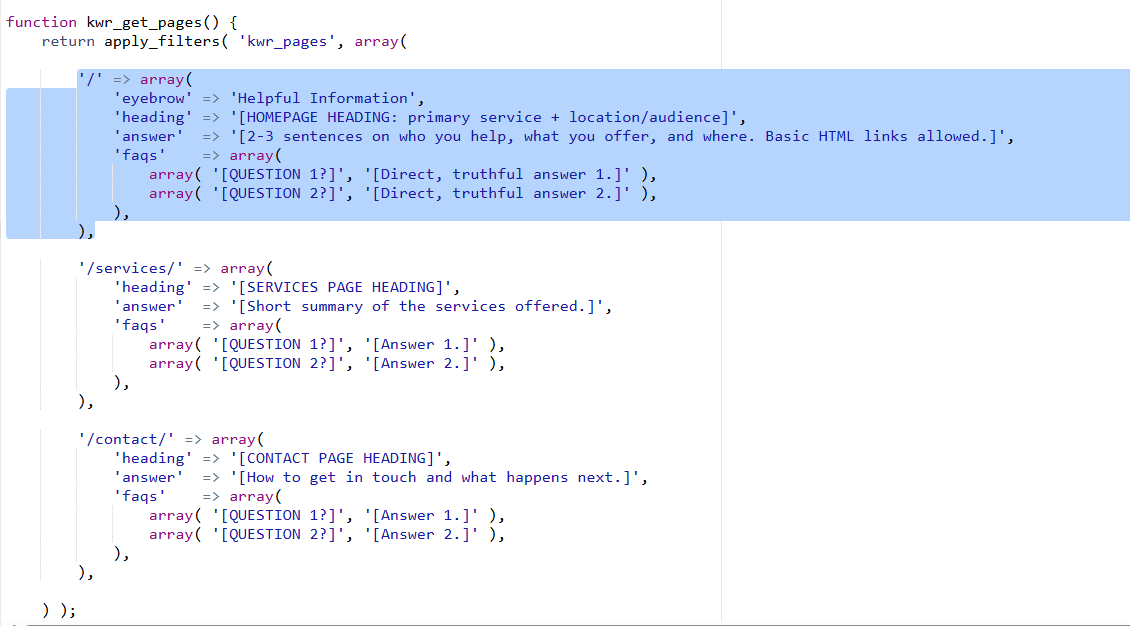
Then copy this block below from it, and paste it for each new page changing the word about to the url slug of page you want it to appear on. Your homepage will just be a single slash so just delete the word about. And then only change the words inside the quote marks below except 'heading', 'answer', and 'faqs', screenshots below for reference on what to edit:
OR install plugin easily in WordPress Method...
* Log in to your sites WordPress dashboard
* Click Plugins, then Add New, then Upload Plugin
* Choose the ZIP file and click Install Now
* Click Activate
If you did not already edit the file, then now you need to add to it which pages to use.
Add your pages you want SEO boosted...
* Go to Plugins, then Plugin File Editor, and open Keyword Reinforcement Block
* Replace the example text in the square brackets with your own words
* Click Update File
Copy this block and paste it for each new page changing the word about to the url slug of page you want it to appear on. Your homepage will just be a single slash so just delete the word about. And then only change the words inside the quote marks below except 'heading', 'answer', and 'faqs', see screenshots below for reference on what to edit:
Troubleshooting...
*If you see nothing, clear your cache plugin and refresh the page. Also, you might not see in editor, so view live page
* If section not showing then check that the page address in the file matches the real address, slashes included
* If site shows a blank white screen: use your hostings File Manager to rename the plugin folder, which turns it off
Writing tips to improve SEO...
* Write something different for each page or have AI come up with it for you
* Answer real questions that your customers ask with keywords naturally
* Include questions asked by local clients or questions asked to AI about your niche
* Do not repeat same phrase over and over, because they can see that as spam
*Use secondary keywords or related keywords and weave them in as well to this block
Removing the plugin...
*Delete just like any other plugin its simple. It saves nothing else on your site, so nothing is left behind.
Other kinds of websites it might work on...
This plugin only works on WordPress that you host yourself. On Shopify, Wix, Squarespace, Wordpres, etc. you can paste the plain HTML version into a custom code block instead.

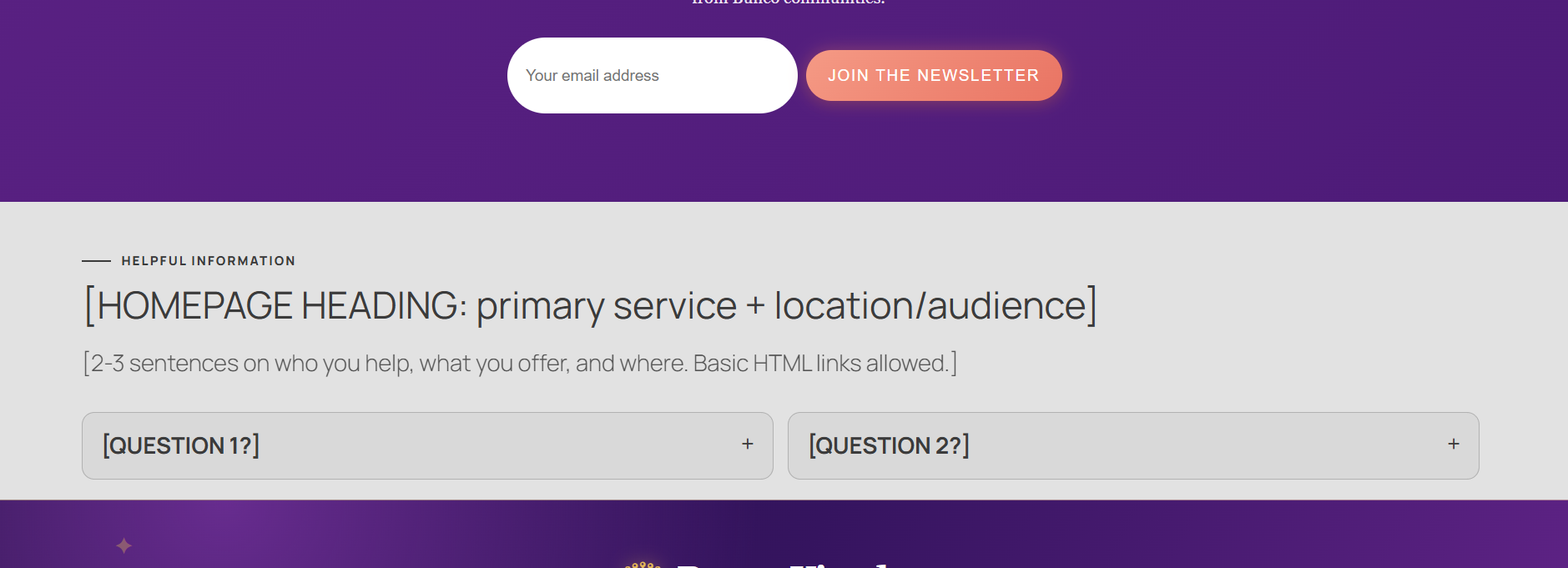
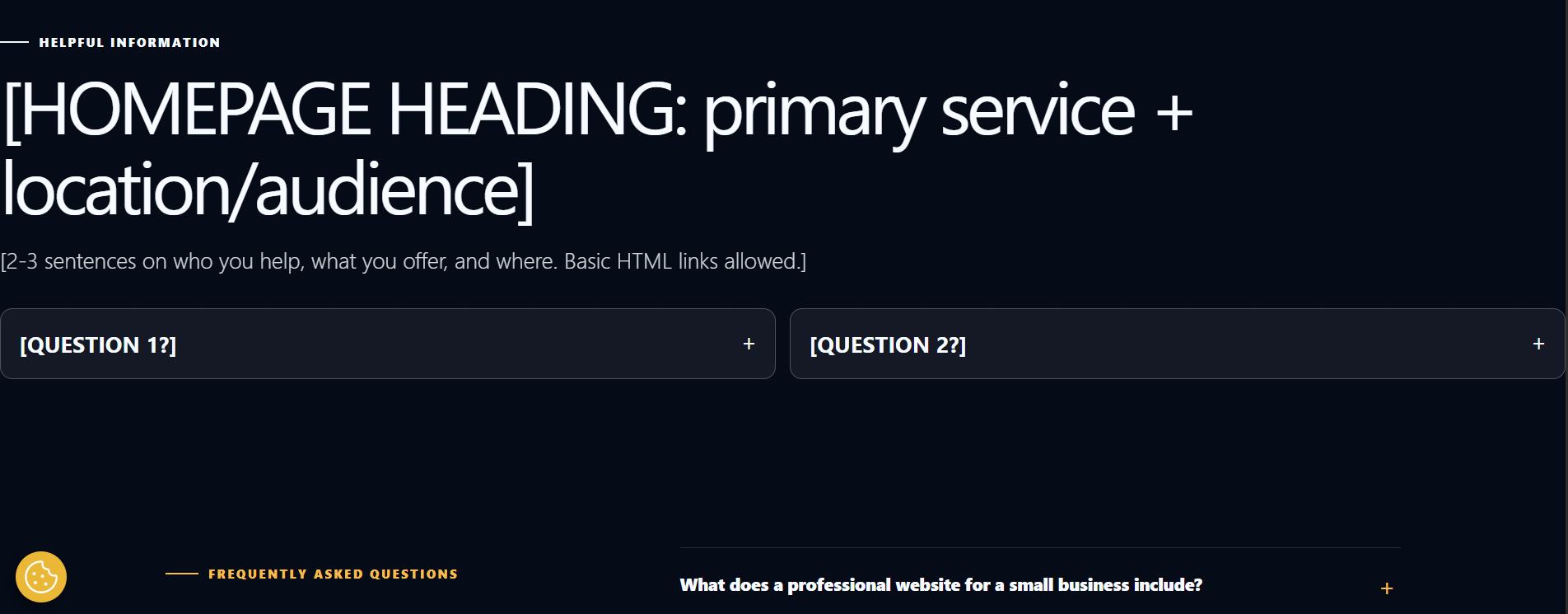

This php file/code adds a small helpful SEO section, with a heading, a short answer, and a few questions, to the pages you pick. You can optimize it for local SEO and AI mentions by using this question format included. It matches the look of your site on its own. I tested on a few different sites and included screenshots below showing it on different themes, but no guarantees to work with every setup, so please backup file/site before using it. There is a plugin file included if you do not want to edit your themes functions.php, use code snippets plugin, or other methods.
PHP File/Raw Code Method...
Code:
https://www.mediafire.com/file/o29qffkpsdb11gz/keyword-reinforcement.php/file
Code:
https://www.virustotal.com/gui/file/a1353067780982353b09625cba44d675d9a7ad3806f6a7a1d20407a866158e58?nocache=1Then copy this block below from it, and paste it for each new page changing the word about to the url slug of page you want it to appear on. Your homepage will just be a single slash so just delete the word about. And then only change the words inside the quote marks below except 'heading', 'answer', and 'faqs', screenshots below for reference on what to edit:
Code:
php
'/about/' => array(
    'heading' => 'Your heading here',
    'answer'  => 'Two or three short, true sentences for this page.',
    'faqs'    => array(
        array( 'Question one?', 'Answer one.' ),
        array( 'Question two?', 'Answer two.' ),
    ),
),
OR install plugin easily in WordPress Method...
Code:
https://www.mediafire.com/file/m4zxm0ymtxhci1o/keyword-reinforcement.zip/file
Code:
https://www.virustotal.com/gui/file/bae8d7008a345718a55fb52dfd0c105ecba251eb076783cc2199ecc384a34cdd?nocache=1* Click Plugins, then Add New, then Upload Plugin
* Choose the ZIP file and click Install Now
* Click Activate
If you did not already edit the file, then now you need to add to it which pages to use.
Add your pages you want SEO boosted...
* Go to Plugins, then Plugin File Editor, and open Keyword Reinforcement Block
* Replace the example text in the square brackets with your own words
* Click Update File
Copy this block and paste it for each new page changing the word about to the url slug of page you want it to appear on. Your homepage will just be a single slash so just delete the word about. And then only change the words inside the quote marks below except 'heading', 'answer', and 'faqs', see screenshots below for reference on what to edit:
Code:
php
'/about/' => array(
    'heading' => 'Your heading here',
    'answer'  => 'Two or three short, true sentences for this page.',
    'faqs'    => array(
        array( 'Question one?', 'Answer one.' ),
        array( 'Question two?', 'Answer two.' ),
    ),
),
Troubleshooting...
*If you see nothing, clear your cache plugin and refresh the page. Also, you might not see in editor, so view live page
* If section not showing then check that the page address in the file matches the real address, slashes included
* If site shows a blank white screen: use your hostings File Manager to rename the plugin folder, which turns it off
Writing tips to improve SEO...
* Write something different for each page or have AI come up with it for you
* Answer real questions that your customers ask with keywords naturally
* Include questions asked by local clients or questions asked to AI about your niche
* Do not repeat same phrase over and over, because they can see that as spam
*Use secondary keywords or related keywords and weave them in as well to this block
Removing the plugin...
*Delete just like any other plugin its simple. It saves nothing else on your site, so nothing is left behind.
Other kinds of websites it might work on...
This plugin only works on WordPress that you host yourself. On Shopify, Wix, Squarespace, Wordpres, etc. you can paste the plain HTML version into a custom code block instead.

