[GEEKPROXY.IO] - x2 TRAFFIC ⚪️ DC (US/EU/RU) ⚪️ ISP (20+ GEO) ⚪️ RESIDENTIAL ⚪️ MOBILE (190 GEO) ⚪️ From $1 - HTTP/Socks5/UDP/SS - REVIEW COPIES ♾️

Group 1 (2) (1).png

×2 traffic offer for BHW members

If you're currently paying for residential or mobile proxies somewhere else:
Show your active subscription, buy the same volume on Geekproxy, get double the traffic on your account.
Your 30 GB → pay for 30 GB on our side → 60 GB credited.
Your 50 GB100 GB credited.
100 GB and above: +50% bonus on top of what you buy.
Conditions: subscription must be active and paid within the last 30 days. Any provider counts. We ask for a short video of your dashboard for verification - sent to our support.

If you don't have a proxy subscription anywhere yet:
Use promo code STARTEN on your first order at geekproxy and get -17% off on Residential Flex and Mobile Proxy

Full conditions and bonus tables at website, you can find it in the main thread
Product recap: dedicated DC, residential, mobile, sticky sessions, UDP supported on all proxy types.

How to claim:
Migration → send dashboard video on support.
First purchase → promo code STARTEN at checkout on geekproxy
Thanks to everyone who left feedback above. If you've been on the fence about testing us, this is a low-risk window to do it.

Main thread - datacenter, ISP, residential, mobile proxies
 
photo_2026-08-12_12-22-57.jpg


Update: traffic top-ups are live.
If your Residential or Mobile sub runs out of GB mid-cycle, you can add 1 to 500 GB at your package's rate instead of buying a new package. Added instantly, same login, unused top-up GB carry over while the sub is active.

Main thread - datacenter, ISP, residential, mobile proxies
 
Update - the new client API is live.

You can now run the whole setup from code instead of the panel: buy a plan, renew it, top up traffic by the GB, pull ready-to-use proxy lists filtered by country and city, and rotate IPs on demand. One key covers everything we sell - rotating and sticky residential (Turbo and Flex), mobile on real carrier IPs, datacenter, and ISP static where you choose the country, city and subnet before you buy. Resellers can automate ordering and top-ups without opening the dashboard, scrapers can pull fresh geo-targeted lists per job, and account farmers can hold a sticky session for as long as they need. Interactive docs are at website.

Main thread - datacenter, ISP, residential, mobile proxies
 
ISP proxies for agencies: log into client GoDaddy / WordPress without the locks

If you run an agency and manage clients sites, you've probably hit this. Your team logs into a client's GoDaddy, Hostinger or WordPress from your own country, and the panel throws a security check, a confirmation email, or a temporary lock. It isn't a bug. Hosts, registrars and CMS platforms score login risk partly by IP, and a login from a country that doesn't match the account's usual location reads as suspicious. Rotating proxies only make it worse: the IP changes every session, so the panel sees a new stranger each time.

What actually holds is a static ISP proxy in the same country as the account. One stable residential ISP IP that doesn't change between logins, so the panel sees a consistent local user instead of a jumpy foreign address. You pick the country (and the city, if the account is tied to a region), pin that IP to the client, and always work through it. New client in another country? Get an IP there and do the same.

This is for accounts you manage legitimately: your own clients, with their consent. Used that way, it simply removes the friction of working across borders, no verification loops or locked panels in the middle of a task.

Our static ISP IPs are sold by country and city: the US down to the city (20+ cities) plus 20+ more countries, from 3$/IP per month, over HTTP, SOCKS5 and UDP. With a lot of clients, you can run purchases and renewals through the API.
Questions: DM
API docs


BUY - Datacenter, ISP, Residential, Mobile proxy
 
Last edited:
Update: Thread Edited

The seller has contacted us to change the content of the opening post in their sales thread. The old content and the new content can be found in the spoilers below.

Title: [GEEKPROXY.IO] - x2 TRAFFIC | DC Private IPv4(US/EU/RU) | Residential | Mobile (190 GEO) | From $1 | HTTP/Socks5/UDP/SS | REVIEW COPIES ♾️


Hey Community!
GEEKPROXY - direct infrastructure provider (no reselling). Datacenter proxies (IPv4), residential and now mobile - all on one balance, plus a client API and free testing tools.
How to use: https://geekproxy.io/how-to-use

:eek:Early Adopter Privilege: to mark our release, a 50%+ discount on all datacenter proxy subscriptions. Strictly limited in time for our first partners!

:eek:2X TRAFFIC WHEN YOU SWITCH FROM ANOTHER PROVIDER: already paying another proxy provider for residential or mobile? Bring it to us. Show your active subscription and we double your traffic. Up to 50 GB residential and 5 GB mobile are doubled 1:1, larger packages get +50% on top. No proxies yet? Code STARTEN on your first order gives you 17% off. Details below.

1. PRIVATE IPv4 (DATACENTER) :cool:
Running on our own server hardware with powerful channels up to 5Gbps. Perfect for traffic arbitrage, SMM and gaming.
Locations: USA, Germany, Netherlands, Russia, Ukraine, "Europe Mix" package. Check new countries at website (Can't find the one you need? We'll set it up on request!)
Protocols: HTTP(s), SOCKS5 and UDP (great for games and specific software).
Types: Shared and Dedicated IPv4. Billed per IP, unlimited bandwidth.
Instant delivery: proxies appear in your dashboard within 10 seconds after payment.
Pricing (Monthly):

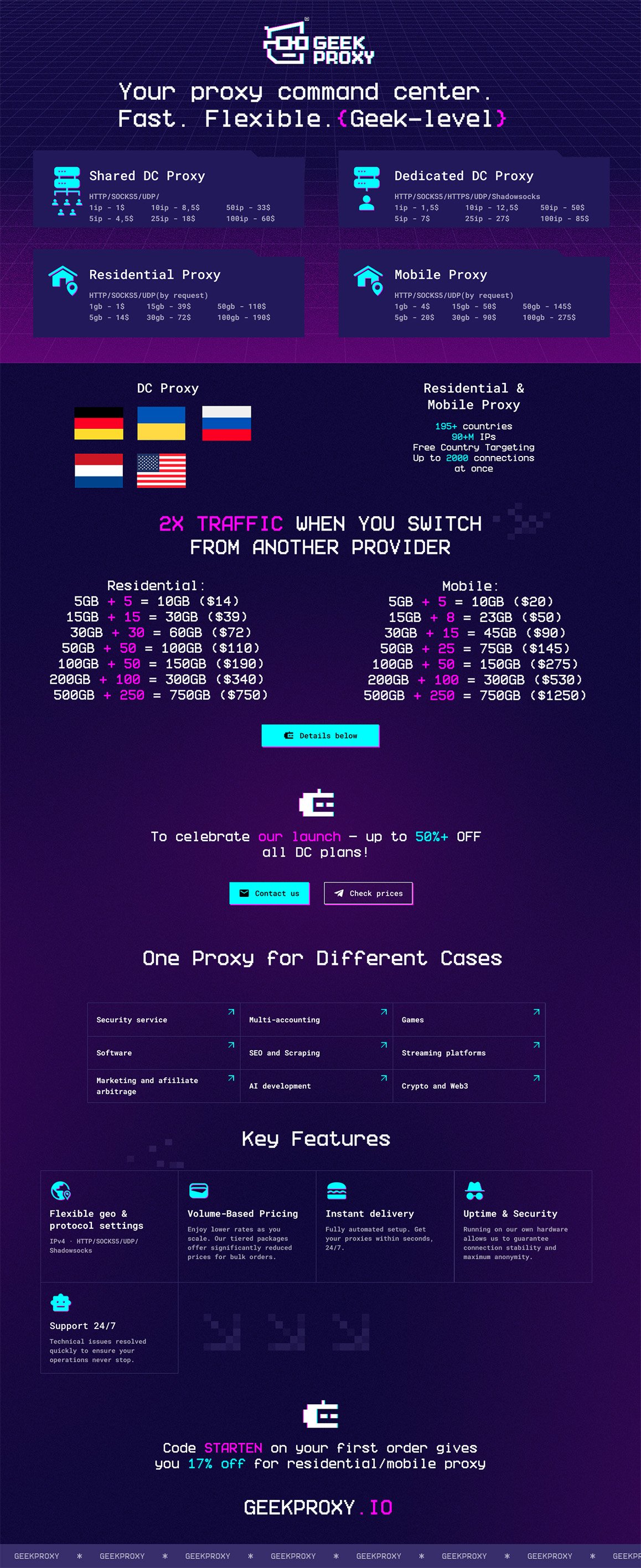
Shared: 1 IP - $1 | 5 IP - $4.5 | 10 IP - $8.5 | 25 IP - $18 | 50 IP - $33 | 100 IP - $60
Dedicated: 1 IP - $1.5 | 5 IP - $7 | 10 IP - $12.5 | 25 IP - $27 | 50 IP - $50 | 100 IP - $85
Flawless proxy:
Adds extra protocols Shadowsocks and real HTTPS
1 IP - $2 | 5 IP - $9 | 10 IP - $16 | 25 IP - $35 | 50 IP - $65 | 100 IP - $110
Most providers advertise "HTTPS" but actually run HTTP-with-CONNECT: the client-to-proxy channel is plaintext and your destination leaks via SNI on the very first hop (readable by your ISP, Wi-Fi operator, corporate DPI, transit carriers). Our Flawless datacenter package gives you real HTTPS. The client-to-proxy channel itself is TLS 1.3 encrypted with a valid Let's Encrypt cert, zero header leaks. Full protocol writeup is on the website.


2. RESIDENTIAL PROXIES:cool:
A global pool of millions of crystal-clean IP addresses of real users worldwide. Every profile gets a flawless real-user fingerprint. Forget bans and easily bypass the strictest anti-fraud systems.
Targeting: free country selection. Need more precision? Filter down to state, city, ZIP code and ISP (ASN). With advanced filters traffic is consumed at a 2:1 ratio.
Smart sessions: dynamic auto-rotation on every request, or hold a Sticky session up to 120 minutes.
High capacity: up to 2000 concurrent threads per plan. HTTP(s) and SOCKS5 supported, UDP enabled on request (turned on in minutes via support).

Pricing (Monthly): 1GB - $3 | 5GB - $14 | 15GB - $39 | 30GB - $72 | 50GB - $110 | 100GB - $190 | 200GB - $340 | 500GB - $750
Documentation: https://geekproxy.io/doc/residential-proxy-tutorial

3. MOBILE PROXIES :cool:
Real mobile carrier IPs - the hardest type to ban. Coverage and targeting like residential: country, state, city, ZIP and ISP (ASN).
Smart sessions: auto-rotation or Sticky up to 120 minutes.
HTTP(s) and SOCKS5 supported, UDP enabled on request.
Pricing (Monthly): 1GB - $4 | 5GB - $20 | 15GB - $50 | 30GB - $90 | 50GB - $145 | 100GB - $275 | 200GB - $530 | 500GB - $1250


2X TRAFFIC WHEN YOU SWITCH FROM ANOTHER PROVIDER :eek:
Track 1, migrating from any provider. Record a short video of your current provider's dashboard showing: an active residential/mobile subscription, the proxy type, the package size and the last payment date (within 30 days). Send the video to our Telegram support with the package you want, pay, and we credit the bonus afterwards.
Residential: 5GB +5 = 10GB ($14) | 15GB +15 = 30GB ($39) | 30GB +30 = 60GB ($72) | 50GB +50 = 100GB ($110) | 100GB +50 = 150GB ($190) | 200GB +100 = 300GB ($340) | 500GB +250 = 750GB ($750)
Mobile: 1GB +1 = 2GB ($4) | 5GB +5 = 10GB ($20) | 15GB +8 = 23GB ($50) | 30GB +15 = 45GB ($90) | 50GB +25 = 75GB ($145) | 100GB +50 = 150GB ($275) | 200GB +100 = 300GB ($530) | 500GB +250 = 750GB ($1250)
Track 2, first purchase with us. Register, pick any residential/mobile package, enter code STARTEN at checkout and get 17% off.
Full details https://geekproxy.io/blog/promo-may-26


API FOR CLIENTS
Full API for automation: generate and manage proxy lists, top up and check balance, switch rotation and sticky sessions programmatically. Plug us straight into your scrapers, antidetect setups and farming tools.
Docs: https://geekproxy.io/api/docs#description/introduction

FREE TOOLS
Proxy checker: geekproxy.io/tools/proxy-checker
UDP checker: geekproxy.io/tools/udp-checker


GUIDES & CASES
https://geekproxy.io/cases

Payment: crypto and bank cards.

Best use cases: traffic arbitrage (FB, Google, TT), account farming, large-scale web scraping, SMM, gaming, YouTube, multi-accounting and WEB3 projects, survey projects

AFFILIATE & RESELLING PROGRAM: earn with us! Lifetime recurring payouts for referred clients:
Datacenter proxies (IPv4): up to 30% commission.
Residential proxies: flat 17% lifetime commission. Want to resell or partner? Message support for details and your referral link.


Fair Play refund policy:
Datacenter proxies (IPv4): 24-hour money-back guarantee on subscriptions. If the proxies don't fit your tasks - just let us know on the first day.
Residential & mobile: refund of the unused balance within the first 24 hours! The amount is calculated after deducting the cost of the traffic you've already used, and the final refund is rounded down to a whole number.
Balance: balance top-ups are final and non-refundable.


Our advice: unsure? Take the smallest package to test our network quality before ordering a serious volume.

FREE TEST FOR A REVIEW: we give away free datacenter proxy test packages to reputable forum members in exchange for an honest review! Reply "Interested" or "+" in this thread (or in the chat on the website) to grab your test.

Contacts:
Website: geekproxy.io
Discord: geekproxy
Telegram: https://t.me/geekproxy_helpbot
Telegram news: https://t.me/geek_proxy


Geek bless your network! ;)

Title: [GEEKPROXY.IO] - x2 TRAFFIC ⚪️ DC (US/EU/RU) ⚪️ ISP (20+ GEO) ⚪️ RESIDENTIAL ⚪️ MOBILE (190 GEO) ⚪️ From $1 - HTTP/Socks5/UDP/SS - REVIEW COPIES ♾️


Hey Community!
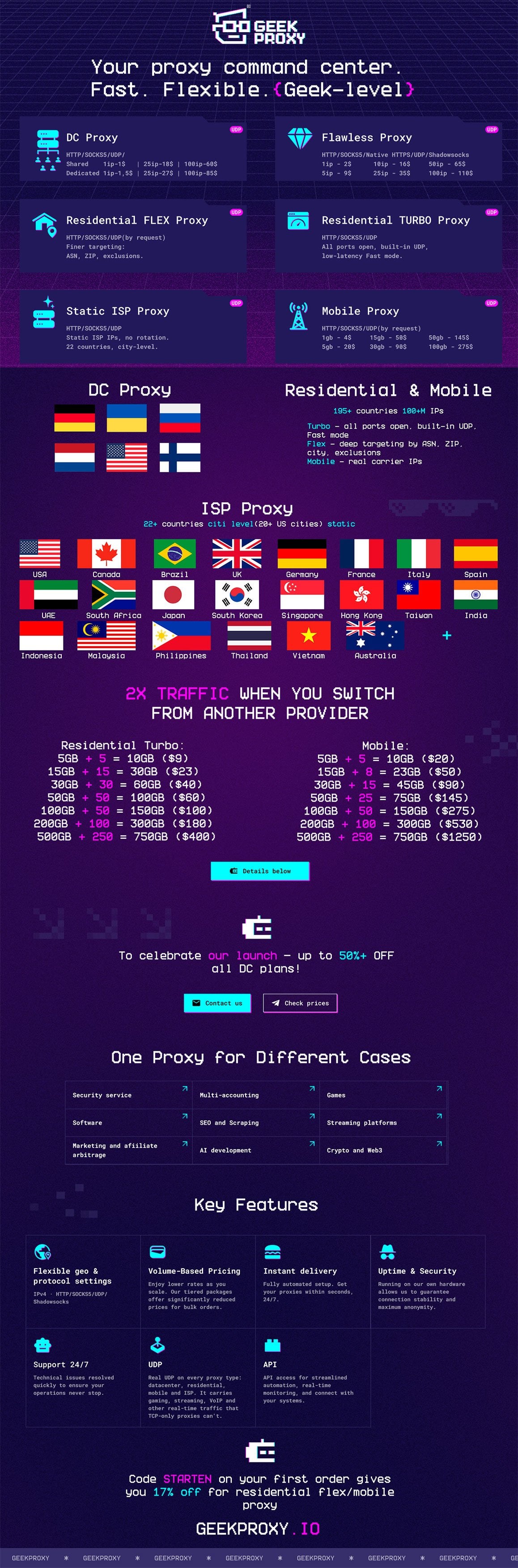
GEEKPROXY - direct infrastructure provider. Datacenter proxies (IPv4), ISP static proxies, residential (Turbo & Flex) and mobile - all on one balance, plus a client API and free testing tools.
How to use: https://geekproxy.io/how-to-use

UDP on every proxy type: built in on datacenter, ISP and Residential Turbo, enabled on request for Flex and mobile. Test it yourself with our free UDP checker.

Early Adopter Privilege: to mark our release, a 50%+ discount on all datacenter proxy subscriptions. Strictly limited in time for our first partners!

2X TRAFFIC WHEN YOU SWITCH FROM ANOTHER PROVIDER: already paying another proxy provider for residential or mobile? Bring it to us. Show your active subscription and we double your traffic. Up to 50 GB residential and 5 GB mobile are doubled 1:1, larger packages get +50% on top. No proxies yet? Code STARTEN on your first order gives you 17% off. Details below.


1. PRIVATE IPv4 (DATACENTER):cool:
Running on our own server hardware with powerful channels up to 5Gbps. Perfect for traffic arbitrage, SMM and gaming.

Locations: USA, Germany, Netherlands, Russia, Finland, Ukraine, "Europe Mix" package. Check new countries at website (Can't find the one you need? We'll set it up on request!)
Protocols: HTTP(s), SOCKS5 and UDP (great for games and specific software).
Types: Shared and Dedicated IPv4. Billed per IP, unlimited bandwidth.
Instant delivery: proxies appear in your dashboard within 10 seconds after payment.
Pricing:
Shared: 1 IP - $1 | 5 IP - $4.5 | 10 IP - $8.5 | 25 IP - $18 | 50 IP - $33 | 100 IP - $60
Dedicated: 1 IP - $1.5 | 5 IP - $7 | 10 IP - $12.5 | 25 IP - $27 | 50 IP - $50 | 100 IP - $85
https://geekproxy.io/datacenter-proxy

Flawless proxy:
Adds extra protocols Shadowsocks and real native HTTPS.
Most providers advertise "HTTPS" but actually run HTTP-with-CONNECT: the client-to-proxy channel is plaintext and your destination leaks via SNI on the very first hop (readable by your ISP, Wi-Fi operator, corporate DPI, transit carriers). Our Flawless datacenter package gives you real HTTPS. The client-to-proxy channel itself is TLS 1.3 encrypted with a valid Let's Encrypt cert, zero header leaks. Full protocol writeup is on the website.
Pricing:

1 IP - $2 | 5 IP - $9 | 10 IP - $16 | 25 IP - $35 | 50 IP - $65 | 100 IP - $110
https://geekproxy.io/flawless-proxy


2. STATIC ISP PROXIES:cool: NEW
Static IPs issued by real ISPs: the trust of a home connection with a fixed address that never rotates. The IP stays yours for the whole rental, so sessions hold and logins stick.
Coverage: over 20 countries across 6 continents - USA (20+ cities, city-level targeting), Canada, UK, Germany, France, Italy, Netherlands, Spain, UAE, India, Indonesia, Japan, Malaysia, Philippines, Singapore, South Korea, Thailand, Vietnam, Hong Kong, Taiwan, Brazil, South Africa, Australia. Full list on the website.
Subnet control: for US cities you can pin a specific /24 subnet, or let Auto spread you across the freshest ranges.
Protocols: HTTP, SOCKS5 and UDP.
Billing: per IP, no traffic metering. Instant delivery, uptime 99.6%.
Pricing: from $3/IP per month, price varies by city. Full grid and live availability on the website.
https://geekproxy.io/isp-proxy


3. RESIDENTIAL PROXIES (TURBO & FLEX):cool:
A global pool of millions of crystal-clean IP addresses of real users worldwide. Every profile gets a flawless real-user fingerprint. Forget bans and easily bypass the strictest anti-fraud systems. Two tiers on the same pool, pick by what you need:


TURBO
Speed and value. All ports open, UDP on by default, low-latency Fast mode. Free country selection. Use cases: arbitrage, scraping at volume, gaming.
Protocols: HTTP(s), SOCKS5, UDP (default).
Pricing: 1GB - $2 | 5GB - $9 | 15GB - $23 | 30GB - $40 | 50GB - $60 | 100GB - $100 | 200GB - $180 | 500GB - $400 | 1000GB - $750
Documentation: https://geekproxy.io/doc/residential-turbo


FLEX
Precise targeting. Filter down to state, city, ZIP code and ISP (ASN), with exclusion filters. With advanced filters traffic is consumed at a 2:1 ratio. UDP enabled on request (turned on via support).
Protocols: HTTP(s), SOCKS5, UDP (on request).
Pricing: 1GB - $3 | 5GB - $14 | 15GB - $39 | 30GB - $72 | 50GB - $110 | 100GB - $190 | 200GB - $340 | 500GB - $750
Both tiers: dynamic auto-rotation on every request, or hold a Sticky.
Documentation: https://geekproxy.io/doc/residential-proxy-tutorial


4. MOBILE PROXIES:cool:
Real mobile carrier IPs - the hardest type to ban. Coverage and targeting like residential: country, state, city, ZIP and ISP (ASN).
Smart sessions: auto-rotation or Sticky up to 120 minutes.
HTTP(s) and SOCKS5 supported, UDP enabled on request.
Pricing: 1GB - $4 | 5GB - $20 | 15GB - $50 | 30GB - $90 | 50GB - $145 | 100GB - $275 | 200GB - $530 | 500GB - $1250
https://geekproxy.io/mobile-proxy


2X TRAFFIC WHEN YOU SWITCH FROM ANOTHER PROVIDER :eek:

Track 1, migrating from any provider. Record a short video of your current provider's dashboard showing: an active residential/mobile subscription, the proxy type, the package size and the last payment date (within 30 days). Send the video to our Telegram support with the package you want, pay, and we credit the bonus afterwards.
Residential Turbo: 5GB +5 = 10GB ($9) | 15GB +15 = 30GB ($23) | 30GB +30 = 60GB ($40) | 50GB +50 = 100GB ($60) | 100GB +50 = 150GB ($100) | 200GB +100 = 300GB ($180) | 500GB +250 = 750GB ($400) | 1000GB +500 = 1500GB ($750)
Residential Flex: 5GB +5 = 10GB ($14) | 15GB +15 = 30GB ($39) | 30GB +30 = 60GB ($72) | 50GB +50 = 100GB ($110) | 100GB +50 = 150GB ($190) | 200GB +100 = 300GB ($340) | 500GB +250 = 750GB ($750)
Mobile: 1GB +1 = 2GB ($4) | 5GB +5 = 10GB ($20) | 15GB +8 = 23GB ($50) | 30GB +15 = 45GB ($90) | 50GB +25 = 75GB ($145) | 100GB +50 = 150GB ($275) | 200GB +100 = 300GB ($530) | 500GB +250 = 750GB ($1250)

Track 2, first purchase with us. Register, pick residential flex/mobile package, enter code STARTEN at checkout and get 17% off.
Full details https://geekproxy.io/blog/promo-may-26


API FOR CLIENTS
Full API for automation: generate and manage proxy lists, top up and check balance, switch rotation and sticky sessions programmatically. Plug us straight into your scrapers, antidetect setups and farming tools.
Docs: https://geekproxy.io/api/docs#description/introduction


FREE TOOLS
Proxy checker: https://geekproxy.io/tools/proxy-checker
UDP checker: https://geekproxy.io/tools/udp-checker


GUIDES & CASES
https://geekproxy.io/cases

Payment: crypto and bank cards.

Use cases: traffic arbitrage (FB, Google, TT), account farming, large-scale web scraping, social media, SEO, gaming, YouTube, multi-accounting and WEB3 projects, survey projects, e-commerce, AI training

AFFILIATE & RESELLING PROGRAM: earn with us! Lifetime recurring payouts for referred clients.

Datacenter proxies (IPv4): up to 30% commission.
Residential proxies: flat 17% lifetime commission.
ISP proxies: 10% lifetime commission.
Mobile proxies: 10% lifetime commission.
Want to resell or partner? Message support for details and your referral link.
https://geekproxy.io/partner-program


Fair Play refund policy:
Datacenter proxies (IPv4) and ISP: 24-hour money-back guarantee on subscriptions. If the proxies don't fit your tasks - just let us know on the first day.
Residential & mobile: refund of the unused balance within the first 24 hours! The amount is calculated after deducting the cost of the traffic you've already used, and the final refund is rounded down to a whole number.
Balance: balance top-ups are final and non-refundable.

Our advice: unsure? Take the smallest package to test our network quality before ordering a serious volume.

FREE TEST FOR A REVIEW: we give away free datacenter proxy test packages to reputable forum members in exchange for an honest review! Reply "Interested" or "+" in this thread (or in the chat on the website) to grab your test.


Contacts:
Website: https://geekproxy.io
Discord: https://discord.com/users/1428725653280264202
Telegram: https://t.me/geekproxy_helpbot
Telegram news: https://t.me/geek_proxy


Geek Bless Your Network! ;)

Notes: This service was re-tested.
 
ISP proxies for ad verification

If you run ads for clients, from your own office you only see your local version, not what a real person in the target city gets served. And that's where you actually need to look.

Datacenter IPs won't help here: platforms filter them and show you a cleaned-up version. A static ISP IP reads as an ordinary local resident, so you see the ads through their eyes: does the campaign reach the right city, is the creative right, plus the offer, the landing-page language, and what competitors are running.

The IP doesn't change, so checks stay consistent: you compare on the same address instead of guessing. Coverage: the US down to the city (20+ cities) plus 20+ countries, from 3$/IP, over HTTP/SOCKS5/UDP.
API docs


BUY - Datacenter, ISP, Residential, Mobile proxy
 
Akamai does not stop you with one check, it stacks several: the TLS fingerprint of your client, the JavaScript sensor that mints its cookies, behavioral scoring of how the session moves, and the reputation of your exit IP, with a virtual waiting room on top during spikes.

You can get the browser side right, matching TLS and a clean sensor run, and still eat Access Denied, because the IP layer failed. A flagged or datacenter-adjacent address gets scored down before the sensor even finishes. That is the layer that quietly kills most setups, and it is the one you cannot fix in code.
That is the layer our proxies are built for. Residential on real ISP lines, and mobile on carrier ranges where trust runs highest because real users sit behind the same addresses. In testing the pattern is consistent: on a clean IP the sensor validates and you are in.

We are not selling a magic Akamai proxy bypass, that is the full stack and your browser does its part. We solve the IP-reputation layer so the rest of your setup gets a fair shot. Sticky sessions on HTTP and SOCKS5, many geos.


BUY - Datacenter, ISP, Residential, Mobile proxy
 
Cloudflare's Sept 15 AI bot thing

What actually happens: Cloudflare starts blocking the Agent and Training crawler categories by default on ad pages - and only on domains that newly join Cloudflare. Existing sites aren't touched. Search stays allowed.
So it's aimed at AI agents browsing sites and crawlers pulling training data. If you're doing normal scraping, price monitoring, account stuff - not your traffic.
The thing that's actually been eating your success rate all year is plain bot detection getting stricter: bigger IP reputation lists, finer fingerprinting. That doesn't care about a date on the calendar.

So before you scale anything: clean IPs over big pools, sane request timing, and test on Cloudflare-protected targets first.

Proxy for AI agents, AI training data, AI scraping - clean residential/ISP, mobile proxy:
Geekproxy
 
"30/60/150/300 million IPs in our pool" - how many actually work? Here's the 15-minute test.

Every provider leads with pool size. 30 million IPs, 50 million, whatever. The part they don't put on the landing page: a huge chunk of those addresses are already sitting on blocklists before you ever connect. Some estimates put it at 75-99% for the cheap end of the market.

That's why the pool number tells you nothing. You buy 30M IPs and still get your accounts flagged and your scraper blocked, because the specific IP you were handed was burned by someone else last week.

So don't argue about pool sizes. Test it yourself before you commit budget:

1. Take a trial or the smallest package. Pull 100-200 IPs.
2. Run them through any IP reputation checker. If a big share comes back flagged as proxy/hosting/abuse - done, you have your answer.
3. More important: fire ~100 requests at YOUR actual target, not at ipinfo.io. A pool that looks clean can still be dead on the site you care about. Write down the success rate.
Before you blame the IPs though - make sure your own side is set up right. Consistent fingerprint, cookies kept per session, headers that match the browser you claim to be, human-ish timing and mouse/keys if the target watches for it. Half the "bad proxy" complaints are really a leaky stack, and the IP just took the fall.
4. Repeat the next day, and at a different hour. Good pools stay flat, tired ones sag by 20-30% once you're not in the demo window.
5. If you paid for sticky - grab a session, hold it 20 minutes, check the IP never silently rotated mid-way.

Whatever number you get in step 3 is the only metric that matters. Success rate on your target beats every pool-size claim on every landing page, ours included.


Test us the same way. Clean residential/ISP, sticky that actually sticks:
Geekproxy - main thread:
- Residential Turbo - clean pools, ports not blocked, UDP open by default
- Residential Flex - deep geo-filtering
- Mobile proxy - 190 countries, UDP on request
- ISP proxy - 20+countries, UDP open by default
 
Ran into a writeup. Guy spent three weeks building a scraper for a simple job:
price, availability, shipping for 200 products across 50 stores. Then he binned it and replaced it with one LLM function - feed the page, get structured data back.
And it works. Layout changes, the model adapts, no more fixing selectors.

His pain just didn't end there, and that's the interesting bit.

50 stores means 50 different anti-bot setups. Some wide open, some behind Cloudflare, some throwing a CAPTCHA on the third request, some only showing real prices to a local IP. Parsing went free. Access didn't. Check those 200 products twice a day and that's 400 requests daily - your pool either holds or starts dying on exactly the stores you actually need.

What works here: stores without aggressive anti-bot pull fine over datacenter, no reason to pay residential there. The problem 5-10 sites out of fifty get residential, surgically. Geo matched to the storefront or the prices aren't real.
And you count requests that landed, not gigabytes.
The moral of the case: scraper code costs nothing now. Getting onto the page does.
Plan the budget there -
GEEKPROXY
- Datacenter proxy - high speed, UDP, Shadowsocks
- Residential Turbo - clean pools, ports not blocked, UDP open by default
- Residential Flex - deep geo-filtering
- Mobile proxy - 190 countries, UDP on request
- ISP proxy - 20+countries, UDP open by default
 
Case: how to actually price ISP proxies when the per-IP sticker lies. The "same basket" method.

Saw a breakdown worth stealing. They took one fixed basket - 10 static US addresses, 12 months - and priced it across every provider. Not the "from $2/IP" on the landing page, but what actually leaves your card over a year.

Everything the storefront hides showed up fast: geo surcharges for the country you need, traffic caps dressed up as fair use, renewal priced above the first month, minimum bundles you can't go under.

The method is simple and you can redo it in an evening:
- fix the basket: how many IPs, which geo, what term;
- price the whole year, not the per-unit sticker;
- write down separately what renewal costs;
- and ask about the traffic cap per address - on static that's usually where the real price is hiding.

Then compare totals, not advertised numbers. The ranking usually flips completely.

We've got nothing to hide.


GEEKPROXY
- Datacenter proxy - high speed, UDP, Shadowsocks
- Residential Turbo - clean pools, ports not blocked, UDP open by default
- Residential Flex - deep geo-filtering
- Mobile proxy - 190 countries, UDP on request
- ISP proxy - 20+countries, UDP open by default
 
How to tell an IP is dead before it wrecks your run

Small pool, fine. Hundreds of addresses and it's a mess - half of them are already dead and you find out from a sagging success rate at the end.
Track health per target, not globally. An IP works fine on one site and is banned on another, so "pool is 92% healthy" tells you nothing.
Pull an address when you get 403/429 back to back, a CAPTCHA where there wasn't one, response times tripling, or empty pages instead of content. One failure means nothing. Three in a row on the same target does.
Don't bin it right away - quarantine it a couple of hours, plenty come back. Kill it for good only after it fails quarantine a few times.
And keep rotation away from sticky. Where you need a session, the IP doesn't change, even if it's slow. Better to drop the session and start clean.


- Datacenter proxy - high speed, UDP, Shadowsocks
- Residential Turbo - clean pools, ports not blocked, UDP open by default
- Residential Flex - deep geo-filtering
- Mobile proxy - 190 countries, UDP on request
- ISP proxy - 20+countries, UDP open by default

GEEKPROXY
 
Proxies for multi-accounting

Platforms mostly link accounts by IP, so keep it simple:
1. One stable IP per profile - a unique sessid on residential or mobile, or a dedicated IPv4 if you want a permanent address.
2. Don't rotate a logged-in account. Swapping IP mid-session looks like someone stole the account. Rotation is for scraping, not for sitting on profiles.
3. Skip shared datacenter. You're on a subnet with strangers, and when one of them gets banned it drags you along. Residential and mobile just read as real users.
4. Make the geo match the story - country, city and ASN should fit whoever the account is supposed to be.

One proxy per antidetect profile (Dolphin, AdsPower, Multilogin, GoLogin) and the accounts stay apart.

What to take from us:
-Residential Turbo - ports aren't blocked, UDP open by default. The default choice for accounts and anything with real anti-bot
- Residential Flex - same pool, but you can drill into geo (country, city, ASN), UDP on request. Take it when the account has to sit in a specific place
- Mobile - carrier IPs, highest trust there is. For strict platforms and accounts you really don't want to lose
- ISP - a static address that's only yours. For profiles that should always come from the same spot
- Datacenter - fast and cheap, made for scraping and volume

Protocols: HTTP, native HTTPS, SOCKS5, UDP, Shadowsocks.

Main thread: https://www.blackhatworld.com/seo/g...5-udp-ss-review-copies.1784987/#post-20296329
 
New proxy use case: checking what AI says about your brand

People google less and ask ChatGPT or Perplexity more - "which service should I get", "who's better". What the AI says there matters about as much as rankings used to.
Catch is, there's no single answer. It changes by country, by account, sometimes session to session. You see one thing from your IP, your US customer sees something else entirely.
Hence proxies: run the same question from residential IPs in the countries you care about, each profile on its own address.

What to take from us:
-Residential Turbo - ports aren't blocked, UDP open by default. The default choice for accounts and anything with real anti-bot
- Residential Flex - same pool, but you can drill into geo (country, city, ASN), UDP on request. Take it when the account has to sit in a specific place
- Mobile - carrier IPs, highest trust there is. For strict platforms and accounts you really don't want to lose
- ISP - a static address that's only yours. For profiles that should always come from the same spot
- Datacenter - fast and cheap, made for scraping and volume

Protocols: HTTP, native HTTPS, SOCKS5, UDP, Shadowsocks.
Main thread: https://www.blackhatworld.com/seo/g...5-udp-ss-review-copies.1784987/#post-20296329
 
Bought clean proxies and still getting flagged? Check these leaks before you blame the pool.

Half the "your proxies are dirty" complaints have nothing to do with the proxy. The IP is fine, the setup is leaking.

IPv6. Your proxy is IPv4, your machine has IPv6 on, and the site just connects over IPv6 without touching the proxy at all. There's your real address. Turn IPv6 off or force everything through the tunnel.
WebRTC. The browser happily hands your real IP to any page that asks. Old news, still catches people every day.
DNS. Depending on how you wired up SOCKS5, names get resolved locally instead of through the proxy. So there's a residential IP from one country sitting next to your home ISP's resolver. That mismatch alone is enough.
Timezone and locale. IP in Texas, browser says Europe/Moscow, system language RU.
Nothing wrong with the IP - the story around it doesn't add up.

Check all of this before you scale anything up. Then judge the pool.

What to take from us:
[B]- Residential Turbo[/B] - ports aren't blocked, UDP open by default. Default for accounts and real anti-bot
[B]- Residential Flex[/B] - same pool, drill into geo (country, city, ASN), UDP on request
[B]- Mobile[/B] - carrier IPs, highest trust. Strict platforms and accounts you can't lose
[B]- ISP[/B] - static address only yours. Profiles that always come from the same spot
[B]- Datacenter[/B] - fast and cheap, for scraping and volume

Main thread: https://www.blackhatworld.com/seo/geekproxy-io-x2-traffic-dc-private-ipv4-us-eu-ru-residential-mobile-190-geo-from-1-http-socks5-udp-ss-review-copies.1784987/#post-20296329
 
"Dedicated IP" doesn't mean clean IP. Check the ASN before you pay.

Common mix-up: people buy a dedicated IP thinking they're getting something premium. Dedicated only means nobody else is using it. It says nothing about how a site scores it.
What actually gets scored is the ASN - the network the address belongs to. If that ASN belongs to a hosting company, every fraud check reads it as a datacenter IP, no matter how exclusive it is or what you paid. Your "private" address gets the same treatment as the shared junk next to it.
ISP static is a different animal. It's a consumer ISP ASN, so the same checks read it as somebody's home line. That's the whole difference, and it's why one costs more than the other.
Takes 10 seconds to verify: look up the IP, read the ASN/org field. Hosting name = datacenter with a nicer label. Do it before you buy, not after your accounts start dying.


What to take from us:
- Residential Turbo - ports aren't blocked, UDP open by default. Default for accounts and real anti-bot
- Residential Flex - same pool, drill into geo (country, city, ASN), UDP on request
- Mobile - carrier IPs, highest trust. Strict platforms and accounts you can't lose
- ISP - static address only yours. Profiles that always come from the same spot
- Datacenter - fast and cheap, for scraping and volume

Protocols: HTTP, native HTTPS, SOCKS5, UDP, Shadowsocks.
Main thread: https://www.blackhatworld.com/seo/g...5-udp-ss-review-copies.1784987/#post-20296329
 
Back
Top